

Would that solve the accelerated wetting and drying though?
And sometimes I want to decide what weather to use rather that mimicking whatever's outside, eg having a sunny day interrupted by summer showers adds some nice variety to races... but the immersion get killed with the Benny Hill speeding up of the effects.
I'm guessing there must be a way to get the transitions more realistic, but I'm not sure how. And not sure why this isn't the default setting.

Its your decision how you want this:Now that I can actually drive in wet weather without things looking like a Powerpoint presentation:
How do you set the wetness to build up realistically?
Start on a dry sunny track, some light drizzle appears, and before I even need to turn my wipers on puddles instantly appear at the side of the track. It's just not realistic at all.
Ditto on a soaking wet track with huge puddles everywhere, the sun comes out and within a few seconds the track is bone-dry. You can actually see the puddles shrinking in real time like water getting flushed down the toilet.
Is it supposed to be like this, speeded up for dramatic effect?
Looks very weird.
How come the default settings aren't more realistic?
Or am I doing something wrong and there's a tick box I missed somewhere?
(latest Pure reset to defaults, latest CSP).





Thanks very much Peter, I'll try to get my head around all of that a little later.Its your desicion how you want this:
If you want a dynamic progression with rain, wetness and water, you can use the dynamic option infront of those parameters:
View attachment 1489709
But you can also build a plan, where those values are forces within every slot. So you could define a steady fixed setting:
View attachment 1489710
Then sure the values are set acoording to the values in the data tab of Pure Planner.
But for a automatic progression use the dynamic option.
If you switch to the "Timed" plan, you will have already a useful template there where those options are activated.
Just add more slots an define their durations:
View attachment 1489711
The Timed mode is actually the most practical plan. But you could also just use the "live" plan. It has this dynamic progression deactivated, because it will change the weather every 5 min with the real weather and so you have a slow progression with 5 min duration to the current weather, but you can also set the dynamic progression there:
View attachment 1489712
You can even set your own rain, wetness or water levels there if you want...


what is the real name??Discoverer FX7 Rental Kart 200cc
A rental kart made and widely used in China(real name is not used for mod). Mod made by me. 20 skins.
View attachment 1489687
View attachment 1489688
View attachment 1489689
Download:https://mega.nz/folder/z8Il0KCK#sWqQ4VdeEDJGOVOJmhyJ8w
File:discoverer_rental_kart_v1.rar


I tried every preview settings posted here and always revert to the one I have because I've fiddled with too many things so the end result is never the same as y'all for some reason lolYeah this time another tricky case with the latest one, but after some tweaking and fiddling you get some decent results.
"default" is not a fixed term here. Because everyone defines default differently. Some does not want to have a progression at all. some want it. Like with a progression, if there was rain, it really takes its time to dry the track. So i can't really say what someone wants to have as defaults.Thanks very much Peter, I'll try to get my head around all of that a little later.
Are you saying that what I was seeing (with wetting and drying vastly speeded up) IS actually the default setting?
Unless I'm missing something here, would it not make more sense (if the user has normal 1x time progression) to have the defaults act like they do in the real world, eg a wet track would not instantly go bone-dry when the rain stops, and a dry track would not instantly get soaking wet as soon as light rain starts to fall etc etc?
I'd guess that the vast majority of Pure users never drill this deep (if at all) into the settings and would reasonably expect things to be as close to 'real world' as possible out of the box. I can't understand why the default settings for wetting and drying are so unrealistically fast.
Still also hoping you have wind direction default set to 'random' in a future update too, it always adds a bit of variation when flags are waving in a different direction when starting a session on a familiar track.
@LAFAYET47 it was set to 1x, but thanks for the suggestion. I think the Pure Planner overrides that setting anyway?


Preparation: After entering the game (no need to pause), press the keyboard keys Ctrl+Shift+Esc at the same time, and pop up the Task Manager to check whether the current game program is running in normal (default) mode for CPU. If it is, you can permanently set it to "High" mode as follows.Hi. How do you do the manual editing of the registry please to resolve this issue. Many thanks. At the moment I reverted to 2.12.


I'm also very interested in this if I can give this a bump, even hearing your guys' experiences on putting these together for solid AI races. I'm overwhelmed by the information coming out, honestlyWith all the AI apps lately I’m very confused - but I see the potential for better AI racing.
We got Nuzzis AI Apps, RaceCars Mods SafetyCarApp, ancient_3s DumbAI and Tetri with his AI Whisperer. On top of that we got timed races thanks to AC World and penalties with Mavil Track Limit Manager.
Do they all work out of the box and don’t interfere with each other? If not - does a Tutorial exist?
Thanks Peter, I'll have a deeper dive into the settings and try to get the wet/dry transitions to behave more how I'd expect them to IRL."default" is not a fixed term here. Because everyone defines default differently. Some does not want to have a progression at all. some want it. Like with a progression, if there was rain, it really takes its time to dry the track. So i can't really say what someone wants to have as defaults.
I just try to have the initial things working without causing too much support, like "rain does not go away" and such things.
But like i said, in the timed plan you have this already active.
Maybe i will do a much easier version of Pure Planner in the future with a fixed function set and limit it to some things like real weather progression.
For now you could build your plans in Pure planner and save them, you can also load them with the session in the dynamic Pure controller menu in the CM Drive menu.
Also there, if you use the "dynamic weather controller" all of those parameters are already dynamic from the session start on. So maybe use this and you already have the wanted behavior:
View attachment 1489723

Interesting project! Could you go a bit more into detail what parameters the tool looks at for the calculation? Is it solely based on UI info or does it process the actual performance in data.acd? How does it work with multiple sets of tires? Which one does it account on for calculations?New version of Performance Points (PP) Generator is out!
Version 0.3
DOWNLOAD LINK: (The file is apparently too large, so I'm putting the download link) https://www.mediafire.com/file/ajajy6agp2kulsv/AC_PP_Script__-_0.3.zip/file
- Added: Lightweight Cars Balancing modifier
- Added: New Custom PP Grids for ±1% & ±2.5% PP Difference
- Fixed: Dynamic Mode not applying correctly
- Fixed: User preferences not persisting across sessions
- Internal: Minor stability and calculation fixes
So i checked it and it seems to work properly. I did this.Thanks Peter, I'll have a deeper dive into the settings and try to get the wet/dry transitions to behave more how I'd expect them to IRL.
It's not just that they look unrealistically quick to me, it also means that if they were slower, more like IRL, then I could set up a race to start in heavy rain with me and the AI all starting on wet tyres, and then break the race up with periods where the rain stops and starts, maybe with the sun breaking through at times (which looks fantastic - albeit briefly before the wet track quickly dries) without the AI pitting every time it happens because the track has instantly dried. It would effectively remain a wet race on wet tyres even as the weather varies. Makes sense I hope?
I'm a little surprised that the default settings aren't based on real-life wetting and drying parameters with the option still available for anyone to adjust them unrealistically quicker or slower if desired, rather than the other way around where they start unrealistic and have to be adjusted to be what would be considered 'correct' in a racing sim where, after all, we are trying to simulate real life racing conditions, weather included, as accurately as possible. But maybe that's just me, and like you say, you can't please all of the people all of the time. And although AC is a sim, a lot of users have probably been raised on arcade or simcade driving games where realism is an alien concept.
So i checked it and it seems to work properly. I did this.
I use the dynamic Pure controller:
View attachment 1489731
I made a weather plan with 1 min heavy rain and then 30 min scattered clouds. I just set fixed temperatures there.
If i launch a race i can load the session with this plan and let it start with the race.
It took a really long time to get the track dry like 20 min.
 www.overtake.gg
With all the AI apps lately I’m very confused - but I see the potential for better AI racing.
We got Nuzzis AI Apps, RaceCars Mods SafetyCarApp, ancient_3s DumbAI and Tetri with his AI Whisperer. On top of that we got timed races thanks to AC World and penalties with Mavil Track Limit Manager.
Do they all work out of the box and don’t interfere with each other? If not - does a Tutorial exist?




Now that I can actually drive in wet weather without things looking like a Powerpoint presentation:
How do you set the wetness to build up realistically?
Start on a dry sunny track, some light drizzle appears, and before I even need to turn my wipers on puddles instantly appear at the side of the track. It's just not realistic at all.
Ditto on a soaking wet track with huge puddles everywhere, the sun comes out and within a few seconds the track is bone-dry. You can actually see the puddles shrinking in real time like water getting flushed down the toilet.
Is it supposed to be like this, speeded up for dramatic effect?
Looks very weird.
How come the default settings aren't more realistic?
Or am I doing something wrong and there's a tick box I missed somewhere?
(latest Pure reset to defaults, latest CSP).


Might as well showcase the car in action no? and showcase the audio that the car will have. While it's not professionally made i think the exterior sound is good to us as neither of us are experts at this. Something i would like to ask though.Hello, People back at it again with another update on the Saleen
Still work to be done, Mainly physics and sound right now.
As for the 3D stuff it's pretty much completed.
What we have atm
1997 Saleen - Donington Spec View attachment 1485370
1998 Cirtek Motorsport - Jarama Spec View attachment 1485371
1997 Saleen - Le Mans 24 Hours Spec
View attachment 1485372
Something to note, That when going trough these years of GT racing i came to the decision that i'll most likely be looking into commissioning the Porsche 911 GT2 car with as many variants that we can find etc.
No one has made an actually good variant of this car and the ones that do exist are frankly. Turds. Low quality and does not live up to the absolute legendary status that the car deserves. So instead of making the Callaway, We'll be looking into the Porsche instead ontop of that we'd be opening up the flood gates to having finally having an car to fill several YEARS of race's and series.
No release date, It's coming when it's ready.
Mmm... haven't noticed. I'll have to check.Is the dry line appearing correctly for you? In 2.12.1 and now 3.140, for me the rest of the track dries up but the racing line stays wet, like it's inverted somehow.
Tried resetting everything I can think of but no dice.


Sure can!Interesting project! Could you go a bit more into detail what parameters the tool looks at for the calculation? Is it solely based on UI info or does it process the actual performance in data.acd? How does it work with multiple sets of tires? Which one does it account on for calculations?

Please, feel free to shareYeah this time another tricky case with the latest one, but after some tweaking and fiddling you get some decent results.
View attachment 1489677
Hi @ancient_3 .As far I'm concerned, for Dumb AI, it is just a small service app I started for myself, out of curiosity. It is not linked with other apps and I use Tetri exploration results with his AI Whisperer to gather insights on "how AI works naturally in AC" and "what I could use to improve my tries"
The Dumb AI app runs each timeframe to check for situations where the original AI seems to be lacking something and try to propose something else by overiding the original behavior.
So far, it just has 3 functionnalities:
- try to expand blue flag behavior by trying to create better overtake opportunities for the leader that is outlapping so that it gets not stuck anymore, but also without provoking crashes or producing new bugs
- overide the "pit when raining" behavior: the original one works very well but I noticed the AI get back on track always with medium tyres compound. This is a good example where you just lack a small thing but have to rewrite the whole process to overide the original situation: from detecting track weather changes to how to make pit the AI and set its tyres to the softer compound
- propose understandable pit strategies: I'm mainly an "arcade-like offline gamer" so I like the idea to be able to simulate rules for different championships but without having to parametrize a zillion of things from scratch each time you want to race. My aim is to propose simple AI strategies that would apply automatically.
Want to have a rule where AI and you must change tyres once in the race ? let's create something that would in the end be just a button to push and the AI will compute itself a frame with small random effects to add diversity.
Want to create a very complex strategy scripted for each AI , what it should do at each lap, etc... ? let's create a json format where you could put all this information and that would be read just by pressing a different button.
I just use my app so I don't know how the Dumb AI would behave when multiple apps give concurrent advices/insights to the same AI. I didn't create a tutorial for it because I was not sure people would use it, I see it has some download but so far had no return about bugs or about new functionnality proposal etc...
Finished the AIHintReader. It keeps comments, you can add more in the app. New feature : comments stick to the START value so if you name a very important corner like EAU ROUGE, even if you add 20 hints, EAU ROUGE will stick to its position.
Added the ZONE1and ZONE2 hints for AIwhisperer as well, so you can add them in a click. As they're not real HINT but just an exploit on the ai_hints.ini file, the ZONE hints are applied immediatly without reloading the track.
Assetto AI Hints ingame editor - Updates
View attachment 1489738
They will interfeer. If you're not into code and APIs, it's hard to tell which apps would work together without issues, as they may use the same "orders" in different ways.
If app A tells carX to follow fastlane at allcost and app B tells carX to go offset by 2 meters then throttlelimit @70%, you get the worst of both worlds most of the time. The app with the fastest update time wins, the app that tweaked a particular setting the last keeps control over it. I would try a few apps, get the one that is either reliable or give you the best smile per effort ratio.
We gonna need "killswitches" on AI apps. I know i'm implementing one on mine.
It's gonna be fun in the incoming months, because everyone sees potential in the new stuff that comes out of CSP apis, but we all have a very different approach.
Mavil Track Limit will not interfeer anyway (the lite version) because it doesn't apply any specific AI behavior as far as i know.
Realistic Track day (which is by far the most advanced at the moment, what a complete one) touches almost everything related to AI, so i wouldn't use anything else with the app. It's strictly Track Mode related atm, which i never use, but it's the best available if you're into cruising with 80 cars on the Nord.
Nuzzi seem to be a little left behind in aftersales with bugs and unsolved issues, i heard he was updating a lot lately. The paywall doesn't help his community to be chill about it. We told him about it already, but having settings saved there and there in the original game files can turn into issues as well.
I finally snapped and start working on my app out of frustration.
This is wild west at the moment. I went for simple brute force with my app (corner X, use this brake, this apprehension, this aggressivity), but as soon as someone starts making WORKING scripts using the pedals that you can call in specific situations (Hairpin->send righ drifting), it's gonna be wild.
As for tutorials and tips, just ask the creators, they're all usually super friendly and happy to share their tips.
The thing that kills me is that there is not a dedicated place to share all the knowledge about AC's AI ; its possibilities, and its limitations. We would probably go much further and faster if we were sharing all this in a dedicated place, cause seriously, i really went to some dusty corners to find ressources about the whole system.
Thank you, yes there is still plenty of room for improvement.
Right now, Dumb AI costs between 0.01 and 0.02 ms for an update(dt) for a memory use between 1 and 2 Mo. I read somewhere that the AC model physics is running at 333MHz, so that lets us max 3ms to avoid any risk of mismatch with the physics. More likely less because the lua API may be quick but is not native C and there are also other app running in the background.
The qualifying stategy looks possible and should not cost too much I think. Basically adding a lap counter to the bot class in Qualify session and counting one lap, two laps and then get back to stand with blue flag behavior on with a timer per bot so that they are not all at the same time on the track. I'll have a look at it !
Virtual safety car, I see it basically as a setSpeedLimit for all driver under some condition. I have not really checked the yellow flag behavior API, I'll have a look.
The problem of the start of the race is I believe closely linked to the native overtake decision. I'm not sure we can access to the native AI code, btw I wonder how CSP is doing its AI adjustments , they don't seem to make an official lua app for it so I suppose they include it in the dll using C/C++/C# whatever the native language of AC ?
Is anyone else getting an error message about a missing texture when loading this new version. It doesn't prevent the track from loading so I think I can ignore it.View attachment 1489752
Fuzo, vernoonfs, Breathe, slider666, LaChub, Fanapryde
- fixed curb in the fifth corner
- added more vegetation
- added lighting for the interior of the main pit building
- updated and adjusted textures
- improved many minor things
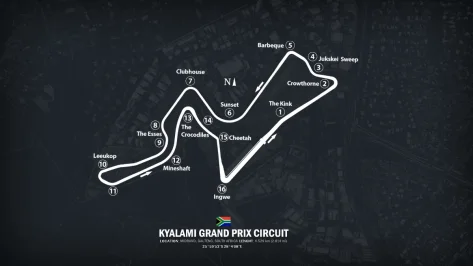
vv_kyalami_v0.9
MediaFire is a simple to use free service that lets you put all your photos, documents, music, and video in a single place so you can access them anywhere and share them everywhere.www.mediafire.com


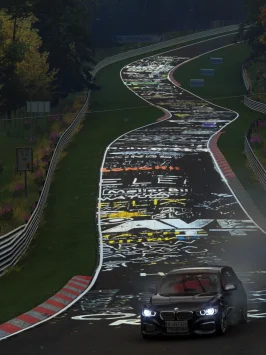
Mine is fine ?Speaking of grass lately - did anybody else miss the grass on Kunos Nordschleife with CSP configs loaded?
 🤷♂️
🤷♂️

Explorer TS7what is the real name??

Same here (though I'm also on an old CSP version):Is anyone else getting an error message about a missing texture when loading this new version. It doesn't prevent the track from loading so I think I can ignore it.
I'm open to it being a 'me' problem since I use an ancient CSP version. I thought it would be best to check if anyone else has the same problem who uses a newer CSP version. Thanks...


Hey guys
I’ve seen a few projects around here trying to improve the AI in Assetto Corsa, and I was wondering do you think it’s possible to make a Safety Car procedure work somehow?
Like, having a car that comes out after a crash, leads the pack under yellow, then goes back to the pits and lets the race resume normally.
I know AC doesn’t have this feature natively, but maybe it could be done with Lua or Python scripting forcing AI cars to slow down and follow a specific car, using triggers or conditions to deploy/recall the SC, maybe even overriding some AI logic temporarily.
I’ve been trying to make something like this work myself, but I can’t get it to behave properly so far. Has anyone here tried anything similar, or found a way around the AI limitations?
www.overtake.gg


