Assetto Corsa PC Mods General DiscussionPC 

  • Thread starter Thread starter daan
  • 154,686 comments
  • 48,662,081 views
Hey guys
I’ve seen a few projects around here trying to improve the AI in Assetto Corsa, and I was wondering do you think it’s possible to make a Safety Car procedure work somehow?
Like, having a car that comes out after a crash, leads the pack under yellow, then goes back to the pits and lets the race resume normally.
I know AC doesn’t have this feature natively, but maybe it could be done with Lua or Python scripting forcing AI cars to slow down and follow a specific car, using triggers or conditions to deploy/recall the SC, maybe even overriding some AI logic temporarily.
I’ve been trying to make something like this work myself, but I can’t get it to behave properly so far. Has anyone here tried anything similar, or found a way around the AI limitations?

There is also a PRO version on his Patreon
 
So I went around the buoy once again with the AK Racing Gen 3 Supercars, and wow! have they changed since I bought and tried them! So, update to my comments:

1. As pointed out by @the_xrod they are now free on the website.
2. SFX has dramatically changed and is even more realistic than BCRC imo.
3. Tyre, suspension fizix is also now in line with reality.

Yeah. I'll be keeping these 😊

cc: @Racer63 @MrLonguinha17
 
Might as well showcase the car in action no? and showcase the audio that the car will have. While it's not professionally made i think the exterior sound is good to us as neither of us are experts at this. Something i would like to ask though.

If anyone happens to know how to make animations in blender specifically .ksanimations please send me an DM, Currently this car wont feature the endurance lights due to (primarily me) wanting to make so that the endurance lights can be toggled on and off in the visuals tab in the setup menu, as making it and ext_config that would need to be enabled for each individual skin makes little to no sense to me when you can just do it like that.

Asking this cause it's an absolute PAIN in the ass to work with due to how strict AC is with how pivot points works and neither of us wants to deal with that headache.

Either way, Video below to showcase the car in action. It's only the exterior, i'll try and post an full showcase later this week.


You should ask Neko to make a sound mod or he might just do it as soon as you release the mod (either way): https://www.overtake.gg/members/neko-taisen.419858/#resources

OR you can use the Saleen S7R's sound file, sounds very similar to the real thing.
 
Preparation: After entering the game (no need to pause), press the keyboard keys Ctrl+Shift+Esc at the same time, and pop up the Task Manager to check whether the current game program is running in normal (default) mode for CPU. If it is, you can permanently set it to "High" mode as follows.
1. Open the Registry, enter:
HKEY_LOCAL_MACHINE\SOFTWARE\Microsoft\Windows NT\CurrentVersion\Image File Execution Options
2. Create a folder named acs.exe
3. Create a folder named PerfOptions in the acs.exe folder
4. Right-click on the PerfOptions folder and create a new DWORD (32-bit), named CpuPriorityClass
5. Double-click CpuPriorityClass and enter the desired CPU priority value:
(1) = Idle.
(2) = Normal (default).
(3) = High (strongly recommended).
(4) = Real-time (if the client starts pausing, it will cause a bottleneck).
(5) = Below normal.
(6) = Above normal.
6. Close the Registry Editor
7. After re-entering the game mode (no need to pause), press the keyboard keys Ctrl+Shift+Esc at the same time to pop up the Task Manager and check the current AC's CPU priority level. At this point, it should be running in "High" mode.
8. My computer configuration is 12th 12600KF (not overclocked), PCIe 4.0 SSD, DDR5 64GB, RTX3060TI 8GB. After using this method, the prompt of 99% CPU usage has not appeared again. This modification only applies to the CM game program, and other programs are not affected. It is compatible with Windows 10 and Windows 11, and also applicable to other programs sensitive to CPU!
Wishing you success and enjoyment!
Thanks. It seams quite complicated for me. Not very good with this sort of stuff. Will give it a go though.
 
Hi @ancient_3 .
I've tested your app, only for the blue flag behavior. Honestly, it works well.
Maybe the way the cars move away from the path and return to it could be smoother, I have to test it deeply.

I still have to test the pit strategies.

What can be done?
I mean, the perfect strategy should be the one that optimises the pace of the car during all the race.

Can it be determined before the race start? I think RARE.lua made something like that.
I know the file tyre.ini gives info about the tyre duration and performance. How to translate that in tenths of seconds on a laptime. Regarding the fuel influence, I don't know if there is something similar.

Is it possible to force the ai to choose a specific tyre compound at the race start and a fuel level associated to this tyre compound?

Something that could be considered is defining a basic pit strategy, which should correspond to the optimal strategy defined above.
And then define some alternative strategies, randomly selected by cars or selected by cars that have failed their qualifying session.
For example, let say a car should be around the 3rd place but it qualified 18th, ai is strongly encouraged to select an alternative strategy (for example multiple pits with low fuel and soft tyres, or harder compound and longer 1st stint or even no pit)

Maybe that is too far from what you had in mind, I don't know.
But I encourage you to continue developing the app, that's good work!
Hi @Thockard , thank you for the test !

I have an improvement in mind to smooth the lateral move, I'll add it in the next version. It is possible that the current version could make some cars with very low traction / adherence go away, I tested it with F50GT from Legion and MP4/4 which are two of the most difficult cars I'm used with and the AI seemed able to manage it .

It is possible in the app to make AI use a specific compound at start of the race, in fact if you test the last version, if you select medium, all cars set the medium compund at start and even change to soft at 1/3rd of the race if you selected the mixed strategy, and conversely if you select soft.

It could be also possible in the future to manage fuel level at start, but it seems quite hard to predict fuel consumption for a lap, hence you'd have to run one lap before gathering the data and apply, or use saved data from former races. Maybe we could use data from qualifying for example, that would be a nice way to tackle the problem for the race? But in theory, you can set up a particular tyre compound with a particular fuel level with different kind of pit stops later.

And lastly , I think it may be possible to constraint strategy according to qualifying results. Must check if race position is accessible before the start, if so, it would be computed with the other constants and bot creation before the start, just after you set the Dumb AI app.

I think I'll focus on qualifying for the next functionality, so I'll look at this at the same time. I have also ideas for the running start and safety cars but I still have to figure how to ensure that positions are kept during the speed limitation.

Anyway, thanks again for the test, in the future, I could add detailed discussions and tutorials on the discussion thread of the app, so that not hijack too much this global mod topic, and just post a small update link here when new version available
 
Last edited:
Could to preview some screenshot, what version csp was?
I opened up the file in kseditor and the material for all of the AC_START, AC_PIT type objects have no texture assigned to their material. Easy fix. Since they are transparent objects, I just assigned a simple 4x4 pixel image to them and the error went away. BTW, nice job on the update. Track looks great.

@Quikslvr

Try this attached file and see if the error is gone. Backup your original to be safe.
 

Attachments

Last edited:
I opened up the file in kseditor and the material for all of the AC_START, AC_PIT type objects have no texture assigned to their material. Easy fix. Since they are transparent objects, I just assigned a simple 4x4 pixel image to them and the error went away. BTW, nice job on the update. Track looks great.

@Quikslvr

Try this attached file and see if the error is gone. Backup your original to be safe.
Just FYI this error did not appear with latest CSP preview.
 
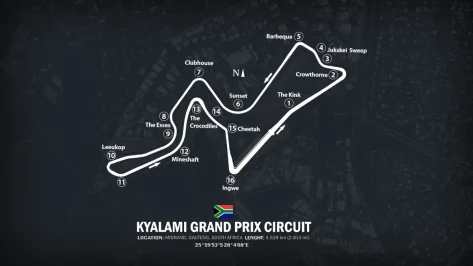
kyalami3.webp
Thx to racinjoe013
new link
 
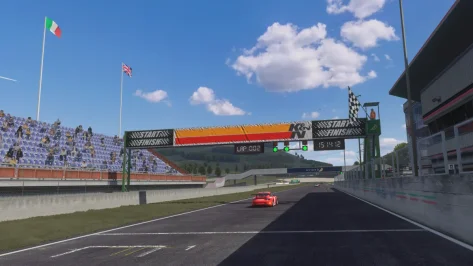
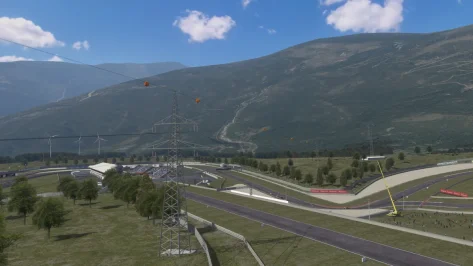
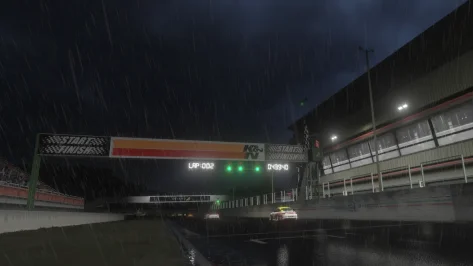
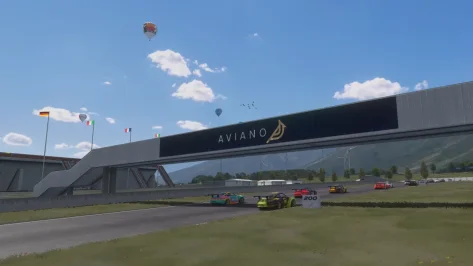
Aviano 2025 release
With huge help from @shi, Tyrone/Nukedrop and @mteam


1762348842819.webp 1762348868817.webp 1762348900530.webp 1762348926399.webp

  • fixed various missing tree, structure and TSO normals and shadows
  • fixed various instances of z-fighting, corrected alpha settings
  • added groove and skidmarks
  • added digital clock and lap timer to start/finish gantry
  • added new pit garage doors, only open for active teams
  • updated pylons and cables
  • new lattice-frame adboards and normal maps with compensated aspect ratios
  • added various textures from previous skins, and created new textures
  • new tree types, floating trees replanted
  • combined and adjusted various grass/rain/light configs
  • added active airspace (helis, balloons, blimp, planes, birds)
  • added knicker97 crowds and corrected the grandstand seating scale
  • added marshals and animated cameramen
  • added animated flag-waving spectators and additional CSP circuit flags
  • added new hi-res Aviano region satellite mountain texture, fixed distant horizon texture
  • added animated wind turbines
  • added pitlane and crowd audio
  • applied Foxeway's 30 pits mod
  • getoags added, UI and previews updated
  • new Aviano logo by Fanapryde, branding added to various textures. RIP buddy, we miss you.
 
Last edited:
You should ask Neko to make a sound mod or he might just do it as soon as you release the mod (either way): https://www.overtake.gg/members/neko-taisen.419858/#resources

OR you can use the Saleen S7R's sound file, sounds very similar to the real thing.

The only game that has any Saleen S7.R sound worth grabbing is Raceroom, But i have no idea how to get access to the audio files without contacting KW Studios themselves. We tried using the Ford Mustang DTM car for our first version, But the audio came out crackling from recording it so we dumped it for the one we have now, Which is a lot better.

But if someone happens to know how to grab the audio files from R3E lmk. I'd consider switching over to any R3E sound files if i can get the raw files & not screen recording audio.
 
Can anyone help? With the latest CSP preview, RMi's Goodwood Vintage crashes. With 0.2.7 it works fine (chicane and no chicane versions). What could be going on? Also I am trying to get the vintage layouts to work with Racing Joe's @racinjoe013 Goodwood, following his instructions, but no joy. Any pointers much appreciated.
 
Last edited:
Hi all!

Another CSP headache.

In some mods, the driver model is visible from the side & back windscreens but not from the front!
Any ideas? Sometimes he is visible from the front & not from the side! Hope you can see it in the picture.

Thanks!

There used to be an option for fixing that, in CSP back in the days : Custom Shaders Patch/Graphics Adjustments/Tweaks and deactivate "Draw driver after the car for external cameras"! But not anymore?
 

Attachments

  • driver.webp
    driver.webp
    182.2 KB · Views: 8
Last edited:
Hey guys
I’ve seen a few projects around here trying to improve the AI in Assetto Corsa, and I was wondering do you think it’s possible to make a Safety Car procedure work somehow?
Like, having a car that comes out after a crash, leads the pack under yellow, then goes back to the pits and lets the race resume normally.
I know AC doesn’t have this feature natively, but maybe it could be done with Lua or Python scripting forcing AI cars to slow down and follow a specific car, using triggers or conditions to deploy/recall the SC, maybe even overriding some AI logic temporarily.
I’ve been trying to make something like this work myself, but I can’t get it to behave properly so far. Has anyone here tried anything similar, or found a way around the AI limitations?
There is this one https://www.overtake.gg/downloads/safety-car-rolling-start-–-yellow-flags-–-full-course-yellow-app-–-offline-races.76662/

They also have pro version if you want

I tried it yesterday, just touched it really and only on 1 track. I mostly wanted it for the rolling start. I tried it on Road America, but the problem I had is that the cars were really staggered following the safety car and it didn't go in the pits after the parade lap. Very high chance that I just did it wrong.

I decided to go with Nuzzi's for the Rolling start as it worked straight out the box and I like the UI. That one doesn't have the safety car and I love that idea, but just sticking to that one for simplicity sake. Nuzzi also has the staggered start for different classes which is awesome. I'll probably mess around with it and see if I can make it work
 
Last edited:
Hi all!

Another CSP headache.

In some mods, the driver model is visible from the side & back windscreens but not from the front!
Any ideas? Sometimes he is visible from the front & not from the side! Hope you can see it in the picture.

Thanks!

There used to be an option for fixing that, in CSP back in the days : Custom Shaders Patch/Graphics Adjustments/Tweaks and deactivate "Draw driver after the car for external cameras"! But not anymore?
Hi. I had similar problem. But it was always present, not like Yours sometimes You see it sometimes You don't. It was mod car internal windows transparency issue.
 
I wonder if there is some new feature in the latest CSP that assigns a texture to any material that doesn't have one. Just guessing.
Wasn´t it fixed by chunks optimization setting recently? I thought this was kinda broke in previews pre 140?

1762360825889.webp


Hi all!

Another CSP headache.

In some mods, the driver model is visible from the side & back windscreens but not from the front!
Any ideas? Sometimes he is visible from the front & not from the side! Hope you can see it in the picture.

Thanks!

There used to be an option for fixing that, in CSP back in the days : Custom Shaders Patch/Graphics Adjustments/Tweaks and deactivate "Draw driver after the car for external cameras"! But not anymore?
Open up graphics_adjustments.ini in assettocorsa\extension\config\ and search for this line as in the screenshot. Either remove hidden, so you see it in CM and you may de-activate it there then, or set it to 0. Don´t know if it fixes the problem since it is already active though.

1762361065322.webp
 
Last edited:
Aviano 2025 release
With huge help from @shi, Tyrone/Nukedrop and @mteam


View attachment 1489844 View attachment 1489845 View attachment 1489846 View attachment 1489847

  • fixed various missing tree, structure and TSO normals and shadows
  • fixed various instances of z-fighting, corrected alpha settings
  • added groove and skidmarks
  • added digital clock and lap timer to start/finish gantry
  • added new pit garage doors, only open for active teams
  • updated pylons and cables
  • new lattice-frame adboards and normal maps with compensated aspect ratios
  • added various textures from previous skins, and created new textures
  • new tree types, floating trees replanted
  • combined and adjusted various grass/rain/light configs
  • added active airspace (helis, balloons, blimp, planes, birds)
  • added knicker97 crowds and corrected the grandstand seating scale
  • added marshals and animated cameramen
  • added animated flag-waving spectators and additional CSP circuit flags
  • added new hi-res Aviano region satellite mountain texture, fixed distant horizon texture
  • added animated wind turbines
  • added pitlane and crowd audio
  • applied Foxeway's 30 pits mod
  • getoags added, UI and previews updated
  • new Aviano logo by Fanapryde, branding added to various textures. RIP buddy, we miss you.
Found a little issue: the green semaphores are on before start.
If you want them to be on only at start you have to set ACTIVE=0 all the GREEN SEMAPHORE sections in extconfig.ini

[edit]
Found also missing face on parking poles. Add:

[SHADER_REPLACEMENT_...]
ACTIVE=1
DESCRIPTION= missing double sided
MESHES = Cylinder06, Cylinder07
CULL_MODE= OFF


lamp.webp
 
Last edited:
Sure can!

The PP calculation is primarily based on Power-to-weight ratio, the fundamental metric using BHP and weight values extracted from each car's UI data. Additionally, for non-street vehicles, the tool analyzes actual aerodynamic data to apply appropriate PP adjustments
The tool uses a hybrid approach for data collection: ui_car.json for extracting basic specs like BHP and weight. For non-street cars, it decrypts and processes each cars' data.acd files to access aero.ini configurations

Calculation Process is as follows:

  1. The tool calculates base PP using power-to-weight ratio with a non-linear mapping system
  2. For race cars, the tool applies an aerodynamic factor calculated from actual wing data:
    • Analyzes each wing's dimensions and aerodynamic properties (If the car is data encrypted, an arbitrary value is used)
    • Processes LUT files to determine maximum downforce values
    • Applies logarithmic scaling to prevent excessive PP inflation
  3. The tool then applies multiple modifiers to balance the results:
    • Medium-end PP boost (for 400-600 PP range)
    • Lower-end PP boost (for cars under 450 PP)
    • High-end PP dampening (for cars above 700 PP)
    • Exponential sensitivity (adjusts the performance gap between cars)
    • Lightweight car balancing (reduces penalty for lightweight cars with lower power)
    • Aero effect multiplier (global control for aerodynamic impact)

All these modifiers are totally adjustable by the user as everyone has a different opinion on how to scale performance ratings.

The current implementation doesn't specifically account for different tire compounds or sets in its PP calculation algorithm. The PP value is determined primarily by power-to-weight ratio and aerodynamics rather than tire performance characteristics to keep things "simple".
Cheers, sounds like it would probably make a nice integration for this mod: https://www.overtake.gg/downloads/g...-race-events-classes-for-assetto-corsa.46934/
 
Wasn´t it fixed by chunks optimization setting recently? I thought this was kinda broke in previews pre 140?

View attachment 1490089


Open up graphics_adjustments.ini in assettocorsa\extension\config\ and search for this line as in the screenshot. Either remove hidden, so you see it in CM and you may de-activate it there then, or set it to 0. Don´t know if it fixes the problem since it is already active though.

View attachment 1490091
Unfortunately it did not work. There must be something else.
Also i noticed another thing, which might be related...
Well, i'll try to explain it...

Watching the replay, from a distant camera, the driver, after exiting a corner, is still ,visually, turning the steering wheel (stuck in the same position) (and his head is tilted to the inside of the corner), even though the car is in a straight line. As the car comes closer, after a good amount of seconds, he behaves normal again. i hope that makes sence! :odd:

???? #CSP ???
 
There is this one https://www.overtake.gg/downloads/safety-car-rolling-start-–-yellow-flags-–-full-course-yellow-app-–-offline-races.76662/

They also have pro version if you want

I tried it yesterday, just touched it really and only on 1 track. I mostly wanted it for the rolling start. I tried it on Road America, but the problem I had is that the cars were really staggered following the safety car and it didn't go in the pits after the parade lap. Very high chance that I just did it wrong.

I decided to go with Nuzzi's for the Rolling start as it worked straight out the box and I like the UI. That one doesn't have the safety car and I love that idea, but just sticking to that one for simplicity sake. Nuzzi also has the staggered start for different classes which is awesome. I'll probably mess around with it and see if I can make it work
Where can I find this app by Nuzzi.
I looked through his stuff on overtake but didn't see it.
TIA
 
Sharing a mod? Host it on GTPlanet Downloads. Free, public hosting for files up to 10GB in size.
Back