Assetto Corsa PC Mods General DiscussionPC 

  • Thread starter Thread starter daan
  • 154,907 comments
  • 48,766,329 views
What the hell is this error and why does the F40 I reworked graphically from F40_LM_Lover look like that (doesn't happen with all cars tho thankfully)? Should I revert CSP back to a stable version for the time being like I did countless times in the past years? I'm using 0.3.0-preview212.
1767354591132.webp
 
I've worked out what my problem is with CSP 0.3 and the random flashes I get about every 20 seconds. It is that the GrassFX disappears for 2 frames.


Annoying as the grass looks better nowadays but it is too distracting to put in solid Targa Florio laps as there is so much grass right up to the edge of the road. 😒
I think someone else mentioned this in the past couple of weeks and I've just seen it myself on Kunos Spa. It happens a few times around the track, and always in the same places, eg towards the end of the start/finish straight just before La Source, if anyone wants to test it.
Grass seems to totally disappear for a split second.
This is with CSP 0.3.0 p212.

There's no problem at all with CSP 0.2.11, with the trade-off being that grass looks generally worse in this build. But at least it doesn't disappear.
 
Last edited:
Chapter 13,567 of the soap opera "Wonderful World of Assetto Corsa and its Charming Mysteries™"...
... i suggest for some tests you make sure you click on something that really restart CSP shaders...
Nothing... After trying all possible combinations, no results. 😢
... Does it have any Cockpit_HR in it?...
Yep, the Koeniggggsenisseggsegnignigsegigiseg has it, or at least that's what I see in lods.ini...
... Ohterwise this might work?

[SHADER_REPLACEMENT_...] ACTIVE = 1 MATERIALS = CULL_MODE = DOUBLESIDED CAST_SHADOWS = 1 DOUBLE_FACE_SHADOW_BIASED = 1
I don't know, my knowledge of these topics is very basic and I wouldn't know exactly what I should add to the "materials" for that spell to work... 😬
I've tried it too, but...

computer says no.webp

... Would like to suggest a workflow process that I undertake for each car-mod once installed, as it may assist with car-ground-shadows...

step#1...
It doesn't work either... Interestingly, when opening the car in the CM Showroom, the primary shadow can be subtly observed...

koenigsegg.webp


... when I increased and save "Body shadow darkness" to 100%, the shadow became more visible...

koenigsegg 1.webp


... but then, in game...

koenigsegg 2.webp


Well, right now I think the only plausible explanation is that some kind of vampire must be inhabiting my PC; at any time the cars will stop reflecting in the mirrors... The only thing left to try is performing an exorcism.

Thank you all for your efforts to help! 😜
 
I've had this on all versions of CSP V3 - went back originally but Tetri's AI tweaks are worth having to overlook some graphical annoyances for me personally, so hopefully one day it figures itself out again.
I went back and checked the 'recommended' CSP 0.2.11 and the horrible shadow banding is in that build too. Same at your end?
 
I went back and checked the 'recommended' CSP 0.2.11 and the horrible shadow banding is in that build too. Same at your end?

Still there but less prominent. The weird thing with the post V3 is that the banding 'moves'. Completely static camera but it crawls along like a snake.

And some tracks look so much worse (same PPF) and I have absolutely no idea why. Seems to just be me.

2.12.1
Screenshot_wsc_legends_dino_206s_berlinetta_westwood_f3ct_19-9-125-17-51-51-1.webp


3.0.212
Screenshot_wsc_legends_dino_206s_berlinetta_westwood_f3ct_19-9-125-17-37-0-2.webp
 
Real studio CSP previews

Hi all, after nearly 1 month of fiddling and tweaking, I hereby share my new CSP preview preset for you all. It should cover all type of cars, without having to change the FOV to get a decent result. I always wanted to have a preview which looks like that the car is really inside a photostudio, and I think I really got the sweet point with that.

You need to have the following:

1. download Retrolux showroom and put it into .../content/showroom --> https://www.overtake.gg/downloads/retrolux-studio-showroom.25772/
2. create a folder "extension" in rl_studio folder
3. put my ext_config.ini into (remove the .txt!)
4. apply and save my .cmpreset in CM from this link --> https://acstuff.club/s/Q45C
5. click "update CSP previews" (make sure you have ticked "use csp previews for final render" in settings --> content manager --> custom showroom)

Some example shots.

Smaller cars
View attachment 1502911

Medium sized cars
View attachment 1502905

Larger cars like SUV
View attachment 1502906

GT
View attachment 1502907

LM
View attachment 1502909

F1
View attachment 1502910

Note: this will only work with CSP 0.30p212. Former CSP versions will not have the car in place as in the preview and may differ. Please don´t alter any setting after applying the preset, otherwise I cannot guarantee the result.
You may experience some errors with URD and RSS cars. Just try again and be patient. This is a current bug in preview 212.

And, last but not least, crap mods remain crap mods. The preview may not solve that.


Hope you like it, please give some feedback.

Cheers, and happy 2026!
So I'm having an issue with some cars, specifically it seems to effect road cars, rally/rallycross cars and drift cars where the suspensions get all wonky and as a result the preview makes it look broken (even though in-game the cars are fine). Here are just four examples of cars that are weird (the VW Polo is hard to notice at first but the front right-side tyre is bent inward). Also certain cars from RSS work but some don't it's very weird. And also cars from URD and and VRC just straight up don't work period with it. And a couple of cars don't load in their skins leading to just plain, white cars too, an example of which I have included.

Don't get me wrong I absolutely love this preset and it's replaced the iRacing style previews I've used up to this point, but these specific issues have been bugging me a lot. Genuinely one of my favourites I've come come across and my new go-to for previews.

1767365346657.webp
1767365443857.webp
1767365486161.webp
1767365857563.webp
1767366258147.webp
 
So I'm having an issue with some cars, specifically it seems to effect road cars, rally/rallycross cars and drift cars where the suspensions get all wonky and as a result the preview makes it look broken (even though in-game the cars are fine). Here are just four examples of cars that are weird (the VW Polo is hard to notice at first but the front right-side tyre is bent inward). Also certain cars from RSS work but some don't it's very weird. And also cars from URD and and VRC just straight up don't work period with it. And a couple of cars don't load in their skins leading to just plain, white cars too, an example of which I have included.

Don't get me wrong I absolutely love this preset and it's replaced the iRacing style previews I've used up to this point, but these specific issues have been bugging me a lot. Genuinely one of my favourites I've come come across and my new go-to for previews.

View attachment 1503436View attachment 1503438View attachment 1503439View attachment 1503444View attachment 1503446
Set the wheel steer at 0deg. Its an old bug.

For car that wont update preview, do it via Skins menu instead, works 100% of the time for me but it take more time

1767366720507.webp
 
@Rodger Davies
Still there but less prominent. The weird thing with the post V3 is that the banding 'moves'. Completely static camera but it crawls along like a snake.


I wonder if the "crawls like a snake" that is experienced with the shadows is actually the shadow moving with the time clock setting.
I noticed it would move faster when setting the time multiplier at a higher rate such as 12X compared to 2X.
 
Happy New Year to all firstly!
I use CSP1.80preview9. Anything beyond that and it's stutter city with a full field. Makes no sense and i've tried everything to fix it. I've reset all my CSP settings, I tried a fresh AC installation without mods, driver updates, clean windows installation, etc. and nothing works. Some have suggested that it might be my system, but if that was the case, why does older CSP versions work fine. If it was my system, I think any CSP version would struggle. Plus, all my other games run perfectly so that shoots that theory out of the water.
hi Joe, could you share the installer file for CSP1.80preview9 please?

It is not available in CSP "Available versions" (jumps from 1.7.79 to 0.2.0 ... )
Thanks!
 
So I'm having an issue with some cars, specifically it seems to effect road cars, rally/rallycross cars and drift cars where the suspensions get all wonky and as a result the preview makes it look broken (even though in-game the cars are fine). Here are just four examples of cars that are weird (the VW Polo is hard to notice at first but the front right-side tyre is bent inward). Also certain cars from RSS work but some don't it's very weird. And also cars from URD and and VRC just straight up don't work period with it. And a couple of cars don't load in their skins leading to just plain, white cars too, an example of which I have included.

Don't get me wrong I absolutely love this preset and it's replaced the iRacing style previews I've used up to this point, but these specific issues have been bugging me a lot. Genuinely one of my favourites I've come come across and my new go-to for previews.

View attachment 1503436View attachment 1503438View attachment 1503439View attachment 1503444View attachment 1503446
Judging from these pics I assume you did not tick "use csp previews" neither you use csp 0.30.p212? My preset was only intended to use with retrolux, not for any other showroom.
 
Last edited:
Panoz Esperante GTR-1 Sound and handling mod is released along with 2 new skins for the mod:


https://www.gtplanet.net/forum/down...te-gtr-1-roadcar-sound-and-handling-mod.7418/
xWG1Z1A.jpeg

soauEkP.jpeg


Mod requires this car to work as it only has updated data and sound:
https://www.modland.net/assetto-corsa-mods/cars/panoz-esperante-gtr-1-road.html

to me in-game (and when generating new previews w CSP ) the new black and red skins look quite different :

1767371153325.webp


1767371172514.webp

not intended this way I guess ... :)

I quickly settled on this for the Red skin :
[Material_CarPaint_Chameleon]
ChameleonColorA = #A35420, 0.3
ChameleonColorB = #938824, 0
ChameleonExponent = 2.00
ChameleonCenter = 0
FlakesK = 0.3
ClearCoatThickness = 0.4
FresnelC = 0.12
SpecularMult = 0.25
AmbientSpecular = 0.7
BrightnessAdjustment = 0.8
AmbientSpecularEXP = 0.9
SpecularBase = 0.8, 20
FresnelMax = 0.4

then I get :
1767371874002.webp


And for the black one just remove the ext_config.ini files from the skin folders altogether ,
to get this :
1767371832935.webp
 
Any member familiar in Blender or another software. A person who can help me in a simple delete a side mounted spare tyre and straps, from a car mod. Did try to delete, did watch a couple of Blender YT, but I can not succeed inhere.
Yes I know it’s a very bad mod but I need this as a grid filler for my historical 1949-1951 LM championship.
Could someone help me by correcting this grid filler car. Please pm me and I will sent you the carmod.

Solved, thanks @BruceD
 
Last edited:

New livery releases starting on Monday again, good luck! 😘
At least i get to look at cool liveries and learn about racing series i have never heard of in my entire life! Just wish carmar would put in the race & series in his livery packs just like you :lol:

One of many reason why none of his packs is in the archive yet, I can't tell what is real or fictional liveries from him, Sometime he throws in 1 single skin that has all the information that i need, But then the rest of his pack is filled with skin with no info, Just an name and a number lol
 
Last edited:

I think someone else mentioned this in the past couple of weeks and I've just seen it myself on Kunos Spa. It happens a few times around the track, and always in the same places, eg towards the end of the start/finish straight just before La Source, if anyone wants to test it.
Grass seems to totally disappear for a split second.
This is with CSP 0.3.0 p212.

There's no problem at all with CSP 0.2.11, with the trade-off being that grass looks generally worse in this build. But at least it doesn't disappear.


Someone else has it on their YT, it's just after 11 seconds. You can pause and use the < > keys to move frame by frame. It's the problem I have with all 0.3 builds, grassFX disappearing for 2 frames resulting in a flash. Now I'm back on 0.2.212 and just have to put up with the chasing the grass glitch 10m infront of me as elements are painted in, and the dayglow grass too.


BTW I've put an Evo versus Original VR Performance video up on the Evo Early Access thread if anyone is interested......
 
Last edited:


Someone else has it on their YT, it's just after 11 seconds. You can pause and use the < > keys to move frame by frame. It's the problem I have with all 0.3 builds, grassFX disappearing for 2 frames resulting in a flash. Now I'm back on 0.2.212 and just have to put up with the chasing the grass glitch 10m infront of me as elements are painted in, and the dayglow grass too.


BTW I've put an Evo versus Original VR Performance video up on the Evo Early Access thread if anyone is interested......

I lowered the sun angle to ~5pm mid summer to get rid of shadow banding in 0.3.0 p212 and it seemed to also get rid of the disappearing grass for some reason. Worth trying until Ilja fixes it properly?

edit: don't bother, I was wrong.

I see someone has posted this video on the Shader Patch discord in the 'preview-issue-reports' channel, so hopefully it'll drip-feed through to Ilja.
 
Last edited:
Ferrari F40 '92(v1.7) by F40 LM Lover

It is tested in CSP 3.0 Preview140.
You need CSP latest Version

It has two Versions.
One is the Stock F40 with 17inch Rims/Tyres.
Another one is Fictional version which has 18inch rims/tyres, stronger Brakes & Suspensions, More grip tyres.

First You need to assign keys in Content manager to start the engine.

EXTRA C is Ignition On, EXTRA D is Engine Stater.

First Push EXTRA C to turn on THE IGNITION,
and then Press 1sec EXTRA D to Start the Engine.

============================================================

Change Logs
  1. It has 17/18 inch tyres and Rims
  2. Tyre textures are changed(Pirelli PZero asimmetrico by Jane_CGI)-. https://janecgi.gumroad.com/l/pirelli...
  3. Front and Rear tyre textures are seperated.
  4. body Painting Config is changed.
  5. Ignition On/Off Funtion added with Driver's arm and Car_key's animation
  6. Left Window Open animation are Updated.
  7. Wiper On/Off Animation is added.
  8. Frunk Hinge Detail is added.
  9. Cockpit_LR is modified.
  10. Exhaust Manifolder is Modified.
  11. Fictional "Classiche Speciale" logos are added.(f40 Classiche Speciale)
  12. Some bugs are fixed.
<Features>
Extra Animation
1. EXTRA A : Left Door Open/Close
2. EXTRA B : Right Door Open/Close
3. EXTRA C : Ignition On/Off
4. EXTRA D : Engine Start/Off
5. EXTRA E : Fog Lights On/Off
6. EXTRA F : Frunk Open/Close
7. EXTRA G : Left Window Open/Close
8. EXTRA H : Rear Cowl Open/Close

Download Link is in the Description of Video

What a fantastic homage to one of the greatest cars ever produced. Great stuff @Young78, many thanks.
The F40 famously had no soundproofing worth mentioning, so I'm finding the cockpit audio (specifically engine, transmission, turbo spool, exhaust and backfire) a little muffled. All reports indicate that driving the F40 was a ear-splittingly raw and visceral experience, which you've captured superbly with the external audio. Does anyone know if there's a per-car instruction that can be added to the config to duplicate the external audio in the cockpit? I know this can be performed globally in CSP settings, but I really want it just for this car, and not every car in my garage. There are tweakable audio settings in the existing config, but try as I might I can't replicate the mechanical brutality of the external audio in the cabin.
 
Last edited:
Chapter 13,567 of the soap opera "Wonderful World of Assetto Corsa and its Charming Mysteries™"...

Nothing... After trying all possible combinations, no results. 😢

Yep, the Koeniggggsenisseggsegnignigsegigiseg has it, or at least that's what I see in lods.ini...

I don't know, my knowledge of these topics is very basic and I wouldn't know exactly what I should add to the "materials" for that spell to work... 😬

I've tried it too, but...

View attachment 1503403

It doesn't work either... Interestingly, when opening the car in the CM Showroom, the primary shadow can be subtly observed...

View attachment 1503407

... when I increased and save "Body shadow darkness" to 100%, the shadow became more visible...

View attachment 1503408

... but then, in game...

View attachment 1503411

Well, right now I think the only plausible explanation is that some kind of vampire must be inhabiting my PC; at any time the cars will stop reflecting in the mirrors... The only thing left to try is performing an exorcism.

Thank you all for your efforts to help! 😜
I have the same problem.
Some cars have a shadow under them and others do not.
I am on CSP 3.212
Haven't found the sollution yet.

URD Bayro 4 GT3 EVO 2025 v1.0 does have a shadow under the car
1767375857797.webp


RSS GT-M Macca 72 V8 Evo has no shadow
1767375883798.webp
 
Bittersweet as they say it'll be the last pack - had hoped for something Swedish before the end of the run. Still, great couple of choices to go out on.
such a shame they're the final cars. There is so many hidden Gems in the supertouring cars that need high quality models like the Chaser and JP Honda Accord MK5
 
Happy New Year to all firstly!

hi Joe, could you share the installer file for CSP1.80preview9 please?

It is not available in CSP "Available versions" (jumps from 1.7.79 to 0.2.0 ... )
Thanks!
Not sure i'm allowed to post it here because it was a patreon version if I remember right. Although it is a 3 year old version so I don't think anyone would care.
 
The fake car shadow works via this file:
View attachment 1503478

Are there any differences between the files of both cars?
Thanks for your reply.

Both cars have these files.
So no difference there.

Just tested the latest RSS Aston and the older RSS Mercedes. They both have a shadow under the car.
And the older RSS Audi does not. So it's nothing to do with old or new RSS cars.
The search continues.

Update:
I copied the body_shadow file from the RSS Mercedes to the RSS McLaren.
This doesn't change anything. Still no shadow under the car.

And I removed the body_shadow file from the RSS Mercedes folder.
And I still get a body shadow when I drive the car...?
To be clear, I do not use "extra fx".


1767384935064.webp
1767385007206.webp
 
Last edited:
Not sure i'm allowed to post it here because it was a patreon version if I remember right. Although it is a 3 year old version so I don't think anyone would care.
I am a paying member of Ilya too , and I cannot find that version on Patreon... even with search function "0.1.8" gives me no posts on that version...

So go ahead and send it to me, I'm sure Ilya won't mind :)
 
And in CM showroom the shadows are okay.

Going back to CSP 2.12 did not solve the problem.

I'm am just going back to racing and will just have to leave all the cars behind me.
So I do not see the missing shadows :D.

1767389181451.webp
 
Last edited:


Someone else has it on their YT, it's just after 11 seconds. You can pause and use the < > keys to move frame by frame. It's the problem I have with all 0.3 builds, grassFX disappearing for 2 frames resulting in a flash. Now I'm back on 0.2.212 and just have to put up with the chasing the grass glitch 10m infront of me as elements are painted in, and the dayglow grass too.


BTW I've put an Evo versus Original VR Performance video up on the Evo Early Access thread if anyone is interested......

Hi Sim Racer, I've done a lot of experimenting and I'm still not quite there! 🤬
I think the latest CSP build is very good overall, but while the grass has finally improved, there's this LOD at very low levels where the full grass only appears at a short distance and there's no way to change any value (@Peter Boese, in the video you'll see what I was saying yesterday), which creates an ugly effect in my opinion. It's the same problem with the shadows of the nets chasing each other, a problem that I don't think can be solved at this point.

I'm asking here, but no one will be able to answer. Is there a way to change the grass's LOD distance?

Thanks
 
Regarding ambient car body shadows, create a backup first, but try copying the collider.kn5 from a mod where the shadow is showing correctly. I know it sounds weird and I've no idea why it should be the case, but each time I've had this problem in the past, my problem solving always linked back to the 3D collider. Maybe it'll have no impact on newer CSP versions, maybe the underlying issue I had was different, but it's an easy try to see if it works.
 
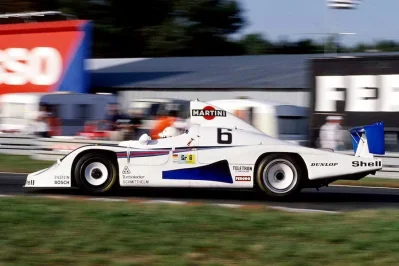
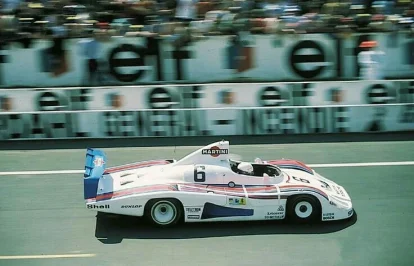
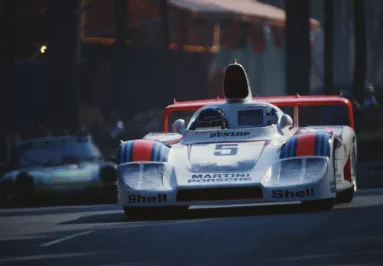
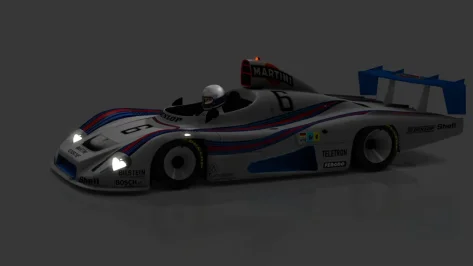
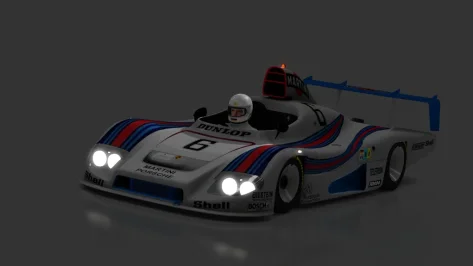
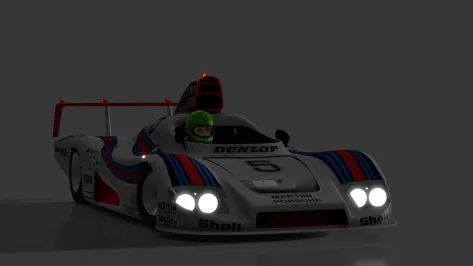
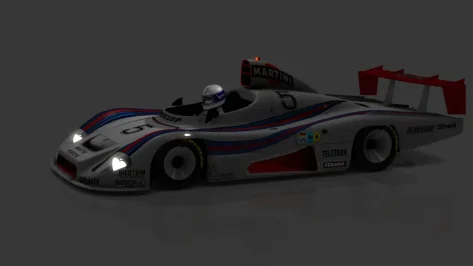
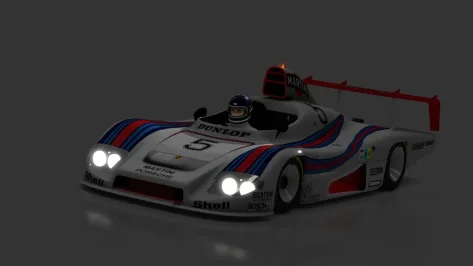
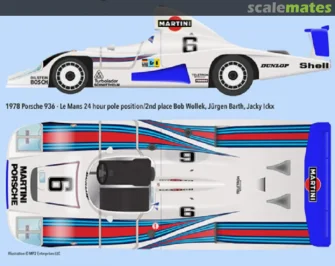
A preview of the new update (adaptation) for the Porsche 936/78.I used the base model (by Legion)...and the rear of the Porsche 936 (mod by Evolution GTR2).

The rear, from what I saw in photos, is a little shorter and thinner, if we can say so.I decided to (hide the internal structures of the rear) to make the car look more like the real thing.

I changed the position of the mirrors (to get closer to the real 1978 model).

A car in track testing (video uploading)...did a time of 3m34 (70% turbo).
I think it would be better if the car were more (restricted)...I think I'll have to adjust the "differential" better.

Parts of the skins, unfortunately I can't improve them.It would be the Martini logo on top, it's curved, ideally it would be (perfectly horizontal). And the stripes along the car would be straighter, but I don't know how to adjust them (because the skin uses two separate files).


Helmets and driver-suit (in the driver_70_fe standard).
The revised version of the model (936/79), further on.

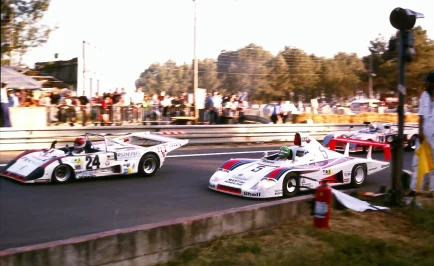
Models still under testing to complete (historical grids), WMP77 and WMP78.
 

Attachments

  • preview3.webp
    preview3.webp
    58.1 KB · Views: 7
  • preview2.webp
    preview2.webp
    54.8 KB · Views: 7
  • preview4.webp
    preview4.webp
    139.2 KB · Views: 9
  • preview1.webp
    preview1.webp
    22.1 KB · Views: 11
  • preview.webp
    preview.webp
    16.7 KB · Views: 8
  • preview.webp
    preview.webp
    18.5 KB · Views: 8
  • preview.webp
    preview.webp
    14.1 KB · Views: 7
  • preview.webp
    preview.webp
    16.8 KB · Views: 6
  • preview.webp
    preview.webp
    18.6 KB · Views: 8
  • LM78.webp
    LM78.webp
    39.8 KB · Views: 13
such a shame they're the final cars. There is so many hidden Gems in the supertouring cars that need high quality models like the Chaser and JP Honda Accord MK5
I was really holding out hope for the Stratus or one of the Toyotas or Mazdas, but I'm content with the BMW and Audi, as I would rather have more manufacturer representation as opposed to a second Alfa, Volvo, Honda, Renault, etc.
 
Sharing a mod? Host it on GTPlanet Downloads. Free, public hosting for files up to 10GB in size.
Back