Assetto Corsa PC Mods General DiscussionPC 

  • Thread starter Thread starter daan
  • 156,755 comments
  • 50,765,134 views
@Tetri How do I set, edit and monitor a zone? I see 2 zones in there at startup, but no obvious link to where those zones are on the track... (Thanks in advance!) I'm getting great results treating the whole track as 1 zone, but I would certainly take advantage of multiple zones. (Hmmm, a window in the whisperer interface with the track outline in it and colors indicating the zones?)
 
Last edited:
@Tetri How do I set, edit and monitor a zone? I see 2 zones in there at startup, but no obvious link to where those zones are on the track... (Thanks in advance!) I'm getting great results treating the whole track as 1 zone, but I would certainly take advantage of multiple zones. (Hmmm, a window in the whisperer interface with the track outline in it and colors indicating the zones?)
You have to create them using AiHintsReader https://www.overtake.gg/downloads/assetto-ai-hints-ingame-editor.80290/

You can create them using the aihintreader app ingame and have them working on the go by clicking "reload AI hints cache" in aiwhisp(Note : the regular *HINTs need a restart)
Capture d'écran 2026-02-02 012731.webp


Using Aiwhisp, the zone the focused car will go thru are highlighted in green ( See "focused car is in : HINT_3").
For more precision, the AIhintReader also highlights the zone your car goes thru. Both work in replay btw, it makes things a little easier on messy bits.

Capture d'écran 2026-02-02 013138.webp


A few tips :
BRAKHINT value is taken into account if the car starts braking INTO the BRAKEHINT zone, i would not beapplied if the car brakes before entering the BRAKEHINT zone.

DANGER works when 2 cars are entering the zone, and would start slowing down as soon as they enter the DANGER zone hint. A value of 0.25 on one side would avoid the sidelines and slow down a little, while a 1.3 value would hit the brakes and make the car jumps back to the fastlane. For zones where you need one side to slow down while the other should push, it's pretty usefull :

ie 0.05 on left side, 0.55 on right side : car on the left would barely lift throttle but car on the right side would start braking entering the zone 2 wide.

Something noone talks about, but in those cases you have to take into account the lookahead base value, as it is directly connected to the fastlane inputs/vectors data. So, a car with a 25 lookahead will brake and take hints into account a little earlier than a car with, let's say, a 10 lookahead base value.

Careful also with going from, ie, a 1.08 HINT to a 0.97 HINT as well, as the AI will brutally force itself back to the fastlane in that particular case. It can be used as a hack to force a drift entry, but i disgress.

In AIWhisp, you can then add values to those zones to help fluidify the AI : a little 0.025 AIGrip + 15% aggression boost on dangerzones would definitly maintain both cars on the road . Since you added a little grip boost, why not making the cars brake later with a nice +0.010 brakehint delay? It's all up to experiment.

I use ZONE1 as an overtaking zone, almost always with those values :


Capture d'écran 2026-01-31 154824.webp


ZONE2 usually for parts of the track where the AI should not use its brakes, with a+0.2 brakehint delay, or a speed limiter per car, or whatever stupidly unique event with a specific car your AI might come up with. I discovered a new way of making the AI completely avoid braking or, opposite, be super efficient with it, using the tyrehint (Thks EDD for the tip), so i'll add it in the next update.
 
Last edited:
His Patreon page has comments with other people having problems with it too.

Also his Portimao extension had some errors.
If others have same problems, then error is in original files and all you can do is try to download the files again and hope that errors are fixed.
 
Interlagos 1999 v1.0

Screenshot_ac_legends_gtc_porsche_911_swb_interlagos_1999_2-1-126-19-26-15.webp

The Interlagos billboard in the F1 1992 Track Pack has been updated to the F1 1999 version.
Some textures and objects from Grand Prix Team's rFactor F1 1998 Track Pack were used.
Pit lane exits since 1999 were taken from rFactor Interlagos 2007 by MMG.
buildings and some adboard textures (base) from GP4 Interlagos 2001 by Hega.

-CSP recommended
-3 layouts (Yearly billboards variations)
-32 pit/start
-AI, cam

Credits & Thanks;
rFactor Track by F1-S-R (ASR)
rFactor F1 1998 Track Pack by Grand Prix Team
rFactor Interlagos 2007 by MMG
GP4 Interlagos 2001 HD AI by Hega
-Thank you for giving me permission (ASR, Grand Prix Team and Hega)

AC Converted by shin956
AI and sidelines by Thockard
logo.png and sections.ini by Fanapryde
Water tower by Alessandro Micali (ASR Formula)
Animated flagmen by Alessandro Micali (ASR Formula) (Original by doublezero)
Crowds texture by Kniker97
some objects from Interlagos 90s
marshall and some textures by kunos
logo textures (GLOBO TV, Antarctica, Mercedes) by Loomis3
Test and Feedback by Loomis3, Red Manuel

Enjoy.
 
shi
Thank you for liking Track.

I recommend you watch the 1987 race video.

I used that video as reference for Track's work (like the Adboards).

One clearly different point is that the curbs are not bluish-white.

Far be it from me to question your work or the historical accuracy of your choices. I simply like to modify certain textures to suit my taste, even if it's not always entirely accurate. (And yes, you're absolutely right, curbs are historically red and white). It's just a skin; everyone is free to use it or not. I hope I haven't offended you, as that was clearly not my intention.
Thanks again for all the tracks you provide for our enjoyment.
 
Far be it from me to question your work or the historical accuracy of your choices. I simply like to modify certain textures to suit my taste, even if it's not always entirely accurate. (And yes, you're absolutely right, curbs are historically red and white). It's just a skin; everyone is free to use it or not. I hope I haven't offended you, as that was clearly not my intention.
Thanks again for all the tracks you provide for our enjoyment.
I wasn't quite clear enough. I wasn't upset.
I wrote about the kerb difference because I thought you were trying to “update” the textures to make the track look more like the actual video.
“Alternative textures” might be a better name than “updated textures.” (I don't speak English, so I might be missing the nuance.)

Thank you.:)
 
Probably a mix of csp bugs between different versions, combined with bad luck. At least we now have several tricks to fix it. :)

It's weird, I'm getting several inconsistent bugs that I can't recreate consistently at the moment, I'm wondering if the latest CSPs new KN5 loader is changing meshes around in some way.

The weirdest one I'm having at the moment is helmet textures randomly disappearing on LoD A. And by 'random', I mean it's consistent for the session but different behaviour each time I reload the grid (all same skins and cars).
 
is the POSITION=0,0,0 just for show in drivers3D.ini or it actually serve a purpose? Tried doing random values and it doesn't move the driver spatially

It's weird, I'm getting several inconsistent bugs that I can't recreate consistently at the moment, I'm wondering if the latest CSPs new KN5 loader is changing meshes around in some way.

The weirdest one I'm having at the moment is helmet textures randomly disappearing on LoD A. And by 'random', I mean it's consistent for the session but different behaviour each time I reload the grid (all same skins and cars).
One year old bug never resolved with the new kn5 loader. The helmet textures reverting to default or whatever despite helmet.dds existing in skin folder
 
Last edited:
Got the greenlight of CTDP for the release !

Still some stuff to tweak, but we're not far at all from a release
Nice! always liked that Renault Livery, goes back to the car sets for GP4 and the EA F1 series from Ralph Hummerich
(Ralph is still making skins, he is a "Senior vehicle artist" for Project Motor Racing)

Are you intentionally driving in the winter look?
if not you can change it in CM in 2 way's

1. Go to CM > Settings > Custom Shaders Patch > Track Adjustment and make sure the Seasons adjustment is not active.
. If your track folder has an extension, then open the ext_config.ini file and delete any Seasons code in it.

2. or set a summer date in here

Knipsel.webp
 
Last edited:
shi
I wasn't quite clear enough. I wasn't upset.
I wrote about the kerb difference because I thought you were trying to “update” the textures to make the track look more like the actual video.
“Alternative textures” might be a better name than “updated textures.” (I don't speak English, so I might be missing the nuance.)

Thank you.:)
You are totally right : “Alternative textures” is better. I will change that asap :)
 
Last edited:
Nice! always liked that Renault Livery, goes back to the car sets for GP4 and the EA F1 series from Ralph Hummerich

Are you intentionally driving in the winter look?
if not you can change it in CM in 2 way's

1. Go to CM > Settings > Custom Shaders Patch > Track Adjustment and make sure the Seasons adjustment is not active.
. If your track folder has an extension, then open the ext_config.ini file and delete any Seasons code in it.

2. or set a summer date in here

View attachment 1510682
"Are you intentionally driving in the winter look?"

Yes
1770035166390.webp


(but thanks tho, was never bothered to change)
 
Ah I see :) well we just getting rid of the snow in Holland man it was after years a real winter
Save at home I drove in ETS2 in a snow landscape
here in france we finally had winter after 3 years of nothing so let's celebrate a little more

It's an old issue with the fastlane with this particular layout, saw your pic with F1s as well. Each time i tried to record a new fastlane for this particular layout it never saved it for some reason.

if you're familiar with the ai_hints.ini file, you could either add a BRAKEHINT hint, or increase the existing brakehint value, or add a MAXSPEED a dozen meters before they brake, etc...

View attachment 1510611


I just tried with F1 2010 and they passed it with my ai_hints.ini file, link below. If you're not familiar, save your version with a different name and extract mine here :
Is this my F1 car ? And apparantly someone forgot to install the mod manually for the tyre textures to work in game
 
Last edited:
It's weird, I'm getting several inconsistent bugs that I can't recreate consistently at the moment, I'm wondering if the latest CSPs new KN5 loader is changing meshes around in some way.

The weirdest one I'm having at the moment is helmet textures randomly disappearing on LoD A. And by 'random', I mean it's consistent for the session but different behaviour each time I reload the grid (all same skins and cars).
I agree. I'm on 0.30p140. Will fiddle around with the "New KN5-loader" settings and some, just for fun. But there's probably nothing really wrong with the car itself then, just some random circumstances which will trigger the bug..
 
One day we shall talk about Sergio Loro and his love for unoptimised work - which is a bummer. Always loved his tracks but since a couple of years they've been more demanding whilst still looking the same (aka like a PS3 era game)... Averaging 80 FPS alone without the 3d people in 2026 (!) shouldn't be the norm, especially when other modders manage better looking tracks with better performance...

F3CT Dalsland vs Fenryr's beta Laguna Seca. Uh oh.
 

Attachments

  • Capture d'écran 2026-02-02 160728.webp
    Capture d'écran 2026-02-02 160728.webp
    5.4 KB · Views: 12
  • Capture d'écran 2026-02-02 160410.webp
    Capture d'écran 2026-02-02 160410.webp
    5.5 KB · Views: 9
Last edited:
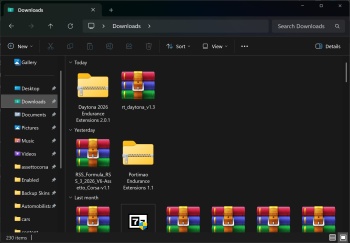
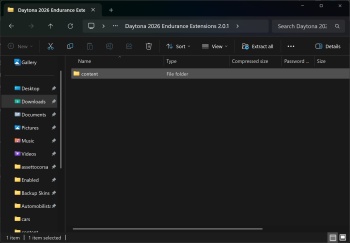
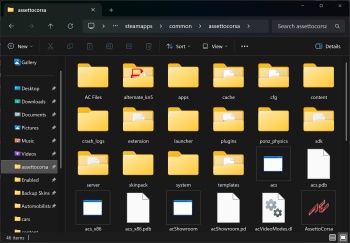
Here is what I did. It's the same thing I've always done for these files. Double clicked on the extension folder.


Cut and pasted content


Into the assettocorsa folder and the installation procedure begins and then it started to hit those file errors one by one

Sorry bit confusion in what you do! Also I can not find any RT_Daytona nor that 2026 extension on the Breathe track list so I guess they all went for the Paystore.
Let me tell you how I do this instalments for every mods! Warning, never install by CM a method you will see at some YT video's.💡
Download the track and unzip it. Explore the directory root, get all the way down to real track "title file" That is in this sample the osth_circuit map, as you can see in my sample. You should do this because creators use al kinds of directory structure. Some use a single track name map only, some have a complex structure ready for use into CM-ModEnabler, or whatever.
1770043261400.webp


Copy this osth_circuit map only into the track folder in Steams Assetto Corsa folder.
1770043973048.webp

Open CM and you should see in de Content->track the track with a greendot.
1770043691591.webp

Now you know it's into the right folder and OK.
Think the same can be done with the Daytona track.


----------------------------------------------------------------------------------------------------------------------------------------------------

One day we shall talk about Sergio Loro and his love for unoptimised work - which is a bummer. Always loved his tracks but since a couple of years they've been more demanding whilst still looking the same (aka like a PS3 era game)... Averaging 80 FPS alone without the 3d people in 2026 (!) shouldn't be the norm, especially when other modders manage better looking tracks with better performance...

F3CT Dalsland vs Fenryr's beta Laguna Seca. Uh oh.
This is because he is not making any progress in his skills, besides using audio for the circuit announcer. Also once a paywall car/track mod is put into the market it will be soon after a couple of corrections been abandoned, upgrades to reach an better in 2026 (CSP) expected quality level are a bit sparse for most paywall modders. The same we see (for VR users only) on car mods, while RSS was the king X-years ago but by neglecting 3D, it was gradually being overruled by URD, while in 2026 it's now that Young78 guy that degraded every paywall carmod. Guess it's all a bit like in sports, records are mend to be broken.

btw two complete different tracks Dalsland vs Laguna Seca compared for benchmarking :confused:
Think it's more about the FPS behavoir that are to be compared. As I do prefer a straight but lesser 80FPS more then a strong fluctuating avg 116 FPS.

Edit: as being curious, I did do a run on Sergio Loren Djursland Denmark track with full grid, think that can be compered to your Dalsland. FPS or in my case the frame time is a very straight low line, no peaks, so this track is very good optimized even in VR. That is normal because its a bit dull and empty flat (cart???) track, no moving objects, no changes in road surface, no circuit audio, no 3D trees. Clearly to see it is a typical 2020 track, with unrealistic colours and 2d grass in a straight row.
 
Last edited:
here in france we finally had winter after 3 years of nothing so let's celebrate a little more


Is this my F1 car ? And apparantly someone forgot to install the mod manually for the tyre textures to work in game
I have no idea what car it is or where i got if from, i never drive modern f1s, i just have them to run tests with my apps. It's referenced as "Grand Prix 1999 F399" and seems to be another version of Formula RTT 1999 F399 from Rock The Track Studio, which have a very different behavior.
 
Last edited:
I have no idea what car it is or where i got if from, i never drive modern f1s, i just have them to run tests with my apps. It's referenced as "Grand Prix 1999 F399" and seems to be another version of Formula RTT 1999 F399 from Rock The Track Studio, which have a very different behavior.
No i'm talking about this F1 car you have screened

1770048251411.webp


This is a Ferrari F10 from 2010, which is recognizable due to the curved nose, the window placement, the steering wheel having leds and 2010 led display. And the ultra high antenna
 
One day we shall talk about Sergio Loro and his love for unoptimised work - which is a bummer. Always loved his tracks but since a couple of years they've been more demanding whilst still looking the same (aka like a PS3 era game)... Averaging 80 FPS alone without the 3d people in 2026 (!) shouldn't be the norm, especially when other modders manage better looking tracks with better performance...

F3CT Dalsland vs Fenryr's beta Laguna Seca. Uh oh.
The same with Nukedrop, Sergio and him are the FPS destroyer
 
No i'm talking about this F1 car you have screened


This is a Ferrari F10 from 2010, which is recognizable due to the curved nose, the window placement, the steering wheel having leds and 2010 led display. And the ultra high antenna
Lol i don't even recognize them😂. it's referenced as this in my Cm. There's another version, same credits, without the 2020 Classic car edit.

Capture d'écran 2026-02-02 172634.webp
 
Last edited:
is the POSITION=0,0,0 just for show in drivers3D.ini or it actually serve a purpose? Tried doing random values and it doesn't move the driver spatially


One year old bug never resolved with the new kn5 loader. The helmet textures reverting to default or whatever despite helmet.dds existing in skin folder

Super weird thing is... it seems if my car has a custom helmet, the others all load fine too.


I agree. I'm on 0.30p140. Will fiddle around with the "New KN5-loader" settings and some, just for fun. But there's probably nothing really wrong with the car itself then, just some random circumstances which will trigger the bug..

I don't know, with that version everyone else who's tried that fix for the 911 shadows has said it was OK. Will DM you a test.
 
Last edited:
Lol i don't even recognize them😂. it's referenced as this in my Cm. There's another version, same credits, without the 2020 Classic car edit.

View attachment 1510726
do yourself a favor and make sure the cim_2010_tyres.zip (available inside assettocorsa/extension/textures/cars in the .7Z downloaded) is inside your assettocorsa/extension/textures/cars to avoid black hole looking tyres

Also I see you have an old version of mine that has the no alpha driver number, so the number 8 on the nose is pitch black and not transparent. You should update too
 
Last edited:
Sharing a mod? Host it on GTPlanet Downloads. Free, public hosting for files up to 10GB in size.
Back