Assetto Corsa PC Mods General DiscussionPC 

  • Thread starter Thread starter daan
  • 152,437 comments
  • 47,071,903 views
I did it with the 996 (and many other cars), you have to add these lines to the ext_config (or create an ext_config on the skin you want to change rims):
in this case my rims files are called "speedline_rim_F" and "speedline_rim_R" because front and rear rims aren't the same. You have to create a kn5 file with only a rim at 0;0;0 axis position, you have to set radius, width and offset.
if you want I can send you also rim files to test

[INCLUDE: common/custom_rims.ini]

[ReplaceRims]
File = rss_gtn_darche_96_a.kn5 ; name of KN5
OriginalRims = RIM_LF?, RIM_RF?, Cylinder001?, Object958? ; list of original rims to hide
Model = speedline_rim_F.kn5, 0.24, 0.310 ; KN5 with a new rim, its radius and width
Offset = 0.034 ; offset for front and rear wheels (negative value move rim deeper inside)
FrontOnly=1

[ReplaceRims]
File = rss_gtn_darche_96_a.kn5 ; name of KN5
OriginalRims = RIM_RR?, RIM_LR?, Object957?, Cylinder013? ; list of original rims to hide
Model = speedline_rim_R.kn5, 0.24, 0.310 ; KN5 with a new rim, its radius and width
Offset = -0.004 ; offset for front and rear wheels (negative value move rim deeper inside)
RearOnly=1


unfortunately I haven't found how to see new rims on previews, only ingame (if someone have the tip ...), previews below are stock previews modified with new rims from a screenshot ingame ... View attachment 1511584View attachment 1511585
Thank you so much! Ended up noticing that the name of the .kn5 was wrong as RSS updated the mod last year
1770489809625.webp

But now it works and i can finally mess about with some rim swaps for the Pork lol
 

Made a update of DumbAI following reports that AI was not leaving pits or freezing during qualifying depending on car and track.

As mentioned in the update,I went through a complete refactoring & optimization of the code and rewrote entirely the pit triggering and release system.

I made successful tests both in qualifying and race sessions up to 19 AI opponents with CSP 0.3.0p212 for the following different cars:
  • Ferrari 365GTB S3 (Mod from AcLegends 60's)
  • McLaren MP4/4 (Mod from MAK Corp)
  • Ferrari GTE 2019 (Mod from URD)
  • Lotus Exo sp1 (Kunos)
  • Ferrari 488 GT3 (Kunos)
  • Lambo Huracan GT3 (Kunos)
  • Ferrari 250 GTO (Kunos)

on different tracks:
  • Lago Maggiore Centre (RT version)
  • Spa Active Airspace (Kunos modified by Mascot)
  • Monza (Kunos)
  • Autosport speedway GT (ACU updated by LaChub & co.)

The app code is now much better designed to receive updates for pitstrop strategies, hopefully this will be the last major debug update before working on new features (json saves and new race rules implemented for different AI pitstop strategies) for the app
 
Last edited:
unfortunately I haven't found how to see new rims on previews, only ingame (if someone have the tip ...), previews below are stock previews modified with new rims from a screenshot ingame ...
In your content manager settings, under the custom showroom header enable "Use CSP for final preview render". Some people have said that it breaks previews, I haven't had that happen personally, but I've had to adjust my previews slightly, so be aware you might have to do so as well.
 
I'd appreciate some help troubleshooting a weird problem. I recently upgraded my PC and migrated all my AC stuff to it (though the game and all my modded content is on a separate SSD). Things have been working all right except for a strange issue in Content Manager where I can no longer open a car's or track's folder through the CM interface -- it briefly opens the folder location in a new desktop window, but the window closes itself after a second. It's happened twice, one I thought I solved after rebooting, but it happened again and I'm not entirely sure why. How do I fix this?
 
I'd appreciate some help troubleshooting a weird problem. I recently upgraded my PC and migrated all my AC stuff to it (though the game and all my modded content is on a separate SSD). Things have been working all right except for a strange issue in Content Manager where I can no longer open a car's or track's folder through the CM interface -- it briefly opens the folder location in a new desktop window, but the window closes itself after a second. It's happened twice, one I thought I solved after rebooting, but it happened again and I'm not entirely sure why. How do I fix this?
maybe u fix/change the assettocorsa root folder inside cm
 
How can I turn it into AWD? Which files do I need to change?
unpack data , then in drivertrain.ini you can change FWD to AWD (or AWD2 although not entirely sure what the difference is between those)

(but know you cannot join online races anymore when you alter the data like that)


EDIT: btw anyone else has a problem (and a fix? ;)) generating previews for the new VRC Beamer and Volvo (CSP versions only)?
EDIT3: found the fix myself, using Gemini: turning off the "New loader for PNG and JPEG textures" did the trick!

EDIT2:
Stupornaut

I'd appreciate some help troubleshooting a weird problem. I recently upgraded my PC and migrated all my AC stuff to it (though the game and all my modded content is on a separate SSD). Things have been working all right except for a strange issue in Content Manager where I can no longer open a car's or track's folder through the CM interface -- it briefly opens the folder location in a new desktop window, but the window closes itself after a second. It's happened twice, one I thought I solved after rebooting, but it happened again and I'm not entirely sure why. How do I fix this?
try running CM as Admin (or not if you are currently doing so already) ... could be a clash of windows permissions...
(if that does not work, paste your question in Gemini if you want to get some other suggestions to try)
Happy hunting!
 
Last edited:
maybe u fix/change the assettocorsa root folder inside cm
Nope, that's not it. I was able to view folders through CM earlier today, and then, without changing anything I could notice, it just stopped working. It actually shows the folder in its actual location before the window closes again, so I don't know if it's a filepath issue. I do know it started happening in tandem with a memory error I forgot to write down, and I can still do most other things in CM (launching a race, renaming/tagging cars and tracks, etc.), it's just this one thing that's bugged out.

EDIT: things seem to be working again after a reboot so I'll keep an eye open for anything specific that happens to cause this error again.
 
Last edited:
Surprised the VRC A4 is FWD, though I guess maybe the quattro version didn't race that long....

Also since thats the final one I guess that means the full Supertourer grid will be the VRC + pm3dm Nissan/Volvo, which are not that hard to BoP....
the Quattro only raced in 1996 and 1997 only (in BTCC) and the rest of the season was the A4 only.

so VRC from the file is 1998 so it's the regular A4 and not the Quattro.

edit: @JK1977 did the Quattro same as Cyril. This is the first regular A4 FWD for the Supertouring cars in AC.
 
Last edited:
Is it possible to make the new Tourer VRC compatible with older versions of CSP? I know a non-CSP version is included, but my non-CSP versions don't perform well on the track.

What I'm trying to ask here is what can be disabled in newer cars to make them work with CSP 0.2.8, like the Gojia (CSP version), for example.
 
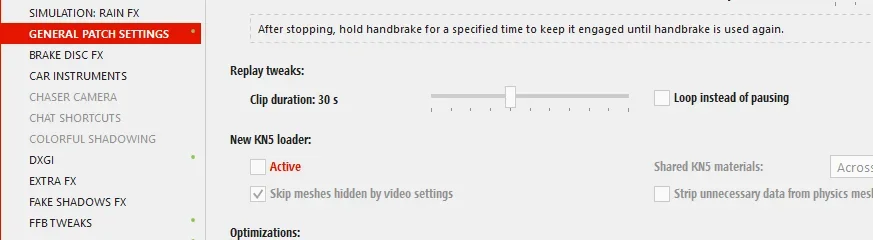
Were to find that new kn5 loader? Did use the search but it did not find any in CM menu.
Btw I’m using the 2.12
It was in General. Might have been absorbed to be on by default, in a later version?

PS. Still there in 0.2.11
 

Attachments

  • 2026-02-08 12_19_42-Content Manager.webp
    2026-02-08 12_19_42-Content Manager.webp
    21.3 KB · Views: 1
Last edited:
are you using 0.2.7 or 0.2.7p1? because 0.2.7p1 is not 0.2.7 public.
I don't know, I've upgraded to 0.2.11, if P1 is the optional paid upgrade that enables rainFX, then yes, I was running 0.2.7p1.

On a sidenote, has anyone else encountered problems with the CSP physics on the RSS Formula Alpine 2025? Namely, the AI refusing to leave the pits? I had to switch to the non-CSP physics to fix it. I've emailed RSS about it.
 
Nope, that's not it. I was able to view folders through CM earlier today, and then, without changing anything I could notice, it just stopped working. It actually shows the folder in its actual location before the window closes again, so I don't know if it's a filepath issue. I do know it started happening in tandem with a memory error I forgot to write down, and I can still do most other things in CM (launching a race, renaming/tagging cars and tracks, etc.), it's just this one thing that's bugged out.

EDIT: things seem to be working again after a reboot so I'll keep an eye open for anything specific that happens to cause this error again.
i think i have the same issue for long time now, it started as soon i upgrade my rtx card. it might has something to do with temporary memory , it started with not be able to open sometimes the folders, then open showrooms or notebooks ... once i restart the pc is all good again for a few days ... ai and a lot of searching online suggest that it might have something to do with 32 bits files instead of 64 in windows/system folders or with dll or d3d11 files , dont remember exactly ...if your issues get worst(showroom not opening ) look at this https://assettocorsamods.net/threads/can’t-start-custom-showroom-external-component-has-thrown-an-exception.3161/ ...i use the video with the https://www.dependencywalker.com/ it work for 2 months then i update the rtx and same issues came back . maybe it was just luck ... i share this just in case someone knows more and not as a fix you should follow, i also save a lot of the errors notifications i got if someone wants to have a look.
 
Last edited:
... has anyone else encountered problems with the CSP physics on the RSS Formula Alpine 2025? Namely, the AI refusing to leave the pits?...
Side note:

For better or worse, it's common to report problems with Assetto Corsa, and sometimes they only affect one or two persons, while the rest are unaffected. If it's a general problem that affects everyone, you know it will be resolved sooner or later, but those kinds of bugs that only affect few people are more frustrating... :banghead:

When these problems are discussed, suspicion usually falls on a particular version or setting of CSP, CM, Windows, etc., but the affected person almost never mentions whether they have any side apps installed (AI related, mainly) that might be contributing to the malfunction. It would also be helpful to mention if we have any apps of this type installed; the more information provided, the more clues the forum experts will have to figure out what is causing the bugs... 🤔

(Thinking Out Loud Mode, Off).
 
Last edited:
Hello, I am looking for cozy61's red bull ring 2022. the file name is called "11_austria_gp22". The gdrive is taken down so I cannot find it anywhere. Thanks in advance.
 
k_p
Proper refraction headlights and turn signals with photoelastic shader for Aston Martin AMR1 (imsa_aston_amr1). For lighting to work you need to unpack data and replace lights.ini then repack or leave data folder and delete data.acdView attachment 1511808
Question for you (and @Fall Guy, and anyone else who's mastered refractive lights via config)... could refractive lights be added to VRC's super tourers? I love these cars but when chasing down a pack of them the rear lights of the cars in front look pretty awful by modern modding standards. Some rear lights on the super tourers are very flat and dull, and don't look much better than NASCAR fake-light decals. Refractive lights would be the icing on the cake for this otherwise wonderful pack.
 
Hey guys need some help I'm getting weird artifacts on the rims with 3.0-preview212 ,I tried with 2.11 and the artifacts are gone.
First photo is CSP 3.0-preview212
View attachment 1509217View attachment 1509218
I'm not sure if this has been answered, but I had a similar issue, but it wasn't just on the rims - I read somewhere it might be something to do with these Extra FX settings:
Screenshot 2026-02-08 150552.webp

Changing to Hi-Z (new) and increasing the number of steps seems to have reduced it somewhat on my setup. You can change it live to see if it improves the visuals. However, setting the steps too high had a negative affect on my FPS.
 
On the subject of strange visuals, does anybody know what causes this effect on the hill going up to Eau Rouge/Radillon or how to fix it? This is Spa66, but it's also noticeable on some other tracks. The effect seems to vanish the closer I get to the uphill section.
Screenshot 2026-02-08 151540.webp
 
On the subject of strange visuals, does anybody know what causes this effect on the hill going up to Eau Rouge/Radillon or how to fix it? This is Spa66, but it's also noticeable on some other tracks. The effect seems to vanish the closer I get to the uphill section.
View attachment 1511845
I had the same bug and solved it in some way by modifying the ext-config.ini, check this post :

 
Nice one. Seems there is a new expert in our club, so feel welcome here.
Thanks, long time lurker. Modding for for several years but keep them private. IHMO refraction looks best when using selflighting or
LIGHT_EXTRA_ and separate mesh acting as bulb

Question for you (and @Fall Guy, and anyone else who's mastered refractive lights via config)... could refractive lights be added to VRC's super tourers? I love these cars but when chasing down a pack of them the rear lights of the cars in front look pretty awful by modern modding standards. Some rear lights on the super tourers are very flat and dull, and don't look much better than NASCAR fake-light decals. Refractive lights would be the icing on the cake for this otherwise wonderful pack.
I will look into it because there are things that need to be present in lights to have good refraction. I mean by that proper textures and separated meshes.
 
On the subject of strange visuals, does anybody know what causes this effect on the hill going up to Eau Rouge/Radillon or how to fix it? This is Spa66, but it's also noticeable on some other tracks. The effect seems to vanish the closer I get to the uphill section.
View attachment 1511845
well... I thought I was going nuts but my Spa (converted from GTR2) has an issue nearly exactly like this.
It "appears" to be CSP related but I cant pin it down, but if I change the road shader to ksPerPixel it goes away.
This is the only place where it happens and nearly exactly from the same viewpoint as your screen.

It's really killing my progress in getting v2 to a release state. Any and all help wanted and needed.
1770569593555.webp
 
Last edited by a moderator:
Same issue.
At far distance and with a low angle I can see the artifact.
It's seems like the textures of objects and terrain near the track blends with the track.
If I move towards the artifact, it moves further.
Screenshot_ac_legends_gtc_alfa_tz_rj_spa_1966_8-1-126-18-12-29.webp

Here you can see the Shell billboard blending with the track (the posted image is zoomed).

Pherhaps it should be something related to CSP/Graphics/adjustments (I have extraFX disabled)
 
well... I thought I was going nuts but my Spa (converted from GTR2) has an issue nearly exactly like this.
It "appears" to be CSP related but I cant pin it down, but if I change the road shader to ksPerPixel it goes away.
This is the only place where it happens and nearly exactly from the same viewpoint as your screen.

It's really killing my progress in getting v2 to a release state. Any and all help wanted and needed.
View attachment 1511884
What about this fix I tried several months ago for the RT Spa 66? (and reposted just above )

Works here with CSP 0.3.0.p212

[SHADER_REPLACEMENT_...]
ACTIVE=1
DESCRIPTION= fixing mirror effect raidillon
MESHES=vis_1ROAD_1_001
MATERIALS= ROAD_TRACKMAIN01_WET
SHADER = ksPerPixelMultiMap_NMDetail
PROP_... = ksAmbient, 0.38
PROP_... = ksDiffuse, 0.33
PROP_...= fresnelC, 0.3
PROP_... = fresnelEXP, 6
PROP_... = fresnelMax,0.6
PROP_... = ksSpecular, 0.1
PROP_... = ksSpecularEXP, 10
RESOURCE_3= txDetail
RESOURCE_FILE_3= tarmac-detail.dds
RESOURCE_4= txNormalDetail
RESOURCE_FILE_4= tarmac-detail_NM.dds


(Yeah , just trying here to make you release a v2 :mischievous:)
 
Last edited:
What about this fix I tried several months ago for the RT Spa 66? (and reposted just above )

Works here with CSP 0.3.0.p212

[SHADER_REPLACEMENT_...]
ACTIVE=1
DESCRIPTION= fixing mirror effect raidillon
MESHES=vis_1ROAD_1_001
MATERIALS= ROAD_TRACKMAIN01_WET
SHADER = ksPerPixelMultiMap_NMDetail
PROP_... = ksAmbient, 0.38
PROP_... = ksDiffuse, 0.33
PROP_...= fresnelC, 0.3
PROP_... = fresnelEXP, 6
PROP_... = fresnelMax,0.6
PROP_... = ksSpecular, 0.1
PROP_... = ksSpecularEXP, 10
RESOURCE_3= txDetail
RESOURCE_FILE_3= tarmac-detail.dds
RESOURCE_4= txNormalDetail
RESOURCE_FILE_4= tarmac-detail_NM.dds


(Yeah , just trying here to make you release a v2 :mischievous:)
are you replacing these with new files?

RESOURCE_3= txDetail
RESOURCE_FILE_3= tarmac-detail.dds <-------------?
RESOURCE_4= txNormalDetail
RESOURCE_FILE_4= tarmac-detail_NM.dds <-------------?
 
Last edited:
Sharing a mod? Host it on GTPlanet Downloads. Free, public hosting for files up to 10GB in size.

Latest Posts

Back