- 1,159

- Italy
Page 156, new chapter: "Repercussions of the rather spectacular encryption fail"
Meanwhile, at Spectre...

Meanwhile, at Spectre...


Sorry, only just seen this.Link is dead. Would it be possible to reupload it please
Here it is. Remove the .txt extensionLink is dead. Would it be possible to reupload it please


Isn't pure incompatible with weatherFX? Or was that SOL?Pure as it

I didn't adjust them ingame, rather edited the default settings in drivetrain.ini - for the Porsche 935 and the Mirage GR8 at least. I haven't touched the Porsche 936 and the Alpine A442 at all.
I even tried deleting gear ratio settings, limiting the AI to a single gear set but that didn't work either.
But it's not like the gear set is too short or too long, rather as if the AI was driving conservatively. A car that is clearly capable of reaching 315 Km/h at worst, accelerates up to around 260-270 Km/h, then seemingly eases off the throttle, slowly reaching 295 Km/h (throttle is full the whole time by the way). They are holding back, that is the issue.


Welcome to the Wonderful World of Assetto Corsa and its Charming Mysteries™... 🫤... What's happening?

In the end, they've released it on their Discord as a zip after many users complaints about the choice of using a third party platform.They can keep it to themselves and enjoy it on their own. I’m not going to install any third-party apps or link my Steam account to an external website just to use a mod. Either it’ll get leaked eventually, losing their bad idea of using this system, or it’ll just stay on their PC or on a third-party cloud like the one or this app hosting...

I'll try... 😥
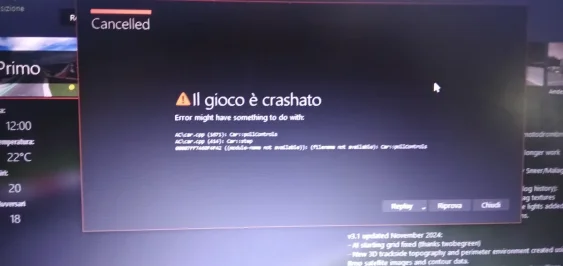
I deactivated the app, but the result doesn't change: the game crashes with this error. I repeat, between FIA GT '02 and FIA GT '03 only the skins change, but the Brno circuit is the same.@Gabriele: If you turn off the Stretched Grid app, does it then work? Maybe just re-install the Stretched Grid app.

You can use the CSP Debug app for this, but you need to set the weather controller to default then.Does anyone know if WeatherFX has an in-game app for planning/changing the weather, like SOL had?
Seeing "Il gioco è crashato" is very cursed for reasons I can't explain (even if I'm Italian)I deactivated the app, but the result doesn't change: the game crashes with this error. I repeat, between FIA GT '02 and FIA GT '03 only the skins change, but the Brno circuit is the same.
Sorry everyone, I forget to switch languages every time: it's because I'm angry about this inexplicable mistake...Seeing "Il gioco è crashato" is very cursed for reasons I can't explain (even if I'm Italian)

For anyone who wants to give it a try, mod has been updated with my Lesmo sand changes. Use the link in the quote to get the update. I am well aware that both sand areas are not shaped correctly as per real life. I just wanted to see if I could teach myself how to pull the sand closer to the kerbs. And since I hope to update the kerbs at some point, there was no reason to go overboard for the time being. I also used my new found knowledge to fix a sand line misalignment issue on one of the Ascari sand pits.Monza 2025 (beta 0.975)
monza_2025_beta
Throwing this out there for anyone to try in the hopes to get a little feedback. I am concerned about flickering on the sponsor banners. I had to fix a lot of them and redo a lot of the uv mapping for the textures. I do not see any but i'm on an old CSP version and don't know if that would make a difference.
Don't let the name fool you. This is not a representation of the track in 2025. It's just a name I picked so I can separate this version from the Kunos version in my CM track list. It is nothing more than all of the mods i've created or downloaded for Monza rolled into one track so I can keep the original Kunos version 'clean'. It is a beta version (about 90% complete) so you can expect to see some obvious mistakes and maybe some poor texture choices. Because it's based on the original Kunos track, you are free to use any mods for that track with this one, such as ai files, track skins, etc. The one thing you can't do is use a mod that will overwrite the ext_config file. That would cause some issues.
Credits:
-- @Masscot for the animated flagmen and balloons
-- Assets used from the monza2022crf version of the track.
-- knicker for the crowd files.
While this track is not as confusing as some of my other ones, I still need to explain a few things:
-- There are two layouts, the base layout and a raceday layout that adds sponsor banners in some spots based on a 2025 GT World Challenge video I watched as a reference. The raceday layout is best to use with modern cars because the sponsors wouldn't make much sense for cars 10+ years old. Also, when using the raceday layout, I would suggest enabling the 2025 Raceday track skin to complete the look.
-- There are four 'Years' track skins that will bring back certain buildings and structures to make the track more period accurate. For example, enabling the 2010 (probably should have been named pre-2010) skin will make the track look like the Kunos default version with no structures hidden.
-- For performance reasons, I have the animated flagmen and live jumbotron displays off by default for older computer users. You can turn them on by enabling the appropriate track skin. Plus it's nice to turn them off when driving a practice session.
-- Last thing, there is a huge difference in how bright the crowds look depending on whether you use CSPs 'New spectators rendering method' so you might have to do some adjusting to the ambient and diffuse values in the camera_facing file. I have it setup for my CSP options, but yours may be different.
Have fun and hope to hear from someone on any issues you may see. If not, then i'll just keep plugging along thinking everything is all right.


Ok so no manual or whatsoever, but please can somebody explain on what coordinates I should use here if wanting pits sound.This looks a bit stupid, but is there an instruction or YouTube tutorials on how to use the object inspector app. Do see a lot of digits but 🤷♂️ Reason I want to un-silence tracks and introduce the typical circuit environmental sounds. 📢


In case of the Mirage GR8, the rev limit is 10.500, and the AI is set to shift up at 9.000.Interesting, what's the rev limit set to in drivetrain? If you follow them in game, they're not using full throttle? Any errors in ai.ini?

Do the AI have a skill level higher than 90? I've found in the past when you start using AI with levels 85-89 they don't fully press down the throttle.In case of the Mirage GR8, the rev limit is 10.500, and the AI is set to shift up at 9.000.
I did a quick test just now to get you the numbers, and the AI was again perfect during qualifying, but I noticed that they didn't even shift up to 5th gear in the race. They stayed in 4th while hovering at 8.600 RPM.
Apparently, they use the full throttle (the bar is full, and the setup debug suggests that as well) but they are clearly holding back so I don't know how accurate it is...or that might just be "AI things".
Actually, the way the AI limited itself at 8.600 RPM and refusing to go beyond that was very suspicious. There has to be a setting for this that I am missing.
Edit: Oh, and there doesn't seem to be anything out of the ordinary in the ai.ini file.
As always buddy thanks for your amazing good and shared through Mega too I really appreciate.For anyone who wants to give it a try, mod has been updated with my Lesmo sand changes. Use the link in the quote to get the update. I am well aware that both sand areas are not shaped correctly as per real life. I just wanted to see if I could teach myself how to pull the sand closer to the kerbs. And since I hope to update the kerbs at some point, there was no reason to go overboard for the time being. I also used my new found knowledge to fix a sand line misalignment issue on one of the Ascari sand pits.
Alternative Mega link for those with issues using Mediafire: rj_monza
Please let me know of any physics issues with either the Lesmo or Ascari areas on the 2025 layouts. I had to redo the physics kn5 file and could have easily overlooked something.

Are they really applicable beyond the Supertourers? I don't think VRC, RSS, or URD has anything with halogen bulbs and fluted lenses that would warrant actually using that effect, at least as far as headlights are concerned.Thanks for the Mondeo config @k_p, again it's a big improvement.
The VRC Accord having a plain texture for the rear lights explains my earlier observation about some VRC tourers having lights that look no better than NASCAR stickers... it seems that's practically what some of them are, just textures.
It's a big shame that VRC cut so many corners with the lights on these cars. Proper refractive lights still seem beyond the skills (or priorities) of the big paymod groups, even though bedroom modders have been including them for years.

Just needs some nice liveries without the simdream sticker on the wing now lol.
In case of the Mirage GR8, the rev limit is 10.500, and the AI is set to shift up at 9.000.
I did a quick test just now to get you the numbers, and the AI was again perfect during qualifying, but I noticed that they didn't even shift up to 5th gear in the race. They stayed in 4th while hovering at 8.600 RPM.
Apparently, they use the full throttle (the bar is full, and the setup debug suggests that as well) but they are clearly holding back so I don't know how accurate it is...or that might just be "AI things".
Actually, the way the AI limited itself at 8.600 RPM and refusing to go beyond that was very suspicious. There has to be a setting for this that I am missing.
Edit: Oh, and there doesn't seem to be anything out of the ordinary in the ai.ini file.


"Clicked at"Ok so no manual or whatsoever, but please can somebody explain on what coordinates I should use here if wanting pits sound.
View attachment 1512377


Nah, there's no need to do that: crashato sounds menacing enough to pass the message it needs (I'm quite curious about all the errors, since I don't have that many maybe I just need to experiment more with AC/CM)Sorry everyone, I forget to switch languages every time: it's because I'm angry about this inexplicable mistake...
"Clicked at"
I use 3dSimed myself for this (set axis as DirectX and invert the Z
As you see I did have clicked, its only what digit from the coordinates should I use?Ok so no manual or whatsoever, but please can somebody explain on what coordinates I should use here if wanting pits sound.
View attachment 1512377
when you click,, it will copy the x-y-z to your clipboardAs you see I did have clicked, its only what digit from the coordinates should I use?
Still do hope a member can help here, so I could implement audio in the track at the right spot!


Does it happen with any track / car combination (Kunos or mods ?)I am at wits end with this, I just don't understand.
Every time I do a rain race, the AI just refuses to pit, they just keep driving, even after they "run out of fuel" (There is no running out of fuel for AI).
Nothing I've tried works, even fresh reinstall, and starting the race dry, and using pure to turn it to a wet race.
What's happening?
I'm currently running 0.2.11, but I've observed it with 0.2.7.Does it happen with any track / car combination (Kunos or mods ?)
What is your CSP version ? because there are sometimes changes in the pit behavior between CSP version and some cars more or less support them.
OK , I think I did not experiment 0.2.11, I have 0.2.7 but spent not much time with it and used more 0.2.12prev and now I'm trying to stabilize on 0.3.0prev212.I'm currently running 0.2.11, but I've observed it with 0.2.7.
It seems to happen to any track, Kunos included.
Will drop you a DM
Do the AI have a skill level higher than 90? I've found in the past when you start using AI with levels 85-89 they don't fully press down the throttle.
That's a very interesting investigation here !In case of the Mirage GR8, the rev limit is 10.500, and the AI is set to shift up at 9.000.
I did a quick test just now to get you the numbers, and the AI was again perfect during qualifying, but I noticed that they didn't even shift up to 5th gear in the race. They stayed in 4th while hovering at 8.600 RPM.
Apparently, they use the full throttle (the bar is full, and the setup debug suggests that as well) but they are clearly holding back so I don't know how accurate it is...or that might just be "AI things".
Actually, the way the AI limited itself at 8.600 RPM and refusing to go beyond that was very suspicious. There has to be a setting for this that I am missing.
Edit: Oh, and there doesn't seem to be anything out of the ordinary in the ai.ini file.