....reverting to older CSP builds to 'fix' things that get broken is treating the symptom, not the cause, and often introduces more issues than it resolves...

no point in doing this unless you are going to release them, what happened to the BTCC Accord or the Porsche GT1???some other Projects (most finished)
View attachment 1518017View attachment 1518018View attachment 1518019View attachment 1518021View attachment 1518022View attachment 1518023View attachment 1518024View attachment 1518025View attachment 1518026View attachment 1518027View attachment 1518029View attachment 1518030View attachment 1518016


Pretty much any circuit with low-speed sections.Minor uptade ,some model shaders , kn5 , lods , extension corrections
Could you give me more information about the problem with AI ?
Which track , which cars ?
I will have a look into that

I hope to see the Calsonic R32 JGTC soon, the version that I have for my JGTC grid is so rough I can't wait to replace it lol.some other Projects (most finished)
View attachment 1518017View attachment 1518018View attachment 1518019View attachment 1518021View attachment 1518022View attachment 1518023View attachment 1518024View attachment 1518025View attachment 1518026View attachment 1518027View attachment 1518029View attachment 1518030View attachment 1518016




Those are great! But.. what happened to Venturi 400 Trophy? i did believe it was almost ready for release..some other Projects (most finished)
View attachment 1518017View attachment 1518018View attachment 1518019View attachment 1518021View attachment 1518022View attachment 1518023View attachment 1518024View attachment 1518025View attachment 1518026View attachment 1518027View attachment 1518029View attachment 1518030View attachment 1518016
Check MaaaaaaaatttttttttteeeeeeeeeeeeeeeThose are great! But.. what happened to Venturi 400 Trophy? i did believe it was almost ready for release..

I just tried a Red Bull Ring - Track Day and Race (with both FN and Kunos) with 16 of the GT4's.no worry i am always racing off line against AI as well , i will spend time to find a way to correct it , most of the time i try on kunos track to avoid some track mods which can have themselve pb with ai lines !
thank you for report
yeah, this.I just tried a Red Bull Ring - Track Day and Race (with both FN and Kunos) with 16 of the GT4's.
Track Day
5 to 6 cars went off at turn 3 on both tracks on the out lap.
5 to 6 cars went off at turn 4 on both tracks on the out lap.
The majority of the grid was gone by the end of the out lap.
Race
2 went off at turn 1 on lap 1.
4 went off at turn 3 on lap 1.
2 went off at turn 4 on lap 1.

The way you have the SCCA stuff organized here looks good, there are so many classes of cars, and they change throughout the years. Best to put them all in one sheet, with the event name/type listed with the other info. It'll be a big help when making grids!Hello, I got two questions that i kinda need help on regarding racing series for the livery spreadsheet, Maybe someone knows more about these series than i do (i don't know much about vintage stuff)
Got the following stuff i need some opinions on
SCCA: There is like 450 different SCCA type events, Should i just merge all these into 1 sheet under just the SCCA banner and throw all the variants into the "track/driver/whatever" category just so people can see what it is, Or should i make individual SCCA sheets just to keep them all seperate (does just add more stuff)
View attachment 1518068
SCCN(?): I don't know what to do about these Japanese racing events, I just recently was made aware that SCCN was is the SCCA equivalent in Japan, However finding any information about this just gives me information about Super Formula, Super GT and not the old stuff, I might just suck at searching but there is just so much time in an working mans life lol.
I made an SCCN sheet as an recent skin pack had like 20+ liveries all tagged under the SCCN name on Overtake. Though i'm unsure about the rest of the ones in the image below. Idk how to search the japanese internet
View attachment 1518069
View attachment 1518070
View attachment 1518071
anyways that was all, If anyone got any suggesting lmk lol
Back to your regular CSP discussion
Just did a race at red bull ring , only one car out , with my new ai datas , I will continu to work on it tomorrowyeah, this.
Generally, by lap 3 or 4, the majority of a Guerilla Mods field has totaled their car and permanently retired to the pits.
The GT4s are just the latest rendition of this, sadly.
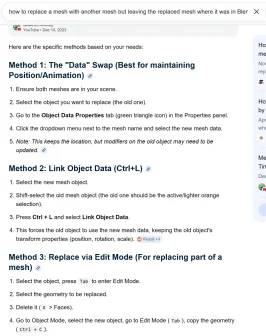
I looked up what you suggested and unless i'm not following the directions properly, I couldn't make it work. It matched the shape properly on the other objects, but it also moved the objects to the same location as the source instead of leaving them where they were.In Blender, if all the segments are to be identical, you are able to edit one and then replace each of the other meshes with the one you edited. I'm several months (into the fog) since using Blender right now, but if you Google the question precisely it'll probably tell you exactly how... Save a bunch of time!
Thank you. I'll have a look and see what info I can gather.This seems to be the official photographer for track days. Not perfect, but its something... Backdated as well. Maybe you will get lucky

Monza Track Days
F1 & Motorsport Quality Photos, Books and Prints | Wedding photo | Portraits photo | Studio photowww.alexgalli.com

I sort of recall jotting down the location of the mesh being replaced and restoring it after the replacement (but only sort of)... Did you make that problem part of the Google query? I usually have to Google 10 times (changing the query accordingly each time. Like so...?I looked up what you suggested and unless i'm not following the directions properly, I couldn't make it work. It matched the shape properly on the other objects, but it also moved the objects to the same location as the source instead of leaving them where they were.


If only one day we get to see this is AC...some other Projects (most finished)
View attachment 1518017View attachment 1518018View attachment 1518019View attachment 1518021View attachment 1518022View attachment 1518023View attachment 1518024View attachment 1518025View attachment 1518026View attachment 1518027View attachment 1518029View attachment 1518030View attachment 1518016

Hard to do when the 3D model hasn't been released anywhere yet.If only one day we get to see this is AC...
Hello, I got two questions that i kinda need help on regarding racing series for the livery spreadsheet, Maybe someone knows more about these series than i do (i don't know much about vintage stuff)
Got the following stuff i need some opinions on
SCCA: There is like 450 different SCCA type events, Should i just merge all these into 1 sheet under just the SCCA banner and throw all the variants into the "track/driver/whatever" category just so people can see what it is, Or should i make individual SCCA sheets just to keep them all seperate (does just add more stuff)
View attachment 1518068
SCCN(?): I don't know what to do about these Japanese racing events, I just recently was made aware that SCCN was is the SCCA equivalent in Japan, However finding any information about this just gives me information about Super Formula, Super GT and not the old stuff, I might just suck at searching but there is just so much time in an working mans life lol.
I made an SCCN sheet as an recent skin pack had like 20+ liveries all tagged under the SCCN name on Overtake. Though i'm unsure about the rest of the ones in the image below. Idk how to search the japanese internet
View attachment 1518069
View attachment 1518070
View attachment 1518071
anyways that was all, If anyone got any suggesting lmk lol
Back to your regular CSP discussion


SCCN was not the equivalent of SCCA in Japan, it was the Sports Car Club of Nissan, under which the Nissan factory race team would often enter races. The early years of racing in Japan was largely held up by car clubs which organised events but everything still had to go through JAF (Japan Automobile Federation) to be sanctioned as an official event. There were some championships back then like the All Japan Drivers Championship, Fuji Champion Series, Freshman Series, but not really any SCCA equivalent. Nerd message overHello, I got two questions that i kinda need help on regarding racing series for the livery spreadsheet, Maybe someone knows more about these series than i do (i don't know much about vintage stuff)
Got the following stuff i need some opinions on
SCCA: There is like 450 different SCCA type events, Should i just merge all these into 1 sheet under just the SCCA banner and throw all the variants into the "track/driver/whatever" category just so people can see what it is, Or should i make individual SCCA sheets just to keep them all seperate (does just add more stuff)
View attachment 1518068
SCCN(?): I don't know what to do about these Japanese racing events, I just recently was made aware that SCCN was is the SCCA equivalent in Japan, However finding any information about this just gives me information about Super Formula, Super GT and not the old stuff, I might just suck at searching but there is just so much time in an working mans life lol.
I made an SCCN sheet as an recent skin pack had like 20+ liveries all tagged under the SCCN name on Overtake. Though i'm unsure about the rest of the ones in the image below. Idk how to search the japanese internet
View attachment 1518069
View attachment 1518070
View attachment 1518071
anyways that was all, If anyone got any suggesting lmk lol
Back to your regular CSP discussion


Perfect timing! I was finishing the behavior script for this era for AIwhisp🤘
Right, No i sort of understand it now, Though it's still like, 1 sheet named "SCCA" where every single event is in on seperated sheets called likeOK, I will try to make this a short answer
I am a long time member of the SCCA and raced with them for more than thirty years. (Fifty years total). I am the current Chairman of the Northeast Division Council. (Northeast Division encompasses from Virginia to Eastern Ohio to Maine)
The SCCA (Sports Car Club of America)
They currently have two levels of racing, Major and Regional. The majors were called the Nationals until about twelve years ago. The Majors (Nationals) consist of twenty eight recognized classes of racing cars, everything from GT cars to production based cars to Formula cars and Sports racers. Too many to list here.
There really are no differences in the classes at the Major level and the Regional level. The difference is in the amount of money one has to play with and are willing to spend. There are more regional level classes as any classes that fall below a specific attendance level in a given year may be put on probation and will be deleted from Major competition and sent to the regional level (sort of like being sent from the major league to the minor league in baseball).
The SCCA also has a professional level of racing. Right now they support the American Trans Am series. It has been one of their series for many years. They also have run a Formula Four series. In the past they had the Can Am series as well.
Hope this helps.
Chris Mosley
Oh, Okay. I guess that explains a lot. Is there any easy way to find out what organization ran these? or are they just ran under that name? ex, Suzuka 1000KM, Fuji Master. Assuming these are just 1 time events not part of any nation wide event in Japan.SCCN was not the equivalent of SCCA in Japan, it was the Sports Car Club of Nissan, under which the Nissan factory race team would often enter races. The early years of racing in Japan was largely held up by car clubs which organised events but everything still had to go through JAF (Japan Automobile Federation) to be sanctioned as an official event. There were some championships back then like the All Japan Drivers Championship, Fuji Champion Series, Freshman Series, but not really any SCCA equivalent. Nerd message over
Also, new 356A
View attachment 1518255


If only one day we get to see this is AC...
ill never finished the trophy version ,only 600LMThose are great! But.. what happened to Venturi 400 Trophy? i did believe it was almost ready for release..

is the vectra dtm still missing its interior?


That’s more a less similar what I wrote down long time ago on adjustments like in Nvidia control panel or in CM, all settings to max and complaining about stutters/FPS. Why burn a lot of unnecessary PC performance if you do not have any benefit or simply not notice it?Too me both just look like Assetto Corsa. It frustrates me how obsessed some players are with such small negligible details, and then complain, when they have the option at any moment to go back to any configuration of csp/pure they want. To me Sol never looked better than pure, so there is no better or worse like some are complaining, it is just what you prefer.
Broken shadows that have sawtooth animation are hardly 'negligible details', and reverting to older CSP builds to 'fix' things that get broken is treating the symptom, not the cause, and often introduces more issues than it resolves. If we don't highlight issues then they might never get fixed. You call it 'complaining', but most people hopefully see it as constructive feedback.

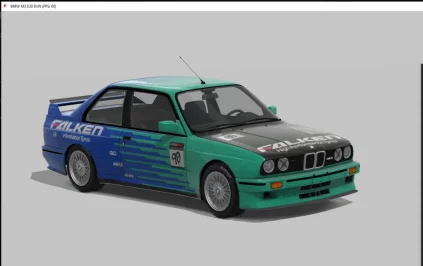
It was a original skin?yesterday i went threw my kunos bmw e30 files and deleted all unnessary files from the s1 version. i deleted all files but not the folders for the stock and drift version. and then i copied my skin folder of the s1 e30 to the stock and drift e30. so far so good but then i emptied my recycle bin and after that realized i have more skins for the drift version than my s1 version and now they are gone. recovery softwares didnt work out so good, does someone here maybe has an idea and also can u check if ur drift kunos e30 has skin with the folder named „falken_drift_team“?
i would be very happy
Do you mind sharing your know how ? pleasePretty much any circuit with low-speed sections.
Jarama was mentioned, that's one.
Cadwell Park is another, completely unraceable there.
Rapid-fire off the top of my head of ones I tested before giving up: Zandvoort, Goria-Thun, Mid-Ohio, Kuala Lumpur Street Circuit (lol, no chance), even Hockenheim.
The AI for these cars, and for many Guerilla cars, simply aren't good enough. It has been the case for a long time.
The big problem, of course, is that the AI for these cars is encrypted - so car AI experts like parrilla or someone with some know-how like myself can't even tweak the files and share them if we wanted.

Hard to do when the 3D model hasn't been released anywhere yet.

Merci beaucoup pour l'aide. But for me it looks like thus and I'm not sure if it is supposed to be like that. If so: This looks more like a flag or sth. and not like a single foxtail. Does it not!? Just saying - maybe other modders can pls have a look on the subject. If it is maybe asked too much so be it - world has other probs these days. It was just a longtime idea and vision of mine...Having issues with the foxtail not appearing or with its wobble settings? It "works" on my end, i have it. Not super pretty though.

opelmanta_400
MediaFire is a simple to use free service that lets you put all your photos, documents, music, and video in a single place so you can access them anywhere and share them everywhere.www.mediafire.com

That's not the right car...