Assetto Corsa PC Mods General DiscussionPC 

  • Thread starter Thread starter daan
  • 155,711 comments
  • 49,723,717 views
Hi, everyone, my first time postimg here! Thank you for all your hard work, modding community is truly awesome!

I wonder, if there is STCC 2014-2016 mods out there for ac
 
Hi, everyone, my first time postimg here! Thank you for all your hard work, modding community is truly awesome!

I wonder, if there is STCC 2014-2016 mods out there for ac
No, Sadly not. No one has made anything STCC related other than some skins for the 2000's season.
 
I've been trying to learn how to UV unwrap now because of a new car being made, its quite a nightmare, but I pretty much stumbled upon this method you explained via various Youtube videos. Interesting that you say by angle is best because I found that projected view worked a bit better, but now that I think about issues I'm having with projected view, maybe by angle is the better solution. Ah well, wouldn't be the first redo of this uv map!
i was doing a video some time ago on the steering of the techart gt street to show a bit some principles

but some guys are doing way much better like connecting all parts together where u have gaps or holes to make it user friendly for skinning in 2D , the best way for skinning a car is still to do it in 3D !

a bit long to watch though

 
fellow racist.
Sarcastic Season 9 GIF by The Office
 
This is the process I did: but when I press "calculate AO", I can only download a completely black image, without the car mapping...😅
So you need to either ask somebody to do a UV map or move on to the next car. I have never seen a car without a wire frame but that does not mean they do no exist.

Have you pressed "view mapping?". forget about "calculate AO" what about view mapping? what does that show you?
 
This is the process I did: but when I press "calculate AO", I can only download a completely black image, without the car mapping...😅
I might be wrong but since you work with paint.net open the file and then at adjustment menu find invert Alpha and click it. Also you can choose "save as" the png file and save it as dds file
 
This is the process I did: but when I press "calculate AO", I can only download a completely black image, without the car mapping...😅
@Gabriele If you have a plain black image, click on the arrow on either side of the screen. this should bring up the basic AO to begin making a template for a skin. If there is no save button on this screen, what I've done is take a snippit of the image and copy it to your Paint.net, crop it and save it as whatever you want, usually the top layer of a template as 'multiply' properties and everything else on layers below with basic paint as the bottom layer.
 
WHAT SHOULD I SAVE AS?

i meant to ask ages ago but forgot.
BC7 is ideal because it has much better quality than BC3 while keeping the same filesize, which is what I would do, though older versions of CSP (Not sure how old) do not support BC7. So if you care about catering to people on ancient versions of CSP then you could go with BC3, or even uncompressed (R8G8B8A8, or R8G8B8 for no alpha)


On an unrelated note, I reduced the poly count of the Scamdream Mclaren. The headlight LEDs are not perfectly round anymore because of it but aside from that I haven't noticed any model quality differences. I mean, I did take 1.6 million polys out of the model, what more do you want from me 😂 It also has a cockpit_LR now, (just a crappy one generated with CM) which it did not before, so that's also something. If I had more time and motivation I would learn physics editing and try to make it drive a bit nicer but that's not in the cards for me, would love if somebody else took a shot at it though. Might try to reduce it some more, since 700k is kind of heavy, but it's still lighter than the Lanzo and Callahan so, I consider it a good place to start. I would have liked to switch the tire mesh with something with a UV that can use one of the tire textures from the big three so it can have tire fx at least, but I have no clue where I would yoink those from.
1777002576103.webp
 
Last edited:
BC7 is ideal because it has much better quality than BC3 while keeping the same filesize, which is what I would do, though older versions of CSP (Not sure how old) do not support BC7. So if you care about catering to people on ancient versions of CSP then you could go with BC3, or even uncompressed (R8G8B8A8, or R8G8B8 for no alpha)


On an unrelated note, I reduced the poly count of the Scamdream Mclaren. The headlight LEDs are not perfectly round anymore because of it but aside from that I haven't noticed any model quality differences. I mean, I did take 1.6 million polys out of the model, what more do you want from me 😂 It also has a cockpit_LR now, (just a crappy one generated with CM) which it did not before, so that's also something. If I had more time and motivation I would learn physics editing and try to make it drive a bit nicer but that's not in the cards for me, would love if somebody else took a shot at it though. Might try to reduce it some more, since 700k is kind of heavy, but it's still lighter than the Lanzo and Callahan so, I consider it a good place to start. I would have liked to switch the tire mesh with something with a UV that can use one of the tire textures from the big three so it can have tire fx at least, but I have no clue where I would yoink those from.
View attachment 1532024
Those FSR cars from LMU have tyrefx, you just have to downsize the NM textures. I can upload a set of tyres if ya want
 
Nice job. Very good looking. If You are not in a hurry i may help with physics. I think You can release it with place holder data, and i will make shure that aw will make an physics update later on.
Hi, if you'd like, we can work on it together. I've already done some versions of the Alfa 75 in the past, mostly simulating the De Dion axle. Among these, I did the 1987 75 WTCC. Download: https://www.patreon.com/posts/wtcc-1987-race07-98671265
The car is available for download.

For users who missed my previous posts, car have placeholder physic data which need to be rework. Other than that it is fully working.

Screenshot_kp_alfa_romeo_75_turbo_evo_ddm_gts_tsukuba_24-3-126-10-20-8.webp
Screenshot_kp_alfa_romeo_75_turbo_evo_ddm_gts_tsukuba_24-3-126-10-16-59.webp


i was doing a video some time ago on the steering of the techart gt street to show a bit some principles

but some guys are doing way much better like connecting all parts together where u have gaps or holes to make it user friendly for skinning in 2D , the best way for skinning a car is still to do it in 3D !

a bit long to watch though


"Basics", eh? 😊

nope lol.webp
 
So you need to either ask somebody to do a UV map or move on to the next car. I have never seen a car without a wire frame but that does not mean they do no exist.

Have you pressed "view mapping?". forget about "calculate AO" what about view mapping? what does that show you?
By pressing "view mapping" a map of the car appears made with green grids
I might be wrong but since you work with paint.net open the file and then at adjustment menu find invert Alpha and click it. Also you can choose "save as" the png file and save it as dds file
I will try this procedure, thanks. 🙏
@Gabriele If you have a plain black image, click on the arrow on either side of the screen. this should bring up the basic AO to begin making a template for a skin. If there is no save button on this screen, what I've done is take a snippit of the image and copy it to your Paint.net, crop it and save it as whatever you want, usually the top layer of a template as 'multiply' properties and everything else on layers below with basic paint as the bottom layer.
The save button is only available with the black image: the car map appears when you press the right arrow. I'll try cropping it. Thanks. 🙏
 
Last edited:
Does anyone know of any mods for this car?
ANGUS FOGG'S J. A. RUSSELL LTD 1970 Ford Mustang Fastback (https://www.foggy.co.nz/).
It races NZ Central Muscle Cars Championship.
I've been looking for years, but I've never found anything, just skins.
Tks in advance.
View attachment 1454531
We still without a model for this car, right? If someone interested, I could do the physics for him. I got some data very close to the real ones, it could be a start. Colleagues for the grid already exist in abundance.

 
Last edited:
Hi everyone,
I'm writing a new script for the URD Darche 992, specifically on the Vhe's Hockenheim (ibternational layout), the one that got a fastlane by parrilla.

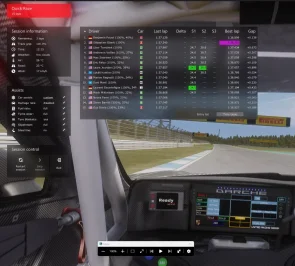
Can any good soul tell me what is your usual pace and PB for this track using the Darche 992 2023? I got my AIs racing at 1.37.5 +/-0.5s but i wonder what's the actual pace i should aim for. My driving skills with GT3 are just off this results, but i suppose a competent and trained racer is going quite faster.

Capture d'écran 2026-04-24 154532.webp

Same request, different cars : Toyota AE86 on Magione, Kunos Porsche cup 2017 on Hockenheim, Any car on Goodwood Vintage (the one Racinjoe made skins for)... Basically any track where the fastlane is decent but you 'd need your AI to be 2-3 or even 4 seconds faster.

Basically i need to make sure i can beat a player's pace with AIs on AIwhisperer last version. Would help a lot to get some data, most "Hotlap" vids on youtube seem to be pretty easy to achieve.

Thanks in advance
 
Last edited:
Last edited:
By pressing "view mapping" a map of the car appears made with green grids

I will try this procedure, thanks. 🙏

The save button is only available with the black image: the car map appears when you press the right arrow. I'll try cropping it. Thanks. 🙏
yep thats what you want that is the wireframe. export what resolution you want and put that layer in Paint.net

BC7 is ideal because it has much better quality than BC3 while keeping the same filesize, which is what I would do, though older versions of CSP (Not sure how old) do not support BC7. So if you care about catering to people on ancient versions of CSP then you could go with BC3, or even uncompressed (R8G8B8A8, or R8G8B8 for no alpha)


On an unrelated note, I reduced the poly count of the Scamdream Mclaren. The headlight LEDs are not perfectly round anymore because of it but aside from that I haven't noticed any model quality differences. I mean, I did take 1.6 million polys out of the model, what more do you want from me 😂 It also has a cockpit_LR now, (just a crappy one generated with CM) which it did not before, so that's also something. If I had more time and motivation I would learn physics editing and try to make it drive a bit nicer but that's not in the cards for me, would love if somebody else took a shot at it though. Might try to reduce it some more, since 700k is kind of heavy, but it's still lighter than the Lanzo and Callahan so, I consider it a good place to start. I would have liked to switch the tire mesh with something with a UV that can use one of the tire textures from the big three so it can have tire fx at least, but I have no clue where I would yoink those from.
View attachment 1532024
Thanks for the explantion. I should of asked this question ages ago, is sRGB or linear the best one to go for out of the BC7's?

by the way this worked and it worked an absolute treat. the nearly black TVR skin went from being matt and pixelated to shiny and black.............easiest fix i have done in a while and a big difference.

i personally cannot tell the difference from the sRGB and linear but thought i may aswell ask.
 
Last edited:
yep thats what you want that is the wireframe. export what resolution you want and put that layer in Paint.net


Thanks for the explantion. I should of asked this question ages ago, is sRGB or linear the best one to go for out of the BC7's?

by the way this worked and it worked an absolute treat. the nearly black TVR skin went from being matt and pixelated to shiny and black.............easiest fix i have done in a while and a big difference.

i personally cannot tell the difference from the sRGB and linear but thought i may aswell ask.
I did. But if I don't have the "AO" map as my background, how do I create the skin?
 
Thanks. Hopefully I can find some other things to button up with this so I can just reupload the whole thing just to screw with simdream since it's clear the author of the model didn't want them selling it.
yep thats what you want that is the wireframe. export what resolution you want and put that layer in Paint.net


Thanks for the explantion. I should of asked this question ages ago, is sRGB or linear the best one to go for out of the BC7's?

by the way this worked and it worked an absolute treat. the nearly black TVR skin went from being matt and pixelated to shiny and black.............easiest fix i have done in a while and a big difference.

i personally cannot tell the difference from the sRGB and linear but thought i may aswell ask.
I think technically sRGB is "correct" but realistically I don't know if it matters. Also, if you have the option to choose between fast or fine compression, always pick fine. The Intel DDS plugin for Photoshop offers this, idk if your program does, but fast BC7 compression looks noticeably worse than fine compression.
 
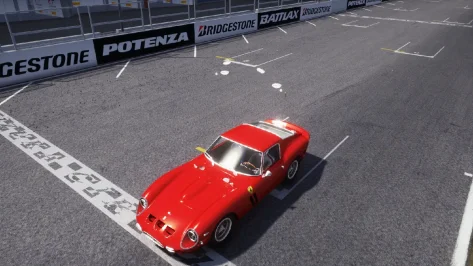
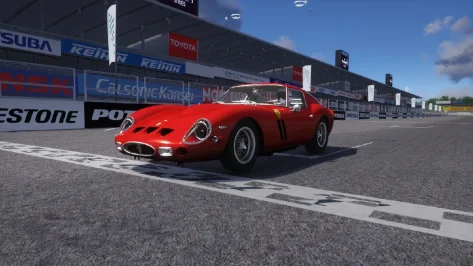
New project, new problems. I'm reworking the 250 GTO but I have to rearrange the lights in order to apply right refraction. When I use the model replacement script in order to hide the old mesh and then insert my tweaked one, they're rotated (facing up) and, if I rotate them by 90 degrees, they are perfectly horizontal but at a wrong height. I use blender and I never had this problem before (with the speedline rims for example). I also noticed a problem with the shadow under the car. What I did wrong? 😣
 

Attachments

  • Screenshot_ks_ferrari_250_gto_rt_suzuka_24-3-126-16-52-9.webp
    Screenshot_ks_ferrari_250_gto_rt_suzuka_24-3-126-16-52-9.webp
    198.8 KB · Views: 3
  • Screenshot_ks_ferrari_250_gto_rt_suzuka_24-3-126-16-52-15.webp
    Screenshot_ks_ferrari_250_gto_rt_suzuka_24-3-126-16-52-15.webp
    147.3 KB · Views: 5
Last edited:
I did. But if I don't have the "AO" map as my background, how do I create the skin?
you would need to create it using the wireframe only, and essentially have no AO. (not to bad if its a dark colour but not great to have no AO if it is a lighter colour.
Thanks. Hopefully I can find some other things to button up with this so I can just reupload the whole thing just to screw with simdream since it's clear the author of the model didn't want them selling it.

I think technically sRGB is "correct" but realistically I don't know if it matters. Also, if you have the option to choose between fast or fine compression, always pick fine. The Intel DDS plugin for Photoshop offers this, idk if your program does, but fast BC7 compression looks noticeably worse than fine compression.
Thankyou i do have the option of fast medium or slow, it was on medium as default so i have just changed it tto slow, i presume slow means "fine". I use paint.net
 
Last edited:
Sharing a mod? Host it on GTPlanet Downloads. Free, public hosting for files up to 10GB in size.
Back