Assetto Corsa PC Mods General DiscussionPC 

  • Thread starter Thread starter daan
  • 157,602 comments
  • 51,467,544 views
I still use CSP 1.77preview1 and Pure works fine. You only need the newer versions if you want to use 2D clouds I believe. Peter can correct me if i'm wrong.


I'll look into it later today, but i'm not sure why that would happen. I didn't touch anything related to the hiding of objects (except the 3D trees). Actually, I don't even recall seeing a bridge in my testing. Were you using the stock track or one of the F1 mods?

EDIT: Are you talking about the structure\bridge just past the tall building after you leave the pits? Other than that one, I don't see a bridge anywhere else on the track.
Thank you for that.

Regarding the Imola track modification could you post a comparative screenshots
 
New version of my reality reshade suite. Ver 6.5. Reworked all the Broadcast profiles according to Natural Mod ppfilter Please see attached video for final result. Please leave a comment with your thoughts


Video demonstration


Bundled with Camtool it looks very good so far. But, since most of us enjoying AC when driving in driver´s view, how about the preset for using F1 view?
 
I tried with F1 2022 extension from Pyyer. I also recognized that ext_original.ini was set to active =1 in your ext. Was that by purpose?
Just had a quick look. I see a couple of typo mistakes I made in a few spots. The building outside the pit exit was all screwed up on the 2022 mod. Have to check the 2021 as well. Will be corrected later today, but I still don't see the bridge. I'll ask again, are you talking about the bridge just past the building on pit exit? Could you post a wide angle screenshot of the bridge so I know what area you mean and what i'm looking for? Thanks...
 
Last edited:
Nah, I meant the older bridge which was removed just before the left turn here:

1650975064279.png


Directly at the Lenovo ads section.
 
Last edited:
Hi there, I hope someone can help me.

I recently got a new PC. I'm pretty eager to get AC up and running on it, but I'm wondering what I need to copy over to have all of my lap times, settings, etc preserved. Can I just copy AC's Steam directory and its folder in documents?

Also for Content Manager, are there any other folders other than the one in AppData\Local\AcTools Content Manager? The executable itself is standalone, right? Also where is CSP stored? It's just merged into the assettocorsa directory, correct?

I upgraded from a GTX 1070/i7 7700k setup to an RTX 3080ti/i9 12900K setup, by the way. What should I do to get the most out of the extra power?

Thanks for your help, folks.
 
Last edited:
Nah, I meant the older bridge which was removed just before the left turn here:
Well now i'm confused. I went to that area and I don't see a bridge anywhere on my system. Going to have to restore Pyyer's version and see if I can see a difference.

Screenshot_rss_gt_ferruccio_55_imola_26-3-122-8-22-56.jpg
 
A couple of years ago, I was in contact with some French people that almost made the "Le défi des remparts" street circuit,
which appears in one Michel Vaillant book and I used to watch the local annual races there. Angoulême.

1650966402755.png
Doesn't even exist for GTR2
 
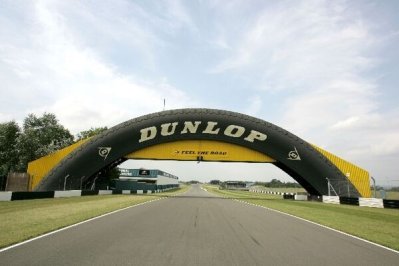
Is there any known version of Donington with the Dunlop bridge? Converted from GTR2 maybe.
 
Hey I wonder if anyone can help me. I have been trying to mod a car into the game for a private mod and for some reason the car
is see though from the inside any idea why? Ive tried playing around in 3dsimed but no luck.
Screenshot_1995_97_corolla_sentul_circuit_26-3-122-14-20-7.jpg
 
Last edited:
Hi there, I hope someone can help me.

I recently got a new PC. I'm pretty eager to get AC up and running on it, but I'm wondering what I need to copy over to have all of my lap times, settings, etc preserved. Can I just copy AC's Steam directory and its folder in documents?

Also for Content Manager, are there any other folders other than the one in AppData\Local\AcTools Content Manager? The executable itself is standalone, right? Also where is CSP stored? It's just merged into the assettocorsa directory, correct?

I upgraded from a GTX 1070/i7 7700k setup to an RTX 3080ti/i9 12900K setup, by the way. What should I do to get the most out of the extra power?

Thanks for your help, folks.
Go into your Documents folder and copy the Assetto Corsa directory to the Documents folder on your new PC. That should take care of laptimes, setups, videos, pics, etc. For mods and such, you will need to copy the assettocorsa directory from the Steam folder of you old pc to the same location on your new one. Probably best to install AC on your new PC first, run it one time just to get everything installed correctly, then copy what I described above and the Content Manager one you already know about to the new PC overwriting anything it asks about.
 
Well now i'm confused. I went to that area and I don't see a bridge anywhere on my system. Going to have to restore Pyyer's version and see if I can see a difference.

View attachment 1142897
Don´t worry too much about, maybe I also screwed up my latest installation a little bit. If everything is fine, let it as it is buddy. I appreciate your work in any case.
 
Hey I wonder if anyone can help me. I have been trying to mod a car into the game for a private mod and for some reason the car
is see though from the inside any idea why? Ive tried playing around in 3dsimed but no luck.
View attachment 1142925
I'm no expert in this area but the voice at the back of my head screams "fix your normals"...
 
Last edited:
Sol 2.2.2 = Sol 2.2.2 beta 3, i just released it to the public at RD
ok thx :) And is it possible to fix ia who take wet tyre in dry condition with all f1 mod plz ?
Thx for your all amazing work ;)
 

Attachments

  • 20220426154040_1.jpg
    20220426154040_1.jpg
    66.3 KB · Views: 39
Go into your Documents folder and copy the Assetto Corsa directory to the Documents folder on your new PC. That should take care of laptimes, setups, videos, pics, etc. For mods and such, you will need to copy the assettocorsa directory from the Steam folder of you old pc to the same location on your new one. Probably best to install AC on your new PC first, run it one time just to get everything installed correctly, then copy what I described above and the Content Manager one you already know about to the new PC overwriting anything it asks about.

Thank you for your help! n_n
 
That bridge was sold back in 2012 (for just £250).
So you'd be looking for a 1990s - 2000s era mod. The layout is basically the same though.
Didn't Chris Evans buy it and stick it in his garden, or some such madassery?
 
Didn't Chris Evans buy it and stick it in his garden, or some such madassery?
Yep, that's right.
I have fond memories of that bridge. It was always the first thing that my dad used to point out to me whenever he took me to 'Donno' as a kid.
 
Last edited:
@ClaudioWRC74 Thank you, it is indeed, definitely worth it !

Only thing is, it is a shame that it is not really suitable for racing vintage cars, or just low downforce cars, as they pretty much all end up in the wall at turn 1 after a full lap. And the AI from @KevinK2 doesn't change anything for that turn. I suppose it works well for modern open wheelers as it was made for, but it is a no go for 70ies GT or 80ies GTX cars. Do you know if anyone did an AI line adapted for vintage racing ? I don't see any other than the Kevin' one.
 
Bundled with Camtool it looks very good so far. But, since most of us enjoying AC when driving in driver´s view, how about the preset for using F1 view?
There is the Helmet cam preset too
 
Hi there.

I can't activate 2d clouds when using Pure. Am i missing something?
 
Sharing a mod? Host it on GTPlanet Downloads. Free, public hosting for files up to 10GB in size.
Back