Assetto Corsa PC Mods General DiscussionPC 

  • Thread starter Thread starter daan
  • 155,474 comments
  • 49,470,043 views
View attachment 1425213

That is just a factual lie, You can generate custom previews with this R32 without any issues. Again as mentioned several times before
Settings > content manager > custom showroom, Look at the previews section and tick "Use CSP for Final Previews Render" and whoala! the blue crystals are fixed.

In general, There is absolutely nothing you need to change with this car anyways. As an previous owner of this automobile it handles just like it does IRL, I can't even think about a single thing that is worth putting my grubby hands on to fix on this car so far.
I don't use "Use CSP for Final Previews Render", to me it looks terrible and blurry, is finicky and slow, is prone to crashing CM outright, and I can't stand the fake look of the "background pictures" in the options. It was an interesting idea implemented many CSP versions ago that, like the New UI, has been abandoned since.

It's not a "factual lie" in the slightest. Updating using standard preview on these past few linked R32/33s yields blue crystals on preview render for each. I have never gotten CSP previews to work properly without using the crappy custom backgrounds - which I am not willing to do.

In that very picture you posted, the floor has not rendered. This is one of many problems that I've never been able to solve with my specific preset (even asking on this thread once or twice years ago for a solution!) - and I'm not really willing to go further into the weeds about the pitfalls of CSP previews.

Because it's a moot point anyway - I don't even really care all that much about that. These are stolen/ripped models, from a paid, heavily licensed game, which are then flipped around and completely encrypted like it's the modder's own work. I'm sure they have a Patreon as well. No ****ing thank you - it's the principle that matters to me.

I'm glad you like the car. I have no interest in arguing this further. If you don't do encrypted cars like myself, these Nissans are not for you. If you don't mind, enjoy the cars.


Past few posts edited for truncation and clarity, not content.
 
Last edited:
X90
I see you think these are custom preview eligible. They are not. Each and every one is blue-crystallized when previews are updated. Instant bin from me when that happens.
I don't think they are custom preview eligible. I know they are custom preview eligible. "They" being the cars I suggested. I don't think it's fair to have a blanket statement if your custom preview doesn't play nice with these cars. Multiple custom previews work with these cars for me, without the "CSP for final preview render" setting.
X90
It's not a "factual lie" in the slightest. If you use the standard previews, it doesn't work, period.
X90
I'm interested in these mods, and downloaded all of them, but found every single one encrypted.
It is a factual lie as you stated ALL the suggested cars are encrypted. Only the update R32 (v1.1.3) is fully encrypted... blue crystals in showroom and custom previews. Unless you use the "use CSP for final preview render" setting option.
X90
I like to edit the data.acd files when need be
What have you found incorrect with the car data and/or physics for these R32 and R33?
X90
Because it's a moot point anyway - I don't even really care all that much about the previews. It's the principle that matters to me - this is a stolen/ripped model, from a paid, heavily licensed game, which is then flipped around and completely encrypted like it's the modder's own work. I'm sure they have a Patreon as well. No ****ing thank you.
If the converted/ripped car mods are your issue, then why bring up encryption?
 
I don't think they are custom preview eligible. I know they are custom preview eligible. "They" being the cars I suggested. I don't think it's fair to have a blanket statement if your custom preview doesn't play nice with these cars. Multiple custom previews work with these cars for me, without the "CSP for final preview render" setting.


It is a factual lie as you stated ALL the suggested cars are encrypted. Only the update R32 (v1.1.3) is fully encrypted... blue crystals in showroom and custom previews. Unless you use the "use CSP for final preview render" setting option.

What have you found incorrect with the car data and/or physics for these R32 and R33?

If the converted/ripped car mods are your issue, then why bring up encryption?
I'm not doing this. None of you are reading what I'm saying, and are arguing around my points.

Please drop it. Thanks.


Ahhhhhh I'll bite on that last one, though. Come on. Can you not read?

which is then flipped around and completely encrypted like it's the modder's own work. I'm sure they have a Patreon as well. No ****ing thank you.

It's even in the very quote you linked.
 
Last edited:
X90
That's enough, I'm not doing this. None of you are reading what I'm saying, and are arguing around my points with nonsense.

Please stop replying, and move the conversation somewhere else. Thanks.


Ahhhhhh I'll bite on that last one, though. Come on. Can you not read?

which is then flipped around and completely encrypted like it's the modder's own work. I'm sure they have a Patreon as well. No ****ing thank you.

It's even in the very quote you linked. Jesus.

That's enough. Feel free to reply to this with some other circuitous reasoning - but I will not be responding.
I still don't understand the reason you brought encryption into the topic. I've downloaded shared/linked mods that happen to be encrypted. If I didn't like the car due to encryption, I binned it. I didn't write a public service announcement... because as you said...
X90
Won't make the points I and many others have made over and over through the years,
Well, that was popcorn theater for everyone.

Kenan Thompson Eating GIF by Saturday Night Live
 
X90
I don't use "Use CSP for Final Previews Render", it has always looked terrible, is finicky and prone to crashing CM outright, and I can't stand the fake look of the "background pictures" in the options. It was an interesting idea implemented God knows how many CSP versions ago that, like the New UI, has gotten zero attention since.
It does look terrible with CSP Enable!!

1738296100626.png
 
I still don't understand the reason you brought encryption into the topic. I've downloaded shared/linked mods that happen to be encrypted. If I didn't like the car due to encryption, I binned it. I didn't write a public service announcement... because as you said...

Well, that was popcorn theater for everyone.

Kenan Thompson Eating GIF by Saturday Night Live
Yeah, all I said was "these are encrypted, which isn't mentioned anywhere in any of these posts - if you care about encryption, pass on these". Quite the reaction!

I wouldn't have bothered downloading these mods or watching the "trailers" for them if I knew they were encrypted. That's "why I brought encryption into the topic". Because there was no mention of it anywhere, in any part of these posts, or even their YouTube descriptions.

Which again, seemed fairly innocuous at the time of posting, but must really be a touchy subject if three short milquetoast sentences is enough to set people off. Guess I won't make that mistake again!

If you like these mods, great. Enjoy. My post was meant only to be a footnote to those like me who don't bother with encrypted cars, so they can save the 10-15 minutes of time and effort that I didn't.
 
Last edited:
It does look terrible with CSP Enable!!

View attachment 1425224
Sorry, "looks terrible with my specific configuration". I am sure that after looking into it for a few hours, I could scrounge up a decent looking CSP preview render if I had a gun pointed at my head. Even if the image quality is considerably blurrier by default (which, I might add, is very much the case in your "example").

I am not willing to go back and redo 2000 cars worth of previews to do that - especially as I find the final output subpar in comparison.

Again (deja vu), if you enjoy the CSP preview render, more power to you. Enjoy. It's a matter of opinion, like most things in life. I do not like it, and was completely disappointed at the final output the handful of times I've tried to get a handle on it and attempted to make a facsimile of my preset. And that's before all the problems with the floor not rendering properly, the blur, the wonky light sources, etc.


Double post infraction, feel free to append this one and the one above.
 
Last edited:
X90
Yeah, all I said was "these are encrypted, which isn't mentioned anywhere in any of these posts - if you care about encryption, pass on these". Quite the reaction!

I wouldn't have bothered downloading these mods or watching the "trailers" for them if I knew they were encrypted. That's "why I brought encryption into the topic". Because there was no mention of it anywhere, in any part of these posts, or even their YouTube descriptions.
I don't have a problem if you dislike encrypted mods. Heck, I'm picky about custom previews and will bin an encrypted mod just for incompatibility with custom preview. My ire is with your footnote that ALL these cars are fully encrypted. I can use custom showroom, custom preview, and unpack/edit data for the Ma7heus R33. Unless I have a special, limited edition Content Manager, it seems like this car is not encrypted.


The Remco/abbo90 R33 is also not encrypted. At least the v1.5 that I have.
X90
Quick note, all of these R32/33s in this convo from the past few days are fully encrypted (and are GT rips).
You should report the Ma7heus mod to Overtake if it is a GT rip.
 
I don't have a problem if you dislike encrypted mods. Heck, I'm picky about custom previews and will bin an encrypted mod just for incompatibility with custom preview. My ire is with your footnote that ALL these cars are fully encrypted. I can use custom showroom, custom preview, and unpack/edit data for the Ma7heus R33. Unless I have a special, limited edition Content Manager, it seems like this car is not encrypted.


The Remco/abbo90 R33 is also not encrypted. At least the v1.5 that I have.

You should report the Ma7heus mod to Overtake if it is a GT rip.
Ah, I missed the text links at the bottom of your post. I assumed they were something else - and actually read that one initially from the Lukensie reply. There was one more R33 - but now that I'm looking at it, it may have been a link from one of the videos themselves and not from here.

You are right. Sorry about that. I was talking about the ones with videos.


My fault, I'll change my post to reflect the error.
 
Last edited:
So the problem is less the AI lines and more the sidelines? If I were to record new updated sidelines that don't extend onto the curbs the AI would be forced to stay within them? Could doing that also break the existing Ai lines if the ideal line come too close to the sideline?
To add to this, you can easily edit the sidelines with the ai spline app (in the app shelf). They are the blue lines on both sides once in the app, it's a bit tideous but if you edit real time with ai racing you can see how they interact with your new settings
 
X90
I don't use "Use CSP for Final Previews Render", to me it looks terrible and blurry, is finicky and slow, is prone to crashing CM outright, and I can't stand the fake look of the "background pictures" in the options. It was an interesting idea implemented many CSP versions ago that, like the New UI, has been abandoned since.

It's not a "factual lie" in the slightest. Updating using standard preview on these past few linked R32/33s yields blue crystals on preview render for each. I have never gotten CSP previews to work properly without using the crappy custom backgrounds - which I am not willing to do.
which "crappy custom backgrounds" are you talking about?
Maybe you have an example? Pretty sure there is a quick way to get a decent result for ya.
If you need any help, just get in touch.
 
Welcome.

I havent seen it that bad before but i have had slight changes in the lighting.

I am pretty sure someone had this issue a while ago and it was to do with the VAO patch in the track folder.

If it has a VAO remove it from the folder and see if it makes a difference

Thats all i can suggest with my limited knowledge


Thanks for that help! Gonna try it, oh yes would be very nice if the person who’s had that problem knows the solution 😄

Edit: it appears only in cockpit view so I guess it’s some sort of ‘light incidence into the cockpit’ problem if you like.
 
Last edited:
So the problem is less the AI lines and more the sidelines? If I were to record new updated sidelines that don't extend onto the curbs the AI would be forced to stay within them? Could doing that also break the existing Ai lines if the ideal line come too close to the sideline?
If the AI line goes beyond the kerb or too much on the kerb, it should be better to create a new one, even if you create new sidelines.
Indeed, the AI line is forced to stay inside the sidelines, but that could change the AI behaviour since if you force it too much, the AI line would be modified, and it generally makes AI brake anormally in the zone.

From my experience, something that works well is to start with a minimum space between the AI line and a sideline around the width of a F1 front wheel in wide turns (let say something like 30 cms). It allows the AI to let their wheels go beyond the sideline but the car stays inside.
For tight turns or hairpins, sometimes, you can decrease this space but I would advise to keep the wheel width as minimum space.
And for straight lines, generally the AI does not goes too close to the sideline.
Even if you used the minimum space of a width wheel, AI would drive at a minimum space equal to an half width of the car from the sideline. Except for some modded cars, or Kunos F1 2004.

In the end, the best way to know if you do well is to try and test, but a minimum space of 30 cms should be a good start!
:)
 
Last edited:
Nurburgring 1984 - 1985 v1.1

Screenshot_alfa_romeo_giulietta_qv_le_nurburgring_1984_31-0-125-18-53-41.jpg

Old layout of Nurburgring, Germany.
Conversion from F1 Challenge.

-CSP recommended
-2 layouts (Yearly billboards and building variations)
-36 pit/start
-AI, cam

Credits & Thanks;
F1 Challenge Track by dmarques
(VB and CMT's version with ugrades and optimizations to buildings and surroundings)

Terms Of Use (F1C);
Enjoy this mod to the fullest, that's all. If you want to convert or use this
as a base to create other cars, you're welcome in doing so as long as the
appropriate credit is given to the respective authors of the files you are
using. You can find all authors in this file

AC converted by @shi (shin956)
logo.png by @Fanapryde
Crowds texture by @Kniker97
background and some textures by kunos

Enjoy.

;;;;;;;;;;;;;;;;;;;;;;;;;;;;;;;;;;;;
v1.01 changelog;
Fixed a problem with the lights on the home straight.

v1.02 changelog;
Fixed missing physical grassy areas and walls. (Thanks StoffelWaffle for the report.)

v1.1 changelog;
Fixed window transparency.
Fixed grass mapping in ext_config.
Imported tree textures from 1995.
Fixed objects flickering.
Some minor fixes.
- Thanks Mascot and M1GHTYM4VS for the report.
 
Last edited:
24H
which "crappy custom backgrounds" are you talking about?
Maybe you have an example? Pretty sure there is a quick way to get a decent result for ya.
If you need any help, just get in touch.
On my system the CSP render previews have always (and still do) looked crappy, compared to my 'normal' previews.
Can't bother switching again to show, but these two pics are a comparison (same settings and while the CSP render looks the same on screen before applying, this is the difference after applying...

NORMAL:
normal.png


CSP RENDER:

csp_render.png


Imo the difference is clear...
 
Thanks for that help! Gonna try it, oh yes would be very nice if the person who’s had that problem knows the solution 😄

Edit: it appears only in cockpit view so I guess it’s some sort of ‘light incidence into the cockpit’ problem if you like.
The solution in my case was a bad VAO patch:

 
On my system the CSP render previews have always (and still do) looked crappy, compared to my 'normal' previews.
Can't bother switching again to show, but these two pics are a comparison (same settings and while the CSP render looks the same on screen before applying, this is the difference after applying...

NORMAL:
View attachment 1425272

CSP RENDER:

View attachment 1425273

Imo the difference is clear...
yes, the settings have to be adjusted according the CSP preview.
If you want send me your settings and I will have a look to make the CSP preview close to the "normal" one
 
24H
yes, the settings have to be adjusted according the CSP preview.
If you want send me your settings and I will have a look to make the CSP preview close to the "normal" one
Thanks, but I don't understand...
As I wrote I can make the CSP render look on screen exactly the same as the normal does. But after hitting 'update all skins' the outcome is always wrong. So what other settings are there to change ?

I forced myself to give it another try. Here an image with on the right the preview with my settings, which looks as I want it to be (the missing Merc star bothers me though.
On the left the outcome:
  • star is there
  • wheels more detailed
  • but complete background and car orientation is wrong (shifted to the right)
  • car paint looks dull

norm_vs_csp.png
 
Last edited:
shi
Nurburgring 1984 - 1985 v1.01

View attachment 1425271
Old layout of Nurburgring, Germany.
Conversion from F1 Challenge.

-CSP recommended
-2 layouts (Yearly billboards and building variations)
-36 pit/start
-AI, cam

Credits & Thanks;
F1 Challenge Track by dmarques
(VB and CMT's version with ugrades and optimizations to buildings and surroundings)

Terms Of Use (F1C);
Enjoy this mod to the fullest, that's all. If you want to convert or use this
as a base to create other cars, you're welcome in doing so as long as the
appropriate credit is given to the respective authors of the files you are
using. You can find all authors in this file

AC converted by @shi (shin956)
logo.png by @Fanapryde
Crowds texture by @Kniker97
background and some textures by kunos

Enjoy.

;;;;;;;;;;;;;;;;;;;;;;;;;;;;;;;;;;;;
v1.01 changelog;
Fixed a problem with the lights on the home straight.

Nurburgring 1984 - 1985 v1.01
The link is in the quote.

v1.01 changelog;
Fixed a problem with the lights on the home straight.

Screenshot_alfa_romeo_giulietta_qv_le_nurburgring_1984_31-0-125-19-56-39.jpg
 
Thanks, but I don't understand...
As I wrote I can make the CSP render look on screen exactly the same as the normal does. But after hitting 'update all skins' the outcome is always wrong. So what other settings are there to change ?

I forced myself to give it another try. Here an image with on the right the preview with my settings, which looks as I want it to be (the missing Merc star bothers me though.
On the left the outcome:
  • star is there
  • wheels more detailed
  • but complete background and car orientation is wrong (shifted to the right)
  • car paint looks dull

View attachment 1425289
I gave up trying to get consistent previews a long time ago. If the previews are encrypted I just leave them alone and have a patchwork quilt in the preview pane.
The fact that out of the blue all my Kunos cars one day reverted to their original Kunos previews might have sapped whatever will I had left. And no, I didn't verify Steam files or anything. It just happened.
 
I gave up trying to get consistent previews a long time ago. If the previews are encrypted I just leave them alone and have a patchwork quilt in the preview pane.
The fact that out of the blue all my Kunos cars one day reverted to their original Kunos previews might have sapped whatever will I had left. And no, I didn't verify Steam files or anything. It just happened.
Maybe that's the way to go, but then my OCD explodes ... :D
Like Bonny's cars with several number plates all over the place...
I don't like it messy.
 
Last edited:
Is anyone else experiencing this at the moment?
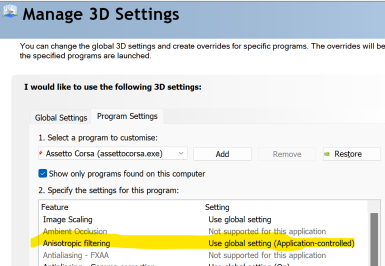
Anisotropic filtering remains OFF in AV Video Settings
1738321689004.png


.... but in NVIDIA Control Panel it keeps reverting to 'Application Controlled' no matter how often I change it to 16x.
This used to be a one-off issue to check for when updating GPU drivers, but it seems like 16x just flat out refuses to save at all now.

1738321823333.png

Any ideas?
 
How do those previews handle? I personally have never given the previews a second thought or glance. We are such a weird bunch. Cake anyone?
 
Is anyone else experiencing this at the moment?
Anisotropic filtering remains OFF in AV Video Settings
View attachment 1425294

.... but in NVIDIA Control Panel it keeps reverting to 'Application Controlled' no matter how often I change it to 16x.
This used to be a one-off issue to check for when updating GPU drivers, but it seems like 16x just flat out refuses to save at all now.

View attachment 1425295

Any ideas?
1738323724091.png

It seems to save
 
The solution in my case was a bad VAO patch:

Thanks you kindly for that Masscot!
So apparently just remove the
The solution in my case was a bad VAO patch:

Thank you kindly for that Masscot!
So, apparently removing the VAO from in my case RJ-spa 1966 might be the actual trick?
 
It's release Friday! :)

This time with the release of the US GP from 1991: Phoenix.

PHOENIX 1991 RELEASED


This 3D-track was made by Nericksenna for rFactor. It was ported to AC by Gilles75. It was overhauled in 2024 by Rainmaker.


Features:
-competitive AI
-working track map
-support for hot lap mode
-replay cameras
-support for time attack mode
-30 pit boxes with working pit lane
-RainFX, GrassFX
-new road mesh
-simple night lights

v2.0
-extra cams by DaBaeda
-new and faster AI
-fixed pit area
-debug for wrong object keys
-fixed many wrong normals and double sided objects
-shader adjustments
-new and smoothed road mesh from the rF version
-added stuff for time attack mode
-new UI
-purged unused objects and material
-corrected position of time gates, now laps count when entering the pits
-added loading screens
-made RainFX
-fixed all trees
-fixed disappearing objects
-added lights from rF original
-vao
-simple night lights
etc.

DOWNLOAD:

bgr00.jpg
bgr02.jpg
bgr03.jpg
bgr04.jpg
 
Last edited:
It's release Friday! :)

This time with the release of the US GP from 1991: Phoenix.

PHOENIX 1991 RELEASED


This 3D-track was made by Nericksenna for rFactor. It was ported to AC by Gilles75. It was overhauled in 2024 by Rainmaker.


Features:
-competitive AI
-working track map
-support for hot lap mode
-replay cameras
-support for time attack mode
-30 pit boxes with working pit lane
-RainFX, GrassFX
-new road mesh
-simple night lights

v2.0
-extra cams by DaBaeda
-new and faster AI
-fixed pit area
-debug for wrong object keys
-fixed many wrong normals and double sided objects
-shader adjustments
-new and smoothed road mesh from the rF version
-added stuff for time attack mode
-new UI
-purged unused objects and material
-corrected position of time gates, now laps count when entering the pits
-added loading screens
-made RainFX
-fixed all trees
-fixed disappearing objects
-added lights from rF original
-vao
-simple night lights
etc.

DOWNLOAD:

View attachment 1425297View attachment 1425298View attachment 1425299View attachment 1425300

yes01.gif
 
Last edited:
Sharing a mod? Host it on GTPlanet Downloads. Free, public hosting for files up to 10GB in size.
Back