Assetto Corsa PC Mods General DiscussionPC 

  • Thread starter Thread starter daan
  • 154,775 comments
  • 48,696,787 views
Hi, you've never seen this message before: what does it mean?😅
 

Attachments

  • IMG_20260129_230139.webp
    IMG_20260129_230139.webp
    63.2 KB · Views: 7
I was watching a GT race at Monza from 2013 looking for sponsors back then and thought this was interesting. The wall setup leading into the first chicane looks like it does in 2025 for the most part. There are a couple of sections way off in the distance that are not the same.

Image_2013.webp


So this leads me to a couple of questions.

1.) Are these walls temporary and only used for races or are they permanent? If permanent, when did they change them from how Kunos made the track look? Obviously they were there in 2013.

2.) What year is the Kunos version based on? I always thought it was 2013 (since that was roughly when the game was released), but it must be from before 2013 since they didn't make the track look like this.
 
This must have been asked for and also answered on a couple of times before I guess, but cannot find it here (this quickly), Apologies for asking again. Is there a simple way in renaming cars such that they do show in CM with (for instance) "LMDh - Ferrari 499P" instead of only 499P? Same goes for "GT3" followed by actual car name in CM, etc. Would make searching in CM a lot more easy for me when setting up a race. Thanks in advance and have the best of day.
 
This must have been asked for and also answered on a couple of times before I guess, but cannot find it here (this quickly), Apologies for asking again. Is there a simple way in renaming cars such that they do show in CM with (for instance) "LMDh - Ferrari 499P" instead of only 499P? Same goes for "GT3" followed by actual car name in CM, etc. Would make searching in CM a lot more easy for me when setting up a race. Thanks in advance and have the best of day.
Sorry maybe I don´t understand your question but you just rename the cars here?

1769759216240.webp
 
I was watching a GT race at Monza from 2013 looking for sponsors back then and thought this was interesting. The wall setup leading into the first chicane looks like it does in 2025 for the most part. There are a couple of sections way off in the distance that are not the same.

View attachment 1509909


So this leads me to a couple of questions.

1.) Are these walls temporary and only used for races or are they permanent? If permanent, when did they change them from how Kunos made the track look? Obviously they were there in 2013.

2.) What year is the Kunos version based on? I always thought it was 2013 (since that was roughly when the game was released), but it must be from before 2013 since they didn't make the track look like this.
1.) These are permanent walls. Added in 2012.
2.) KS Monza is based on the 2011 version
 
Hi, you've never seen this message before: what does it mean?😅
Think it’s Italian, the translation seems to be:

Indice oltre i limiti della matrice. = index beyond matrix limits.

Somewhere in CM there is an language adjustment to change it to English so you do not have to translate it.

😅😂🤣


Now Seriously, I can not help you but now the translation is published, a member maybe can help you further. Remember this is an English forum as most members can not read this beautiful Italian language.
 
Hi, you've never seen this message before: what does it mean?😅
In English in programming parlance, "Index out of bounds"
Objects in an array (competitor cars in a race, for example ) might be numbered (indexed) in a group (array).
The error refers to "I have an object claiming to be #11 in array(1..9)"

That said, the error gives us no clue as to the specifics, so a general explainer is all I have ¯\(ツ)
 
Last edited:
This must have been asked for and also answered on a couple of times before I guess, but cannot find it here (this quickly), Apologies for asking again. Is there a simple way in renaming cars such that they do show in CM with (for instance) "LMDh - Ferrari 499P" instead of only 499P? Same goes for "GT3" followed by actual car name in CM, etc. Would make searching in CM a lot more easy for me when setting up a race. Thanks in advance and have the best of day.
Just copy and paste the category name each time and save ? It's not that tedious lol
 
Think it’s Italian, the translation seems to be:

Indice oltre i limiti della matrice. = index beyond matrix limits.

Somewhere in CM there is an language adjustment to change it to English so you do not have to translate it.

😅😂🤣


Now Seriously, I can not help you but now the translation is published, a member maybe can help you further. Remember this is an English forum as most members can not read this beautiful Italian language.

You're right, sorry. I didn't think to change the language before publishing. Thanks for the reply.

In English in programming parlance, "Index out of bounds"
Objects in an array (competitor cars in a race, for example ) might be numbered (indexed) in a group (array).
The error refers to "I have an object claiming to be #11 in array(1..9)"

That said, the error gives us no clue as to the specifics, so a general explainer is all I have ¯\(ツ)
I restarted CM and the error seems to be gone. Thanks a lot.
 
Just had this pop up on loading game this am (found 1 update for mods OULTON PARK (6) any ideas what it is about what the update is ?

Regards

Mark
 
24H
Doran JE4 1.1 should be this one


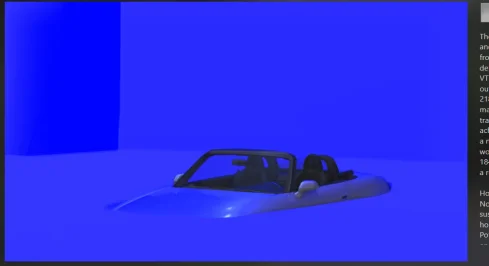
Release of the CSP preview settings 01-2026

Preset: https://acstuff.club/s/loda
Showroom: https://www.mediafire.com/file/ot02bbw1z0dsitu/tav_moderna.7z/file

Please do a backup if you already have the TAV Moderna showroom
Extract to your assetto corsa showroom folder: Steam\steamapps\common\assettocorsa\content\showroom

View attachment 1509849View attachment 1509850View attachment 1509851View attachment 1509852
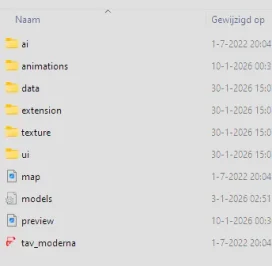
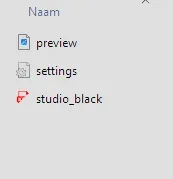
whats wrong with mine? and what pp filter did you use?

when i look inside the showroom folder your is build like a track structure, all others have only 2 or 3 files
 

Attachments

  • Schermafbeelding 2026-01-30 150003.webp
    Schermafbeelding 2026-01-30 150003.webp
    12.3 KB · Views: 7
  • Schermafbeelding 2026-01-30 151038.webp
    Schermafbeelding 2026-01-30 151038.webp
    9.9 KB · Views: 9
  • Schermafbeelding 2026-01-30 151055.webp
    Schermafbeelding 2026-01-30 151055.webp
    2.6 KB · Views: 6
Last edited:
Luca959, if you see this message, please reply. I would like to reply to the direct message you sent me, but I am unable to do so due to an error in gtplanet.
Hi, do you have a download to replace the original Ford Doran collider with yours? I'm not very familiar with replacing files.
Thank you for your kind reply
 
I was unable to reply due to an error on gtplanet, so we will respond from here.

I recommend making a backup in case it doesn't turn out the way you want it to.

This is my car's collider.
It may not work with your version of the car as it is compatible with other modifications. please note.
I'm not sure if my explanation is sufficient, but all you have to do is put this collider in the "data" folder of the relevant car.

Go to the Content tab in Content Manager.

Find Doran JE4 in Content Manager.

Click on "Folder (located next to Reload)" displayed under the car.

Drag and drop the downloaded "collider.ini" into the "data" folder in the displayed folder and replace it.

Alternatively, you can change the collider of your car directly without downloading.
I simply made the height of the collider thinner than the original (it doesn't matter how many 0s you add lol).

Click on the "data" folder in the car folder to open it.

Find "collider.ini" and click to open it (select an app to open it in, such as Notepad).

Delete all the text in the ini file and copy and paste the following string.

[HEADER]
COLLIDERS=1

[COLLIDER_0]
CENTRE=0 ,-0.27 ,0.40
SIZE=1.2 ,0.00000001 ,4.20
GROUND_ENABLE=1

Save your changes and close.
 

Attachments

24H
Doran JE4 1.1 should be this one


Release of the CSP preview settings 01-2026

Preset: https://acstuff.club/s/loda
Showroom: https://www.mediafire.com/file/ot02bbw1z0dsitu/tav_moderna.7z/file

Please do a backup if you already have the TAV Moderna showroom
Extract to your assetto corsa showroom folder: Steam\steamapps\common\assettocorsa\content\showroom

View attachment 1509849View attachment 1509850View attachment 1509851View attachment 1509852
Thanks for sharing. These look great. The clear seperation of background and floor, but with much less texture than the previous release.
Yes please. :cheers:

@Bob Jackson Just go ahead and generate the preview, sir. The finished render doesn't look like that.
 
Last edited:
Azure Coast + Cote d'Azure v1.1
-fixed grass part near highway/train crossing
mediafire or google drive

GT Sainte Croix v1.3
-fixed detail textures for electric poles
-fixed some vehicle shadow issues (via CSP config only)
-made some white lines in corners smoother
-updated crowd textures
-updated 2 pine tree textures
-more detailed/colorfull/shiny vehicle textures
-shinier water
-added some crew stuff in pits
-added more groove in pits
-added timing tower, showing top 12 of leader board
mediafire or google drive

or via CM in the next couple days
 
Last edited:
whats wrong with mine? and what pp filter did you use?

when i look inside the showroom folder your is build like a track structure, all others have only 2 or 3 files

I get the same result...:confused:
Settings/ Content Manager/ Custom Showroom & uncheck the box "Use CSP for final previews render".

24H
Doran JE4 1.1 should be this one


Release of the CSP preview settings 01-2026

Preset: https://acstuff.club/s/loda
Showroom: https://www.mediafire.com/file/ot02bbw1z0dsitu/tav_moderna.7z/file

Please do a backup if you already have the TAV Moderna showroom
Extract to your assetto corsa showroom folder: Steam\steamapps\common\assettocorsa\content\showroom

View attachment 1509849View attachment 1509850View attachment 1509851View attachment 1509852
Beautiful previews & works as intended, no problems on my side!
Thanks for sharing!
Is it possible to have this in a dark theme (background)? Since you were working on this it might be easy for you.
 
Thanks for sharing. These look great. The clear seperation of background and floor, but with much less texture than the previous release.
Yes please. :cheers:

@Bob Jackson Just go ahead and generate the preview, sir. The finished render doesn't look like that.
yes they did, but now i have checked the use csp for final previews render and now its very good looking
 
Sharing a mod? Host it on GTPlanet Downloads. Free, public hosting for files up to 10GB in size.
Back