- 293

- Ukraine
I tried some other cars, they jump too, but not like this one.I have no such problems when driving the track. But I don't have the same car. 🤷♂️
I tried some other cars, they jump too, but not like this one.I have no such problems when driving the track. But I don't have the same car. 🤷♂️



Have driven a few other cars now, but unfortunately can't reproduce your problem. Sorry.I tried some other cars, they jump too, but not like this one.


Sorry, I was miffed by your app's seeming lack of organization (like "Assets" isn't a folder anywhere in AC). I was hoping for something more like 'drag and drop'. Lazy, I guess. Muy bad.Wait, what?
Also I've updated the files on RD. I completely forgot to include the other cars UI files before, so I've added a folder structure to make install easier.
Also also after some more research it appears URD's 2020 car doesn't exist in reality, 2019 saw the introduction of the car and then '21 is when the new exhaust was introduced so I've updated the 2020 UI to show 2019.

So to you there's no difference between publicly charging (without permission) for something that someone else, studio, whoever....spent moths/years working on, and a rip/conversion, that someone brought into AC?Do you use ACC track conversions? Forza rips?
Why is this so different? Because he asks for money? Is that it? That is the line?
I don't know how devs allow any of the stuff that goes on in AC modding.
Thanks for the updates. It would still be nice if you or someone else would take another look at the background.ACTK Falkenhill Speedpark v1.01
Update groove.kn5
Update pivot point wind turbine in actk_falkenhillspeedpark.kn5
Update ext_config.ini


I have to add some CUT area, I will look at that tooThanks for the updates. It would still be nice if you or someone else would take another look at the background.
View attachment 1090214


No, i am mearly pointing out that the post i responded to was outraged that it is allowed.So to you there's no difference between publicly charging (without permission) for something that someone else, studio, whoever....spent moths/years working on, and a rip/conversion, that someone brought into AC?
..btw, since when has modding become a scratch-built only business?


No, no. Forgot to describe the track. It is not what you think.I also have a different version and everything is fine on it, but on this one from Easy, huge problems on areas made of concrete slabs.
I suspect that he changed something with the roadway and not for the better. By the way, Easy has remade this particular version!


Nah, I don't think they are as inaccurate as rF1 - I have driven them quite a bit and all the IRL reference points and lines work. That said, I did see inaccurate FM7 tracks, their quality varies quite a bit. But Daytona Road Course and Sonoma are good.They´re good but the fm7 bases aren´t that good tbh. Even tho they scanned plenty of tracks, the final meshes in game aren´t that dense so you´re ultimately smoothing out an rfactor level mesh.
I´m curious about the ignition tracks, I´m guessing they remastered tracks from previous games but don´t know if cota was featured anywhere besides codemasters games before.
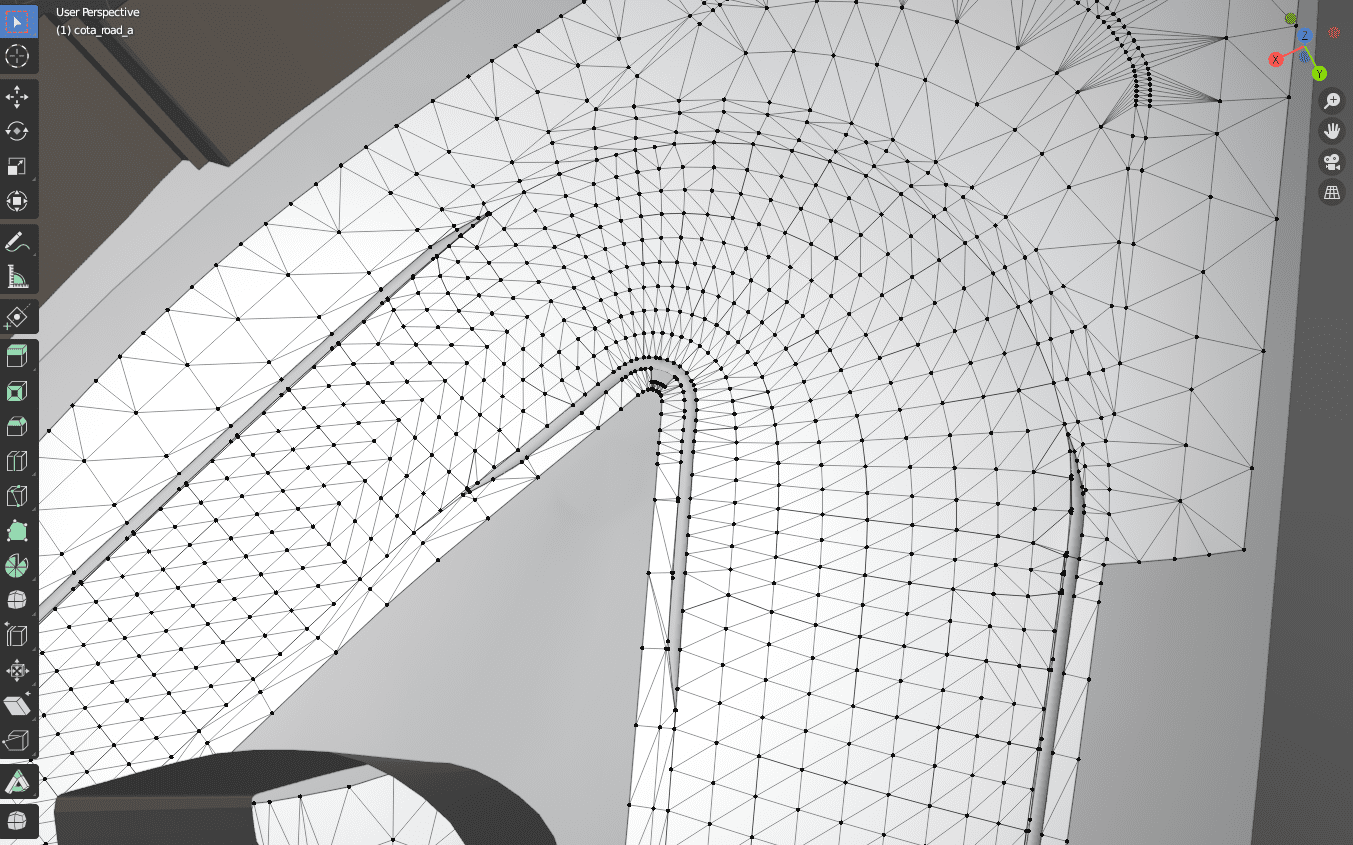
The accuracy of this Cota from ignition is 15-20cm between verts.
So sadly this does not look laser scanned maybe at best they are claiming drone scan.
However I think this must be better than COTA codemasters conversion acu did for AC accuracy wise.
I am gonna dirt import this whole thing on weekend and than compare to iracing/real life and current version we have from codemasters in AC.
In this trailer here cota is said to be scanned.

Ah yeah that was my excitement in getting something on RD for the first time, the new updated ones are more drag and drop-ish though still not fully since there are files for skins, but now you can copy and past the cars folders from the download into your cars folders properly.Sorry, I was miffed by your app's seeming lack of organization (like "Assets" isn't a folder anywhere in AC). I was hoping for something more like 'drag and drop'. Lazy, I guess. Muy bad.

The accuracy of this Cota from ignition is 15-20cm between verts.
So sadly this does not look laser scanned maybe at best they are claiming drone scan.
However I think this must be better than COTA codemasters conversion acu did for AC accuracy wise.
I am gonna dirt import this whole thing on weekend and than compare to iracing/real life and current version we have from codemasters in AC.
In this trailer here cota is said to be scanned.
The comparison to rf1 is about point density, which as I said above is not accuracy, but detail.Nah, I don't think they are as inaccurate as rF1 - I have driven them quite a bit and all the IRL reference points and lines work. That said, I did see inaccurate FM7 tracks, their quality varies quite a bit. But Daytona Road Course and Sonoma are good.
They are probably aerial scans, one data point every 1-2 sq m of track. (Instead of the 1-15-20cm of the ground scans.)
I don't know. I feel much more difference (in positive direction) from a very skillfully created, but not scan-based track (e.g. Reiza tracks) to a 15-20cm scan, than from a 15-20cm to a 1-2cm scan.
As long as sth is at least aerial scanned (until a reasonable detail - and actual laser, not photogammetry) it will feel accurate - i.e. IRL reference points and lines will work ~98% correctly.
Oh boy, one of the strangest bugs I have ever encountered, anyway this is how I fixed it about month ago:Hello,
Does anybody know how to fix a missed shadow?
I tried to update it by CM Showroom, but no results
. Anyway that's how I've fixed it, more precisely I was replacing one part then another (kn5, data, sound etc...) of the version without bug with the latest version to try and identify the cause of issue, and the shadow just stayed there even when I've replaced everything. So I'm still completely confused of what could have been the issue, but I hope this method works for you If not then PM meFunny you should say that cause I have the lidar scan for Cota accuracy of scan is 2-4cm in cloud compare. Las files are massive requires huge luck cloud compare doesn't crash just to cut sections out.Point density isn't accuracy, why not actually compare it to the lidar data and to the Codemasters version instead?
(Also, it's not 15-20cm, these tracks import at 0.01 scale)
The comparison to rf1 is about point density, which as I said above is not accuracy, but detail.
Plenty of that detail is lost in an rf1/fm7 level of density, at least from what I've seen in most fm7 tracks (long beach was mostly 1 big square every 2-4 meters, which felt like crap in the previous, non-smoothed conversion)
Also,
"I feel much more difference (in positive direction) from a very skillfully created, but not scan-based track (e.g. Reiza tracks) to a 15-20cm scan, than from a 15-20cm to a 1-2cm scan."
Have you had a chance to try rfPro in a specialized sim? Cause otherwise I seriously doubt you've driven a track made out of a 1-2cm scan, definitely not with that point density in the actual mesh.
Rf2 scanned tracks are more or less around 1m-50cm dense, ac and acc look similar tho I've never actually measured it and I doubt iracing would use any more than that.
 www.racedepartment.com


This one is rather nice too, a Mercedes W202 DTM (AlexBfromG and tipitjafar):I’ve got both of those packs (along with the DRF Class One pack) but hoping for something a little more old-school




Not sure if this will help @TimLotus they are skins I did to test out different configs for csp. I found white to be the best base for chrome. Hope it helpsI wonder if someone could give me some shader values and/or point me to the documentation that will help? I want to use lines in an ext_config.ini to make some skins dead flat, some a not very shiny gloss and others quite sparkly metallic. I will use [Material_Carpaint_Solid] and [Material_CarPaint_Metallic]
the Material of the car body is carpaint, txDiffuse is body.dds (which is a copy of the AO map; does the colour make any difference?) txNormal is FLAT_NM.dds which is a little square purple normal map - I assume this just spreads the body colour as a flat surface without adding a texture.
Thanks in advance!
www.racedepartment.com


sweet just used that to complete 1995 dtm season.This one is rather nice too, a Mercedes W202 DTM (AlexBfromG and tipitjafar):
https://mega.nz/file/FBVyXKYC#EUq9d5uTgVlBwTxzWg-MdauHejDIcxKr6bO-1aGJwcc
View attachment 1090230
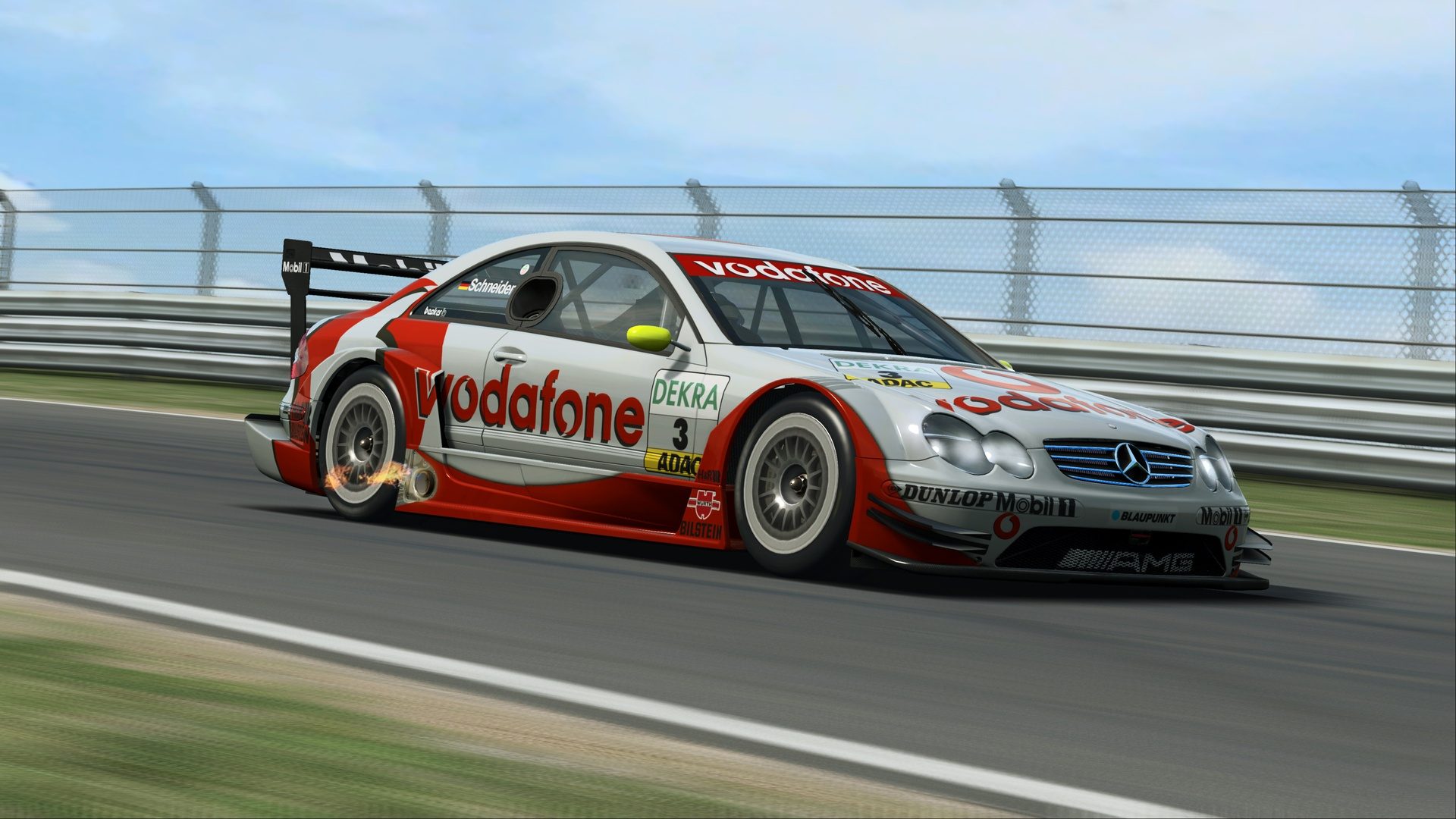



They can all be only ripped so far with either Ninja Ripper (like how Fernando Valentim did) or 3D Ripper DX if that also works as well, just make sure to not get caught by the ex-SimBin members while doing so, just like it happened with Fernando like he told me.wish i had the skills to convert models. the 2003 season just needs the clk dtm (2nd gen) to be complete. theres a decent model from raceroom not sure if they can be ported over to AC


Where can I get these other DTM cars from?
Quite impossible because it depends on the system you have and personal preference.Hi guys can you share with me the best Sol config to use the most realistic settings thx if possible!!
View attachment 1090288
i have a good system it can run it on ultra smoothly but I can't find the best config that matches real life sky cause i saw some people getting some amazing sky graphics with sol config...Quite impossible because it depends on the system you have and personal preference.
Again, nobody can provide you that.i have a good system it can run it on ultra smoothly but I can't find the best config that matches real life sky cause i saw some people getting some amazing sky graphics with sol config...
ok thx man but the only problem is that when I use cloud rendering method 2 3d clouds they look bad idk why!!!!Again, nobody can provide you that.
With system I meant type/brand/specs of monitors (or VR ?), single, triple, different GPU's etc...
It's all about personal preference.
Just experiment with sol config until you find what you like.
If you copy an 'amazing' sky from someone doesn't mean it'll look the same on your system.
Also video/photo may differ hugely from what you get on your screen(s).