Assetto Corsa PC Mods General DiscussionPC 

  • Thread starter Thread starter daan
  • 157,288 comments
  • 51,163,345 views
you can do it with Gimp or any photoshop app if not possible in CM...

Here already something to get you going :

View attachment 1334878
DOWNLOAD (drag & drop in CM to install this new skin)
(includes also same style previews for the 2 original skins)

I don't know how far you wanna take it , but from afar this already kinda resembles the yellow road version... (I hid some parts that are not on the road version, but some things like the spoiler can't easily be changed to match the road version)
This is the most effort I wanted to put into this... :)
Enjoy it , improve on it if you want (or not). It's completely yours to do with what you want... :)
thank you so much
 
Still tweaking my 1982 F1 season. More here.

Since I have plenty of DNF's (ai engine failures) now the cars retire in the middle of the track sometimes and that creates a problem.

I have some good progress with tweaking the ai failures and the qualifying times between Cosworths and Turbos are very realistic.

Is there anything on the Content Manager that when cars retire they immediately disappear from the track and go to the pit?. Now it seems to take about one lap before the DNF'd car disappears from the track.

Thanks.
 
Last edited:
W.I.P.
__custom_showroom_1709837345.jpg
__custom_showroom_1709837351.jpg
__custom_showroom_1709837359.jpg
__custom_showroom_1709837403.jpg
__custom_showroom_1709837411.jpg


You want the one by the legend that is RacinJoe, who's added layers of polish on top of the original, very nice Reboot Team version.

Thanks

Thanks
 
Last edited by a moderator:
Interesting. My version of the track got a download name change and placed on MediaFire under a different link. I'm assuming whoever did this made some changes. I'd love to know what they are so maybe I could incorporate them into my actual version of the track. I'm always looking for ways to improve any track i've done. Would anyone know what the difference is between this one and my version?
 
Interesting. My version of the track got a download name change and placed on MediaFire under a different link. I'm assuming whoever did this made some changes. I'd love to know what they are so maybe I could incorporate them into my actual version of the track. I'm always looking for ways to improve any track i've done. Would anyone know what the difference is between this one and my version?
Looks like it mostly changes tree/foliage colouration
 
Last edited:
Does anyone have this livery or a similar one for the Lanoz V12 aka the RSS Murcielago R-GT?
maxresdefault.jpg

From what I can see at some point the car was sold unlivered but the car now comes with a livery pack and not the plain carbon like the R-GT prototype.
 
Speaking of vintage tracks, does anyone have working 80's Zolder? There is the one 1967 version which has pretty similar layout as the 80's but it's broken in many ways (pitboxes, etc.)


@racinjoe013 Have you done the 1967 Kyalami? Just drove it today. Works great, amazing track to drive.
 
Last edited:
Speaking of vintage tracks, does anyone have working 80's Zolder? There is the one 1967 version which has pretty similar layout as the 80's but it's broken in many ways (pitboxes, etc.)


@racinjoe013 Have you done the 1967 Kyalami? Just drove it today. Works great, amazing track to drive.
I believe the track I used as a base was Reboot's 1967 version, but was told way back then that the track I used to start with was really more like a 1976 version. So I renamed mine Kyalami 1976.
 
I believe the track I used as a base was Reboot's 1967 version, but was told way back then that the track I used to start with was really more like a 1976 version. So I renamed mine Kyalami 1976.
You're right, it's a conversion of AMS1 70s Kyalami, the road is wider than it was in the 60s and it has some barriers and other 'modern' features (relatively speaking!).
 
Hi, how is't possible that all the skins for the Alfa Romeo 75 Turbo Evoluzione have disappeared? Skins like "Alfa Corse", "Scuderia Giudici", "Beretta", "Jolly Club" and others, I can't find anything. The car is found, the skins are not... 😅😨
 
Last edited:
Check out Rainmaker's updated Zolder 1967 here. Unfortunately, It doesn't look as if anyone has specifically made a 1980s version.

Wow that's a great conversion. But Rainmaker is the man. His Dijon is a masterpiece too. One of my favorite tracks to drive the 80's F1's.

Composing the 1982 season together and this Zolder was a gem.
 
Last edited:
Hello friends, I am writing to tell you about a situation I don't like while using Pure 0.251 and to find a solution if there is one. There was no such problem before, but after the last few Pure updates, it gives an unrealistic green effect when No Clouds or Clear weather conditions are selected. In reality, the weather is not GREEN in the morning or evening in these conditions. By the way, I am using the C13AEGIS filter but the problem persists even with Pure PP Filter selected.

f2.jpg

f4.jpg


Has anyone tried this pit lane app (which basically forces ai to pit once during the race)?


It's pretty straightforward to use (according to instructions). However there is one thing I don't understand.

This is from the lua script

Code:
-- GLOBAL VARS
  -- VALUES USER CAN SET START
  local isAppEnabled = true               -- When false, disables the app. (Can also be done in Content Manager -> Content -> Miscellaneous -> Lua Apps)
  local AiStartTyreCompoundIndex = 2      -- Tyre compound index AI start on. (0 is the softest)
  local aiUniqueStrategies = true        -- When false, all ai pit on same lap. When true, AI randomly pit on: pitLap, one sooner, or one later. (Much more realistic.)
  local pitLap = 10                        -- Lap AI pit on. (Don't set lower than 2. Don't set higher than final lap - 2. E.G - No higher than 8 for a 10 lap race.)
  local NewTyreCompoundIndex = 1          -- Tyre compound index the AI will pit onto.
  local expectedTyreChangeTime = 2.4      -- Expected time for AI car to be stationary in pit-box while crew puts on new tyres.
  local pitBoxToTheRight = true           -- Set true when pitboxes are on right side of pitlane. Set false when pit boxes are to the left of the pitlane. (Used so AI know wich way to turn.)
  local additionaltimeToFixFrontWing = 3  -- Extra time taken to fix front wing of AI cars ontop of standard tyre change.
  local additionaltimeToFixRearWing =  3  -- Extra time taken to fix rear wing of AI cars ontop of standard tyre change.
  -- VALUES USER CAN SET END

That part

Code:
"pitBoxToTheRight = true           -- Set true when pitboxes are on right side of pitlane. Set false when pit boxes are to the left of the pitlane. (Used so AI know wich way to turn.)"

So basically it means that you have to set this value up individually for each race and it doesn't work in the season mode unless you manully make the switch before each race.

Let's say 1988 Detroit pit boxes are on the left and Monaco pit boxes are on the right. You have to remember to adjust this setting before you start your race, right?

I have only driven 10-15 lap races for two years but would like to make the races longer... and I guess there's no way to force ai to pit without this kind of tool?
 
It is obvious that this should come to AC:
 
Has anyone tried this pit lane app (which basically forces ai to pit once during the race)?


It's pretty straightforward to use (according to instructions). However there is one thing I don't understand.

This is from the lua script

Code:
-- GLOBAL VARS
  -- VALUES USER CAN SET START
  local isAppEnabled = true               -- When false, disables the app. (Can also be done in Content Manager -> Content -> Miscellaneous -> Lua Apps)
  local AiStartTyreCompoundIndex = 2      -- Tyre compound index AI start on. (0 is the softest)
  local aiUniqueStrategies = true        -- When false, all ai pit on same lap. When true, AI randomly pit on: pitLap, one sooner, or one later. (Much more realistic.)
  local pitLap = 10                        -- Lap AI pit on. (Don't set lower than 2. Don't set higher than final lap - 2. E.G - No higher than 8 for a 10 lap race.)
  local NewTyreCompoundIndex = 1          -- Tyre compound index the AI will pit onto.
  local expectedTyreChangeTime = 2.4      -- Expected time for AI car to be stationary in pit-box while crew puts on new tyres.
  local pitBoxToTheRight = true           -- Set true when pitboxes are on right side of pitlane. Set false when pit boxes are to the left of the pitlane. (Used so AI know wich way to turn.)
  local additionaltimeToFixFrontWing = 3  -- Extra time taken to fix front wing of AI cars ontop of standard tyre change.
  local additionaltimeToFixRearWing =  3  -- Extra time taken to fix rear wing of AI cars ontop of standard tyre change.
  -- VALUES USER CAN SET END

That part

Code:
"pitBoxToTheRight = true           -- Set true when pitboxes are on right side of pitlane. Set false when pit boxes are to the left of the pitlane. (Used so AI know wich way to turn.)"

So basically it means that you have to set this value up individually for each race and it doesn't work in the season mode unless you manully make the switch before each race.

Let's say 1988 Detroit pit boxes are on the left and Monaco pit boxes are on the right. You have to remember to adjust this setting before you start your race, right?

I have only driven 10-15 lap races for two years but would like to make the races longer... and I guess there's no way to force ai to pit without this kind of tool?
I've been using this app and really like it. Solves the issue of AI cars only releasing one at a time during pitstops. I'm getting great AI races now (usually 30 laps) with an actual pit window.

Alternatively, you can force AI pit stops by manipulating fuel consumption in Content Manager or by setting tire wear maximums in the RARE app.
 
Has anyone tried this pit lane app (which basically forces ai to pit once during the race)?


It's pretty straightforward to use (according to instructions). However there is one thing I don't understand.

This is from the lua script

Code:
-- GLOBAL VARS
  -- VALUES USER CAN SET START
  local isAppEnabled = true               -- When false, disables the app. (Can also be done in Content Manager -> Content -> Miscellaneous -> Lua Apps)
  local AiStartTyreCompoundIndex = 2      -- Tyre compound index AI start on. (0 is the softest)
  local aiUniqueStrategies = true        -- When false, all ai pit on same lap. When true, AI randomly pit on: pitLap, one sooner, or one later. (Much more realistic.)
  local pitLap = 10                        -- Lap AI pit on. (Don't set lower than 2. Don't set higher than final lap - 2. E.G - No higher than 8 for a 10 lap race.)
  local NewTyreCompoundIndex = 1          -- Tyre compound index the AI will pit onto.
  local expectedTyreChangeTime = 2.4      -- Expected time for AI car to be stationary in pit-box while crew puts on new tyres.
  local pitBoxToTheRight = true           -- Set true when pitboxes are on right side of pitlane. Set false when pit boxes are to the left of the pitlane. (Used so AI know wich way to turn.)
  local additionaltimeToFixFrontWing = 3  -- Extra time taken to fix front wing of AI cars ontop of standard tyre change.
  local additionaltimeToFixRearWing =  3  -- Extra time taken to fix rear wing of AI cars ontop of standard tyre change.
  -- VALUES USER CAN SET END

That part

Code:
"pitBoxToTheRight = true           -- Set true when pitboxes are on right side of pitlane. Set false when pit boxes are to the left of the pitlane. (Used so AI know wich way to turn.)"

So basically it means that you have to set this value up individually for each race and it doesn't work in the season mode unless you manully make the switch before each race.

Let's say 1988 Detroit pit boxes are on the left and Monaco pit boxes are on the right. You have to remember to adjust this setting before you start your race, right?

I have only driven 10-15 lap races for two years but would like to make the races longer... and I guess there's no way to force ai to pit without this kind of tool?
by setting the fuel consumption, doesn't AI still come into the pits when it needs to refuel? I didn't understand what else this App does
 
It is obvious that this should come to AC:
It's your lucky day

 
by setting the fuel consumption, doesn't AI still come into the pits when it needs to refuel? I didn't understand what else this App does
This app disregards fuel consumption and lets you manually dictate a pit window for all cars, and also solves the issue of AI cars releasing one at a time during pit windows, which would typically lead to a wide spread and uncompetitive races. You can also manually assign tire compound changes during the pit window.

I've been doing 30 lap races with the 1991 ASR F1 cars with a manually set pit window of laps 17-19 (AI will be randomly assigned), cars starting on a medium compound then changing to a soft compound, with super competitive results. Without the app, you'd have to manipulate fuel consumption in Content Manager so that AI can't do the entire race on one tank of fuel.

Ideally, the app will see further development so that you can dictate multiple pit windows in a single race.
 
Last edited:
Not sure if this is sarcasm or not?
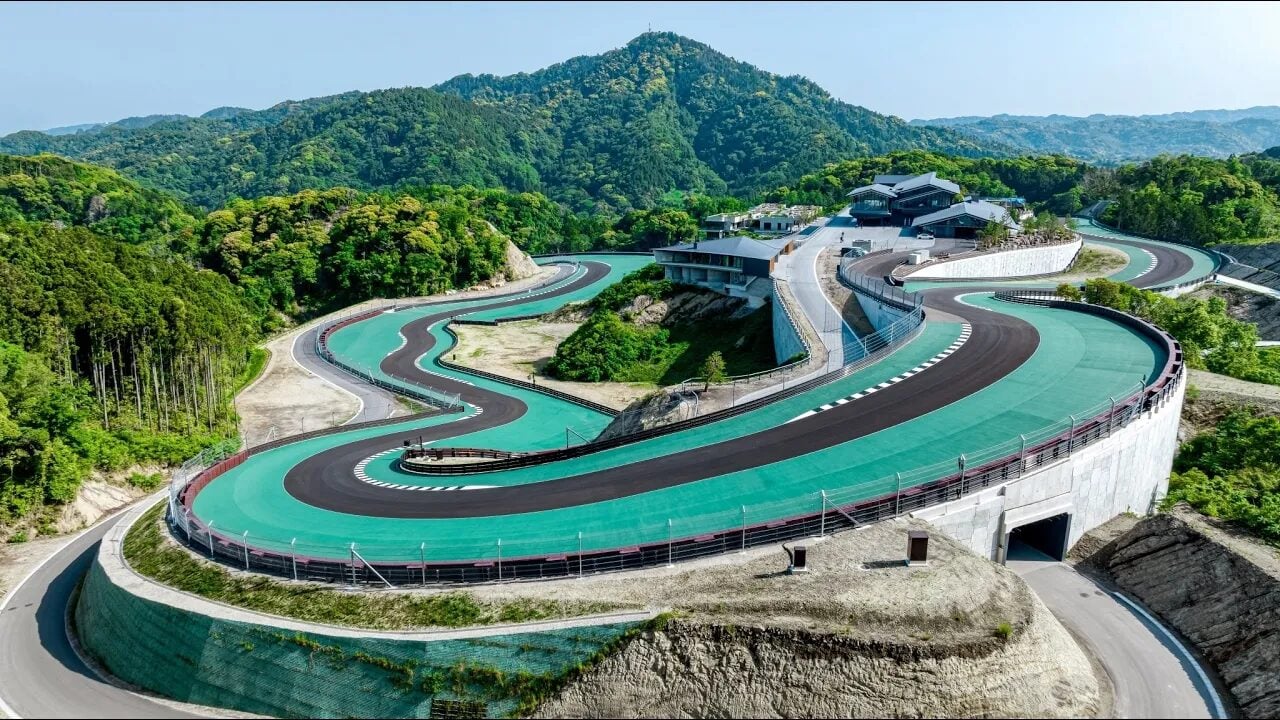
To me, this layout is like those terribad BTB tracks that occasionally pop up on RD, where the modder has just gone crazy without any consideration for how the track actually drives.
I'm guessing the layout here was severely limited by the local topography, but:
Blind crests? Tick.
Ridiculous elevation changes? Tick.
Over-use of chicanes and hairpins? Tick.
Terrible sight lines? Tick.

Compare this to fictional tracks by, say, doublezero and it's not even in the same league. And I'm not even talking about the modelling and textures (or getting dropped from space when starting a hot lap...).
Maybe it's just supposed to be a rich man's playground, IDK.
Not sarcasm. Ok after having driven it, it obviously falls into the "challenging" category rather than "nice and flowing", but it's still a pretty unique track and coming from someone like Tilke it definitely breaks the mould of his cookie cutter F1 tracks. I liken it to being a touge but in the form of a circuit, then they added 2 long straights for supercars to stretch their legs and tried to shoehorn a Turkey Turn 8 as a hairpin (the most awkward bit of the track in my opinion). Also I suspect the last sector flows better in reverse but for safety reasons obviously going uphill is better because of lower average speed.

If you watch the Top Gear video on it they said the design brief was for the track to be tricky so the members wouldn't get bored driving on it. So it definitely fits the bill. And having to fit that along with a hotel into a narrow valley obviously restricts the design freedom. If he had a more open layout probably he would make something close to Bilster Berg (which you have to agree flows great and is very similar to a lot of doublezero's tracks in feel).

Is it the best track in the world? Not really. Is it one of the more interesting ones? Yes and I'm glad it exists and they made a mod for it so I can have it in my AC collection :)

Oh and I agree the optimisation of the mod sucks. Terrible frame rate on my low end device. They should've recruited Tyrone to make it :P
 
Last edited:
Sharing a mod? Host it on GTPlanet Downloads. Free, public hosting for files up to 10GB in size.
Back