Assetto Corsa PC Mods General DiscussionPC 

  • Thread starter Thread starter daan
  • 157,267 comments
  • 51,146,305 views
Montagna di Pietra - v1.10

changelog v1.10:
  • 24 pit/grid by @pugsang
  • new road shaders by @Den_88
  • a few 2x sides added to config

:: DOWNLOAD v1.10 ::
This is a wonderful track. Wow. To driving with a Porsche 356 or Mercedes 300 Sl (1955) etc, its so funny.
But there is one point: the road surface feels to flat. You can hear, if the surface is changing, but you don't feel it. The small part with paving stone must give a much bigger feedback.
 
313
maybe it has something to do with the "groove fix" for certain rt tracks?

[SHADER_REPLACEMENT_...]
ACTIVE=1
DESCRIPTION= shadows cast on white lines
MATERIALS= groovesuzuka, groovesuzukalayouts
BLEND_MODE = ALPHA_TEST
IS_TRANSPARENT = 0
That code is included in the config, but I never had the issue since installing the track
Dont know if its this setting (should be off by default) but if its ticked on, try turning it off. On the Mills Metro Park track and some fat alfie tracks I have to turn this setting off otherwise I get that sort of rubbered lined over everything.

View attachment 1424027
That is not ticked
No issue for me on CSP 0.2.4 public and Pure 2.37 LCS. If CSP is not the cause, then could it be a specific version of Pure? Are you seeing this issue on Pure 2.38?

Or this? 👇
Running Pure 2.38 Hotfix 1
perhaps the better fix would be...:

[SHADER_REPLACEMENT_...]
MATERIALS= groovesuzuka, groovesuzukalayouts
SHADER = ksPerPixelAlpha
PROP_... = alpha, 0.6
CAST_SHADOWS = 0
BLEND_MODE = ALPHA_BLEND
IS_TRANSPARENT = 1

(untested)
THAT IS A CONFIRMED FIX !!
Using Pure LCS again, no other changes made... 👍
Thanks.
Please if you discover such things, always switch to default wfx and set it to LCS mode. If its the same there it is caused by the LCS shaders of CSP. Pure does not have an influence on track specific materials!

View attachment 1424046
Thanks tried it, but it had the same result. @RMi_wood code in the config fixed it for me.

===============

@oli65 must be your FFB settings, we even had complaints from DD wheel users that the feeling was too harsh.
Fort me (also Simucube DD wheel) it feels perfect.
 
Last edited:
That code is included in the config, but I never had the issue since installing the track

That is not ticked

Running Pure 2.38 Hotfix 1

THAT IS A CONFIRMED FIX !!
Using Pure LCS again, no otherr changes made... 👍
Thanks.

Thanks tried it, but it had the same result. @RMi_wood code in the config fixed it for me.

===============

@oli65 must be your FFB settings, we even had complaints from DD wheel users that the feeling was too harsh.
Fort me (also Simucube DD wheel) it feels perfect.
I have a fanatec DD 1. In other Tracks like sebring there I feel the bumpy road very immersive.
 
Good day. Recently I have been actively using the GTC60 AC Legends package, for some reason the bot that goes first (regardless of the car brand) goes much faster than the others (for example, on the Nordschleife it goes 15-20 seconds (per lap) faster than the second one, and all the other bots. I have not seen such a big difference with other Kunos cars. What could this be connected with, is it possible to fix it somehow?
 
Version 1.0 of Legion's Chevron B16 historical livery pack is up on RD:
https://www.overtake.gg/downloads/chevron-b16-historical-skinpack-4k.74671/ (car download is linked in the RD post)

Featuring 10 liveries spread over the 4 models provided by Legion, all of these were put together at the end of 2024, but decided to wait until Legion uploaded the public versions/variants onto his blog :)

More will be done, of course, after working on some Fairlady's ;)

__custom_showroom_1737973018.jpg
 
I have a fanatec DD 1. In other Tracks like sebring there I feel the bumpy road very immersive.
You can't compare small cobbles with the concrete slabs at Sebring (where irl cars break suspensions)

Version 1.0 of Legion's Chevron B16 historical livery pack is up on RD:
https://www.overtake.gg/downloads/chevron-b16-historical-skinpack-4k.74671/ (car download is linked in the RD post)

Featuring 10 liveries spread over the 4 models provided by Legion, all of these were put together at the end of 2024, but decided to wait until Legion uploaded the public versions/variants onto his blog :)

More will be done, of course, after working on some Fairlady's ;)

View attachment 1424067
Just FYI, the link for the cars on RD/Overtake doesn't work for me... jetlag maybe ?:lol:
 
... @oli65 must be your FFB settings, we even had complaints from DD wheel users that the feeling was too harsh...
T818 here and except for the cobblestone area, in my case the track feels flat like a politician's EEG, as oli65 said... Are we talking about the same mod, Montagna di Pietra"?
 
@Fanapryde: how much road feeling do you set in ac settings?
AC>CONTROLS>FF
Road effect: 15% (if that is what you mean - I had to check, because I haven't touched that in years)
Simucube overall strength set to 40%.
T818 here and except for the cobblestone area, in my case the track feels flat like a politician's EEG, as oli65 said... Are we talking about the same mod, Montagna di Pietra"?
oli65 was asking about the road feel on the paving stones (which I understood as the cobbles ?)
Precisely these (and the bus stops) were reported as a bit harsh by some testers.
The other surfaces could benefit from a bit more feel maybe, but it is not an old worn surface, but looks freshly repaved.

And yes, it's about Montagna di Pietra v1.0
 
Last edited:
DON't USE the latest Pure LCS 2.3x version! It has broken all 3rd party PP filters (C13 Aegis, Natural Mod PP filter, etc.) I normally use. The standard Pure PP filter is OK in daytime, but the day night transitions and night lighting look really bad for me in VR (Oculus Rift CV1). After several days of testing without any result, I switched back to Pure LCS 2.16 and C13 Aegis 2.04 (don't use newer versions, as they are made for Pure LCS 2.3x with poor results). It also works well with CSP 0.2.6/0.2.7-preview1, that I need to use as several VRC Hyperscars and Fuzos TCR cars need at least CSP 0.2.4 (don't use, AI is broken), CSP 0.2.5 (don't use, it's full of game breaking bugs) or CSP 0.2.6 (bug fix version; I use this version, as the only problems for me are the UGLY new Grass FX and the black icon in the upper left corner during races I barely see in VR).

These are my settings, if someone wants to test it:

CSP 0.2.6/0.2.7-preview1 + Pure 2.16 LCS + C13AEGIS 2.04
Never tried LCS and don't use VR lol

edit : rolled back to Aegis 1.89 and Pure 2.16, no more funky nights !

No way I'm 'upgrading' those again.
 
Last edited:
Good day. Recently I have been actively using the GTC60 AC Legends package, for some reason the bot that goes first (regardless of the car brand) goes much faster than the others (for example, on the Nordschleife it goes 15-20 seconds (per lap) faster than the second one, and all the other bots. I have not seen such a big difference with other Kunos cars. What could this be connected with, is it possible to fix it somehow?
This is a bug of the AC, regardless of the car, at least for me, there is almost always one bot that drives significantly faster than the others and one that drives too slowly (braking very early)
 
So it glows on the outside then, but nothing on the object ? I've done that mistake once. Illuminate mesh was the "bulb" but the glass in front of it was not set on alpha blend. Could be a hint.

Here's a fonctioning one from me and the shader parameters for both objects (bulb and glass in front of it) :

View attachment 1423985
View attachment 1423986
Transparency set on YES for the glass and NO for the lights

If that can help...
Appreciate your response once again mate!

Every glass is set to alpha blend with transparency=yes
Every bulb/bulb support/housing is set to opaque with transparency=no

Also, since I edited the rear tail & brake lights with lights.ini, they work only in CM Showroom. In game there's still no result. See how it looks in-game and CM Showroom below: (central brake light does not light up in CM because it's setup in ext_config and they work not like the tails).
1737981761201.png

1737981818303.png

Kinda lost on what's happening now...
 
Last edited:
Appreciate your response once again mate!

Every glass is set to alpha blend with transparency=yes
Every bulb/bulb support/housing is set to opaque with transparency=no

Also, since I edited the rear tail & brake lights with lights.ini, they work only in CM Showroom. In game there's still no result. See how it looks in-game and CM Showroom below: (central brake light does not light up in CM because it's setup in ext_config and they work not like the tails).
View attachment 1424078
View attachment 1424079
Kinda lost on what's happening now...
Hijacking this because first couple of times I asked about that I got ignored lol

I have the same problem with two cars I'm working on, headlights don't work in game but they do in CM showroom. No refracting or emissive stuff, just some basic lights.
 
DON't USE the latest Pure LCS 2.3x version! It has broken all 3rd party PP filters (C13 Aegis, Natural Mod PP filter, etc.) I normally use. The standard Pure PP filter is OK in daytime, but the day night transitions and night lighting look really bad for me in VR (Oculus Rift CV1). After several days of testing without any result, I switched back to Pure LCS 2.16 and C13 Aegis 2.04 (don't use newer versions, as they are made for Pure LCS 2.3x with poor results). It also works well with CSP 0.2.6/0.2.7-preview1, that I need to use as several VRC Hyperscars and Fuzos TCR cars need at least CSP 0.2.4 (don't use, AI is broken), CSP 0.2.5 (don't use, it's full of game breaking bugs) or CSP 0.2.6 (bug fix version; I use this version, as the only problems for me are the UGLY new Grass FX and the black icon in the upper left corner during races I barely see in VR).

These are my settings, if someone wants to test it:

CSP 0.2.6/0.2.7-preview1 + Pure 2.16 LCS + C13AEGIS 2.04

Test conditions for a bright summer day:
Track "Kunos Nordschleife Standard layout", date "20th June 2024", time "13:00", weather "clear".

Settings in Pure: (reset Pure to standard settings before starting)

PP Saturation 1.3 (very high setting, to get a good summer feeling)
PP Brightness 1.0
PP Contrast 1.01
PP Godrays 1.5
PP Night Sky Preset: Standard
PP Glare Style: Aggressive
PP User Adjustments (Active): Power of the sun, GADU spec godrays, Reflection tweak
PP Tone mapping function: C13 Curve Filmic
Pure Night/Sky: Moon : moon.appearance: 5.0 (changes the brightness of the moon)
Pure Night/Sky: Stars : stars.appearance: 5.0 (changes the brightness of the stars)
Pure Shaders: sunblinding: fade in speed of the effect: 0.010 (the sunblinding works now immediately as in real life)

These settings are made for the use with my Oculs Rift CV1, but should also work with other VR Headsets or monitor setups.
Sorry that you made this bad experience then, but for most people the newer version works really good. Maybe its because of the Rift CV1, it had no so good displays built in. Also the ppfiiltera are growing with Pure and we try to fix necessary things. So also use their latest versions with Pure 2.38 then...
 
Last edited:
Hijacking this because first couple of times I asked about that I got ignored lol

I have the same problem with two cars I'm working on, headlights don't work in game but they do in CM showroom. No refracting or emissive stuff, just some basic lights.
This is driving me crazy for real haha
 
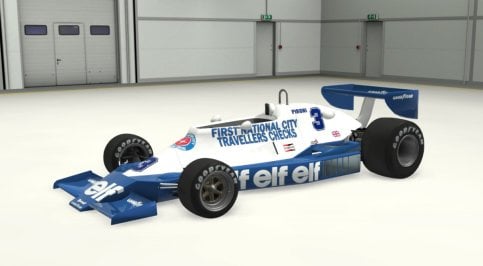
Here is the link (in the same post from a few days ago...) with the corrections in both versions of the Tyrrell 008.

I corrected the errors in the "DATA" folder and did the necessary tests.

I believe there will be no problems now.


PLEASE DELETE THE OLD VERSIONS.


Sorry for the inconvenience, but the car was not properly tested with others from the same season.

I checked the Ferrari 312T3 (both versions), but I used a physical one (different DATA folder).

Between today and tomorrow, I will have to correct the other cars that I was going to share, because I believe they have the same problem.
McLaren M26
Ligier JS7
Ligier JS9 (3 versions)
Copersucar F5A (4 versions)
Williams FW05
Renault RS01
Porque el fantastico Tyrrell 008 aparece en CM Showroom, sin ninguna sombra debajo ?
Tiene solución ?

Why does the fantastic Tyrrell 008 appear in CM Showroom, without any shadow underneath?
Do you have a solution?
 

Attachments

  • no_shadow.jpg
    no_shadow.jpg
    73.7 KB · Views: 20
Never tried LCS and don't use VR lol

edit : rolled back to Aegis 1.89 and Pure 2.16, no more funky nights !

No way I'm 'upgrading' those again.
Latest everything here, including C13 AEGIS filter and my nights are perfect! Using latest LCS from Mr. Boese
 
if you can easily dive them don't look into brakehint but instead increase their aggressivenes.
They won't be much faster with more brakehint at least not without giving up a lot of safety and they are already pretty much on the edge.
Hey mate,

i've played a little with your lanes and the ai hints. I think they are still as fast but way more challenging to overtake. Would you have a look and see if it's working as well on your side?

Basically i made them cut the corners a bit so they keep on the inside and added a few brake hints so they trail brake rather than throttle-play. Also, i've made them accelerate sooner in the fast corner after the straight so they don't loose momentum.

If you guys wanna try it, it's AI lanes/hints for the Crystal Palace 1969, completely based on the @IMEAN 's ones:


I also updated a few GTC60 AI cars, available here :


There's a Drive CSP preset in the folder which i ran my tests on.

The Alfa 33 Corsa is a bit OP (and chaotic) and i've yet to find a proper setup for the Simca, and i'll spend a lil more time on them later. Otherwise they're pretty fun to race against. For some reason the WSC TVR is way more reliable as an AI car than its original counterpart, so i would use the WSC version to fill the grid.
 
Last edited:
You can't compare small cobbles with the concrete slabs at Sebring (where irl cars break suspensions)


Just FYI, the link for the cars on RD/Overtake doesn't work for me... jetlag maybe ?:lol:

Here you go. :)
 
Sorry that you made this bad experience then, but for most people the newer version works really good. Maybe its because of the Rift CV1, it had no so good displays built in. Also the ppfiiltera are growing with Pure and we try to fix necessary things. So also use their latest versions with Pure 2.38 then...
It isn't a problem of the Rift CV1 as everything looks perfectly for me with Pure 2.16 LCS + C13Aegis 2.04. With Pure 2.38 and with the latest versions of all PP filters I tested, it's impossible to get the same result. The latest CSP 0.2.6 has totally broken the look of the Grass FX. Why? It was looking great before. And with Pure 2.38 LCS I have lost the sun and moon and what has happened to the godrays?

The Pure PP filter is OK in daytime, but the day-night transitions and night lighting is working really bad compared to the C13Aegis PP filter.

It isn't a good idea to make such big changes over and over again, that break the 3rd party PP filters and settings of the users.
 
Good day. Recently I have been actively using the GTC60 AC Legends package, for some reason the bot that goes first (regardless of the car brand) goes much faster than the others (for example, on the Nordschleife it goes 15-20 seconds (per lap) faster than the second one, and all the other bots. I have not seen such a big difference with other Kunos cars. What could this be connected with, is it possible to fix it somehow?
3 or 4 secs ahead is normal for the first car, but 20s per lap seems a lot. You play at 100% strenght? Are the others very slow or something?

Also, considering the differences of power inside the pack, there might be one that is way more powered than the other
 
3 or 4 secs ahead is normal for the first car, but 20s per lap seems a lot. You play at 100% strenght? Are the others very slow or something?

Also, considering the differences of power inside the pack, there might be one that is way more powered than the other
yes, i play on 100% difficulty, 2nd, 3rd and all the rest are pretty tight (not counting those who crash/fly off). the first one stands out, of course not every time, but he (sometimes it's tvr, sometimes alpha, sometimes mustang) is doing about 8:05 laps, when the others are doing 8:20, and often worse, 8:25 and slower. in the thread user exva wrote that it's AC's fault, and he often has this with different cars.
 
Last edited:
thanks!!!

thank you !

ps:
you could have included Masscot's shadow fix , saving us all to have to go and add that once more after replacing the file ;)


EDIT: and add this to make glass look better:
;make glass look less reflective
[INCLUDE: common/materials_glass.ini]
[Material_Glass]
ACTIVE=1
MATERIALS = WINDOWS_OUT
FilmIOR = 0.83
ThicknessMult = 0.3


example WITHOUT:
View attachment 1423905
WITH:
View attachment 1423907

EDIT 2 :
remove this line in the [Material_CarPaint_Metallic] section:
Skins = SKIN
(this makes for no skin to receive the properties... as no skin is called SKIN)
If you fix this , this is how car 3 looks (with my preview at least):
View attachment 1423910

I also do not like the way the wipers reflect light... but they have been set to have material BODY as well as the actual body of the car...

I will post a new extension cfg , that includes Masscot's shadow fix, JK1977's Wiper Animation for Lod b and c , the body paint fix, and windows and wipers reflection fixes.

then it looks like this:
View attachment 1423912


EDIT3: but I struggle to get the rollcage to look like it does in CM Showroom (chrome-like)...

I settled for this :
View attachment 1423939

DOWNLOAD (can be dragged and dropped in CM)

this extension cfg file is based on the original v1.0 and includes following:
-shadows in interior fix (Masscot)
-Wiper Animation for Lod b and c (JK1977)
-windows and wipers less reflective
-rollcage more chrome-like (more like it's shown in the CM Showroom)
-less reflective steering wheel metal (EDIT: I turned that one off again, it's not better)
@JK1977 please note these glass settings and consider updating your cars with them (and using it for future cars). The milky highly-reflective settings you normally use can look quite odd. These are subjectively better.
 
Last edited:
@Tetri

First of all your [BRAKE_HINT_] 0, 1 and 2 are not working because you used the wrong command, so everything you said that improved according to trailbraking was fantasy and imagined - the commands don't work. You have to use [BRAKEHINT_]. Test this yourself it does not work in your file, so nothing changed throught those hints.

Second they are NOT trailbraking because you put [BRAKEHINT_] there - even if you would use the correct command. That is not how AC bots work or how this command works. [BRAKEHINT_] just makes them lose more or less speed depending on the number you put there it is not a trailbreak thing.

Third I do not let them drive to the very apex because I leave a bit of margin in them for mistakes and side by sides.

Fourth your [HINT_] 0, 1 and 2 are not increasing the ai speed - overall I gained 0.1 sec on the last straight with a period correct car and that's it.

Fifth as I told you if you want them to be harder on overtakes increase their aggression and they wont let you in easily.


Please don't edit my work in this wrong way everything I do has its purpose ;) .
 
Last edited:
Sharing a mod? Host it on GTPlanet Downloads. Free, public hosting for files up to 10GB in size.
Back