Assetto Corsa PC Mods General DiscussionPC 

  • Thread starter Thread starter daan
  • 157,267 comments
  • 51,146,078 views
It´s not that you should change the ppfilter and the preview image is different then. ;) It´s hidden in the folders of csp. Believe me, I spoke a trillion times about this with Ilja but recently there was no effort to change (or to be able to) change the pp filter for the previews. Have you tried switching to a different showroom? Is the problem still persisting? I don´t have these issues and I believe 24H hasn´t them as well, so there must be something weird with your settings.
strange... so I should attempt a complete clean reinstall of CM , with clean reinstall of CSP... but I'm holding off on that as I fear loosing my whole hoarders collection (+7000 cars all with rating, custom tags and notes with pro's and con's of each mod)

Another weird thing I notice , maybe you guys can check if this also is the case for you (if not it certainly is my setup at fault):
When I change MSAA and Pixel density, this has no impact at all on the generated preview:
1756538666255.webp
1756538651286.webp

so when I go from 0 to 16x pixel density it is quite visible in the preview window, but not in the rendered result...

(the suspension gets altered and/or the angle of the steering wheel , but those are prob unrelated bugs)

EDIT : when I turn of "use CSP" pixeldensity does get taken into account... but as soon as I check that box, it no longer has any effect. Maybe this is a hint towards what the issue may be...


BUT this all seems so trivial , as I just read up on the sad news about Fanapryde ... my condolences for his family and friends (also the digital ones here).
 
Last edited:
Spa-Francorchamps 1993 v1.6

  • quality update
  • grass mismatch on Eau Rouge fixed
  • cone wall at end of pit replaced with a tirewall
  • cones at bus stop replaced with AC_POBJECT cones
  • added some LODS
  • fences are now ALPHA_BLEND
  • seasons fixed
  • other small fixes
  • my first track to be updated via CM CUP

:: DOWNLOAD ::
I've got the same problem as 2000


1756539201338.webp
 
Yes that is slow. How did you qualify? Are the ai cars seconds behind your lap time?

Why not use the 1998 Spa? Brilliant fastlane, accurate layout, no garbage modern ads.

I wasn't qualifying, I really only play AC to simulate seasons via the AI, the qualifying time I posted above is the times the AI drove, both the 412T2 and the rest of the field.

I believe the AI is set to 100% skill, with 95% aggression, if that helps.
 
Sad, awful news about @Fanapryde

Willy was a fine, fine forum-friend.
We shared mods and opinions about mods (and THE mods), language jokes, and how growing old sucked.
And finally, a small hint of his despair at knowing he would not grow old.

I'd like to think that if his family knew the depth of regard and affection we felt for him, that might be some comfort to them.

Rest well, friend.
 
I hate these kinds of posts...

Our friend, my friend, @Fanapryde passed away earlier this month from a brain tumor.

He was one of the kindest people I have ever met in the world of SimRacing.
I had the chance to meet him several times over the last few months and I will never forget him.
This is the news I never wanted to read about him. I knew about his situation because we kept in touch via direct messages, but I hoped (given the small positive signs he had told me about) that he would win this race. My heart goes out to his whole family, especially his mother. Rest in peace @Fanapryde, we will miss you.
 
This is the news I never wanted to read about him. I knew about his situation because we kept in touch via direct messages, but I hoped (given the small positive signs he had told me about) that he would win this race. My heart goes out to his whole family, especially his mother. Rest in peace @Fanapryde, we will miss you.
I'm very sorry to add that Willy's mother sadly passed away just a couple of weeks before he did.
 
Last edited:
I hate these kinds of posts...

Our friend, my friend, @Fanapryde passed away earlier this month from a brain tumor.

He was one of the kindest people I have ever met in the world of SimRacing.
I had the chance to meet him several times over the last few months and I will never forget him.
Didn't interact much with him, I think, but from the rim discussion we had about the F60 he seemed like a fun guy to be around, followed up on the jokes I did and even though he wasn't an open wheel guy he still gave a try to my mods out of curiosity. Sucks that in 2 month we lost 2 great people, him and Greg.

I hope his family find his gtplanet account and read all these posts here about him, it's always great in these moments to find out that the person you loved is equally loved outside for what he was.
 
strange... so I should attempt a complete clean reinstall of CM , with clean reinstall of CSP... but I'm holding off on that as I fear loosing my whole hoarders collection (+7000 cars all with rating, custom tags and notes with pro's and con's of each mod)

Another weird thing I notice , maybe you guys can check if this also is the case for you (if not it certainly is my setup at fault):
When I change MSAA and Pixel density, this has no impact at all on the generated preview:
View attachment 1475654View attachment 1475653
so when I go from 0 to 16x pixel density it is quite visible in the preview window, but not in the rendered result...

(the suspension gets altered and/or the angle of the steering wheel , but those are prob unrelated bugs)

EDIT : when I turn of "use CSP" pixeldensity does get taken into account... but as soon as I check that box, it no longer has any effect. Maybe this is a hint towards what the issue may be...


BUT this all seems so trivial , as I just read up on the sad news about Fanapryde ... my condolences for his family and friends (also the digital ones here).
Nearly none of the bespoked functions you see in the options tab do have an influence on the outcome of your generated preview if you use csp generation for previews. Forget about the quality tab. Only scene, camera and lights along with hdr can be adjusted and have an outcome you will recognize.
 
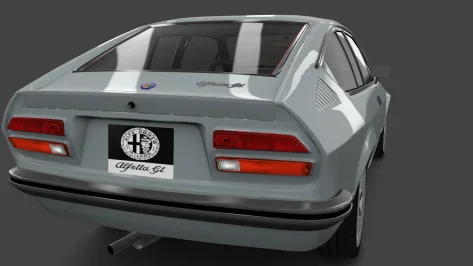
Alfa Romeo Alfetta GT by ABB Creations, SColMODS edit geppo (who collaborated with the following team)
Released after the confirmation message from the ABB Creations team, SColMODS, whom I thank for this...
In this new version, the interiors, which were in really bad shape, have been improved, new upholstery color, body shaders changed, some chrome, yellow headlights added, emergency lights fixed (the side indicators now work too), and many other small aesthetic adjustments... The skin colors are original Alfa Romeo ones from the period (made some time ago).
The physics have remained unchanged.


Really nice to finally have this car in good shape in AC.
I did a few tweaks if anyone wants them:

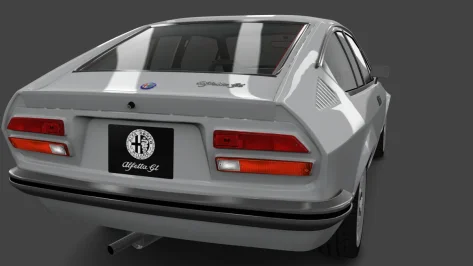
New dealer plate and normal map (drop them into individual skin folders, or replace them globally in CM Showroom) to fix the squashed aspect ratio and put everything on a black background.

Original:
__custom_showroom_1756548278.webp

New:
__custom_showroom_1756548270.webp

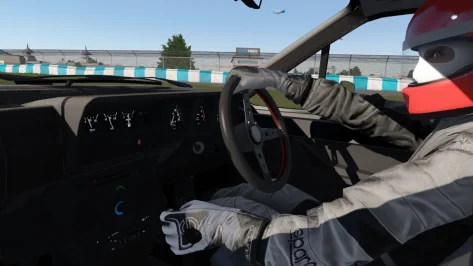
New driver position for better hand/wheel interaction.
New shifting animation, looks more natural to me in VR, less robotic. Keep the original if you prefer it.
(remove the .txt extensions and put in the car's 'animation' folder after backing up the originals)

1756548781903.webp

Fixed sunlight leakage around dashboard seams (add the following to the end of the config):

Code:
;stop sun ingress around cockpit mesh seams, into footwells etc
[SHADER_REPLACEMENT_...]
ACTIVE = 1
MATERIALS = bump_leather, bump_plastic, Car_Paint, Black_Plastic, plastic, black, chrome
CULL_MODE = DOUBLESIDED
CAST_SHADOWS = 1
DOUBLE_FACE_SHADOW_BIASED = 1

edit: dealer plate and NM added. Again, remove the .txt extensions.
 

Attachments

Last edited:
... New dealer plate and normal map (drop them into individual skin folders, or replace them globally in CM Showroom) to fix the squashed aspect ratio and put everything on a black background...
It's possible that you forgot to attach these files?
 
Last edited:
... or replace them globally in CM Showroom...
Sorry to be a pain in the ass again, but... can you explain to a dummy like me how to, please?

Tried to find info in the net, but no success; trialing I came to this step...


A new complication....webp


... but I don't know what's next. Teach this man how to fish, please... 😕
 
1756552621234.webp

trying to fix the see-through wheels on the otherwise magnificent Caterham 7 Superlight R500 AERO by 101Creative ,
(cat_r500_13_aero , I've installed the Easy version, 0.99.1 ... but the same issue is on the original 1.0 version )

I tried adding this to extension cfg top no avail (I was sure it would do the trick as it had done so in the past , but it didn't!?)
[SHADER_REPLACEMENT_...]
MESHES = M_Tire_Max_Toyo_Proxes_R888R_Medium002
CULL_MODE = DOUBLESIDED

Anyone an idea?
 
Sorry to be a pain in the ass again, but... can you explain to a dummy like me how to, please?

Tried to find info in the net, but no success; trialing I came to this step...


View attachment 1475688

... but I don't know what's next. Teach this man how to fish, please... 😕
To replace textures globally on a car, what I do first is add them to the first skin folder (to make finding them easier, but also initially as a test to check how they look).
Then enter CM showroom.
So for this exercise:
1. Click on the texture (in this case the rear dealer plate).
2. Click the three little dots to the right of txDetail:
3. Select 'Replace' from the pop-up menu
4. Navigate to the skin folder where you put the new textures (you might already be in it)
5. Click the texture you want to replace it with.
Repeat for the normal map by clicking the three little dots next to txNormalDetail: and repeat steps 3, 4 & 5

This should update those textures for the actual car itself, not the individual skins, so you can then delete the new textures from whatever skin folder you put them in.

1756553426658.webp
 
Really nice to finally have this car in good shape in AC.
I did a few tweaks if anyone wants them:

New dealer plate and normal map (drop them into individual skin folders, or replace them globally in CM Showroom) to fix the squashed aspect ratio and put everything on a black background.

Original:
View attachment 1475673

New:
View attachment 1475674

New driver position for better hand/wheel interaction.
New shifting animation, looks more natural to me in VR, less robotic. Keep the original if you prefer it.
(remove the .txt extensions and put in the car's 'animation' folder after backing up the originals)

View attachment 1475678

Fixed sunlight leakage around dashboard seams (add the following to the end of the config):

Code:
;stop sun ingress around cockpit mesh seams, into footwells etc
[SHADER_REPLACEMENT_...]
ACTIVE = 1
MATERIALS = bump_leather, bump_plastic, Car_Paint, Black_Plastic, plastic, black, chrome
CULL_MODE = DOUBLESIDED
CAST_SHADOWS = 1
DOUBLE_FACE_SHADOW_BIASED = 1

edit: dealer plate and NM added. Again, remove the .txt extensions.
I've updated the link with a new version 1.3.2 containing your changes.
Thanks
 
I hate these kinds of posts...

Our friend, my friend, @Fanapryde passed away earlier this month from a brain tumor.

He was one of the kindest people I have ever met in the world of SimRacing.
I had the chance to meet him several times over the last few months and I will never forget him.
Thank you, Breathe, for your kind and thoughtful words.
My deepest condolences to the family.

Fana, I miss you very much.
 
I also noticed a drop in performance with large grids of AI cars with recent CSP builds. Maybe the newer AI features are overloading the CPU? Or memory leaks?Very annoying, whatever the cause.
Anywhere closer to a cause or solution for this? The problem came with CSP 0.2.8 as far as I can see. Running 0.2.7 seems fine, but some newer cars require a more recent version. Some strange preview problems also came with the same update.
 
Anywhere closer to a cause or solution for this? The problem came with CSP 0.2.8 as far as I can see. Running 0.2.7 seems fine, but some newer cars require a more recent version. Some strange preview problems also came with the same update.
There's been a few ideas floating around.
Default limit audio option in general patch settings got changed to 20 in last csp preview
1756555365890.webp

Changing it back to 6 (I think it was this before?) helped reduce my cpu load a bit - still higher than before though.
 
I hate these kinds of posts...

Our friend, my friend, @Fanapryde passed away earlier this month from a brain tumor.

He was one of the kindest people I have ever met in the world of SimRacing.
I had the chance to meet him several times over the last few months and I will never forget him.
I didn't know him personally, but he was always one of the kindest and most pleasant people around here.
Truly sad news – my heartfelt condolences to his family and everyone who was close to him.
 
To replace textures globally on a car, what I do first is add them to the first skin folder (to make finding them easier, but also initially as a test to check how they look).
Then enter CM showroom.
So for this exercise:
1. Click on the texture (in this case the rear dealer plate).
2. Click the three little dots to the right of txDetail:
3. Select 'Replace' from the pop-up menu
4. Navigate to the skin folder where you put the new textures (you might already be in it)
5. Click the texture you want to replace it with.
Repeat for the normal map by clicking the three little dots next to txNormalDetail: and repeat steps 3, 4 & 5

This should update those textures for the actual car itself, not the individual skins, so you can then delete the new textures from whatever skin folder you put them in.

View attachment 1475694
:sly:

1756558196604.webp
 
Talking about the new URD EGT pack, does anyone know if the OverTake-RaceDepartment skins still works fine with the newer version of the pack or they are broken? I don't want to write over 30gb of skins for nothing on my SSD in order to test it out. Thanks in advance
 
Talking about the new URD EGT pack, does anyone know if the OverTake-RaceDepartment skins still works fine with the newer version of the pack or they are broken? I don't want to write over 30gb of skins for nothing on my SSD in order to test it out. Thanks in advance
Yes they work, at least with the Corvette C8.R and the BMW M8. Didn´t look at the other cars though.
 
Sharing a mod? Host it on GTPlanet Downloads. Free, public hosting for files up to 10GB in size.
Back