Assetto Corsa PC Mods General DiscussionPC 

  • Thread starter Thread starter daan
  • 155,511 comments
  • 49,531,811 views
You can't really take one particular track out of the blue and say the cars are wrong. That track might have a bad fastlane. You don't say what track you used. However ACU Interlagos and Shi's 1992 ASR tracks both have good fastlanes.

It's very difficult to balance the lap times for all 16-20 tracks in the season. For example I adjusted the 1988 SD traction lower and more realistic, the cars crashed all over the place. I had to keep a bit exaggerated traction and compesate that by increasing a bit of aero drag in order to keep them perform correctly on most tracks.

I'd say their laptimes are almost spot on at 11 tracks out of 16. In Spa and Monza for example they're dead on accurate +/-0.5 seconds. But then they're a few seconds slower on Monaco for example. Nothing wrong with 1988 Monaco track fastlane... it's just how the cars are designed.

The most important part in the season is that the individual drivers perform correctly. The 1995 season was a two drivers' deal: Hill and Schumacher. If you want to make the season realistic I strongly recommend using the championship.champ file and define both Schumi and Hill ai level to 100.

You can't emulate, say, Hakkinen's McLaren unreliability to the game. Well you can actually... I experimented that a lot with the 1982 cars.. you can create ai engine failures but those cause bad traffic issus on AC. You just have to make the "second tier" cars/drivers Berger, Hakkinen, Coulthard etc. at level 94 or so. Of course Hakkinen was a top driver but his car reliability was total garbage (10 DNF's) so his AI level should be around 92-94'ish.

Most 90's F1 seasons were two-driver battles and those two should always have a significant ai level advantage over others in order to achieve realistic results.

If the ai drivers/cars are generally slow compared to the user/driver (whatever driver you're controlling in the game) you can always go to your car data and the easiest way to make relative performance changes is the CD gain. You can easily give the AI cars top speed advantage there. Of course this doesn't work if the season is skin based (and uses only 1 base car). Decreasing CD gain is the easiest way to make AI faster without tinkering the driving feel at all. I have no idea what those 1995 cars are but if the cars are actually too slow, that is a good trick to increase the overall performance too.

Test with another track and see how they perform in that one.
Sorry to bother but how can I edit this gain parameter per driver?
 
Something I just realized, if your wing has any bones attached to it and isn't just an object moving, this part would fit your case more, because yeah if there's bones involved you can have issues like wing missing/not being at it's correct place

Ok so It turned out I had to do the 90 degree turn for the fbx export but only on the empty before I was doing it on everything parented to the empty since its all attached. Took a bit but I have it properly working! Seriously thank you!
 
Sorry to bother but how can I edit this gain parameter per driver?

Take the championship file package from my 2004 season mod and you'll see. Basically you just edit the drivers' ai level with a Notepad. Like this.

Code:
"opponents": [
    {
      "name": "PLAYER",
      "car": "ks_ferrari_f2004",
      "skin": "Raikkonen"
    },
  {
      "name": "Michael Schumacher",
      "car": "ks_ferrari_f2004",
      "skin": "01_ferrari_1",
      "aiLevel": 100.0,
      "aiAggression": 30.0,
      "nationality": "Germany"
    },
    {
      "name": "Rubens Barrichello",
      "car": "ks_ferrari_f2004",
      "skin": "02_ferrari_2",
      "aiLevel": 97.0,
      "aiAggression": 8.0,
      "nationality": "Brazil"
    },
   {
      "name": "JP Montoya",
      "car": "ks_ferrari_f2004",
      "skin": "Montoya",
      "aiLevel": 94.0,
      "aiAggression": 19.0,
      "nationality": "Colombia"
    },

etc.

This is a Kunos F2004 skin based season so all drivers have the F2004 base car. Full grid. I've had some great races and the results are ultra realistic.

What people often do they set up a race on CM and define the global aggression to say, 80 (to get more overtaking). Then they complain that the AI cars will knock you out mercilessly on every corner. Yeah sure they do. If you want to screw up AC ai you'll do the CM global settings. However if you want to make a decent F1 season you will NOT touch anything on CM but define everything on the champs files and never exceed 30 driver aggression. You don't need ballasts and all that crap, simply do the driver skill differences on the code. Sure you can do those driver CM presets but I never found them working as consistently as this method,

Montoya and Schumacher have the top aggression. 30 is pushing it though but it works with F2004.

I'm now at the 10th race of the season and I haven't had ONE SINGLE crash when overtaking. This video has examples of ai driving on each track. Sure AC ai is not great... you can't compare it to F1 2020 by Codemasters which has absolutely SUPERIOR ai to any "real sim"... but with correct settings AC ai perfectly decent and the results are as realistic as you can get. Of course you need high quality tracks with good fastlanes to achieve good ai. And fortunately we have some incredible tracks and fastlane makers (like Thockard and IMEAN).

I'm not a great sim racer but not the worst either, and can't beat Schumacher at ai 100 with McLaren/Raikkonen. But I'm not supposed to as 2004 Ferrari was overwhelmingly superior. I've won only one race so far.

Take a look at Race 12 (Hockenhemi) how I've set the cars to pit at the halfway (video has timestamps).

 
Last edited:
It´s not that you should change the ppfilter and the preview image is different then. ;) It´s hidden in the folders of csp. Believe me, I spoke a trillion times about this with Ilja but recently there was no effort to change (or to be able to) change the pp filter for the previews. Have you tried switching to a different showroom? Is the problem still persisting? I don´t have these issues and I believe 24H hasn´t them as well, so there must be something weird with your settings.
strange... so I should attempt a complete clean reinstall of CM , with clean reinstall of CSP... but I'm holding off on that as I fear loosing my whole hoarders collection (+7000 cars all with rating, custom tags and notes with pro's and con's of each mod)

Another weird thing I notice , maybe you guys can check if this also is the case for you (if not it certainly is my setup at fault):
When I change MSAA and Pixel density, this has no impact at all on the generated preview:
1756538666255.webp
1756538651286.webp

so when I go from 0 to 16x pixel density it is quite visible in the preview window, but not in the rendered result...

(the suspension gets altered and/or the angle of the steering wheel , but those are prob unrelated bugs)

EDIT : when I turn of "use CSP" pixeldensity does get taken into account... but as soon as I check that box, it no longer has any effect. Maybe this is a hint towards what the issue may be...


BUT this all seems so trivial , as I just read up on the sad news about Fanapryde ... my condolences for his family and friends (also the digital ones here).
 
Last edited:
Spa-Francorchamps 1993 v1.6

  • quality update
  • grass mismatch on Eau Rouge fixed
  • cone wall at end of pit replaced with a tirewall
  • cones at bus stop replaced with AC_POBJECT cones
  • added some LODS
  • fences are now ALPHA_BLEND
  • seasons fixed
  • other small fixes
  • my first track to be updated via CM CUP

:: DOWNLOAD ::
I've got the same problem as 2000


1756539201338.webp
 
Yes that is slow. How did you qualify? Are the ai cars seconds behind your lap time?

Why not use the 1998 Spa? Brilliant fastlane, accurate layout, no garbage modern ads.

I wasn't qualifying, I really only play AC to simulate seasons via the AI, the qualifying time I posted above is the times the AI drove, both the 412T2 and the rest of the field.

I believe the AI is set to 100% skill, with 95% aggression, if that helps.
 
Sad, awful news about @Fanapryde

Willy was a fine, fine forum-friend.
We shared mods and opinions about mods (and THE mods), language jokes, and how growing old sucked.
And finally, a small hint of his despair at knowing he would not grow old.

I'd like to think that if his family knew the depth of regard and affection we felt for him, that might be some comfort to them.

Rest well, friend.
 
I hate these kinds of posts...

Our friend, my friend, @Fanapryde passed away earlier this month from a brain tumor.

He was one of the kindest people I have ever met in the world of SimRacing.
I had the chance to meet him several times over the last few months and I will never forget him.
This is the news I never wanted to read about him. I knew about his situation because we kept in touch via direct messages, but I hoped (given the small positive signs he had told me about) that he would win this race. My heart goes out to his whole family, especially his mother. Rest in peace @Fanapryde, we will miss you.
 
This is the news I never wanted to read about him. I knew about his situation because we kept in touch via direct messages, but I hoped (given the small positive signs he had told me about) that he would win this race. My heart goes out to his whole family, especially his mother. Rest in peace @Fanapryde, we will miss you.
I'm very sorry to add that Willy's mother sadly passed away just a couple of weeks before he did.
 
Last edited:
I hate these kinds of posts...

Our friend, my friend, @Fanapryde passed away earlier this month from a brain tumor.

He was one of the kindest people I have ever met in the world of SimRacing.
I had the chance to meet him several times over the last few months and I will never forget him.
Didn't interact much with him, I think, but from the rim discussion we had about the F60 he seemed like a fun guy to be around, followed up on the jokes I did and even though he wasn't an open wheel guy he still gave a try to my mods out of curiosity. Sucks that in 2 month we lost 2 great people, him and Greg.

I hope his family find his gtplanet account and read all these posts here about him, it's always great in these moments to find out that the person you loved is equally loved outside for what he was.
 
strange... so I should attempt a complete clean reinstall of CM , with clean reinstall of CSP... but I'm holding off on that as I fear loosing my whole hoarders collection (+7000 cars all with rating, custom tags and notes with pro's and con's of each mod)

Another weird thing I notice , maybe you guys can check if this also is the case for you (if not it certainly is my setup at fault):
When I change MSAA and Pixel density, this has no impact at all on the generated preview:
View attachment 1475654View attachment 1475653
so when I go from 0 to 16x pixel density it is quite visible in the preview window, but not in the rendered result...

(the suspension gets altered and/or the angle of the steering wheel , but those are prob unrelated bugs)

EDIT : when I turn of "use CSP" pixeldensity does get taken into account... but as soon as I check that box, it no longer has any effect. Maybe this is a hint towards what the issue may be...


BUT this all seems so trivial , as I just read up on the sad news about Fanapryde ... my condolences for his family and friends (also the digital ones here).
Nearly none of the bespoked functions you see in the options tab do have an influence on the outcome of your generated preview if you use csp generation for previews. Forget about the quality tab. Only scene, camera and lights along with hdr can be adjusted and have an outcome you will recognize.
 
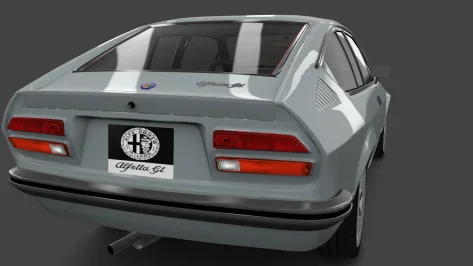
Alfa Romeo Alfetta GT by ABB Creations, SColMODS edit geppo (who collaborated with the following team)
Released after the confirmation message from the ABB Creations team, SColMODS, whom I thank for this...
In this new version, the interiors, which were in really bad shape, have been improved, new upholstery color, body shaders changed, some chrome, yellow headlights added, emergency lights fixed (the side indicators now work too), and many other small aesthetic adjustments... The skin colors are original Alfa Romeo ones from the period (made some time ago).
The physics have remained unchanged.


Really nice to finally have this car in good shape in AC.
I did a few tweaks if anyone wants them:

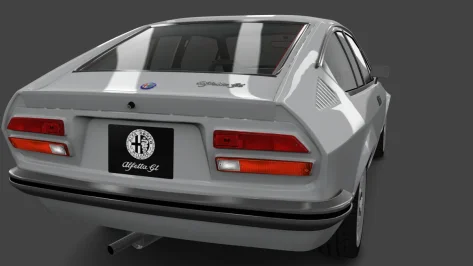
New dealer plate and normal map (drop them into individual skin folders, or replace them globally in CM Showroom) to fix the squashed aspect ratio and put everything on a black background.

Original:
__custom_showroom_1756548278.webp

New:
__custom_showroom_1756548270.webp

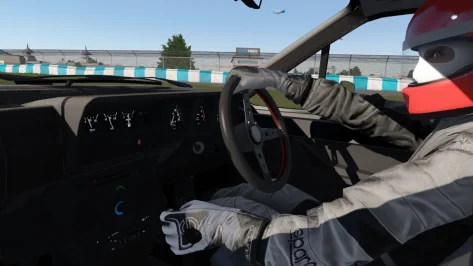
New driver position for better hand/wheel interaction.
New shifting animation, looks more natural to me in VR, less robotic. Keep the original if you prefer it.
(remove the .txt extensions and put in the car's 'animation' folder after backing up the originals)

1756548781903.webp

Fixed sunlight leakage around dashboard seams (add the following to the end of the config):

Code:
;stop sun ingress around cockpit mesh seams, into footwells etc
[SHADER_REPLACEMENT_...]
ACTIVE = 1
MATERIALS = bump_leather, bump_plastic, Car_Paint, Black_Plastic, plastic, black, chrome
CULL_MODE = DOUBLESIDED
CAST_SHADOWS = 1
DOUBLE_FACE_SHADOW_BIASED = 1

edit: dealer plate and NM added. Again, remove the .txt extensions.
 

Attachments

Last edited:
... New dealer plate and normal map (drop them into individual skin folders, or replace them globally in CM Showroom) to fix the squashed aspect ratio and put everything on a black background...
It's possible that you forgot to attach these files?
 
Last edited:
... or replace them globally in CM Showroom...
Sorry to be a pain in the ass again, but... can you explain to a dummy like me how to, please?

Tried to find info in the net, but no success; trialing I came to this step...


A new complication....webp


... but I don't know what's next. Teach this man how to fish, please... 😕
 
1756552621234.webp

trying to fix the see-through wheels on the otherwise magnificent Caterham 7 Superlight R500 AERO by 101Creative ,
(cat_r500_13_aero , I've installed the Easy version, 0.99.1 ... but the same issue is on the original 1.0 version )

I tried adding this to extension cfg top no avail (I was sure it would do the trick as it had done so in the past , but it didn't!?)
[SHADER_REPLACEMENT_...]
MESHES = M_Tire_Max_Toyo_Proxes_R888R_Medium002
CULL_MODE = DOUBLESIDED

Anyone an idea?
 
Sorry to be a pain in the ass again, but... can you explain to a dummy like me how to, please?

Tried to find info in the net, but no success; trialing I came to this step...


View attachment 1475688

... but I don't know what's next. Teach this man how to fish, please... 😕
To replace textures globally on a car, what I do first is add them to the first skin folder (to make finding them easier, but also initially as a test to check how they look).
Then enter CM showroom.
So for this exercise:
1. Click on the texture (in this case the rear dealer plate).
2. Click the three little dots to the right of txDetail:
3. Select 'Replace' from the pop-up menu
4. Navigate to the skin folder where you put the new textures (you might already be in it)
5. Click the texture you want to replace it with.
Repeat for the normal map by clicking the three little dots next to txNormalDetail: and repeat steps 3, 4 & 5

This should update those textures for the actual car itself, not the individual skins, so you can then delete the new textures from whatever skin folder you put them in.

1756553426658.webp
 
Really nice to finally have this car in good shape in AC.
I did a few tweaks if anyone wants them:

New dealer plate and normal map (drop them into individual skin folders, or replace them globally in CM Showroom) to fix the squashed aspect ratio and put everything on a black background.

Original:
View attachment 1475673

New:
View attachment 1475674

New driver position for better hand/wheel interaction.
New shifting animation, looks more natural to me in VR, less robotic. Keep the original if you prefer it.
(remove the .txt extensions and put in the car's 'animation' folder after backing up the originals)

View attachment 1475678

Fixed sunlight leakage around dashboard seams (add the following to the end of the config):

Code:
;stop sun ingress around cockpit mesh seams, into footwells etc
[SHADER_REPLACEMENT_...]
ACTIVE = 1
MATERIALS = bump_leather, bump_plastic, Car_Paint, Black_Plastic, plastic, black, chrome
CULL_MODE = DOUBLESIDED
CAST_SHADOWS = 1
DOUBLE_FACE_SHADOW_BIASED = 1

edit: dealer plate and NM added. Again, remove the .txt extensions.
I've updated the link with a new version 1.3.2 containing your changes.
Thanks
 
I hate these kinds of posts...

Our friend, my friend, @Fanapryde passed away earlier this month from a brain tumor.

He was one of the kindest people I have ever met in the world of SimRacing.
I had the chance to meet him several times over the last few months and I will never forget him.
Thank you, Breathe, for your kind and thoughtful words.
My deepest condolences to the family.

Fana, I miss you very much.
 
I also noticed a drop in performance with large grids of AI cars with recent CSP builds. Maybe the newer AI features are overloading the CPU? Or memory leaks?Very annoying, whatever the cause.
Anywhere closer to a cause or solution for this? The problem came with CSP 0.2.8 as far as I can see. Running 0.2.7 seems fine, but some newer cars require a more recent version. Some strange preview problems also came with the same update.
 
Anywhere closer to a cause or solution for this? The problem came with CSP 0.2.8 as far as I can see. Running 0.2.7 seems fine, but some newer cars require a more recent version. Some strange preview problems also came with the same update.
There's been a few ideas floating around.
Default limit audio option in general patch settings got changed to 20 in last csp preview
1756555365890.webp

Changing it back to 6 (I think it was this before?) helped reduce my cpu load a bit - still higher than before though.
 
I hate these kinds of posts...

Our friend, my friend, @Fanapryde passed away earlier this month from a brain tumor.

He was one of the kindest people I have ever met in the world of SimRacing.
I had the chance to meet him several times over the last few months and I will never forget him.
I didn't know him personally, but he was always one of the kindest and most pleasant people around here.
Truly sad news – my heartfelt condolences to his family and everyone who was close to him.
 
Sharing a mod? Host it on GTPlanet Downloads. Free, public hosting for files up to 10GB in size.
Back