Assetto Corsa PC Mods General DiscussionPC 

  • Thread starter Thread starter daan
  • 154,790 comments
  • 48,704,719 views
Screenshot_pb_lexus_isf_dub_08_ek_myogi_21-8-125-1-13-55.webp
Screenshot_pb_lotus_europa_06_ks_laguna_seca_1-8-125-5-37-29.webp
Screenshot_pb_lexus_isf_08_ek_hakone_turnpike_7-8-125-21-33-46.webp
Screenshot_pb_tnr_europa_06_ek_irohazaka_3-8-125-3-37-57.webp
 
3.0 update released for the F1 2007 mod

I'll have to thank @zsolt_mol for this release. He gave me some great insight of what needs to be fixed and what feature would be added on the mod for league racing, and worked hard getting Poly cruncher to work correctly to generate more lods on the cars.

Changelog :

-All cars have normal map to make the body lines appear more

-New blurred rim. For all cars

-Added cockpit_HR on every cars and attached the cockpit object to it, Then the lod generator did its work thanks to @zsolt_mol

-Added a glossy paint for Ferrari on their dark skin

-New steering wheel for the Ferrari, from test drive ferrari racing legends. Dash by Prophetimus

-Rainlight for all cars, fixed

-Fixed Wet FFB thanks to Didier Bastard

-Tyres now have correct size

Download the update

This was a zig-zag ride, but we have got there, what's next ? :-)
 
Do you guys know who this is? he has been spamming the steam forums with his "Ground breaking force feedback" file and wants money for it. Join the discord and blahblahblah.

 
I might have accidentally woken up very heavily on my autistic side today. Decided to some cleaning up in my AC folder by going from heaviest skin folder to the lightest, and boy were there some full skin folders.

Either way, While i was cleaning them out i made myself an little spreadsheet for series and skins that i was keeping, and so far i have this. It's not much but i'm working trough my Kunos AMG GT3 folder rn and apparently i have over 200+ skins for that car alone. Many being duplicates or those horrible fictional ones that i don't enjoy having anymore.

It's not the best spreadsheet but i am not aware of any other spreadsheet around that "documents" liveries for AC.
Update to the "database" added roughly 300+ liveries.
There is a lot of liveries that i'm probably still missing, Mainly on overtake due to how terrible their search function is. At minimum they could have enabled so that KUNOS content would have their own tag for each individual car....man. It's an absolute PAIN going trough that site just to find liveries.
 
Do you guys know who this is? he has been spamming the steam forums with his "Ground breaking force feedback" file and wants money for it. Join the discord and blahblahblah.

Haptics? More canned effects, he means then?
 
Do you guys know who this is? he has been spamming the steam forums with his "Ground breaking force feedback" file and wants money for it. Join the discord and blahblahblah.

I might start my own Patreon too, selling my CSP config.
Trust me its great, only 20$ a month to discover if it suit you or not! :sly:
 
Update to the "database" added roughly 300+ liveries.
There is a lot of liveries that i'm probably still missing, Mainly on overtake due to how terrible their search function is. At minimum they could have enabled so that KUNOS content would have their own tag for each individual car....man. It's an absolute PAIN going trough that site just to find liveries.
I rate you for this to be fair...creating a more updated Database for skins....albiet it's gonna take alot of god damn work to go through and find everything...and i mean everything
 
Check the car's body in CM showroom. The name of it might have changed between updates and if so you need to update the livery.dds file to the correct one.
Yes, I think that's it. I checked, and I think it's working now. Thank you very much. The other version I have is 1.0.7, also by f302; I think I found it here. However, with this version, I can't get the skins to work properly. They display, but they're all misaligned and positioned incorrectly. Do you have any solution for this problem, please?
 
Keeping on the useless retro engineering, i manage to get all the data out of the fast_lane.ai in a simple way. I never found anything on the web doing it properly (blender was able to do it apparently with an import addon, but i never managed to get it to work).

I used a python converter which allows you to extract any data from the fastlane without going thru Blender or Fastlaneutils, and translate them to CSV. In the future (and this is probably more for myself), that would allow you to interfeer with the inputs directly into the fastlane. ****ed up a little braking in a fast corner? Well, you can now edit the data directly : included are the spline position on the track (distance), the Gas, brake and steering inputs (x,y,z), and the sidelines (right and left_boundaries). The CSV file is a complete nightmare to read with regular human eyes BUT it has everything, while the lua files are super simple.

I haven't coded the python app to save it back to a fast_lane.ai file yet, but i'm on my way. It also need a more detailed option (i think i stayed on a 1% precision for this one, so 7 meters for the 8km track i was working on) in case anyone would want to edit the inputs on a very specific part of a corner.


Anyway, because there's a goal to this nonsense, the idea is to be able to load some of this data into the aihints.lua script @shi started to mess with.

If you're not familiar with coding, python and ****, don't worry : neither do I. It's just some retro engineering and basic computer typing.
If you wanna give it a try, you need https://dotnet.microsoft.com/fr-fr/ and https://www.python.org/downloads/release/python-3137/

To use the python apps, when in the ai folder, then "shift + right click", "open powershell window here". Then just call the app : "python analyze_ai.py fast_lane.ai" first, then "python generate_fastlane_lua.py" if you want to have the lua conversions (that are useless at the moment, but whatever, if you get to understand the values stored in the CSV files, you can easily modify the lua converter to get the values you would actually need in a AI script).


A first python app attempted to decrypt the fast_lane format and how to read the data, but i ended up with a mess cause the way it's packaged and exploited ingame is not intuitive at all.

It apparently depends on the track but i was lucky enough to find that link : https://assettocorsamods.net/threads/extract-ai-pit-fast-lanes.2013/#lg=attachment5126&slide=0, which, coupled with https://github.com/gro-ove/actools/tree/master/AcTools/AiFile, was pretty helpful.

Note that the python apps need to be in the same folder as the fast_lane.ai. The saved resulting files would appear in the folder.

To transfer the data to a CSV file, i made the analyze_ai.py. Open with powershell, type "python analyze_ai.py fast_lane.ai", it should automatically detect the best format and save the result as a CSv file.

Now, using the "generate_fastlane_lua.py" : Open with powershell, type "python analyze_ai.py fast_lane.ai" and you should get 3 lua files. As i'm still trying to figure out what would work best and for further testing (and to see what's the impact on the game perfs), it creates 3 lua files : detailed, medium and light. It looks like this, which is understandable for all :

local fastlane_data = {
[0] = {
distance = 0.000000,
x = 414.438,
y = 4.913,
z = 710.346,
right_boundary = 4.941,
left_boundary = 0.670
},
[1] = {
distance = 7.887292,
x = 406.701,
y = 4.881,
z = 711.875,
right_boundary = 5.577,
left_boundary = 0.763
},
etc etc...

At the moment i picked random values (the ones written x, y, z) for brakes and throttle, i have my clues but i couldn't pinpoint one variable to be either one or the other. Same for boundaries, they could be related to something else, maybe you can have a look inside the CSV file and try to see, out of the 23 values in, who does what. Shouldn't be too hard at this point, and i'll edit the lua converter accordingly. Same for the CSV to fastlane encoder, no need for it until i figure out which values do what.


At the moment, i have access thru the lua script to : each car position, its distance to next car, its distance from the fastlane, its distance to the sidelines. I still have to figure out how to configure the car being Left or Right to the fastlane.

What it could allow in the future : implement a behavior depending on the car position and what script to apply. Let's say left = danger, car on the right, apply countersteering and extra braking for example. Another cool feature that i 'm trying to add : in case of a car very close at front, increase speed and attempt overtaking, then careful driving while being on the inside line to not overshoot the corner. There's probably plenty of possibilities i haven't thought of, most of them being either not reliable or completely insane, but maybe there could be a few ones worth it to help those poorly designed ai Hints.


Anyway, this is just for the challenge, but i'm sure people involved in creating AI fastlanes and/or playing with lua scripts would enjoy to finally have access to this fast_lane.ai data, as i found the ressources about it to be extremely scarse and cryptic. Now, it's easy to access. I'll upload the CSV to .ai converter later.
 

Attachments

Last edited:
I rate you for this to be fair...creating a more updated Database for skins....albiet it's gonna take alot of god damn work to go through and find everything...and i mean everything
Yeah, so far the biggest issue is skins that are on the official Assetto Corsa forum. I can’t access it. I tried making a new account, but I keep getting flagged as a bot no matter what I do. Then I tried logging in with my Steam account and was instantly banned, even though I have NEVER used the website before. So now I’m completely stuck when it comes to getting skins from that site.
 
Last edited:
Keeping on the useless retro engineering, i manage to get all the data out of the fast_lane.ai in a simple way. I never found anything on the web doing it properly (blender was able to do it apparently with an import addon, but i never managed to get it to work).

I used a python converter which allows you to extract any data from the fastlane without going thru Blender or Fastlaneutils, and translate them to CSV. In the future (and this is probably more for myself), that would allow you to interfeer with the inputs directly into the fastlane. ****ed up a little braking in a fast corner? Well, you can now edit the data directly : included are the spline position on the track (distance), the Gas, brake and steering inputs (x,y,z), and the sidelines (right and left_boundaries). The CSV file is a complete nightmare to read with regular human eyes BUT it has everything, while the lua files are super simple.

I haven't coded the python app to save it back to a fast_lane.ai file yet, but i'm on my way. It also need a more detailed option (i think i stayed on a 1% precision for this one, so 7 meters for the 8km track i was working on) in case anyone would want to edit the inputs on a very specific part of a corner.


Anyway, because there's a goal to this nonsense, the idea is to be able to load some of this data into the aihints.lua script @shi started to mess with.

If you're not familiar with coding, python and ****, don't worry : neither do I. It's just some retro engineering and basic computer typing.
If you wanna give it a try, you need https://dotnet.microsoft.com/fr-fr/ and https://www.python.org/downloads/release/python-3137/

To use the python apps, when in the ai folder, shift + right click, open powershell window here. Then just type the app call : "python analyze_ai.py fast_lane.ai" first, then "python generate_fastlane_lua.py" if you want to have the lua conversions.


A first python app attempted to decrypt the fast_lane format and how to read the data, but i ended up with a mess cause the way it's packaged and exploited ingame is not intuitive at all.

It apparently depends on the track but i was lucky enough to find that link : https://assettocorsamods.net/threads/extract-ai-pit-fast-lanes.2013/#lg=attachment5126&slide=0, which, coupled with https://github.com/gro-ove/actools/tree/master/AcTools/AiFile, was pretty helpful.

Note that the python apps need to be in the same folder as the fast_lane.ai. The saved resulting files would appear in the folder.

To transfer the data to a CSV file, i made the analyze_ai.py. Open with powershell, type "python analyze_ai.py fast_lane.ai", it should automatically detect the best format and save the result as a CSv file.

Now, using the "generate_fastlane_lua.py" : Open with powershell, type "python analyze_ai.py fast_lane.ai" and you should get 3 lua files. As i'm still trying to figure out what would work best and for further testing (and to see what's the impact on the game perfs), it creates 3 lua files : detailed, medium and light. It looks like this, which is understandable for all :

local fastlane_data = {
[0] = {
distance = 0.000000,
x = 414.438,
y = 4.913,
z = 710.346,
right_boundary = 4.941,
left_boundary = 0.670
},
[1] = {
distance = 7.887292,
x = 406.701,
y = 4.881,
z = 711.875,
right_boundary = 5.577,
left_boundary = 0.763
},
etc etc...


At the moment, i have access thru the lua script to : each car position, its distance to next car, its distance from the fastlane, its distance to the sidelines. I still have to figure out how to configure the car being Left or Right to the fastlane.

What it could allow in the future : implement a behavior depending on the car position and what script to apply. Let's say left = danger, car on the right, apply countersteering and extra braking for example. Another cool feature that i 'm trying to add : in case of a car very close at front, increase speed and attempt overtaking, then careful driving while being on the inside line to not overshoot the corner. There's probably plenty of possibilities i haven't thought of, most of them being either not reliable or completely insane, but maybe there could be a few ones worth it to help those poorly designed ai Hints.


Anyway, this is just for the challenge, but i'm sure people involved in creating AI fastlanes and/or playing with lua scripts would enjoy to finally have access to this fast_lane.ai data, as i found the ressources about it to be extremely scarse and cryptic. Now, it's easy to access. I'll upload the CSV to .ai converter later.
That sounds excellent !

Is there a resource somewhere that describes how the AI is implemented in AC ? I understand it follows a line but I suppose there may be as well some kind of event loops with decision rules to check for overtake etc...
 
Last edited:
Yea, So far the biggest issue is skin's that are on the official Assetto Corsa forum. I can't access it. I tried making an new account for it but i keep getting flagged as an bot no matter what i do, I then tried to login with my steam account and was instantly banned even though i have NEVER used the website before. So i'm completely stuck getting skins off that site.
I ran into similar issues years ago. The Offical Assetto Corsa Forum, is literally one of the worst things.
 
Last edited:
That sounds excellent !

Is there a resource somewhere that describes how the AI is implemented in AC ? I understand it follows a line but I suppose there may be as well some kind of event loops with decision rules to check for overtake etc...
Couldn't find much, but with the CSV file you get out of the fastlane, it is pretty dense. 23 values on a fews thousands lines (track positions), clearly tells the AI what it 's suppose to follow. On the AI behavior, i suppose it is hardcoded somewhere else, as you don't record anything about it while recording a new fast_lane.

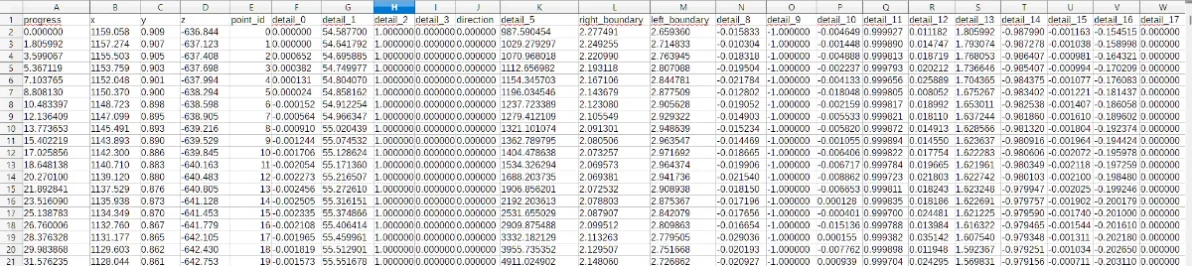
Here's my fastlane from dundrod converted into a CSV : CSV Fastlane.webp


Progress is easy, it's the distance in meters (Dundrod being 12,129 km, you get 12 129 meters).

The x, y, z, i have no idea yet. The point Id i suppose is just the fastlane progress definition, as there are no big size differences in kb between a 2km track fastlane and a 10 kms one.

Since we're looking at the straight at the start of the race, and you have full trottle on this part of the track, there should be no brake values here. The boundaries could be the sidelines, but how are they calculated? Distance from fastlane? Surfaces? Center of the road?

To define the fastlane points position, it's a 3d space anyway, so i would expect 3 values of positionning. Maybe that's what the x y z values are.

For the detail values, best way to have a look at it is to make charts, i.e here with details 0 and 12 :
Capture d'écran 2025-09-22 170309.webp

That way we can at least figure throttle and brake pedals, as they need to change all along the track. We can then check with the ai hints of a track and translate to the progress value. If i have a hairpin at 0.82 ingame (% of the track), i just have to check at progress * 0.82 and find out who's going crazy in values there. Should be easy, just have to get rid of my kids to figure it out.
 
Last edited:
3.0 update released for the F1 2007 mod

I'll have to thank @zsolt_mol for this release. He gave me some great insight of what needs to be fixed and what feature would be added on the mod for league racing, and worked hard getting Poly cruncher to work correctly to generate more lods on the cars.

Changelog :

-All cars have normal map to make the body lines appear more

-New blurred rim. For all cars

-Added cockpit_HR on every cars and attached the cockpit object to it, Then the lod generator did its work thanks to @zsolt_mol

-Added a glossy paint for Ferrari on their dark skin

-New steering wheel for the Ferrari, from test drive ferrari racing legends. Dash by Prophetimus

-Rainlight for all cars, fixed

-Fixed Wet FFB thanks to Didier Bastard

-Tyres now have correct size

Download the update
rarely did I see an F1 car flip over simply by cornering too fast and hitting a slight curb in the apex...
I witnessed it just now... AI that was in the lead, flipped on the first corner (after 1 lap) on Bikernieki High Speed Ring
Here my settings for the race:
1758554923401.webp

(nevermind the Candidates, it was with your Ferrari F2007
and haven't seen any other F1 mods do that on this track , so I guess it's a car mod issue, not a track issue)
 
Can someone please show me the correct way to change the driver that's specified in Data/driver3d.ini, without changing it in that file. Can I change the driver in a skin's ext_config.ini or with skin.ini? Skin.ini doesn't seem to do it...
 
Thinking about bringing some F1 22 to AC - is there a legit way to get the pre-update 1.15 cars ? Like, if I install a copy on my PC, it'll automatically install the newest version right ? Cuz all the 2022 cars we have are the post-update and I like the 'basic' concept the teams used for the first rounds (like the blocky MCL or the 0.5 pods Williams)
 
Last edited:
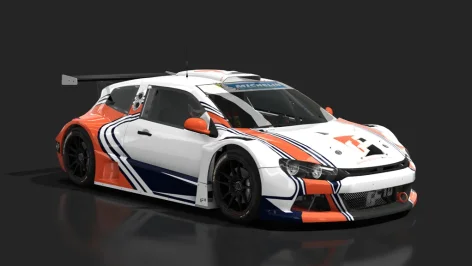
Same fixes and updates to VW Scirocco GC10.


VW Scirocco GC10 V6, V8 2013.webp


INSTALL ORIGINAL CAR
You need one of the following versions:

  • V8 (scirocco_gc10_v8 by Assettogarage),
  • V6 (scirocco_gc10_v6 by unknown)
  • V8 Hillclimb (HillClimb_scirocco_gc10_v8 by Assettogarage, GR.TEAM)
  • V6 Hillclimb (scirocco_gc10_v6_hillclimb_jlr by JLR modding)
You can find them at https://www.assettoworld.com/cars/1
(in the "Keywords" searchbox type "scirocco gc10" and download the one or more of the firsts 4.

INSTALL ADDONS & FIXES

  • copy the "enimations", "ui" and "extension" folders to your car folder.
  • copy the files inside "(copy to each skin folder with FANATEC windshield banner)"
  • delete scr_lights.dds from skin folders with FANATEC windshield banner
FIXES & ADDONS:

  • CSP wipers
  • cinematic camera before race starts
  • gas and brake driver animations by DigitalVei
  • reverse light
  • turn lights (fake on front, IRL they are above front fender)
  • fixed brake lights
  • high and low beams
  • endurance ambi-light and stearing wheel buttons light-up with car lights
  • exhausts shake
  • fixed RPM LEDs on stearing wheel (now last LED will lightup and all LEDs will flash at the limiter)
  • carpaint more shiny
  • skin fix for liveries with FANATEC windshield banner without reflection. The MICHELIN banners are OK.
NOTE: skin fix doesn't work with V6 Hillclimb version.


Now it's here on the forum Dowload section Scirocco update
 

Attachments

  • VW Scirocco GC10 V6, V8 2013.webp
    VW Scirocco GC10 V6, V8 2013.webp
    37.6 KB · Views: 9
Last edited:
Can someone please show me the correct way to change the driver that's specified in Data/driver3d.ini, without changing it in that file. Can I change the driver in a skin's ext_config.ini or with skin.ini? Skin.ini doesn't seem to do it...
There are several ways to change the driver model. You have to copy the new driver model to "content/driver" first.

You can create a "name_of_the_car_folder.ini" (e.g. ks_ferrari_488_gtb.ini) in
C:\Users\Your_Name\Documents\Assetto Corsa\cfg\extension\cars
with the following text

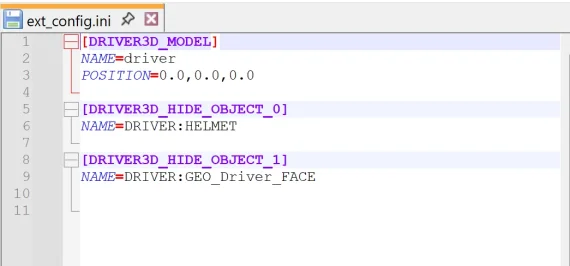
[DRIVER3D_MODEL]
NAME=driver_name (without kn5 extension; e.g. driver_no_helmet_sunglasses)
POSITION=0.0,0.0,0.0

[DRIVER3D_HIDE_OBJECT_0]
NAME=DRIVER:HELMET

[DRIVER3D_HIDE_OBJECT_1]
NAME=DRIVER:GEO_Driver_FACE

Or just copy the text to the "ext_config.ini" in the "extension" folder of the car or the "ext_config.ini" in a skin folder of the car. This should work, too.

Another method is to create a subfolder "data_override" in the "extension" folder of the car, unpack the data.acd of the car, copy the driver3d.ini to the new "data_override" folder and change it to the new driver. You should use this method, if you also want to change the timings of the shift animation of the driver.
Don't forget to finally delete the "data" folder with the unpacked files. This method works for all ini-files from data.acd, that only change the graphics of the car. (e.g. driver3d.ini, lods.ini, lights.ini).
 
Last edited:
Couldn't find much, but with the CSV file you get out of the fastlane, it is pretty dense. 23 values on a fews thousands lines (track positions), clearly tells the AI what it 's suppose to follow. On the AI behavior, i suppose it is hardcoded somewhere else, as you don't record anything about it while recording a new fast_lane.

Here's my fastlane from dundrod converted into a CSV : View attachment 1480979


Progress is easy, it's the distance in meters (Dundrod being 12,129 km, you get 12 129 meters).

The x, y, z, i have no idea yet. The point Id i suppose is just the fastlane progress definition, as there are no big size differences in kb between a 2km track fastlane and a 10 kms one.

Since we're looking at the straight at the start of the race, and you have full trottle on this part of the track, there should be no brake values here. The boundaries could be the sidelines, but how are they calculated? Distance from fastlane? Surfaces? Center of the road?

To define the fastlane points position, it's a 3d space anyway, so i would expect 3 values of positionning. Maybe that's what the x y z values are.

For the detail values, best way to have a look at it is to make charts, i.e here with details 0 and 12 : View attachment 1480980
That way we can at least figure throttle and brake pedals, as they need to change all along the track. We can then check with the ai hints of a track and translate to the progress value. If i have a hairpin at 0.82 ingame (% of the track), i just have to check at progress * 0.82 and find out who's going crazy in values there. Should be easy, just have to get rid of my kids to figure it out.
As while playing a F1 1988 championship I encountered the same issue than @Apocalypse211 (blue flag problem), I bought the Nuzzi app for flags and virtual safety car. I tried it and it seems to work in some way but did not test it extensively to be honest.

Anyway, I opened his lua code to have insights and it seems you can catch the situations of any cars at each frame and then you can apply throttle limits according to rules so if your kids let you a moment free, you could have a look there to find some inspiration.

I'm interested in the problem , I don't know lua but looks like a easy script language so I could try to help but later : I'm currently drowning into my Rouen-les Essarts update project, Blender is such a mess for a newb :-D
 
Last edited:
Thinking about bringing some F1 22 to AC - is there a legit way to get the pre-update 1.15 cars ? Like, if I install a copy on my PC, it'll automatically install the newest version right ? Cuz all the 2022 cars we have are the post-update and I like the 'basic' concept the teams used for the first rounds (like the blocky MCL or the 0.5 pods Williams)
You can try and yarr harr and download it from illegitimate places like counter strike rinsed rust. Someone might have uploaded clean files of each update at some point.
 
As while playing a F1 1988 championship I encountered the same issue than @Apocalypse211 (blue flag problem), I bought the Nuzzi app for flags and virtual safety car. I tried it and it seems to work in some way but did not test it extensively to be honest.

Anyway, I opened his lua code to have insights and it seems you can catch the situations of any cars at each frame and then you can apply throttle limits according to rules so if your kids let you a moment free, you could have a look there to find some inspiration.

I'm interested in the problem , I don't know lua but looks like a easy script language so I could try to help but later : I'm currently drowning into my Rouen-les Essarts update project, Blender is such a mess for a newb :-D

I have tried to downplay the blue flag issue by setting up the lower tier driver/car aggression to near zero. They also have reduced AI skill (88-90'ish). In 20 lap races you get a few occasional backmarkers They are not a huge issue as long as you choose your overtake spot wisely and be patient. The backmarkers usually won't come before lap 16-17. They only create major problems in Monaco. Overtaking them in other tracks is relatively easy and I haven't had much trouble with them.

The lack of outlap intelligence in qualifying is much more annoying. On top of that AI is very stupid and doesn't have any sense at all when they choose to leave the pits. Fortunately the best AI drivers get very good qualifying times 90% of the time. Monaco is the problem again as AI doesn't even attempt to overtake. And if they get stuck in a train they won't abandon the lap but will religiously follow the slow cars for 4 laps like complete idiots.
 
Last edited:
Yeah, so far the biggest issue is skins that are on the official Assetto Corsa forum. I can’t access it. I tried making a new account, but I keep getting flagged as a bot no matter what I do. Then I tried logging in with my Steam account and was instantly banned, even though I have NEVER used the website before. So now I’m completely stuck when it comes to getting skins from that site.
the official forum will be annoying and getting early year skins which also would have disappeared during then to be fair plus you also have patreon where some skins are on there
 
rarely did I see an F1 car flip over simply by cornering too fast and hitting a slight curb in the apex...
I witnessed it just now... AI that was in the lead, flipped on the first corner (after 1 lap) on Bikernieki High Speed Ring
Here my settings for the race:
View attachment 1480981
(nevermind the Candidates, it was with your Ferrari F2007
and haven't seen any other F1 mods do that on this track , so I guess it's a car mod issue, not a track issue)
It's a new feature it's called roulette russe.
Makes F1 more interesting


(No seriously I just forgot to fix this. Someone told me before the trick to prevent this)
 
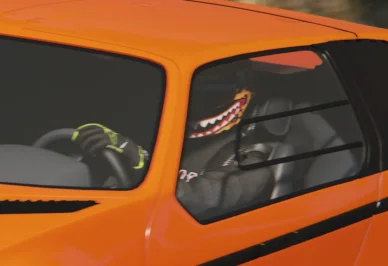
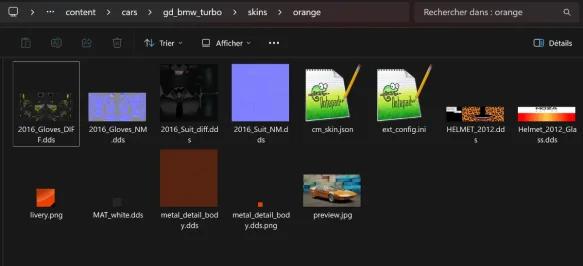
Can someone please show me the correct way to change the driver that's specified in Data/driver3d.ini, without changing it in that file. Can I change the driver in a skin's ext_config.ini or with skin.ini? Skin.ini doesn't seem to do it...
You need an ext_config inside the skin you want to change the helmet.

1758564513263.webp
[DRIVER3D_MODEL]
NAME= * name of the appropriate model you want *

You also put the suit skin in there, must be compatible with driver model.


Skin folder should looks like this:
1758564703228.webp


And it should work :P
1758564937045.webp


Sounds stupid, but I did see one guy who was selling his adjustments on Patreon. 🤑
There is (or was) a dude selling pictures he took in Ac!! :lol:
 

Attachments

  • Screenshot 2025-09-22 141110.webp
    Screenshot 2025-09-22 141110.webp
    38.3 KB · Views: 14
Last edited:
You can try and yarr harr and download it from illegitimate places like counter strike rinsed rust. Someone might have uploaded clean files of each update at some point.
Don't have enough space left for the full game, I'll try my luck with the myriad of mods released for rfactor, after all I just need a couple of bodies lol
 
the official forum will be annoying and getting early year skins which also would have disappeared during then to be fair plus you also have patreon where some skins are on there
Patreon isn't really an issue, It's only really an issue if the creator is an lobotomite and don't properly name their posts like an certain "creative" highway.
 
Sharing a mod? Host it on GTPlanet Downloads. Free, public hosting for files up to 10GB in size.
Back