Assetto Corsa PC Mods General DiscussionPC 

  • Thread starter Thread starter daan
  • 157,299 comments
  • 51,176,160 views
Fully agree its a game changer, first thing I do when downloading a new mod is normalize the volmue. Saves my ears when later on the rig and putting the headphones on I know won't be super loud!
Must-have app for me, different cars and modders for different engine levels that break my immersion quite easily.
That and the constant thing where I want my racecar's cockpit bleeding loud and the rest of the world quiet and below all the rest, so triple duty, mixing cockpit sounds, lowering them, eventually mixing external sounds for replays.

I could add that wind effect on closed cockpits is slightly underestimated in AC but all the mixing stuff above is enough work.
Anyways, must-have app. 👍
It's one of those apps that I wonder how I played the game before the modder made it :lol:. For all of AC CSP's bugs and quirks, there have been some really cool apps that have made some great qol upgrades to the game over the last year or two
 
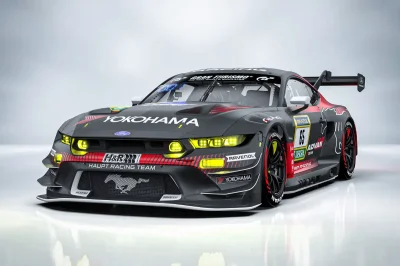
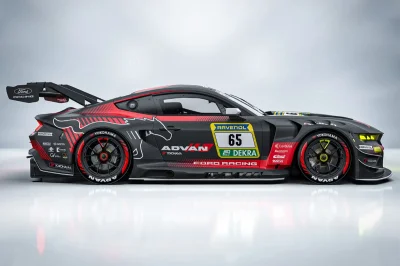
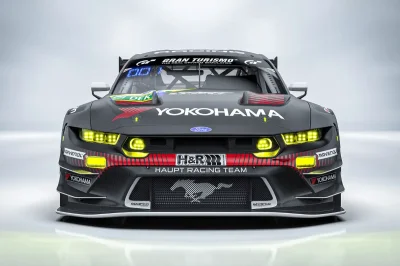
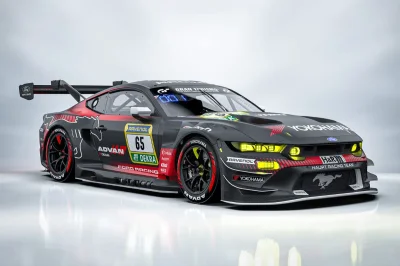
What paint job did they do for the Ford Mustang GT3?
 

Attachments

  • FB_IMG_1769312772362.webp
    FB_IMG_1769312772362.webp
    87.4 KB · Views: 24
  • FB_IMG_1769312761950.webp
    FB_IMG_1769312761950.webp
    69 KB · Views: 15
  • FB_IMG_1769312748501.webp
    FB_IMG_1769312748501.webp
    90.8 KB · Views: 15
  • FB_IMG_1769312738023.webp
    FB_IMG_1769312738023.webp
    79.4 KB · Views: 16
For in game, this app I found to be a game changer for per car volume adjustment. Can't tweak as much as the ext_config file, but overall engine volume, transmission, tires etc can be changed in game on the fly and it will load up everytime you use the car

Would this app enable us to use the full exterior audio from @Young78's F40 (damped ever-so-slightly-but-not-much) in the cockpit?
All attempts to achieve this via a config or by sound bank editing have so far proved fruitless.
 
I'm trying to kind of replicate the track resurfacing done in 2024, but I could use a little info from people who know more about the track than I do. Which of these pictures looks closer to the road surface brightness of the real track as it is now? Or should I go brighter or darker? I'm guessing the third one is too dark, but I threw it in there just in case my assumption is wrong.

1.webp

2.webp

3.webp


Thanks for any input...
 
Currently i'm preparing a hotfix for Pure LCS and Gamma to solve this strange bug: The skydomes are not properly loaded, you just see some rings, which could be a broken texture loading or texture access on GPU VRAM level.
1769350954667.webp


It actually happens only on ASUS NVIDIA cards for now ASUS ASTRAL 5080/5090, but also a 3060 ti

If someone has this bug too, please tell me your exact GPU vendor and model name. I'm currently investigating why those cards have a problem with loading BC7 textures but only while other stuff is loaded.

Maybe the solution i'm building is obsolete with a new CSP but for now i can prevent it.

The bug happens mostly if AC is loaded or if you switch to Replay and back.

Actually it is everytime solved if you just reset Pure in Pure Config app or Pure PP app.


For now idk, if this is a VRAM thing or a firmware issue...
 
what setting do I need to fix with preview 212 CSP

if I drop back to 0.2.11 CSP issue goes away.
iwaiinaina - Copy.webp

I am starting to really hate CSP and just new things creating bugs

I thought my graphics card was on the way out here.
Ran OCCT for 2 hours to scan for gpu and vram artifacts and none passed. no overheating on 3060ti.

So its something in CSP that causes this random issue with skin...this happens with every single car.
 
Something for y'all on this gloomy sunday :


Everything is explained there - the post 2014 spec wing used on the 2013/14 skins was nagging me a bit.


Little before / after :

preview.webp
preview.webp


This will overwrite the original kn5 so copy that one beforehand if you don't like the look of the early wang

(originally uploaded the wrong config files lmao)
 
Last edited:

Attachments

  • Capture d'écran 2026-01-25 172705.webp
    Capture d'écran 2026-01-25 172705.webp
    79.3 KB · Views: 10
I'm trying to recreate the thumbnail preview preset of Forza Horizon 6 (as of the dev direct footage's release).
Screenshot 2026-01-26 003434.webp


Here's what I feel is the thumbnail preview style that will be used in FH6.
Screenshot 2026-01-26 002626.webp


Is there anything else i can adjust further to make it pin-point accurate?
 
Would this app enable us to use the full exterior audio from @Young78's F40 (damped ever-so-slightly-but-not-much) in the cockpit?
All attempts to achieve this via a config or by sound bank editing have so far proved fruitless.
Worth a try. It has sliders that you can mid int and ext sound levels. Might be car dependent though if you're having trouble doing it via ext_config. I use it more just for basic engine leveling and adding some more transmission noise on some cars.
 
I am starting to really hate CSP and just new things creating bugs
I do feel your pain, but my last criticism about his work, if you consider his $52280 monthly from Patreon, did introduce me too a couple of angry Ilya fanboys 🤐
Could sent you my settings


Thanks for noticing, that @Young78 is the Fat-Alfie from the car mods. His car mods are much better then of all the paid mods I ever did drive. Young78 Keep on the great work.
 
Last edited:
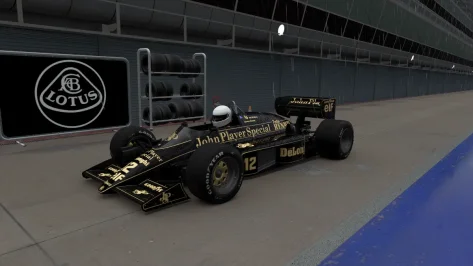
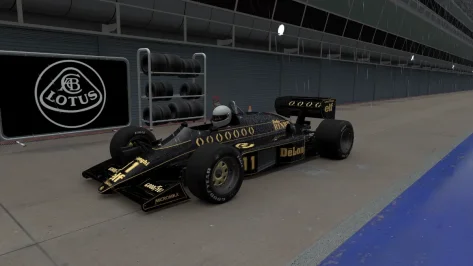
Hope somebody can help. Just started using the KUNOS LOTUS 98T after quite a while and I've noticed that the driver helmet has gone to this grey colour 🤷‍♂️ I'm sure it used to have Ayrton Senna's yellow helmet, any ideas as to why its changed ? Tried an integrity check its doesn't change it.

Regards

Mark
 

Attachments

  • Screenshot_lotus_98t_rj_monza_25-0-126-19-41-5.webp
    Screenshot_lotus_98t_rj_monza_25-0-126-19-41-5.webp
    81.3 KB · Views: 11
  • Screenshot_lotus_98t_rj_monza_25-0-126-19-36-22.webp
    Screenshot_lotus_98t_rj_monza_25-0-126-19-36-22.webp
    81.4 KB · Views: 14
not for the purists , but if you want some quick laps against ai which doesn't all have black skins, you can grab these fictional skins I made for the Grand Prix 2026 CAD26 mod by SDD.

preview.webp
preview.webp
preview.webp
preview.webp
preview.webp
preview.webp
preview.webp

download available here

I also think the tyres were too reflective, so in the mods general ext_config.ini best add this:
Code:
[SHADER_REPLACEMENT_...] ;improve tyres
ACTIVE = 1
MATERIALS = RTT_TIRE, RTT_TIRE_TREAD
PROP_... = ksAmbient, 0.04
PROP_... = ksDiffuse, 0.1
PROP_... = ksSpecular, 0.01
PROP_... = ksSpecularEXP, 100
PROP_... = fresnelMaxLevel, 0.01
PROP_... = fresnelEXP, 5
PROP_... = fresnelC, 0.007

(if not the tyres will not look as in the screenshots, and in game , esp in VR they are way too shiny otherwise imho)
 
Last edited:
Refracting headlights for the Aston Martin AMR1

Copy the the values below into your ext_config.ini.

1769372398713.webp


[REFRACTING_HEADLIGHT_0]
POPUP_ENABLED=0
SURFACE = headlightr_a_SUB3,headlightr_a_SUB4,headlightl_a_SUB4,headlightl_a_SUB3
INSIDE = headlightr_a_SUB1,headlightl_a_SUB1,headlightlbulbs_a
RELATIVE_TO =
SYNC_EMISSIVE_AUTO = 1
ABSORPTION = 0.12
AMBIENT_MULT = 1
BASE_EMISSIVE_K = 1
BOUNCED_BACK_MULT = 0.75
BULB_BLUR_K = 4
BULB_REFLECTION_K = 0.1
CUSTOM_BULB_0 = 0.5,0.5,0,0
CUSTOM_BULB_1 = 0.5,0.5,0,0
CUSTOM_BULB_2 = 0.5,0.5,0,0
CUSTOM_BULB_3 = 0.5,0.5,0,0
DIFFUSE_MAP_FILTER_MULT = 1.19
DIFFUSE_MAP_MULT = 1
DIRECTION = 0,0,-1
DYNAMIC_EMISSIVE_MAP = 0
EMISSIVE_MULT = 100
EXTRA_GLASS_COLORIZATION = 1
EXTRA_SIDE_THICKNESS = 0
F0 = 0.48
GLASS_COLOR = 0.25,0.25,0.25
GLASS_EMISSIVE_MULT = 0.89
GLASS_EXTRA_THICKNESS = 0
INNER_SPECULAR = 6.9
INNER_SPECULAR_EXP = 178
IOR = 1
IOR_FLYOUT_FLAT = 0
LOD_BIAS = 2
MIRROR_2_AS_5 = 0
MIRROR_3_AS_4 = 1
MIRROR_DIR = 1,0,0
MIRROR_POS = 8.046627e-07,0.39471573,1.9302659
NM_SHARE_EXT = 0
NM_SHARE_INT = 1
ORIGIN = 0.74885917,0.39471647,1.9357328
RADIUS = 0.1935346
REFLECTIVENESS_DIFFUSE_MULT = 100
REFLECTIVENESS_MULT = 10
REFLECTIVE_GAMMA = 0.4
REFRACTION_MASKING = 0
SIDE_FALLOFF = 3.16
USE_COLORED_BULBS = 0
USE_CUSTOM_BULBS = 0
USE_NORMAL_ALPHA = 0


[EMISSIVE_LIGHT_...]
NAME=headlightlbulbs_a
COLOR=1,1,1,1
LAG=0.1
LOCATION=FRONT
BIND_TO_HEADLIGHTS=1
CAST_LIGHT=1
CLUSTER_THRESHOLD=1.0

Mod is from KJRacing81 / Lu Thua Kien
 
Last edited:
I do feel your pain, but my last criticism about his work, if you consider his $52280 monthly from Patreon, did introduce me too a couple of angry Ilya fanboys 🤐
Could sent you my settings


Thanks for noticing, that @Young78 is the Fat-Alfie from the car mods. His car mods are much better then of all the paid mods I ever did drive. Young78 Keep on the great work.
I am close to quitting patreon support due to lack of care.

Ilya never replies.
Legit one update from next always makes something go boom.
We are like years from stable build because code they keep rewriting 100 times over.

Biggest issue is that the physics part of new csp updates are really good.
So teams like URD that release new mods that have cosmic suspension/raycasting to fix kerb tire thing and is built on FIA / manufacturer / driver / telemetry data etc require newest CSP but than you run into ****** issue where I can't for life of me find what pile of crap graphics settings changed from previous to newest paid version that causes this glitching.

I know its something to do with lightning and skin but like what setting. Its going 1 to 1 and changing it to figure this horse**** out.
 
Monza 2025 (beta 0.92)

monza_2025_beta

Throwing this out there for anyone to try in the hopes to get a little feedback. I am concerned about flickering on the sponsor banners. I had to fix a lot of them and redo a lot of the uv mapping for the textures. I do not see any but i'm on an old CSP version and don't know if that would make a difference.

Don't let the name fool you. This is not a representation of the track in 2025. It's just a name I picked so I can separate this version from the Kunos version in my CM track list. It is nothing more than all of the mods i've created or downloaded for Monza rolled into one track so I can keep the original Kunos version 'clean'. It is a beta version (about 90% complete) so you can expect to see some obvious mistakes and maybe some poor texture choices. Because it's based on the original Kunos track, you are free to use any mods for that track with this one, such as ai files, track skins, etc. The one thing you can't do is use a mod that will overwrite the ext_config file. That would cause some issues.

Credits:
-- @Masscot for the animated flagmen and balloons
-- Assets used from the monza2022crf version of the track.
-- knicker for the crowd files.

While this track is not as confusing as some of my other ones, I still need to explain a few things:

-- There are two layouts, the base layout and a raceday layout that adds sponsor banners in some spots based on a 2025 GT World Challenge video I watched as a reference. The raceday layout is best to use with modern cars because the sponsors wouldn't make much sense for cars 10+ years old. Also, when using the raceday layout, I would suggest enabling the 2025 Raceday track skin to complete the look.
-- There are four 'Years' track skins that will bring back certain buildings and structures to make the track more period accurate. For example, enabling the 2010 (probably should have been named pre-2010) skin will make the track look like the Kunos default version with no structures hidden.
-- For performance reasons, I have the animated flagmen and live jumbotron displays off by default for older computer users. You can turn them on by enabling the appropriate track skin. Plus it's nice to turn them off when driving a practice session.
-- Last thing, there is a huge difference in how bright the crowds look depending on whether you use CSPs 'New spectators rendering method' so you might have to do some adjusting to the ambient and diffuse values in the camera_facing file. I have it setup for my CSP options, but yours may be different.

Have fun and hope to hear from someone on any issues you may see. If not, then i'll just keep plugging along thinking everything is all right.
Track has been updated to version 0.92. Use the link in the quote to get the update. Disable any track skins you are using first then extract and overwrite when it asks. Or the safer method would be to delete your existing track folder first.

I wasn't planning such a quick update, but we got 16" of snow today. When you are stuck in the house, you have plenty of time to work on things.

Updates:

-- Removed the AGIP logos from the track surface for the 2023 and 2025 track skins. Thanks to @Quark67 for pointing out they should be removed. I tried my best to blend the new texture mapping on the meshes with the surrounding surfaces, but the one coming out of Ascari was way too difficult to match. Hopefully it's not too noticeable.
-- Moved one of the Ascari Rowe banner meshes to a more accurate location based on race footage.
-- More tree shifting to eliminate some trees from poking through walls.
-- Some objects removed for 2025 to better match race footage.
-- First attempt at making the track look resurfaced for 2025. At the moment you will need to enable the 2025 track skin to make it work. I may eventually make it a separate track skin just in case anyone wants to make their own version. And i'm still waiting to hear if it is too dark.
-- Added the Monza logo to the object at the start of pit lane.

I think that's all I did.

Screenshot_yzd_aston_martin_v8_vantage_gte_rj_monza_25-0-126-22-20-45.webp
 
Last edited:
I'm actually back with yet another question: Since I am working a bit to improve the DRM-Revival mod I wanna ask if experts know or even can remember (I should for ex. but cannot, also don't find too many pix via Google) which cars in the DRM had yellow headlights!? Since I have learned how to mod the range and also the color of headlights (giggity) I want to try and improve that on those awesome cars as well for even more realism. - Oh and if someone maybe knows how I can make an orange skin for the crew in GIMP that would also be nice to knöw you knöw.Thank ye.👍

Edit: So have found a bit of info about the yellow headlights and modded it accordingly. The question how to get an orange crew overall (Team Jägermeister is my goal) however is still hot. Thx!
 
Last edited:
I've updated the 3 tracks.
shi
Chatham Hills Raceway v1.5

View attachment 1216062
A fictional circuit in USA.
Conversion from GTR2.

-CSP recommended
-26 pit/start
-AI, cam
Credits & Thanks;
Original track made by ISI for Sportscar GT
Conversion to rFactor by Bud Lucas
Almost completely rebuild by @Zwiss for GTR2
-Thank you for giving me permission (Zwiss)

AC Converted by @shi (shin956)
AI lines, sidelines and ai_hints.ini by IMEAN
Cams and ext_config by @CrisT86
logo.png and sections.ini by @Fanapryde
Crowds texture by Kniker97
Car objects by Ben O'Bro (https://www.overtake.gg/downloads/track-props.37866/)
some textures by kunos
Test and Feedback by @Masscot

Enjoy.

;;;;;;;;;;;;;;;;;;;;;;;;;;;;;;;;;;;;;;;;;;;;;;;
v1.3 changelog;
-Fixed many of the normals.
-Spectators are now supported for camera_facing.
-The model of the cars has been changed.
-Fixed billboard mapping.
-Added groove/skidmark.
-Updated flag and Billboard textures.
-Updated VAO-patch.
-Updated preview.
-Smoothed road surface.
-Added cams by CrisT86.
-New ext_config by CrisT86. (Edited by me)

v1.4 changelog;
Added AI lines, sidelines and ai_hints.ini created by IMEAN. (Thanks!)
Added 3D terrain.
Added more trees.
Added marshalls and cameramans.
Replaced and updated some textures.
Update shaders.
Updated ext_config and VAO-patch.
Recreated the groove and skidmarks.
Fixed road surface mapping.
Fixed floating objects.
Fixed grass holes.
Changed crowd textures by Kniker97. (Thanks)
Smoothed the edge of the road surface.
Removed unsightly tents.
A few other minor fixes.

v1.5 changelog;
Fixed floating trees.
Fixed light pole mapping.
Fixed mapping for several adboards.
Fixed one-sided objects.
Updated several textures.
Updated ext_config and VAO-patch.
A few other minor fixes.

Chatham Hills Raceway v1.5

v1.5 changelog;
Fixed floating trees.
Fixed light pole mapping.
Fixed mapping for several adboards.
Fixed one-sided objects.
Updated several textures.
Updated ext_config and VAO-patch.
A few other minor fixes.

Screenshot_bmw_m3_e30_dtm_chatham_9-0-126-16-38-16.webp


shi
Circuit Piddy v1.2

View attachment 1347713
Fictional circuit in Switzerland.
Conversion from GTR2.

-CSP recommended
-36 pit/start
-AI, cam
-2 layouts (SH and SAH)

Credits & Thanks;
Original Track by Fredhot & Neel Jani
-Attempts to contact them have gone unanswered. Thank you for their work.

AC Converted by @shi (shin956)
logo.png and sections.ini by @Fanapryde
Billboard textures by @Masscot
cameraman and textures by kunos
Test and Feedback by @Masscot , @twobegreen

Enjoy.
Converted upon request by Patreon member Rainer Musch.

;;;;;;;;;;;;;;;;;;;;;;;;;;;;;;;;;;;;
v1.1 updated by @Masscot (April 2024)

Animated flag-waving spectators added
Patrolling helicopters added
Blimp and hot-air ballons added
Some adboard textures changed/corrected
New start/finish gantry track logo
New grandstand icon
New grass texture and tweaked GrassFX config
New distance markers
Trees darkened, some normals fixed
New loading logo and track previews

-Fixed grass mapping to reduce tiling.
-Updated flags.
-Changed crowd textures by @Kniker97 . (Thanks)

v1.2 changelog;
Even when CSP settings → General Patch Settings → CPU optimizations → Chunks optimizations are set to Advanced, ground objects are no longer hidden. (Tested with CSP 0.2.12-preview1.)
Updated ext_config.ini.
Reworked skidmarks.
Recreated the sidelines for both layouts.
Added Garage Doors.
Added more marshalls.
Adjusted the size of the gantry adboards.
Fixed fence mapping.

Circuit Piddy v1.2

v1.2 changelog;
Even when CSP settings → General Patch Settings → CPU optimizations → Chunks optimizations are set to Advanced, ground objects are no longer hidden. (Tested with CSP 0.2.12-preview1.)
Updated ext_config.ini.
Reworked skidmarks.
Recreated the sidelines for both layouts.
Added Garage Doors.
Added more marshalls.
Adjusted the size of the gantry adboards.
Fixed fence mapping.
Screenshot_ks_maserati_mc12_gt1_piddy_10-9-125-15-6-47.webp

shi
Solvalla Stockholm v1.2

View attachment 1292944
Solvalla Stockholm is a temporary motorsport race track in Sweden. The circuit is located in the Bromma district west of the Swedish capital Stockholm. Rather than using the streets of the city, the track itself will use the horse racing venue, making it the first stadium circuit in Sweden. (Wikipedia)
Conversion from RACE07.

-CSP recommended
-15 pit/start
-AI, cam

Credits & Thanks;
Original Track by Neteye
RACE07 Updated version by AndreasFSC
-Thank you for giving me permission (Both).

AC Converted by @shi (shin956)
logo.png and sections.ini by @Fanapryde
Crowds texture by @Kniker97
ambulance and some textures by kunos
Test and Feedback by @Fanapryde

Enjoy.
;;;;;;;;;;;;;;;;;;;;;;;;;;;;;;;;;;;;;;;;;;;;;;;
v1.1 changelog;
Smoothed the white line.
Fixed the buried mesh.
Upscale the Solvalla logo texture using AI.
Updated the podium texture.
Updated ext_config.ini and VAO-patch.
Some other minor fixes.

v1.2 changelog;
Recreated the fast_lane.ai and sidelines.

Solvalla Stockholm v1.2

v1.2 changelog;
Recreated the fast_lane.ai and sidelines.
 
Sharing a mod? Host it on GTPlanet Downloads. Free, public hosting for files up to 10GB in size.
Back