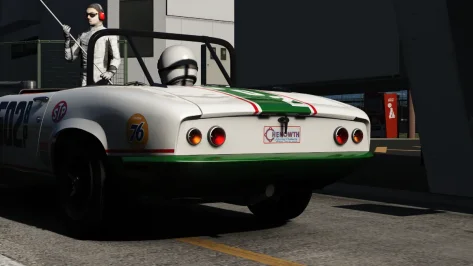
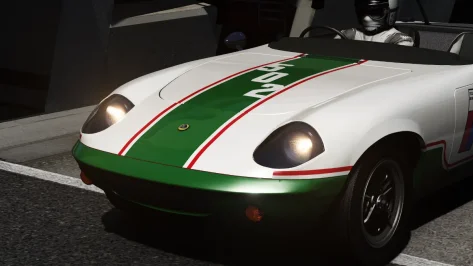
Is it just me, or are the speedometer and tachometer not working?😅😅😅
Lotus Elan SCCA Spyder updated to 3.1,
Added the LODs via @ItsHords
Added refraction & mirror fix by @k_p
Thank you both for the additions and fixes, be sure to keep your eye on your inbox for a 250GTO livery later
View attachment 1521134


does this need a special patch version to work? in my car the hand is always on the shifter and neither the hand or the shifter move when shifting.This is the first mod I'm aware of (please correct me if there's another) that uses different push/pull animations for the up/down sequential shifting. Kudos, @Koldo83. A great little detail that adds a lot to VR immersion, and a fantastic car overall. Great job!



Data isn't encrypted, You just can't have the data folder as an different name unless you have unpacked the data folder before handNot even an hour after releasing it lol
View attachment 1521039
Since he seemingly encrypted the data folder I can't manually transfer the LODs, anyone able to help with that? I'll pass the credits for LODs to the one who does and send them an unreleased livery for their help

it can be skinned but not sure i would want to get invloved. depending on what actual livery they put on it will be the deciding factor.Nah **** you right, I thought this one was 'hard' encrypted but you can use the AO. My bad


it can be skinned but not sure i would want to get invloved. depending on what actual livery they put on it will be the deciding factor.
Because its a 1 off vehicle it will be liveried up-to-the-max.
it gives me renault 5 gt turbo cup vibes or btcc escort vibes......
its not something i would get involved in it will be popular enough that there will be afew people try and skin it i would imagine, i will step aside and let them have a go.
View attachment 1521133


What is the point in this ???Data isn't encrypted, You just can't have the data folder as an different name unless you have unpacked the data folder before hand
But put this in the lods.ini file, according to his stuff. Though looking at those LODs you'd be better off just not using them cause holy **** they are bad.
[COCKPIT_HR]
DISTANCE_SWITCH=7
[DRIVER_HR]
DISTANCE_SWITCH=25
[LOD_0]
FILE=lotus_elan_spyder.kn5
IN=0
OUT=15
[LOD_1]
IN=15
OUT=45
FILE=lotus_elan_spyder_lod_b.kn5
[LOD_2]
IN=45
OUT=201
FILE=lotus_elan_spyder_lod_c.kn5
[LOD_3]
IN=201
OUT=15000000000
FILE=lotus_elan_spyder_lod_d.kn5


That's a remnant of my original lod-less patch, don't ask a painter to programWhat is the point in this ???
[LOD_3]
IN=201
OUT=15000000000
FILE=lotus_elan_spyder_lod_d.kn5
This is 15 million kilometers, LOD_3 is visible from this distance... WTF ?

If you are not looking from space, usually for any car model it is pointless to be visible beyond 2km, which is 2000 in AC.That's a remnant of my original lod-less patch, don't ask a painter to program
Ask ACTK. The model don't even need lods in the first place imo, Its low poly enough that an pc from 2002 should be able to run with 20+ cars on the grid without breaking an sweat. If anything just the first two lod's are enough if you really want lods.What is the point in this ???
[LOD_3]
IN=201
OUT=15000000000
FILE=lotus_elan_spyder_lod_d.kn5
This is 15 million kilometers, LOD_3 is visible from this distance... WTF ?

 www.overtake.gg


Weird. Works fine for me using the latest CSP.does this need a special patch version to work? in my car the hand is always on the shifter and neither the hand or the shifter move when shifting.


1997, 1998, 1999, 2025 of BTCC is fully completed (just some of the cars are made on the wrong generation cars)This is the only JGTC season I know of that is fully complete (At least, on the GT500 side):
JGTC 2000 Season Skin Pack
This pack contains the skins for all 22 cars which participated in the 2000 All Japan Grand Touring Car Championship (JGTC) GT500 class. All skins are available in either 2k or 4k resolution, just select the folder you want and copy/paste to your...
Does anyone else know of any other JGTC, BTCC or similar series that is also like this (I.E fully complete?)
It's such a damn shame with all of those projects, and other ones like the Portugal Open World project. Even some like their 610 Challenge were advertised like crazy, only to find out that they were commissioned for a random gaming lounge. I just don't understand this business model. It feels like they're pretending to be another RSS/VRC/URD but not releasing much to the public, with like you said "carrot-dangling" while Patreon subs money keeps coming in with little being delivered. Basically turning AC modding into corporate selling projects and trying to buy licensing for real tracks.The Indycar content for Authentic Sim seems to be dead at this point. Detroit, Nashville, and St Pete have all been in beta for years now, with no substantial updates or progress shared. Authentic Sim seems to have the same issue that Historic Sim Studios has: tons of new projects /WIPs being added with no release for any of them in sight, just endless carrot-dangling. In their 2025 Year End Update, they're promising the Markham Street Circuit already, but based on the aforementioned tracks, I'd imagine it won't be released in a v1.0 state.
EDIT: just want to clarify that I respect the work of all the talented modders who are making said content, it's the management of their Patreon / lack of delivering on promises that is the frustrating bit.

Here it is!the livery of the press images will be used for NLS2 and the 24H Qualifiers race........for the 24h Nurburgring race there will be a new livery on that car


I almost only race VRC SuperTourers, Prototypes, and F1. I tried your suggestion and loaded up 25 RSS car fields in their GT3 and F1 fields and had no problems. Loaded up a 19 car field with VRC F1 car and immediately replicated 99% Occupuncy warning with massive freezing in game. This saddens me because I love VRC Supertourers which will almost always give me the error too.This happens when things are not made to the Kunos pipeline. This car, along with most of their others, are extremely unoptimized. Every car you have on the grid loads in 7 steering wheels. That is 140 high res steering wheels being loaded into your game. Things like that will kill performance. Now go load up a grid of RSS cars. The models have more triangles and details, yet they run extremely smooth. You can tell they spend time on optimization.


Just drive the non-CSP VRC Super Tourers. Problem solved.I almost only race VRC SuperTourers, Prototypes, and F1. I tried your suggestion and loaded up 25 RSS car fields in their GT3 and F1 fields and had no problems. Loaded up a 19 car field with VRC F1 car and immediately replicated 99% Occupuncy warning with massive freezing in game. This saddens me because I love VRC Supertourers which will almost always give me the error too.
Thanks for the info that helps me not wanna pull my hair out in frustration now. I should have tried other vehicles but I just love the VRC Supertourers so much. Are there optimized touring cars out there that are worth driving?


Uncheck "Straighten AIs trajectory when starting" in AI (New Behavior).Has anyone noticed that with the new CSP preview the AI just completely stopped battling each other? I did a 5-lap race at Brands Hatch with a bunch of cars (Ben O'Bro's Caterhams + Kunos's MX-5 Cup and 500 Assetto Corse) and they literally stayed in a train-like formation the entire race with 0 battles between themselves, it's pretty annoying that Ilya fixing some stuff with the AI broke something else. I had to revert back to the preview before to actually seeing them battle each other.


Is it just me, or are the speedometer and tachometer not working?😅😅😅Lotus Elan SCCA Spyder updated to 3.1,
Added the LODs via @ItsHords
Added refraction & mirror fix by @k_p
Thank you both for the additions and fixes, be sure to keep your eye on your inbox for a 250GTO livery later
View attachment 1521134



I'm on the latest version of CSP; I haven't tried previous versions. I had to use a Lua script to get it working. No one else has reported the window problem to me. Try deleting the car folder and reinstalling it manually to rule that out. I'll check it out anyway.does this need a special patch version to work? in my car the hand is always on the shifter and neither the hand or the shifter move when shifting.
The legs do move when shifting.
@Koldo83?
also the inside side window is set to transparency: no, but as it is encrypted, it cannot be changed in CM.
Is it just me, or are the speedometer and tachometer not working?😅😅😅
Lotus Elan SCCA Spyder updated to 3.1,
Added the LODs via @ItsHords
Added refraction & mirror fix by @k_p
Thank you both for the additions and fixes, be sure to keep your eye on your inbox for a 250GTO livery later
View attachment 1521134

Yes, good tip, first thing I did, the issue is only in VR, the glass does not look transparent when transparency is not set to yes. Usually a quick fix in custom showroom, if the car is not encrypted.I'm on the latest version of CSP; I haven't tried previous versions. I had to use a Lua script to get it working. No one else has reported the window problem to me. Try deleting the car folder and reinstalling it manually to rule that out. I'll check it out anyway.