- 585

- Germany
Could you show it and could you please share your CSP settings?Weird, that's nothing like what I'm seeing with default settings.
Could you show it and could you please share your CSP settings?Weird, that's nothing like what I'm seeing with default settings.
Thanks, maybe Golf I, I'll see if I find the time.Thanks for that, man! 3 ACE cars within one week. Do you see a possibility to convert also the Golf I and VIII?
Appreciate your hard work!
Thank you.
View attachment 1532110
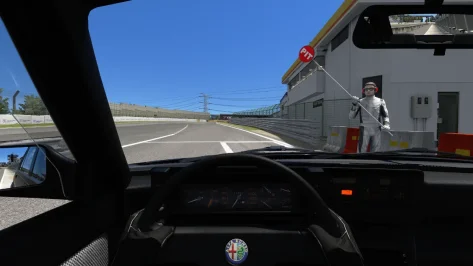
Thanks for this. Great car, looking forward to the new physics. I did a couple of tweaks if you want to test them. Might mainly be good for VR users or if you drive pancake in first person with the driver visible.
1. Attached is a new shift animation (no more exaggerated loop, and closer to the gearknob) and driver rescale/reposition to get his hands on the steering wheel rim when turning. Remove the .txt extensions and place in the 'animations' folder.
Disclaimer: Kunos driver postures don't like high t-bar steering wheel designs like the one in this Alfa, so the thumbs clip through this a little. But it's a necessary compromise to get the hands on the rim when turning, which is much more important (in VR, anyway).
Important: change LOCK to =320 in data/driver3d.ini to also synch the hands better with the rim rotation.
2. There's a lot of daylight leakage around mesh seams on the dashboard, door cards and A-pillars, so add this to the config to fix that:
Code:;stop sun ingress around cockpit mesh seams, into footwells etc [SHADER_REPLACEMENT_...] ACTIVE = 1 MATERIALS = EXT_PLASTIC_BLACK, EXT_BODY;external bodywork, trim, pillars, dashboard etc CULL_MODE = DOUBLESIDED CAST_SHADOWS = 1 DOUBLE_FACE_SHADOW_BIASED = 1
One more observation: for me (latest CSP, latest Pure LCS, Pure PPF) the dashboard instrument emissive glow seems overly bright. is anyone else getting this?
This is in daylight - at night of course, it's even brighter:
View attachment 1532216
Anyway, hope that helps. Feel free to ignore.
Thanks, for fixes. I must admit that I used some driver and just reposition and scale so animations are not perfect.No loads as normal for me, I am on CSP 0.2.11 No Pure or such
Yes


Just to be clear, the example I gave you on your Discord is a standard Kunos car.Maybe those lights were made much brighter in the cars config to force more glare. Now with the fixed sun speculars the glare was changed in the standard pure ppfilter.
Could be that those lights are too strong anyway in comparison to world lights. But there must be a decent difference to much brighter world lights.
Would be interesting to see the difference of standard Kunos cars configs and the configs where this problem appears…


It is just the Glare effect which works now properly in VR too.Just to be clear, the example I gave you on your Discord is a standard Kunos car.
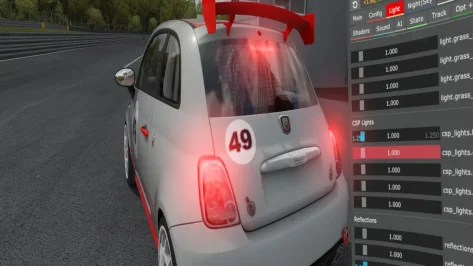
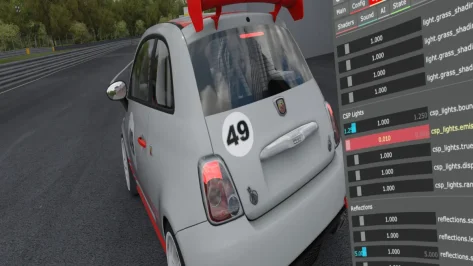
Problem with CSP Lights Emmisive - using CSP 0.3.x I have to set emmisive to 0.01 as default setting at 1 is super-duper emmisive. I have uninstalled csp and Pure, reinstalled and still the same. I hit Reset to Defaults in Pure before taking the images. When I revert back to CSP 0.2.12 the lights are behaving normally.
Image 1 is default settings in Pure - Image 2 is with CSP Light Emmisive reduced to 1%
using PureVR PP Filter and VR headset

AC is an emotional rollercoaster... After my joy this morning, I find that this update isn't working for me; this is disheartening... 😩 Is anyone else experiencing the same issue?Little update to @blackbolt2017 Alpine A110S...


thanks but when i tried adding my plates they are inverted and upside down. is there a possibilty to fix that?Little update to blackbolt2017 Alpine A110S
Changes:
- added selflighting to headlights and taillights
- mask_gbuffer to allow to selflighting to be seen
- added license plate and ilumination for that
- now cateye reflectors in rear bumper reflect light
- modified glass shader for lights to refract meshes inside when looking at an angle
View attachment 1532594View attachment 1532595
What not working? License plate or lighting? I added few lines to original ext_config so it should work. Try fixed file in original post because I maybe set wrong origin in blender.AC is an emotional rollercoaster... After my joy this morning, I find that this update isn't working for me; this is disheartening... 😩 Is anyone else experiencing the same issue?
Fix in original post.thas
thanks but when i tried adding my plates they are inverted and upside down. is there a possibilty to fix that?


No, i just stayed with the previous version..anyone figured out how to get AI's launching at monaco_GP_2013 ? ( details )
Nothing... The .ini extension isn't activating, the license plates aren't showing up, the cateye reflectors aren't appearing, and I don't see any changes to the lighting... I don't know what I'm doing wrong...What not working? License plate or lighting?...
Strange, I wonder if it's just on your side. Was original file working corectly? I don't know otherwise, no one reported that it didn't work.Nothing... The .ini extension isn't activating, the license plates aren't showing up, the cateye reflectors aren't appearing, and I don't see any changes to the lighting... I don't know what I'm doing wrong...
By the way, I'm trying to download your file again to test it, but it's no longer available in the downloads section...
(For the full experience, please play this on background while reading this post...)
Inductees of my Very Personal Hall of Fame, for their invaluable work in helping solve Assetto Corsa problems that drive bananas clumsy ignoramuses like myself:
- @Alx Hill, for finding the solution to the capricious behavior of objects appearing and disappearing on tracks depending on the viewing distance: https://www.gtplanet.net/forum/threads/assetto-corsa-pc-mods-general-discussion.307899/post-14537752
- @Swisss, for finding the solution to configuration problems for three monitors after a significant jump between CSP versions: https://www.gtplanet.net/forum/threads/assetto-corsa-pc-mods-general-discussion.307899/post-14521752
... to which today I have the pleasure to add another of these (for me and my peace of mind) unsung heroes, who is none other than...
- @greunix, whose first and only post to date on this forum has left a deep impression on me, as he has finally made those damned, misplaced reflections from the brake lights and glowing brake discs disappear from my sight once and for all: https://www.gtplanet.net/forum/threads/assetto-corsa-pc-mods-general-discussion.307899/post-14595646
Always remembered, always praised, my eternal gratitude to you, buddies...

Since this last update it's not letting me update the car previews. It just clips my CPU usage and stays on the "Updating Previews" menu endlessly...Car updated to 1.1
Changes:
View attachment 1532580
EDIT:
Update 1.2
- fixed gauges and needles being to dark in certain conditions when using gamma. It still depends on how ppfilter use auto exposure inside car.
View attachment 1532625


How did you solve it?View attachment 1532212
Well I fixed my AC loading issue and now I have another one, this one I've tried tweaking several settings for and still having issues here. No idea what to do here does anyone have any suggestions please?


dd wheels seems like a complete waste of time on AC as the ffb is so good. and on so many other games it seems just like endless hours of setup changes. Id like to get it working perfect on Live for Speed, with the recent update that game feels amazing to drive, just not enough ffb and haptics.Since I've had my CSL Fanatec 8nm i've really struggled with AC. Just cant get it feeling like how my TX did, which I know is very weird, in AMS2 and RF2 its transformed those games, totally, to the point AMS2 seems to me like a new game and dare i say it some of the cars FFB and feeling is sublime.
So last night i set my FFB in fanalab to 3.9 nm, similar to old TX. And its back again, AC feels like AC again.
This must be because surely i've been 4000hrs and 9 odd years playing AC on a TX and to much familiarity with lower forces.
Or is there more to it? What sort of DD wheels were available to average consumers 10 years ago? Was AC developed to work with TX type wheels? I don't know, all i know is AC feels like AC to me again now.
Anyone else use a CSL?


Im on csl dd 8nm few years, upgrade from geared wheel. It feels exactly like it should in AC, more details in center and faster response. What are Your expectations from dd? It's hard to tell from Your post why it feels inferior to You from belt driven wheel. AC feels like AC not helping. There were plenty dd wheels back when AC was developed. Plus now you can try alternative ffb plugins for AC. Setting it to 4nm is weird thing to do. I recommend instead setting in fanatec driver 95-100% in game 70 and paying attention to clipping meter in game, if You have a lot of clipping that may be why it feels bad for You. Could be defective equipment.Since I've had my CSL Fanatec 8nm i've really struggled with AC. Just cant get it feeling like how my TX did, which I know is very weird, in AMS2 and RF2 its transformed those games, totally, to the point AMS2 seems to me like a new game and dare i say it some of the cars FFB and feeling is sublime.
So last night i set my FFB in fanalab to 3.9 nm, similar to old TX. And its back again, AC feels like AC again.
This must be because surely i've been 4000hrs and 9 odd years playing AC on a TX and to much familiarity with lower forces.
Or is there more to it? What sort of DD wheels were available to average consumers 10 years ago? Was AC developed to work with TX type wheels? I don't know, all i know is AC feels like AC to me again now.
Anyone else use a CSL?
No its not that, at full 8nm and in the Porsche Clubsport race car it feels like the car is bouncing, it felt this way with my TX, but at 8nm its just too much, at 3.9nm it feels like it used to. Like i say in all other racing games its transformed them and the Fanantec is beyond my exspectations.Im on csl dd 8nm few years, upgrade from geared wheel. It feels exactly like it should in AC, more details in center and faster response. What are Your expectations from dd? It's hard to tell from Your post why it feels inferior to You from belt driven wheel. AC feels like AC not helping. There were plenty dd wheels back when AC was developed. Plus now you can try alternative ffb plugins for AC. Setting it to 4nm is weird thing to do. I recommend instead setting in fanatec driver 95-100% in game 70 and paying attention to clipping meter in game, if You have a lot of clipping that may be why it feels bad for You. Could be defective equipment.
I'm happy to report that your upgrade is working correctly for me now.Strange, I wonder if it's just on your side. Was original file working corectly? I don't know otherwise, no one reported that it didn't work.
I edited file again few minutes ago, maybe thats why was not available, now it seems download work.
I upgraded from a TS-XW Racer to a T818, and aside from a couple of teething problems with the latter, I'm very happy with the change. It's true that the change is abrupt at first; you go from something you've grown accustomed to over time, to something completely new that you have to get used to. The key is to be patient and take the time to find the right settings, which sometimes takes longer than we'd like.... I am moving towards AC being so good in FFB and feel is the reason i kept my TX for 10 years, I'll keep the new wheel at 3.9 for AC only and i guess over time as i get used to it i'll start increasing it...
Hmm its just not very often someone say weaker belt drive wheel feels better over dd, hence defective equipment was mentioned, not that i notice much constructive criticism or something, mostly subjective expressions how it feels for You. In Your previous post that was.No its not that, at full 8nm and in the Porsche Clubsport race car it feels like the car is bouncing, it felt this way with my TX, but at 8nm its just too much, at 3.9nm it feels like it used to. Like i say in all other racing games its transformed them and the Fanantec is beyond my exspectations.
I am moving towards AC being so good in FFB and feel is the reason i kept my TX for 10 years, I'll keep the new wheel at 3.9 for AC only and i guess over time as i get used to it i'll start increasing it.
I know the general responce to any percieved criticism is to jump to 'defective' hardwear, but its not that, i have also maonly been using AC for drifting for the last year so only just got back to driving the race cars.
It was just interesting to me from the perspective of how all the games that were not that great on the TX, AMS2 ACC are now sublime and, IMO, 'better' than AC...
So yes, i think AC just nailed FFB on a wide range of wheels and now for me a DD is giving me to much info back.
I imagine in 2 years my Fanatec in AC will feel 'exactly like it should'.