Assetto Corsa PC Mods General DiscussionPC 

  • Thread starter Thread starter daan
  • 155,105 comments
  • 49,023,749 views
1778182473642.webp


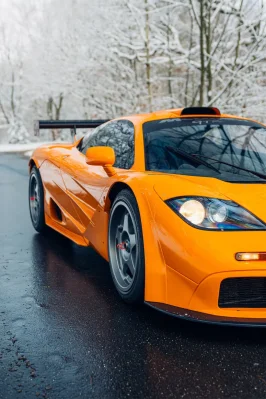
@Pilot3331 I´ve set the emissive multiplier for the front headlights to 0.15 instead of 1. think it suits better. Btw, this car has no headlight beam function....

[EXTRA_FX_EMISSIVE_...]
MESHES = mcl_f1gt_97_cockpit_interior_gauge_emissive_,displays
RANGE = 0.22 ; range in meters (by default 0.08 for cars and 5 for tracks)
COLOR = 1.0 ; optional brightness multiplier (could be an RGBA value)
; Optional optimization flags for cars:
INTERIOR_ONLY = 0 ; show up for interior views only
EXTERIOR_ONLY = 0 ; show up for exterior views only

[REFRACTING_HEADLIGHT_0]
SURFACE = mcl_f1gt_97_lod0_headlightL_detail_glass_clear_
INSIDE = mcl_f1gt_97_lod0_headlightL_head_light_
ABSORPTION = 0.02
AMBIENT_MULT = 0.25
BASE_EMISSIVE_K = 0.05
BOUNCED_BACK_MULT = 0.4
BULB_BLUR_K = 2
BULB_REFLECTION_K = 0.2
CUSTOM_BULB_0 = 0.5,0.5,0,0
CUSTOM_BULB_1 = 0.5,0.5,0,0
CUSTOM_BULB_2 = 0.5,0.5,0,0
CUSTOM_BULB_3 = 0.5,0.5,0,0
DIFFUSE_MAP_FILTER_MULT = 1
DIFFUSE_MAP_MULT = 1
DIRECTION = 0,0,-1
DYNAMIC_EMISSIVE_MAP = 0
EMISSIVE_MULT = 0.15
EXTRA_GLASS_COLORIZATION = 1
EXTRA_SIDE_THICKNESS = 0
F0 = 0.8
GLASS_COLOR = 0.25,0.25,0.25
GLASS_EMISSIVE_MULT = 0.25
GLASS_EXTRA_THICKNESS = 0.0050000055
INNER_SPECULAR = 10
INNER_SPECULAR_EXP = 800
IOR = 1.5
IOR_FLYOUT_FLAT = 0
LOD_BIAS = -0.5
MIRROR_2_AS_5 = 0
MIRROR_3_AS_4 = 1
MIRROR_DIR = 1,0,0
MIRROR_POS = 0.6236519,0.5111146,1.7918918
NM_SHARE_EXT = 0.5
NM_SHARE_INT = 0.5
ORIGIN = 0.6866393,0.5111146,1.8007689
RADIUS = 0.07247979
REFLECTIVENESS_DIFFUSE_MULT = 60
REFLECTIVENESS_MULT = 10
REFLECTIVE_GAMMA = 1
REFRACTION_MASKING = 0
SIDE_FALLOFF = 0
USE_COLORED_BULBS = 0
USE_CUSTOM_BULBS = 0
USE_NORMAL_ALPHA = 1


[REFRACTING_HEADLIGHT_1]
SURFACE = mcl_f1gt_97_lod0_headlightR_detail_glass_clear_
INSIDE = mcl_f1gt_97_lod0_headlightR_head_light_
ABSORPTION = 0.02
AMBIENT_MULT = 0.25
BASE_EMISSIVE_K = 0.05
BOUNCED_BACK_MULT = 0.4
BULB_BLUR_K = 2
BULB_REFLECTION_K = 0.2
CUSTOM_BULB_0 = 0.5,0.5,0,0
CUSTOM_BULB_1 = 0.5,0.5,0,0
CUSTOM_BULB_2 = 0.5,0.5,0,0
CUSTOM_BULB_3 = 0.5,0.5,0,0
DIFFUSE_MAP_FILTER_MULT = 1
DIFFUSE_MAP_MULT = 1
DIRECTION = 0,0,-1
DYNAMIC_EMISSIVE_MAP = 0
EMISSIVE_MULT = 0.15
EXTRA_GLASS_COLORIZATION = 1
EXTRA_SIDE_THICKNESS = 0
F0 = 0.8
GLASS_COLOR = 0.25,0.25,0.25
GLASS_EMISSIVE_MULT = 0.25
GLASS_EXTRA_THICKNESS = 0.0050000055
INNER_SPECULAR = 10
INNER_SPECULAR_EXP = 800
IOR = 1.5
IOR_FLYOUT_FLAT = 0
LOD_BIAS = -0.5
MIRROR_2_AS_5 = 0
MIRROR_3_AS_4 = 1
MIRROR_DIR = 1,0,0
MIRROR_POS = -0.6236514,0.5111145,1.791892
NM_SHARE_EXT = 0.5
NM_SHARE_INT = 0.5
ORIGIN = -0.56072104,0.5041237,1.7986552
RADIUS = 0.07253679
REFLECTIVENESS_DIFFUSE_MULT = 60
REFLECTIVENESS_MULT = 10
REFLECTIVE_GAMMA = 1
REFRACTION_MASKING = 0
SIDE_FALLOFF = 0
USE_COLORED_BULBS = 0
USE_CUSTOM_BULBS = 0
USE_NORMAL_ALPHA = 1

@Masscot could you change the hack-and-slay shifting animation to something more appropriate, please?
 
Last edited:
View attachment 1535278

@Pilot3331 I´ve set the emissive multiplier for the front headlights to 0.15 instead of 1. think it suits better. Btw, this car has no headlight beam function....

[EXTRA_FX_EMISSIVE_...]
MESHES = mcl_f1gt_97_cockpit_interior_gauge_emissive_,displays
RANGE = 0.22 ; range in meters (by default 0.08 for cars and 5 for tracks)
COLOR = 1.0 ; optional brightness multiplier (could be an RGBA value)
; Optional optimization flags for cars:
INTERIOR_ONLY = 0 ; show up for interior views only
EXTERIOR_ONLY = 0 ; show up for exterior views only

[REFRACTING_HEADLIGHT_0]
SURFACE = mcl_f1gt_97_lod0_headlightL_detail_glass_clear_
INSIDE = mcl_f1gt_97_lod0_headlightL_head_light_
ABSORPTION = 0.02
AMBIENT_MULT = 0.25
BASE_EMISSIVE_K = 0.05
BOUNCED_BACK_MULT = 0.4
BULB_BLUR_K = 2
BULB_REFLECTION_K = 0.2
CUSTOM_BULB_0 = 0.5,0.5,0,0
CUSTOM_BULB_1 = 0.5,0.5,0,0
CUSTOM_BULB_2 = 0.5,0.5,0,0
CUSTOM_BULB_3 = 0.5,0.5,0,0
DIFFUSE_MAP_FILTER_MULT = 1
DIFFUSE_MAP_MULT = 1
DIRECTION = 0,0,-1
DYNAMIC_EMISSIVE_MAP = 0
EMISSIVE_MULT = 0.15
EXTRA_GLASS_COLORIZATION = 1
EXTRA_SIDE_THICKNESS = 0
F0 = 0.8
GLASS_COLOR = 0.25,0.25,0.25
GLASS_EMISSIVE_MULT = 0.25
GLASS_EXTRA_THICKNESS = 0.0050000055
INNER_SPECULAR = 10
INNER_SPECULAR_EXP = 800
IOR = 1.5
IOR_FLYOUT_FLAT = 0
LOD_BIAS = -0.5
MIRROR_2_AS_5 = 0
MIRROR_3_AS_4 = 1
MIRROR_DIR = 1,0,0
MIRROR_POS = 0.6236519,0.5111146,1.7918918
NM_SHARE_EXT = 0.5
NM_SHARE_INT = 0.5
ORIGIN = 0.6866393,0.5111146,1.8007689
RADIUS = 0.07247979
REFLECTIVENESS_DIFFUSE_MULT = 60
REFLECTIVENESS_MULT = 10
REFLECTIVE_GAMMA = 1
REFRACTION_MASKING = 0
SIDE_FALLOFF = 0
USE_COLORED_BULBS = 0
USE_CUSTOM_BULBS = 0
USE_NORMAL_ALPHA = 1


[REFRACTING_HEADLIGHT_1]
SURFACE = mcl_f1gt_97_lod0_headlightR_detail_glass_clear_
INSIDE = mcl_f1gt_97_lod0_headlightR_head_light_
ABSORPTION = 0.02
AMBIENT_MULT = 0.25
BASE_EMISSIVE_K = 0.05
BOUNCED_BACK_MULT = 0.4
BULB_BLUR_K = 2
BULB_REFLECTION_K = 0.2
CUSTOM_BULB_0 = 0.5,0.5,0,0
CUSTOM_BULB_1 = 0.5,0.5,0,0
CUSTOM_BULB_2 = 0.5,0.5,0,0
CUSTOM_BULB_3 = 0.5,0.5,0,0
DIFFUSE_MAP_FILTER_MULT = 1
DIFFUSE_MAP_MULT = 1
DIRECTION = 0,0,-1
DYNAMIC_EMISSIVE_MAP = 0
EMISSIVE_MULT = 0.15
EXTRA_GLASS_COLORIZATION = 1
EXTRA_SIDE_THICKNESS = 0
F0 = 0.8
GLASS_COLOR = 0.25,0.25,0.25
GLASS_EMISSIVE_MULT = 0.25
GLASS_EXTRA_THICKNESS = 0.0050000055
INNER_SPECULAR = 10
INNER_SPECULAR_EXP = 800
IOR = 1.5
IOR_FLYOUT_FLAT = 0
LOD_BIAS = -0.5
MIRROR_2_AS_5 = 0
MIRROR_3_AS_4 = 1
MIRROR_DIR = 1,0,0
MIRROR_POS = -0.6236514,0.5111145,1.791892
NM_SHARE_EXT = 0.5
NM_SHARE_INT = 0.5
ORIGIN = -0.56072104,0.5041237,1.7986552
RADIUS = 0.07253679
REFLECTIVENESS_DIFFUSE_MULT = 60
REFLECTIVENESS_MULT = 10
REFLECTIVE_GAMMA = 1
REFRACTION_MASKING = 0
SIDE_FALLOFF = 0
USE_COLORED_BULBS = 0
USE_CUSTOM_BULBS = 0
USE_NORMAL_ALPHA = 1

@Masscot could you change the hack-and-slay shifting animation to something more appropriate, please?
Hi. Car has no headlight beam function, You mean no light cone, like road in front of car is not lit? That would be strange, it should have it working.
 
Nah sorry I meant the high beam. Not functional.
Oh, I see. That is the case. To be honest I never tested switch between high low beam in any car in assetto Corsa, I don't even know what button does it :). Is it not by default on? Anyways, tell me how do You think it should work, like press lights on it turns on low beam first and as an option it should turn high, or how? And I will try to arrange update for it.
 
Oh, I see. That is the case. To be honest I never tested switch between high low beam in any car in assetto Corsa, I don't even know what button does it :). Is it not by default on? Anyways, tell me how do You think it should work, like press lights on it turns on low beam first and as an option it should turn high, or how? And I will try to arrange update for it.
You may choose if it should be on or not, by default it is enabled trough CM, yes, but I have set that to disabled due to realism. You can bind any button in CM for that.

1778189423674.webp


1778189511592.webp
 
1778231706505.webp
1778231880899.webp
1778232224375.webp

Looks like there are questions for Peter Boese.Some players are complaining about textures disappearing.If I turn off Weather FX, the textures don't disappear.I have personally seen this for myself
 
seems like grand prix historic France (at Paul Ricard where they run old F1 cars) runs sims with my cars. Which seems cool at first glance but I'm quite disappointed that this is paid. 10€ the few laps....... Would been at least quite nice of them to contact me before using my cars on a commercial product. And it's not even consistent across the seats. Some have latest version, some have the very old version
IMG_1529.webp
 
View attachment 1535351View attachment 1535352View attachment 1535354
Looks like there are questions for Peter Boese.Some players are complaining about textures disappearing.If I turn off Weather FX, the textures don't disappear.I have personally seen this for myself
I guess it has nothing to do with Pure! If you use the "default" weather style it is the same?!

I found a bug which is somehow related to ExtraFX in the current and newest CSP builds. So are you using extarFX and do the textures come back if you deactivate ExtarFX?

In my case it is related to certain camera directions and positions.

Actually i don't do any node related manipulations in Pure. So if certain parts of a car are gone, it can't be caused by Pure. If Pure would be the problem everything would be gone, like a skyshader also draws over the track, but then you would see nothing but a static color.


It could also be caused by an app you guys are using. Apps have access to the node structure of CSP/AC and so they can manipulate certain parts. Please check which apps you are using and maybe deactivate them one by one, so you will find out which one is causing it.

Would be crazy if those 4 letters CMRT will come up...
 
Last edited:
I guess it has nothing to do with Pure! If you use the "default" weather style it is the same?!

I found a bug which is somehow related to ExtraFX in the current and newest CSP builds. So are you using extarFX and do the textures come back if you deactivate ExtarFX?

In my case it is related to certain camera directions and positions.

Actually i don't do any node related manipulations in Pure. So if certain parts of a car are gone, it can't be caused by Pure. If Pure would be the problem everything would be gone, like a skyshader also draws over the track, but then you would see nothing but a static color.


It could also be caused by an app you guys are using. Apps have access to the node structure of CSP/AC and so they can manipulate certain parts. Please check which apps you are using and maybe deactivate them one by one, so you will find out which one is causing it.

Would be crazy if those 4 letters CMRT will come up...
I tried all types of controllers, and this happened with all of them. Only turning off Weather FX stopped it.It's true, I didn't think to turn off the extra fx.However, I have never had such phenomena before, and it is a strange coincidence that other people have also experienced this, even on patch 0.2.11.
 
I tried all types of controllers, and this happened with all of them. Only turning off Weather FX stopped it.It's true, I didn't think to turn off the extra fx.However, I have never had such phenomena before, and it is a strange coincidence that other people have also experienced this, even on patch 0.2.11.
Is it only on this track?

For example i have a camera position at mugello where it happens, but it is really rare and the position is outside the track.

But it could be many things. If you can recreate the problem, please capture a camera position in the photo mode app and check if it is only happening with certain cam pos/directions

Or if you can reacreate it, please tell me where, when and under which conditions

I also investigated the position slighty differs between the weatherFX styles, but currently Ilja is checking this bug i have. But it would be interesting if your bug is similar or the same.

Her is the mugello cam file:
Please put it in:
1778241114480.webp

and use point 10. With the "default" weather style, the track should be gone if you select this point.
1778241237078.webp


ExtraFX must be active and at least 1 module of it active!

Until now i found this bug in all CSP versions.
 

Attachments

Last edited:
A lot of companies are doing this. Using free mods to make money. I seen this in Dijon Prenois, Magny-Cours. But here this is the event that making money with your mod. This is really sad…
 
Is it only on this track?

For example i have a camera position at mugello where it happens, but it is really rare and the position is outside the track.

But it could be many things. If you can recreate the problem, please capture a camera position in the photo mode app and check if it is only happening with certain cam pos/directions

Or if you can reacreate it, please tell me where, when and under which conditions

I also investigated the position slighty differs between the weatherFX styles, but currently Ilja is checking this bug i have. But it would be interesting if your bug is similar or the same.

Her is the mugello cam file:
Please put it in:
View attachment 1535373
and use point 10. With the "default" weather style, the track should be gone if you select this point.
View attachment 1535374

ExtraFX must be active and at least 1 module of it active!

Until now i found this bug in all CSP versions.
Personally, I and other players saw this at the Lausitzring DTM '21.Other people have had this happen on other tracks. I don't think the camera position is key, since in my case it was both from the drone camera and from the first-person perspective from the cockpit.
 
A lot of companies are doing this. Using free mods to make money. I seen this in Dijon Prenois, Magny-Cours. But here this is the event that making money with your mod. This is really sad…
I mean I'm not complicated on that matter specifically, like i won't do a "license" thing like RSS do for the use of theirs cars in events like this. But i would have liked basic respect that is to contact me on that matter, so that I would be aware and I could even do custom modification for the need of the event.

The fact that they didn't and as a result spread various version of my mod across their sim (with glaring issues) and didn't even install it correctly (white helmet) piss me off. Like this is unprofessional and unfit of such event.

Having side by side latest version and V1 with one screen the R30 with shiny shaders and the second with older tyre model and mat R30 aghhhhhhhhgh

IMG_1527.webp
 
Last edited:
seems like grand prix historic France (at Paul Ricard where they run old F1 cars) runs sims with my cars. Which seems cool at first glance but I'm quite disappointed that this is paid. 10€ the few laps....... Would been at least quite nice of them to contact me before using my cars on a commercial product. And it's not even consistent across the seats. Some have latest version, some have the very old versionView attachment 1535355
I don't understand why so many F1 setups insist on running on T-cam too. Especially since there is no halo and they're on an ultrawide
 
OP link was updated with fix for proper low beam outside lights position...
As Masscot, I'm too old for this kind of fuss...

Let's see: once your updated mod is installed, what else do I need to install to complete it? Kwara's kn5 and code...? Fall Guy's code...? Something else...? None of the above...? 🙄
 
Last edited:
As Masscot, I'm too old for this kind of fuss...

Let's see: once your updated mod is installed, what else do I need to install to complete it? Kwara's kn5 and code...? Fall Guy's code...? Something else...? None of the above...? 🙄
He he. It's good to do some exercise for brain, to prevent aging. :)
You would need base mod (I assume You got it), archive from AW update, then recommended but optionally You install Kwara's kn5. All code is already updated.
 
Last edited:
I don't understand why so many F1 setups insist on running on T-cam too. Especially since there is no halo and they're on an ultrawide
Simple answer. Lowest Common Denominator. It's easier for the punters. Easier to see the apex, easier to accurately place the wheel at the apex, plus the widescreen gives top-down 180-deg spatial vision for side-by-side. Just easier. We know that's not what the driver can see because cockpit, helmet, seat, and we want to do it, like the driver gets to see it. That's part of our challenge. But they have to cater for the first-time guy, the never will be guy, as well as you and I. And so, LCD. ¯\(ツ)

PS. Pardon for the (not) double posts. Be gentle, please, admins 😊
 
Last edited:
Simple answer. Lowest Common Denominator. It's easier for the punters. Easier to see the apex, easier to accurately place the wheel at the apex, plus the widescreen gives top-down 180-deg spatial vision for side-by-side. Just easier. We know that's not what the driver can see because cockpit, helmet, seat, and we want to do it, like the driver gets to see it. That's part of our challenge. But they have to cater for the first-time guy, the never will be guy, as well as you and I. And so, LCD. ¯\(ツ)

PS. Pardon for the (not) double posts. Be gentle, please, admins 😊
its cheating.
 
He he. It's good to do some exercise for brain, to prevent aging. :)
You would need base mod (I assume You got it), archive from AW update, then recommended but optionally You install Kwara's kn5. All code is already updated.
Thanks for the aclaration. And for worrying about my brain health, although it's probably too late; I think the excessive consumption of Assetto Corsa has fried the few neurons I still had working... 🥳
 
seems like grand prix historic France (at Paul Ricard where they run old F1 cars) runs sims with my cars. Which seems cool at first glance but I'm quite disappointed that this is paid. 10€ the few laps....... Would been at least quite nice of them to contact me before using my cars on a commercial product. And it's not even consistent across the seats. Some have latest version, some have the very old versionView attachment 1535355
If you did all the modelling yourself then i'd let them know and come to some agreement, if you took models from other games then I doubt you have a leg to stand on.

I'm not going to link it, but over on a popular video sharing site there is a guy who has cracked all encrypted mods so i'd expect alot of decripted stuff popping up all over the mod sharing sites.
I daren't try it though.
Let me explain better actually, you download a new cm.exe and it just over rides encryption, so anyone can do it. And they will...
 
Last edited:

Addon Layout for Calabogie Motorsports Park (LilSki)...​

In the west layout, these two tire walls located after the Turn 8 sign and before the start/finish straight (left side of the track) do not have a collision, as can be seen in the images...


Screenshot_ks_lotus_3_eleven_lilski_calabogie_8-4-126-20-6-39.webp


Screenshot_ks_lotus_3_eleven_lilski_calabogie_8-4-126-20-1-57.webp


... and at the pit entrance there is also a group of tires that are not collidable. Thanks.
 
img6.webp

I found this and I’ve been adjusting the flames a bit while checking the mod overall. I feel like it could be even better.

Do you think it could be released publicly once it’s finished? I remember there used to be very strict policies about that back in the day.
It still needs a proper AO pass so it doesn’t look that bright. I’m currently looking into it.
Also, I don’t remember those cars having a 6-speed gearbox like the one in the mod.
 
Sharing a mod? Host it on GTPlanet Downloads. Free, public hosting for files up to 10GB in size.
Back