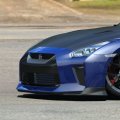
I don't know why but screenshots are a no-go since I don't see anything on my screen when in-game (all black) , only have image in the VR headset (quest3 , usb3 link cable) ...
I will check see later this evening if I have the same when putting on monitor.
EDIT : also on Single screen rendering the difference is visible and representative of what I see in the VR headset to some extent
pure pp filter:
View attachment 1319537View attachment 1319538
with IV PureCS_2.0 filter:
View attachment 1319536View attachment 1319541
Although, here with a sunset and sun directly into the eyes, it get's to be a complete different pic on screen vs VR (for the pure filter)...
View attachment 1319544View attachment 1319543
(left = pure , right = IV PureCS_2.0 )
Here on screen render pure seems better, and in VR the sunlight being brighter is also more realistic , but the instrument panels and steering wheel are almost invisible, they are so dark (much darker then on the screenshot, even darker then how you see on the right screenshot... ).
When I look down (away from the sun) after a second or 2 the image gets much brighter (as if my eyes needed to adjust to the low light condition)... it simulates the eyes closing to protect due to too much light coming in, but that is best left to the actual eye's (no? i could be wrong but now the darkening happens twice, once irl and once simulated...)
With the IV PureCS filter there's also a bit that effect, but it does not darken the dash and wheel to the extent they can't be seen (and it's in VR like in the screenshot)






 )
)