Assetto Corsa PC Mods General DiscussionPC 

  • Thread starter Thread starter daan
  • 157,294 comments
  • 51,168,667 views
Model replacement also allows to inject the new kn5 into any node but I highly doubt it’s related to the windows not being parented to the COCKPIT_HR. I had tried that with other cars before and there are lots of cars without COCKPIT_HR that don’t have rain inside the cockpit. And then there‘s this piece of advice from the car pipeline:
View attachment 1159833

The side windows are fine btw, only the windows that have a black brim are affected.
No maybe you misunderstood or I explained it wrong. I did not mean to put the windows into cockpit_hr, I meant the interior meshes that are receiving rain (all interior meshes should be in cockpit_hr). CSP also uses some other forms of guessing too. Did the car have cockpit_hr? I still have not had time to check.
 
The link doesn´t work ??
Sorry, but first post here and already complaining about a link from 2 years ago which is obviously dead… !?
Why not using the search function and read some more here… ?
There is a track list from @Breathe ( mentioned over and over in this thread) which is very accurate, complete and (due to changing links) for 99% up to date.
Try that one.
 
Anyone know what can cause this weirdness on the tyres in the replay? Looks okay in game.

View attachment 1159818
View attachment 1159821
View attachment 1159822
Looks like the usual case of classic CSP ripples.
They have a weird social effect on people: mention them on Ilya's Patreon and all folks will tell you those are not a priority.


Northern lights are.
Exit Strategy Bai GIF
 
No maybe you misunderstood or I explained it wrong. I did not mean to put the windows into cockpit_hr, I meant the interior meshes that are receiving rain (all interior meshes should be in cockpit_hr). CSP also uses some other forms of guessing too. Did the car have cockpit_hr? I still have not had time to check.
Hm, I am pretty sure that putting the interior into COCKPIT_HR hasn't had much effect on other cars I've tried to fix before, but in this case it actually seems to work, at least there are only a few rain drops left making their way through the rear windows now.
In any case, thanks for putting me on the right track @norms :cheers:
1654953960913.png

Updated config: https://www.mediafire.com/file/qdq6smjka1xrv09/nissan_350z_gt4_le_z33.zip/file

Updated to v0.3, now including working analog fuel indicator.
 
Last edited:
I used AC car tuner and cloned the VRC car 4 times and called each one by the engine manufacturer. Copied the appropriate sound files into each one and then copied the appropriate skins into each one. Worked like a charm and you still keep the original intact.
never used that tool. can you explain how? or do you know any tutorial that i can watch?
 
Hi guys!
I have never used Blender - want to make a groove line.
This is now just a line, how to determine the width?
It should look like a flat ribbon. Or is there a solution other than Blender? This thing is very, very, very annoying...

blender_fastline.jpg
 
Hi,
I have recently updated to CSP 0.1.79p5
I'm not sure if this is related but I suspect since this update, I see these modeling lines
On screenshot I took below, it's on Lotus 72D and lines disappears after several seconds. It reappears sometimes, I don't know why.
But on another car (Peugeot 106 rallye s2 mod), it never disappears
Do you know from where it comes from, and how I can disable this ?
FYI, installing back CSP 0.1.78p1 and the problem has disappeared.
So probably a 0.1.79 csp bug or a new setting to desactivate.
 
FYI, installing back CSP 0.1.78p1 and the problem has disappeared.
So probably a 0.1.79 csp bug or a new setting to desactivate.
Hi , I believe these lines are related to tracking of your VR controllers , at least I've seen them when i pick up my VR controller (and hand motion is then controller by moving the vr controller ... cool, I just hope soon we can also do this with handtracking! )
Anyway, after putting the controller down, these lines dissappear..
Maybe it's your controller coming 'into play' , because you move it or something? First try in 0.1.79p5 try disable this and see if those lines dissappear :
1654963118540.png

1654963156859.png
 
never used that tool. can you explain how? or do you know any tutorial that i can watch?
Here you go. I made a quick beginners tutorial. Hope it makes the basics clear

 
Last edited:
Hi guys!
I have never used Blender - want to make a groove line.
This is now just a line, how to determine the width?
It should look like a flat ribbon. Or is there a solution other than Blender? This thing is very, very, very annoying...
 
Thanks, mate! Yes, I researched and found this post, but 3dsMax can't open the .csv file... Blender has been recommended, but I'm trying unsuccessfully. Import OK but .dae or .fbx export does not work.

PS:
oops... something is happening... maybe success... thanks!
 
Last edited:
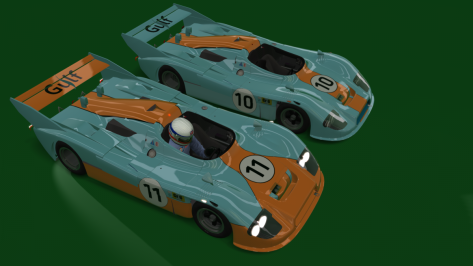
Watching the Le Mans race, I made my version of the 1975/1976 Mirage Gr8 as close as I could get, using the Porsche 936 as a "base car" and then putting in parts from other cars.

Not appearing an "official Mirage" we go with a "fake". later I will adapt the "1976 skins". for the 1977, 1978 and 1979 Mirages, maybe I'll adapt directly to the Alpine-Renault.


I think I'll "redo" it for something better, using Alpine-Renault itself for all versions of the Mirage, the GR8 (1975/1976 ), M9, M10....I analyzed it just now.
 

Attachments

  • __custom_showroom_1654966571.png
    __custom_showroom_1654966571.png
    118.1 KB · Views: 53
Last edited:
Hi , I believe these lines are related to tracking of your VR controllers , at least I've seen them when i pick up my VR controller (and hand motion is then controller by moving the vr controller ... cool, I just hope soon we can also do this with handtracking! )
Anyway, after putting the controller down, these lines dissappear..
Maybe it's your controller coming 'into play' , because you move it or something? First try in 0.1.79p5 try disable this and see if those lines dissappear :
View attachment 1159941
View attachment 1159942
Great Jac0 ! This solves my problem
I have reinstalled 0.1.79p5 and unchecked both "Render controllers as two points" and "Render controllers direction as blue lines" to remove the yellow crosses and blue lines
I guess because my T300 whell is attached to my desk and my controller is also on my desk, small shakes of FFB made the controller move a little ...
Thank you for your help
 
Last edited:
hi, something is off with the taillights, in VR they arre not being rendered correct in right eye it seems, making it "dance" around... I don't know how to better describe it ... but it's very disturbing and makes the car undrivable for me (as I only use VR)
Otherwise it's a gem of a mod , so I hope this can be fixed in a later update.
Our french "friend" made those taillights. I dont have VR so I cant check. But he released another update hours later. Must be really hard to make a living with Sharemods. :lol:
 
Flashing headlights need to be configured in data/lights.ini iirc, don‘t know if there‘s a CSP equivalent. Which Bayro by the way? I have 6...

URD T5 Bayro (2013):
INI:
[LIGHT_0]
NAME=HEAD_LIGHTS
COLOR=300,280,330
; ...

INI:
[HEADER]
VERSION=3
FLASHING_BLINK_TIME=0.15
FLASHING_REPEAT=4

[LIGHT_0]
NAME=HEAD_LIGHTS
COLOR=300,280,330
PITLINE=1
FLASH=1
; ...


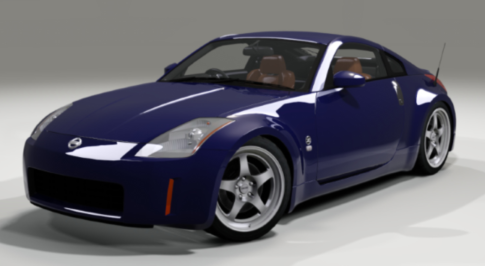
CSP config to add wiper animation and internal windows: https://www.mediafire.com/file/qdq6smjka1xrv09/nissan_350z_gt4_le_z33.zip/file

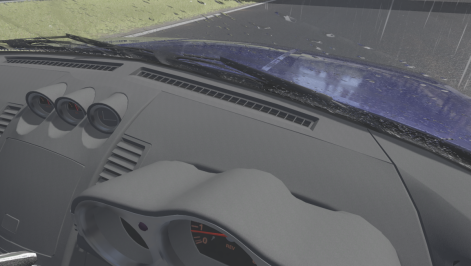
There are rain drops on the dashboard which is most likely caused by the windshield being split into two separate meshes. The same happens with the windows behind the c-pillar.
View attachment 1159715
Thanks for your help mate, but I cannot find this file data/lights.ini in the car folder... the car in question is the Bayro 4 and Bayro EGT. I will keep looking for it.
 
Nissan 350Z Gran Turismo 4 Limited Edition (Z33) update
(with thanks to the original modders and recent assistance from El Locho & Sister Sludge)

v1.5 June 2022
  • Original conversion by WKMod
  • Updated by Blackwood91 and Matgamer
  • Conversion to GT4 Edition by Mike173 at GTPlanet
  • Updated again by Opperslang
  • Further updates by Poppa Woody (driver scale/position, shifting animation/timing, cockpit shader tweaks, driver suits/gloves/helmets, paint finish config, cockpit switch/needle lights added, front/rear/brake lights adjusted, custom number plate, other stuff)
  • Front & rear wipers added and cockpit leaks sealed, plus working analogue fuel guage by El Locho
  • LODs added by Sister Sludge

1654979880463.png

 
Last edited:
Finally learned how to add crowds, but before I go through the process of adding them in spots around the track, do people prefer crowds or no crowds? It's not that it's hard to do, but if no one uses them, i'm not going to bother.

View attachment 1160013
No crowds. It's a distraction - and a bit useless

edit : does anyone have a Saleen S331 to share ? You know, the big yankee y'all truck. Cheers
 
Last edited:
Sharing a mod? Host it on GTPlanet Downloads. Free, public hosting for files up to 10GB in size.
Back