- 501

- United States
Nice they are also adding a Ferrari 333SP I wonder what else they are going to add.


hi joe, maybe any of these are to your likingAnother skin question. Anyone have a good carbon image they could share. The one I made awhile ago works, but the colors are a little off. Gives kind of a purple sheen to the carbon areas. I could edit it, but if someone has one, that would be easier. I'm trying to help someone with a car skin. Thanks...
Feel for these guys, all that work. Hope they'll get over it and find a way to get back. I'm sure we've missed out on something good


I don't think it's going anywhere just a re-shuffle of packs.Feel for these guys, all that work. Hope they'll get over it and find a way to get back. I'm sure we've missed out on something good
You should press the "+Quote" button on each post you want to reply to , instead of using the "Reply" button...


It runs smoother than before yes, but at night it looks like a nuclear explosion happened (latest SOL/CSP)Paywall yes, but v0.8 from CHQ was improved last weekend by the author and Pyyer itself with the help from the community and runs smooth like silk, also at night.
Thanks for the reply info. Never did understand how that's done.You should press the "+Quote" button on each post you want to reply to , instead of using the "Reply" button...
Then down in the clean post window you press "Insert Quotes" , and then you add what you want to reply.
Pretty counter-intuitive if you ask me
PS: don't know if you know this, but you can always grab any carbon (or whatever texture ) you like from any car (except encrypted ones) , via CM Showroom... click on the part of the car that has the texture you like, and then export them using the 3 dots and then export button.


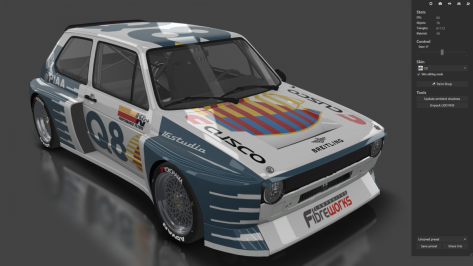
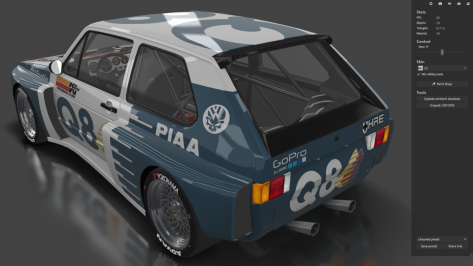
Have you gotten to the point yet where you move a logo one pixel left, test the skin. Move it one pixel right, test again. Put it back where it was and test a third time before you realize that only you would notice the difference. If so, then you probably need a break.You can't just go cold turkey with this junk. You need to ween yourself off it slowly.
View attachment 1210217 View attachment 1210218


Now that you mention it, I did find myself editing individual pixels with that Q8 skin...Have you gotten to the point yet where you move a logo one pixel left, test the skin. Move it one pixel right, test again. Put it back where it was and test a third time before you realize that only you would notice the difference. If so, then you probably need a break.


CHQ with Pyyer extension and latest CSP & latest Pure, pure PPfilterIt runs smoother than before yes, but at night it looks like a nuclear explosion happened (latest SOL/CSP)
View attachment 1210196
View attachment 1210198
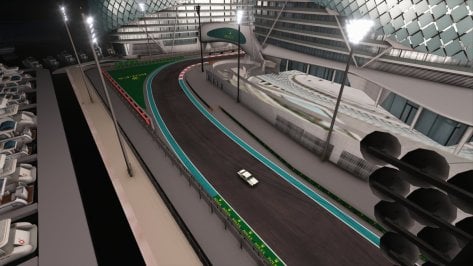
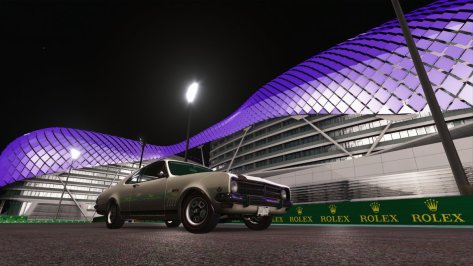
Same conditions/settings for the Yas Marina (BAI Zhantang and so on) posted a couple of days ago by @ClaudioWRC74. Looks a bit more like the rest of my tracks:
View attachment 1210201
View attachment 1210202
No idea what causes the overexposion, but even track exposure to minimum in SOL config doesn't help.


This has been my experience as well.CHQ with Pyyer extension and latest CSP & latest Pure, pure PPfilter



It should be possible.I would like to know if it is possible to turn on the lights when it rains
 github.com
RAIN: rain intensity, from 0 to 1.

RAIN_WETNESS: returns track wetness (quickly raises to 1 as rain starts).

RAIN_WATER: returns amount of water on a track (slowly rises to track intensity and stays, defines puddles).CHQ with Pyyer extension and latest CSP & latest Pure, pure PPfilter
Thanks for checking. On my side (I reinstalled) it keeps looking nuclear with all filters/possible settings, this while no other of my tracks has lighting issues. So maybe it’s been made for use with Pure only ?This has been my experience as well.
Edit: The looking good part, I mean.


@Fanapryde @Pyyer Me too the same thing with Pure 0.148, the lights are too bright on the CHQ 0.8 In ext_config.ini (original layout) there are no lines for [LIGHT_SERIES] maybe that's it? in the BAI Zhantang version and so on it's perfect For the CHQ 0.8 version the ext_config.ini file is in an "extension" folder outside the circuit folder and the values [LIGHT_SERIES] 0, 1, 2 .... are not the same what do you think ???It runs smoother than before yes, but at night it looks like a nuclear explosion happened (latest SOL/CSP)
View attachment 1210196
View attachment 1210198
Same conditions/settings for the Yas Marina (BAI Zhantang and so on) posted a couple of days ago by @ClaudioWRC74. Looks a bit more like the rest of my tracks:
View attachment 1210201
View attachment 1210202
No idea what causes the overexposion, but even track exposure to minimum in SOL config doesn't help.


I don't t know if it will have a remedy, since this has been going on for a long time; in Masscot case all you have to do to comprove is take a look at Okutama or Bernese Alps, for instance (assuming MaScot and MaSScot are the same person).Have you gotten to the point yet where you move a logo one pixel left, test the skin. Move it one pixel right, test again. Put it back where it was and test a third time before you realize that only you would notice the difference. If so, then you probably need a break.
Yes, when moving the config into track extension (which I mostly do) I noticed the differences between CHQ and BAI.@Fanapryde @Pyyer Me too the same thing with Pure 0.148, the lights are too bright on the CHQ 0.8 In ext_config.ini (original layout) there are no lines for [LIGHT_SERIES] maybe that's it? in the BAI Zhantang version and so on it's perfect For the CHQ 0.8 version the ext_config.ini file is in an "extension" folder outside the circuit folder and the values [LIGHT_SERIES] 0, 1, 2 .... are not the same what do you think ???


Maybe both version's lights are copied from acu_yasmarina, the lights are well understand csp 1.78 and sol2.2, I didn't test the mod under Pure, I have no the Pure.Yes, when moving the config into track extension (which I mostly do) I noticed the differences between CHQ and BAI.
But I didn't take time to try changing values (because I'm not to sure about what does what exactly.
The BAI version works fine for me (and doesn't have flickering / z-fighting on some banners), so I'll stick to that version for now.
Good to know I'm not the only one having lighting issues with this track... (though that would have surprised me since it's the only one causing trouble at night). Also: since you are using PURE, it's not only when using SOL that things go wrong...
I change values "RANGE" in [LIGHT_SERIES_0] to [LIGHT_SERIES_23] (aide avec erentuzci sur le discord Breathe)Yes, when moving the config into track extension (which I mostly do) I noticed the differences between CHQ and BAI.
But I didn't take time to try changing values (because I'm not to sure about what does what exactly.
The BAI version works fine for me (and doesn't have flickering / z-fighting on some banners), so I'll stick to that version for now.
Good to know I'm not the only one having lighting issues with this track... (though that would have surprised me since it's the only one causing trouble at night). Also: since you are using PURE, it's not only when using SOL that things go wrong...


 paypal.me
Much better, thanks.I change values "RANGE" in [LIGHT_SERIES_0] to [LIGHT_SERIES_23] (aide avec erentuzci sur le discord Breathe)
If it's too dark in some areas, just increase the values slightly
.../...
Delete .txt extension
Just copy this file in the extension folder (external folder Abu Dhabi 2021 track CHQ 0.8 beta) = it's for original track not for Pyyer F1 2022 extension !!!!