Assetto Corsa PC Mods General DiscussionPC 

  • Thread starter Thread starter daan
  • 155,776 comments
  • 49,787,466 views
It's release Friday! :)

Today we have a update of the MDRS with a new championship, a small update of the modern Dijon and a fix-a-rama for tracks and cars of other mod makers, notable the CSP updates for the AC carTOON (Barcika) tracks. Enjoy!

----------------------------------------

UPDATE of Modern Day Racing Series

v1.1
Code:
-new championship added: Formula Regional Oceania 2023 from New Zealand
-added crowds to Chang International Circuit
-added the new Lexus RC F GT3 2023 (GT-M Lux V8) by RSS to IMSA series and race grids
-faster AI for the RSS Mercedes-AMG GT3 Evo
-faster AI for the RSS BMW Hypercar
-changed IMSA Acura Hypercar to the new SimDream version + added faster AI
-changed WEC 2023 Vanderwall Hypercar to the new SimDream version + added faster AI
-updated Trans Am grid with the Challenger
-updated missing link for Velo Citta
-renamed Stock Car Pro Series 2022 race grid

Note: If you don't want to support SimDream you can use older versions of MDRS you can get in the History tab at Racedepartment.


Formula Regional Oceania 2023.jpg


----------------------------------------

UPDATE of Dijon 2016

v3.32
-removed dirt additiveness from side street materials that made wrong skid marks


----------------------------------------

UPDATE of Car fix pack

new in v5.0
Code:
Acura ARX-06 2023 (SimDream) faster AI
Alfa Romeo Giulietta Spider 1955 (Simaothekid) electronics fix
Alfa Romeo Spider 1986 (MacedoSTI) better shader
Audi R8 LMS EVO II GT3 (FSR) faster AI
BMW M Hybrid V8 2023 (RSS) faster AI
Daihatsu Midget II D-Type (TheNuvolari) autoshift fix
Donkervoort D8 GTO 2013 (Gijs L) brighter shader
Ferrari F355 Berlinetta (GADU Boys) fix pit after lap one
Formula Mazda 2013 (Blaze) Masscots shift animation easy install
Grand Prix 1973 (SimDream) AI fix + real names v2.2
Honda Prelude MK5 1999 (MNBA) AI + autoshift fix
Jaguar D-Type 1955 (Velo) better FFB
Lamborghini Diablo SE30 Jota 1995 (A3DR) fix pit after lap one
Lamborghini Murciélago 2005 (Jerry Wei) fix pit after lap one + autoshift
Lamborghini Murciélago LP 670-4 SV (Jerry Wei) fix pit after lap one
Lotus Esprit V8 2002 (GADU Boys) autoshift and electronics fix
McLaren F1 1994 (Yasuo) electronics fix
Mercedes-AMG GT3 Evo (RSS) faster AI
Mercedes-Benz A200 (101Creative) AI and autoshift fix
Mercedes-Benz AMG One 2021 v0.92 (MNBA) better AI behavior
Morgan Plus 4 1961 (GeroDa74) steer ratio fix
Porsche 356 A-1600 Speedster 1957 (GeroDa74) autoshift fix
Spyker C8 Laviolette (Katyusha) electronics fix
Toyota MR-S 2003 (101Creative) autoshift fix
Vanwall Vandervell 680 2023 (SimDream) faster AI


----------------------------------------

UPDATE of New AI + fixing mega pack Vol. 2

v3.0
Code:
Chang International Circuit (Mitja Bonca) crowds
Colline de la mer (carTOON) fixing
Ebisu Higashi (perma369) working timing
Gemello (carTOON) CSP update
Goodweek (carTOON) CSP update
Guangdong (Paulmarc) CSP update
Highlands Motorsport Park (Neil Shaw) fix grass and gravel
Kirkispark (carTOON) CSP update
Kirkmoar (carTOON) CSP update + road mesh fix
Ludovito (carTOON) CSP update
Mobara Twin Circuit (skyflightmusic) timing fix
Tamiami Park (shi) faster AI
Taupo (shi) faster AI for present layout

 
Solvalla Stockholm v1.2

Screenshot_bmw_m3_e92_solvalla_stockholm_6-9-123-21-38-0.jpg

Solvalla Stockholm is a temporary motorsport race track in Sweden. The circuit is located in the Bromma district west of the Swedish capital Stockholm. Rather than using the streets of the city, the track itself will use the horse racing venue, making it the first stadium circuit in Sweden. (Wikipedia)
Conversion from RACE07.

-CSP recommended
-15 pit/start
-AI, cam

Credits & Thanks;
Original Track by Neteye
RACE07 Updated version by AndreasFSC
-Thank you for giving me permission (Both).

AC Converted by @shi (shin956)
logo.png and sections.ini by @Fanapryde
Crowds texture by @Kniker97
ambulance and some textures by kunos
Test and Feedback by @Fanapryde

Enjoy.
;;;;;;;;;;;;;;;;;;;;;;;;;;;;;;;;;;;;;;;;;;;;;;;
v1.1 changelog;
Smoothed the white line.
Fixed the buried mesh.
Upscale the Solvalla logo texture using AI.
Updated the podium texture.
Updated ext_config.ini and VAO-patch.
Some other minor fixes.

v1.2 changelog;
Recreated the fast_lane.ai and sidelines.
 
Last edited:

Thanks - nobody expects perfection, I was more interested in whether you were going to continue refining the track.
Hence the bug reports. They aren't criticism, they're intended to help. You might not spot stuff that others do (it's easier to spot stuff like this in VR, for example).

Here's some screenshots showing gaps between walls and road (there's a similar gap at hedge tops too) and floating houses and bits of missing landscape, all visible under normal driving conditions.
Hope they help, but if you're finished with the track and are taking it no further, then thanks anyway.
The gaps/floaties/etc are likely due to the way the original GPL mod was produced with the cockpit view as the intended view and the way the game renders.

IOM is designed specifically around Draw Distance for GPL cockpit view. Draw Distance(LOD) is important for optimization as well as showing or hiding road and scenery at proper designed distance.
RF2 conversion has kept same principle in mind. It means player with view other than cockpit may find that scenery or road sections appear too soon or in the air, due to the different camera position or LODMultiplier value. The recommended way to enjoy this track is through cockpit view.
Note, if a track piece appears in the mid of air along the forward driving direction while using cockpit view, it means the car mod is set on a higher LODMultiplier value than default 1.0 value. Additionally, the default value for Swingman view is 2.0, which also enables you to see further than the track LOD is designed for. However there is no way to enforce LODMultiplier value from track itself, the only fix is by editing car mod camera file.
 
OK, but most of them can be seen from cockpit and they can all be fixed for AC.
Point is the original mod by Jim Pearson had some very specific points that had to be met for any prospective conversions.
Check out the rF2 conversion thread OP and the linked PDF from the original creator - https://www.racedepartment.com/thre...n-mountain-course-conversion-from-gpl.192070/

From my reading, I wouldn't be surprised if things aren't changed, seems like the original author is very specific and particular about things.
 
Thanks - nobody expects perfection, I was more interested in whether you were going to continue refining the track.
Hence the bug reports. They aren't criticism, they're intended to help. You might not spot stuff that others do (it's easier to spot stuff like this in VR, for example).

Here's some screenshots showing gaps between walls and road (there's a similar gap at hedge tops too) and floating houses and bits of missing landscape, all visible under normal driving conditions.
Hope they help, but if you're finished with the track and are taking it no further, then thanks anyway.

View attachment 1292936View attachment 1292937View attachment 1292938View attachment 1292939View attachment 1292940View attachment 1292941
1 may be a lod problem, as it requires vr to look sideways, I can't find it unless you tell me the position of the track in fraction (using ai_helper app) or object name (using object inspector with dev tools enabled) so far with only a screenshot there's no way to know if RF2 and original gpl track take looking sideways into consideration
2,3 most likely also exist in rf2, since I haven't moved objects around. again you need to tell me the position of the track in fraction or object name
4-6 you simply don't model everything, only things that are close to track, the "gap" of screenshot 4 occurs very far ahead. RF2 doesn't have those modeled. everything is converted in batch by 3dsimed, so it should be impossible I missed an object
 
Last edited:
Is it correct that both RSS and URD have made a GT3 car based on the GT3 BMW? If yes what you guys think is the best in terms of physics representation of the real car?
 
4-6 you simply don't model everything, only things that are close to track, the "gap" of screenshot 4 occurs very far ahead. RF2 doesn't have those modeled. everything is converted in batch by 3dsimed, so it should be impossible I missed an object
Yes, all tracks have bugs that need attention. But this is what you get if you 'BATCH CONVERT' tracks in one hour and go about insulting people like me in private message that my 'modding skills suck'.
How about checking the mapping of your Nurburging track?
Screenshot_fiat_600_nurburgring1966_12-9-123-17-21-22.jpg

And something seems to have gone wrong with WilliamRiker's Nurburgring shaders:

Screenshot_fiat_600_nurburgring1967_12-9-123-17-49-52.jpg

And yes, your 'Crystal Palace 1937' could use some attention: there was no swimming pool in 1937, no football stadium, no New Link, there were many other buildings in the 30's and the start and pits were at the other straight. And your infield elevations are all wrong. You didn't even bother to make the rF2 trees 3D :) And still you brag about your incredible 3DS MAX skills in p.m. and call other other people incompetent...

Screenshot_fjunior_st60_crystal_palace_37_6-10-123-17-5-24.jpg


If you want to get positive reactions to what you do: be nice, communicate and be open to comments.
I collected many pictures of the Crystal Palace track in the 60's, 50's and 30's. I am even willing to send you a zip file with all I have to help you out. We all help each other. Just be nice ;)
 
Last edited:
1 may be a lod problem, as it requires vr to look sideways, I can't find it unless you tell me the position of the track in fraction (using ai_helper app) or object name (using object inspector with dev tools enabled) so far with only a screenshot there's no way to know if RF2 and original gpl track take looking sideways into consideration
2,3 most likely also exist in rf2, since I haven't moved objects around. again you need to tell me the position of the track in fraction or object name
4-6 you simply don't model everything, only things that are close to track, the "gap" of screenshot 4 occurs very far ahead. RF2 doesn't have those modeled. everything is converted in batch by 3dsimed, so it should be impossible I missed an object
I only turned my head sideways to show them more clearly, all of the gaps and holes and floating buildings and missing landscape etc are all visible from cockpit view (and would be worse in chase cam with its wider FOV). It would take me forever to walk the track and give coordinates for everything that needs addressing. If you drive the track slowly in chase cam you should see quite clearly where the issues are. It's a big track so a big exercise, but quite necessary to get the track up to a modern level of acceptability. The source material is very dated but at the moment it's the technical aspects that let it down, not the visual aesthetics.
Like a lot of old tracks there's an over-reliance on tree walls and hill cards (and other low-poly smoke and mirrors) that were necessary back then for performance reasons. Extensive use of 2D texture walls aren't really needed with modern PCs, especially when they're so close to the track.
 
Last edited:
What’s wrong about creating championships with vanilla launcher?
Easy, intuitively, always working

But I think with CM you can give diverse AI drivers divers strength, while with vanilla you have to work more with ballast handicaps.

And vanilla work only up to 45 championships at once.
I'm not saying there's something wrong with anything... :)
Just canvasing opinion here..
 
FYI , a youtube find , a Peugeot 308 2022 that looks to be half decent... (incl download)
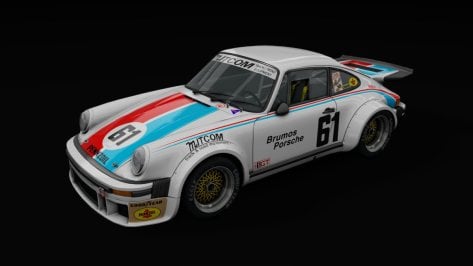
View attachment 1292943
but when I try to create better previews, it says the model is damaged or files are missing, but the mod launches in-game and is drivable.

View attachment 1292942
So this is only when trying to create previews, not when starting a race.
Anyone know what could be causing this or how to fix/workaround?
The weird steering wheel position makes it pretty much impossible to put the driver in a sensible posture though.
One for no-wheel invisidrivers only, I think - unless someone wants to move the steering wheel?
 
Last edited:
Interesting issue. I checked it with the Nicecuppatea cars and did not had any problems.
Yeah, it's odd -- most cars are OK for me, including Nicecuppatea's and Legion's cars, Fourty-Too!'s Delages, and HSS's Maserati 8CM:

1696606651143.png


But a number of HSS cars and all of SimDream's 1937 cars give me this -- only a very light shadow when viewed through the windscreen up close...
1696607921466.png


...that gets lighter and almost nonexistent with distance...
1696608026958.png


...and rain reflections that disappear when viewed through the windscreen:

1696608881109.png

1696608942515.png


Really just wondered if it was a known issue that may have been discussed before...
 
I wonder if someone might be able to shed light on something that's always bothered me. On some cars, generally those with separate windscreens as opposed to modern integrated windshields, the windscreen glass material reduces the darkness of the shadows under competitors' cars (or eliminates the shadows completely). This happens regardless of lighting conditions. For example, here's what normal car shadows look like:

windshield_2.png


But here's what I see through the windscreen:

windshield_1.png


windshield_3.png


I'd like the shadows to remain dark. I've fixed it on a couple cars by going into the CM showroom and messing with the values for the glass material, changing the alpha mode from "alpha blending" to "alpha testing" and/or the blend mode from "normal" to "read only." While I have no idea what I'm doing here, this worked for SimDream's Maserati 6CM (for instance), but not for HSS's Alfa Romeo P2.

Does anyone have any idea why this happens and/or how to fix it?
Usually what happens when the windscreen is a shader other than ksWindscreen (usually they use perpixelreflection which is meant for the exterior glass)
 
Don't bother, I've realized it probably originates with the fact most of my LMH/LMDh mods come from a BoP'd pack & all my mods with that issue come from that pack...
 
Yeah, it's odd -- most cars are OK for me, including Nicecuppatea's and Legion's cars, Fourty-Too!'s Delages, and HSS's Maserati 8CM:

View attachment 1292990

But a number of HSS cars and all of SimDream's 1937 cars give me this -- only a very light shadow when viewed through the windscreen up close...

View attachment 1292994

...that gets lighter and almost nonexistent with distance...

View attachment 1292995

...and rain reflections that disappear when viewed through the windscreen:

View attachment 1293002
View attachment 1293004

Really just wondered if it was a known issue that may have been discussed before...
Checked the GP 1937, was OK for me, used the standard version. Which PP filter do you use?

Screenshot_f1_1937_autounion_montreal1982_6-9-123-19-18-43.jpg

Usually what happens when the windscreen is a shader other than ksWindscreen (usually they use perpixelreflection which is meant for the exterior glass)
Indeed the other shader setting but did work too.

Screenshot 2023-10-06 192120.png
 
Does someone know how to generate preview image with Content Manager for cars with Addon rim/wheels like Tommy78 or Chivas cars ?

Thanks
 
Last edited:
WINDOW BANNER VARIANT 2

This car had 3 different window banners that i can see so i made up another variant and posted it in the downloads section incase anyone wants this version. this is not a fix or anything just something to give people a bit of choice.
Screenshot (185).png
 
Usually what happens when the windscreen is a shader other than ksWindscreen (usually they use perpixelreflection which is meant for the exterior glass)
Ah, I think you've probably hit on it -- thanks for this. No experience with ksEditor, but I'll find a tutorial and try changing the shader on each affected car.
Checked the GP 1937, was OK for me, used the standard version. Which PP filter do you use?
Interesting. I'm using a heavily modified version of Gabimaix's 4PP filter. But it could also be that this is an issue that a more recent CSP has addressed (I'm still on 1.80 preview 1). Anyway, I appreciate your checking.
 

All 50 Livery skins For The Nissan R32 JTCC

View attachment 1292659
In this mod, you'll find:

-50 livery skins for the Nissan Skyline R32 JTCC.

-Some skins are our own creations.

-Some skins are from other video games.

-Skins available in 2K and 4K resolution.

-A unique "Saltimbanco" skin inspired by a touring show.

The latest addition is the"Saltimbanco" skin, inspired by a touring show. This is a very rare livery skin

Special Credits:

  • Collaborations with Shin956, for the Team UNISIA, and Castrol. skins

Download Patreon
Download GTplanet
Hugh effort on the skins, great work! I tried your updated nissan r32 gtr from a few pages back, on Ruapuna as an AI competitor. It kept hitting the curbs and flipping over. No cars completed a lap 🤣. However, there is a gtr from a JTCC set that works ok but still does hit the curbs a bit much compared to other cars.

Rainmaker: I noticed you did some updates for Ruapuna, which I have the latest one listed in this forum. Amazing to have a high quality pc version of my local track.

One thing that seems exagerated in the game is the bumps. The track is quite smooth in real life. Id say they should be 50% the size they currently are. See video:


Regards and happy racing
Mike
 
Last edited:
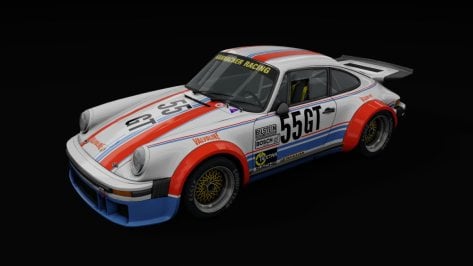
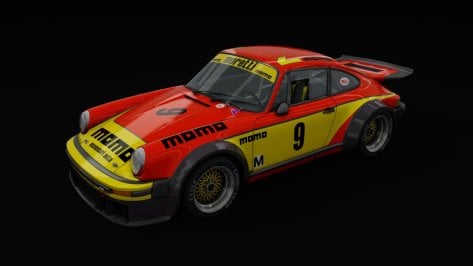
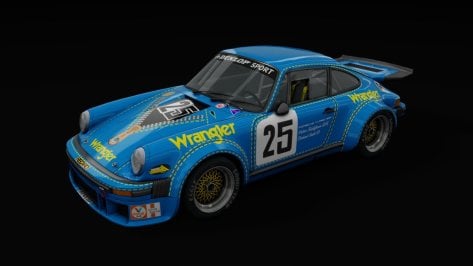
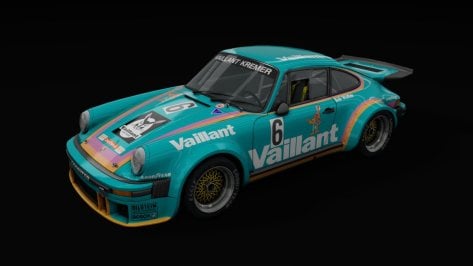
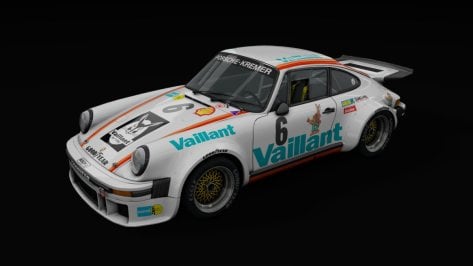
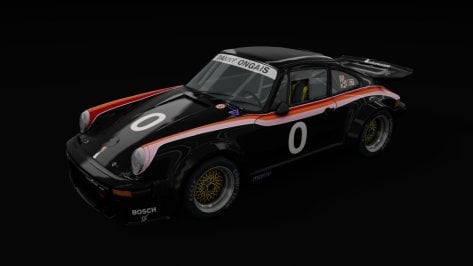
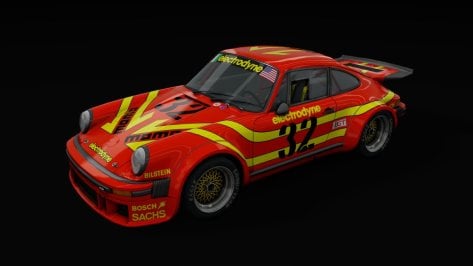
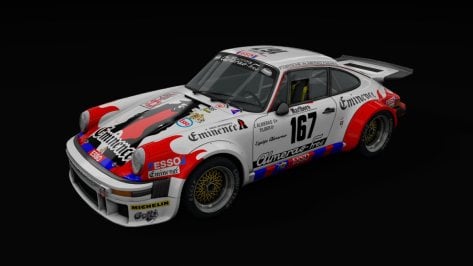
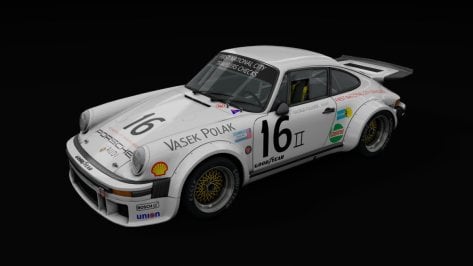
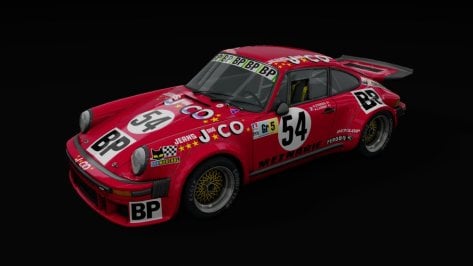
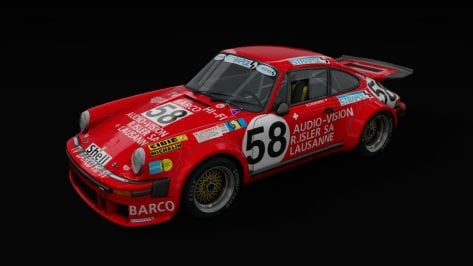
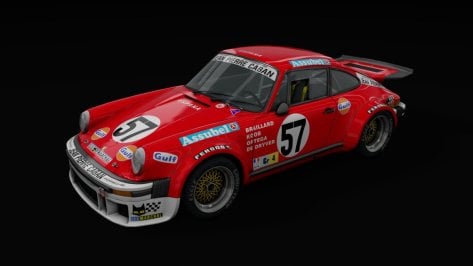
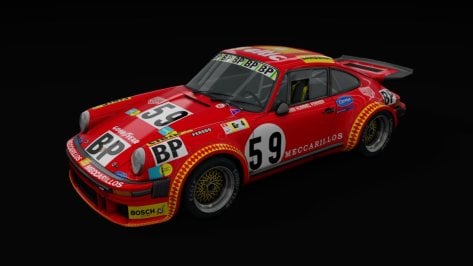
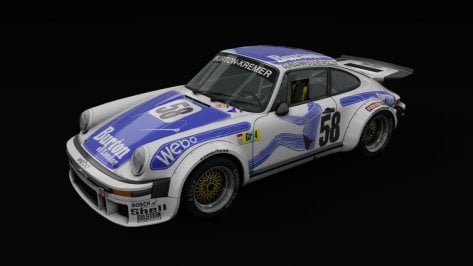
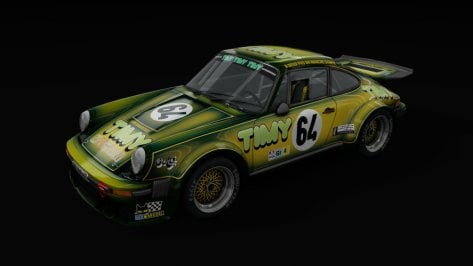
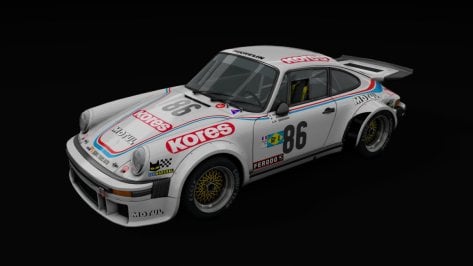
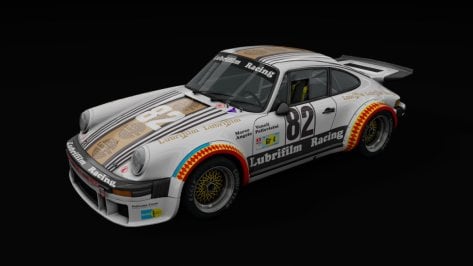
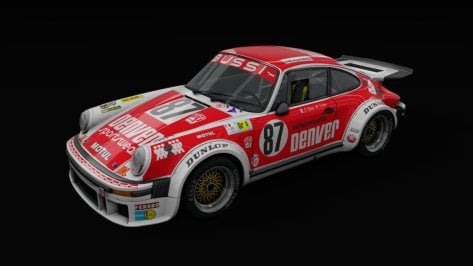
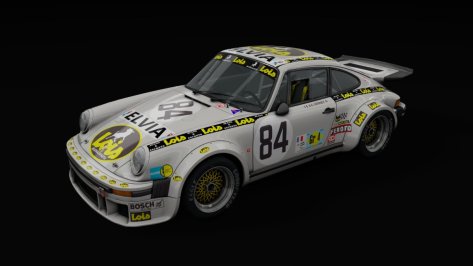
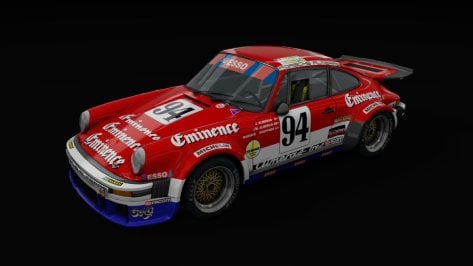
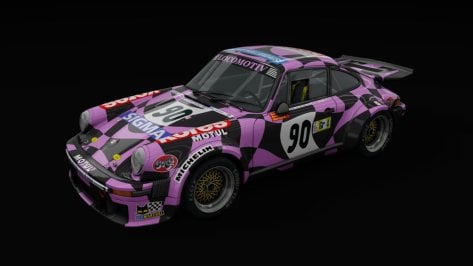
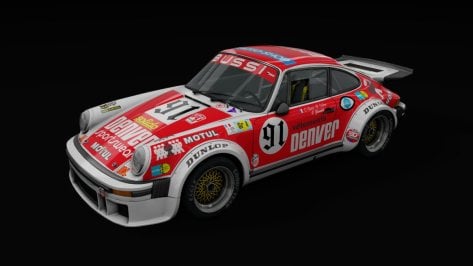
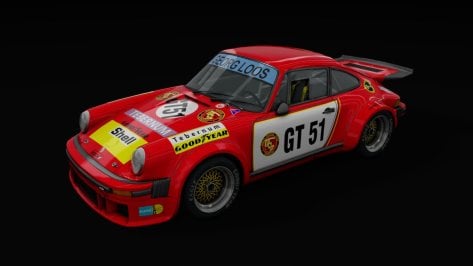
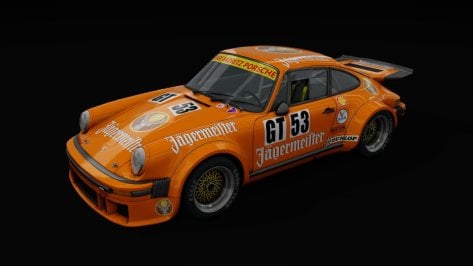
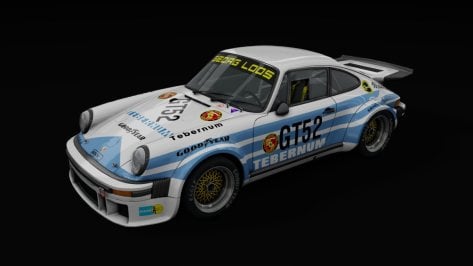
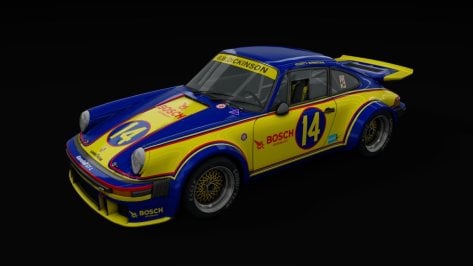
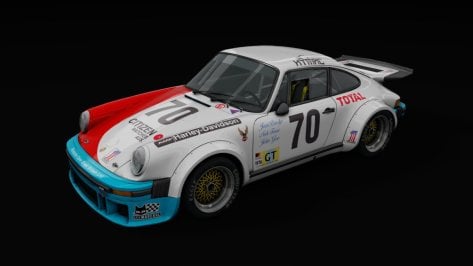
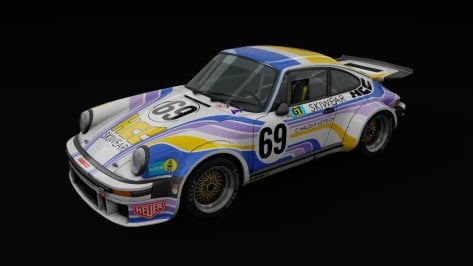
Something old, something new, some ... oh ffs, just take my life, Porsch.


Code:
The Porsche 934 was a racing version of the Porsche 911 Turbo, prepared to FIA Group 4 rules, similar to the Porsche 935 which was prepared to FIA Group 5 rules.

Original R3E, converted by First Studio Racing.
==============================

Version 1.1 by Pfalzdriver
--------------------------------------------------------------------------
Source of specs: https://www.supercars.net/blog/1976-porsche-934/

Added:
- CSP extension
- Working turbo gauge, oil temp, oil press, turning lights, reverse lights, dash lights
- Working wipers
- Damage and dirt textures (Quick 'n dirty!)
- Body and windows damage
- Cintures
- RainFX V2 features
- LODs
- VAO
- Soundbank by DRM

Fixed:
- Aero (a Porsch isnt a Ferrari)
- Brakes (new mesh/materials and naming in brakes.ini)
- Suspension (a Porsch isnt a Ferrari)
- Gearing (irl the car didnt have six gears, ratios were all wrong)
- Engine (turbo was missing, power.lut was a natural aspired engine)
- Flames (positions/angles were completely off)
- Tires (This car had neither semislicks nor 90s slick tires)
- Digital instruments (except fuel light nothing worked)
- Collider (collider was too low and kn5 wasnt really fitting)
- Fuel (wrong capacity and tank position)

Download at Sharemods or GTPlanet

Bravo, this is outstanding. Virtual 911 heaven!
 
I'm not saying there's something wrong with anything... :)
Just canvasing opinion here..
Yes you´re right, my answer to your question was not exactly suitable. :crazy:

If i am honest i can`t even answer that, because non CM user, so i am fine with vanilla championships creation, but can`t really compare.
 
@Pfalzdriver did a really nice rework for the 934 mod. I saw that some skins in his version as well as some driver data were missing or simply incorrect. I removed these errors and sorted all folders by race event and year like Le Mans 1976-1981, Trans Am, IMSA, FIA WSC
I also added new livery.png's and Pfalzdrivers Skin.ini's etc.


__custom_showroom_1696618044.jpg__custom_showroom_1696618049.jpg__custom_showroom_1696618052.jpg__custom_showroom_1696618055.jpg__custom_showroom_1696618058.jpg__custom_showroom_1696618062.jpg__custom_showroom_1696618064.jpg__custom_showroom_1696618067.jpg__custom_showroom_1696618070.jpg__custom_showroom_1696618073.jpg__custom_showroom_1696618076.jpg__custom_showroom_1696618080.jpg__custom_showroom_1696618084.jpg__custom_showroom_1696618087.jpg__custom_showroom_1696618091.jpg__custom_showroom_1696618095.jpg__custom_showroom_1696618099.jpg__custom_showroom_1696618103.jpg__custom_showroom_1696618106.jpg__custom_showroom_1696618109.jpg__custom_showroom_1696618112.jpg__custom_showroom_1696618115.jpg__custom_showroom_1696618119.jpg__custom_showroom_1696618122.jpg__custom_showroom_1696618125.jpg__custom_showroom_1696618130.jpg__custom_showroom_1696618134.jpg__custom_showroom_1696618137.jpg__custom_showroom_1696618141.jpg__custom_showroom_1696618144.jpg__custom_showroom_1696618148.jpg__custom_showroom_1696618156.jpg__custom_showroom_1696618162.jpg__custom_showroom_1696618158.jpg
 
Last edited:
if your tyres look like they are bright white in sunlight and you are wondering how to fix this like i was (this will work on any car) then add these shader properties (see pic) into your z4 and your tyres should look a bit more natural in sunlight instead of being bright white. click on the three dots next to "material" to pull this screen up that i have pictured then go to "change values" and once done hit save and your good to go, the values on this bmw may not work the same on other car's, if not then play around with the values a little to get the desired effect all kunos car's seem to have different values. i have included a before and after pic so you can see exactly what i mean. I am using sol with csp 1.79 your results may vary depending on what you are using

Screenshot (186).png


Screenshot (179).png


Screenshot (187).png
 
Sharing a mod? Host it on GTPlanet Downloads. Free, public hosting for files up to 10GB in size.
Back