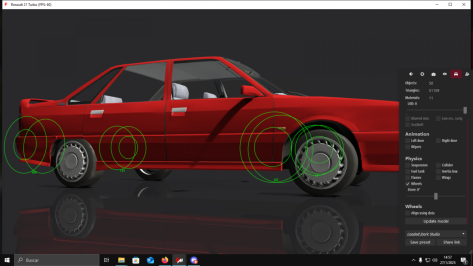
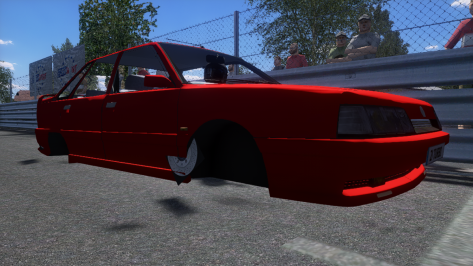
@JK1977 please note these glass settings and consider updating your cars with them (and using it for future cars). The milky highly-reflective settings you normally use can look quite odd. These are subjectively better.thanks!!!
thank you !
ps:
you could have included Masscot's shadow fix , saving us all to have to go and add that once more after replacing the file
EDIT: and add this to make glass look better:
;make glass look less reflective
[INCLUDE: common/materials_glass.ini]
[Material_Glass]
ACTIVE=1
MATERIALS = WINDOWS_OUT
FilmIOR = 0.83
ThicknessMult = 0.3
example WITHOUT:
View attachment 1423905
WITH:
View attachment 1423907
EDIT 2 :
remove this line in the [Material_CarPaint_Metallic] section:
Skins = SKIN
(this makes for no skin to receive the properties... as no skin is called SKIN)
If you fix this , this is how car 3 looks (with my preview at least):
View attachment 1423910
I also do not like the way the wipers reflect light... but they have been set to have material BODY as well as the actual body of the car...
I will post a new extension cfg , that includes Masscot's shadow fix, JK1977's Wiper Animation for Lod b and c , the body paint fix, and windows and wipers reflection fixes.
then it looks like this:
View attachment 1423912
EDIT3: but I struggle to get the rollcage to look like it does in CM Showroom (chrome-like)...
I settled for this :
View attachment 1423939
DOWNLOAD (can be dragged and dropped in CM)
this extension cfg file is based on the original v1.0 and includes following:
-shadows in interior fix (Masscot)
-Wiper Animation for Lod b and c (JK1977)
-windows and wipers less reflective
-rollcage more chrome-like (more like it's shown in the CM Showroom)
-less reflective steering wheel metal (EDIT: I turned that one off again, it's not better)


 .
.

Some exterior window trim gaps can be kinda-plugged with this, and there's a config for the satin-finish roll cage. Yours needs deactivating I think, it glowed white?thanks!!!
thank you !
ps:
you could have included Masscot's shadow fix , saving us all to have to go and add that once more after replacing the file
EDIT: and add this to make glass look better:
;make glass look less reflective
[INCLUDE: common/materials_glass.ini]
[Material_Glass]
ACTIVE=1
MATERIALS = WINDOWS_OUT
FilmIOR = 0.83
ThicknessMult = 0.3
example WITHOUT:
View attachment 1423905
WITH:
View attachment 1423907
EDIT 2 :
remove this line in the [Material_CarPaint_Metallic] section:
Skins = SKIN
(this makes for no skin to receive the properties... as no skin is called SKIN)
If you fix this , this is how car 3 looks (with my preview at least):
View attachment 1423910
I also do not like the way the wipers reflect light... but they have been set to have material BODY as well as the actual body of the car...
I will post a new extension cfg , that includes Masscot's shadow fix, JK1977's Wiper Animation for Lod b and c , the body paint fix, and windows and wipers reflection fixes.
then it looks like this:
View attachment 1423912
EDIT3: but I struggle to get the rollcage to look like it does in CM Showroom (chrome-like)...
I settled for this :
View attachment 1423939
DOWNLOAD (can be dragged and dropped in CM)
this extension cfg file is based on the original v1.0 and includes following:
-shadows in interior fix (Masscot)
-Wiper Animation for Lod b and c (JK1977)
-windows and wipers less reflective
-rollcage more chrome-like (more like it's shown in the CM Showroom)
-less reflective steering wheel metal (EDIT: I turned that one off again, it's not better)
;satin finish roll cage
[INCLUDE: common/materials_interior.ini]
[Material_Metal_v2]
ACTIVE = 1
Materials =
Meshes = INT_ROLLGAGE
Brightness = 0.9
DetailScale = 0
OcclusionMult = 0.9
Smoothness = 0.5
CubemapReflectionBlur=0.1

;doubleside mesh, eg fix bad wiper arms, window gaps, sun ingress etc
[SHADER_REPLACEMENT_...]
ACTIVE = 1
MATERIALS = INT_CARBON, INT_PLASTIC_BLACK
MESHES =
CULL_MODE = DOUBLESIDED
DOUBLE_FACE_SHADOW = 0
CAST_SHADOWS = 1
DOUBLE_FACE_SHADOW_BIASED = 1

I've investigate the issue...perhaps the better fix would be...:
[SHADER_REPLACEMENT_...]
MATERIALS= groovesuzuka, groovesuzukalayouts
SHADER = ksPerPixelAlpha
PROP_... = alpha, 0.6
CAST_SHADOWS = 0
BLEND_MODE = ALPHA_BLEND
IS_TRANSPARENT = 1
(untested)


 easyupload.io


well this will never work right if the shader is an *ATI've investigate the issue...
It's caused by applying the following section to skidmarks and/or grooves
[SHADER_REPLACEMENT_...]
ACTIVE= 1
DESCRIPTION= shadows cast on white lines
MATERIALS=
MASK_GBUFFER= ?whiteline?
DEPTH_MODE= LESSEQUAL
BLEND_MODE= ALPHA_BLEND
IS_TRANSPARENT= 0
CAST_SHADOWS= 0
Just delete any reference to skidmarks and/or grooves. Leave only the ones to painted track lines.
I found and solved the same issue on other RT tracks


Hahaha that's a bigfail on me, i tried something😂🤟. I really thought they were harder to overtake but i guess that was just the ai spline.@Tetri
First of all your [BRAKE_HINT_] 0, 1 and 2 are not working because you used the wrong command, so everything you said that improved according to trailbraking was fantasy and imagined - the commands don't work. You have to use [BRAKEHINT_]. Test this yourself it does not work in your file, so nothing changed throught those hints.
Second they are NOT trailbraking because you put [BRAKEHINT_] there - even if you would use the correct command. That is not how AC bots work or how this command works. [BRAKEHINT_] just makes them lose more or less speed depending on the number you put there it is not a trailbreak thing.
Third I do not let them drive to the very apex because I leave a bit of margin in them for mistakes and side by sides.
Fourth your [HINT_] 0, 1 and 2 are not increasing the ai speed - overall I gained 0.1 sec on the last straight with a period correct car and that's it.
Fifth as I told you if you want them to be harder on overtakes increase their aggression and they wont let you in easily.
Please don't edit my work in this wrong way everything I do has its purpose
lp design for gt and trr for prototype in my opinionWho has the best content out of these creators FSR, TRR and LP Design?
FSR = horribleWho has the best content out of these creators FSR, TRR and LP Design?

FSR have a load of BTCC car's (newer stuff) which is not available anywhere else at the moment in AC which is why i have a few of there car's floating around.Who has the best content out of these creators FSR, TRR and LP Design?
Try more agression, something like 75% and the AI becomes really stubborn in my experience they dive you more and they don't leave their lane anymore.the aggression don't do much on my side, they tend to be a lil faster around 45/55% but otherwise i never noticed much, at least on vintage cars.
Yup, will try this eveningTry more agression, something like 75% and the AI becomes really stubborn in my experience they dive you more and they don't leave their lane anymore.


Ok, I thought he was talking about the feeling at the whole -Montagna di Pietra- track, not just the cobblestone/paving stones parts...... oli65 was asking about the road feel on the paving stones (which I understood as the cobbles ?)...


Ok, I thought he was talking about the feeling at the whole -Montagna di Pietra- track, not just the cobblestone/paving stones parts...
Anyway, in my case the paved area does not transmit any feedback, nothing, not even the slightest vibration... feels unnatural (in my case, I insist). The road maintenance company has done a very good job paving those streets... 😅


Always remembering, they are (conversions/partial).Porque el fantastico Tyrrell 008 aparece en CM Showroom, sin ninguna sombra debajo ?
Tiene solución ?
Why does the fantastic Tyrrell 008 appear in CM Showroom, without any shadow underneath?
Do you have a solution?
Many thx. Great Work !!Always remembering, they are (conversions/partial).
There will always be some problems in the textures and some others, which I can't explain.
There was a case of a Brabhm BT49 (1979) that I removed the front spoiler, but in the showroom the "shadow" of it remains.
Here I have shadows, but with very little intensity (hard to notice).THX


If I'm not mistaken, many years ago, on the official AC forum, one of the game developers explained the meaning of the "aggression" slider. According to him, "aggression" affects how much the bots will go beyond their prescribed racing trajectory. This has nothing to do with defending against the player or attacking the player. Again, if my memory serves me right.Try more agression, something like 75% and the AI becomes really stubborn in my experience they dive you more and they don't leave their lane anymore.
You are kinda right - in my experience on high aggression they do not move away from their lanes at all, so if you try to dive them they do not move away and hence it is harder to overtake them. At least that was my experience and it seems that is what the dev meant.If I'm not mistaken, many years ago, on the official AC forum, one of the game developers explained the meaning of the "aggression" slider. According to him, "aggression" affects how much the bots will go beyond their prescribed racing trajectory. This has nothing to do with defending against the player or attacking the player. Again, if my memory serves me right.


@JK1977 For what it's worth, I personally prefer your original glass settings...for me, with the "revised" settings, it looks like there's no glass at all in replays.@JK1977 please note these glass settings and consider updating your cars with them (and using it for future cars). The milky highly-reflective settings you normally use can look quite odd. These are subjectively better.

Appreciate your response once again mate!
Every glass is set to alpha blend with transparency=yes
Every bulb/bulb support/housing is set to opaque with transparency=no
Also, since I edited the rear tail & brake lights with lights.ini, they work only in CM Showroom. In game there's still no result. See how it looks in-game and CM Showroom below: (central brake light does not light up in CM because it's setup in ext_config and they work not like the tails).
View attachment 1424078
View attachment 1424079
Kinda lost on what's happening now...
Hijacking this because first couple of times I asked about that I got ignored lol
I have the same problem with two cars I'm working on, headlights don't work in game but they do in CM showroom. No refracting or emissive stuff, just some basic lights.

I found it by opening up the full app task bar on the right, then clicking on App Shelf, and scrolling to the Car Mirrors app (see small window on the far left of my screen). From that point on, the Car Mirrors app will reside in the primary app list on the far right.That's what I forgot.
Where can I get this menu to appear (mirror editing)?
I had activated it a while ago, but I don't remember it anymore.
If you could show me a (print) where it is in the (CSP), I'd appreciate it.
Sure.. there was another suggestion that the engine and rev limit sound need to match, or the limit should not be exceeded.About the Copersucar sound (cuts in the turns), I'll see what I can improve (maybe by modifying the "sfx" file) or the "sounds" file in the "Data" folder with something else.
Maybe something halfway between the two would work?@JK1977 For what it's worth, I personally prefer your original glass settings...for me, with the "revised" settings, it looks like there's no glass at all in replays.
 www.overtake.gg

Solved!! In the end it was another rookie mistake: lights and brakes numbering in the headers + some mesh issues with the materials of those specific parts. I'm now working with the self-lighting and tweaking some parameters.
"Congratulations. You have reached the end of my knowledge. For more information, please contact technical support"
yes, i play on 100% difficulty, 2nd, 3rd and all the rest are pretty tight (not counting those who crash/fly off). the first one stands out, of course not every time, but he (sometimes it's tvr, sometimes alpha, sometimes mustang) is doing about 8:05 laps, when the others
I was running graphic tests and give the GTC60s a ride on the Nord. My leader is 3 secs away from the second place and third place, but the back of the pack is indeed 20 seconds behind.are doing 8:20, and often worse, 8:25 and slower. in the thread user exva wrote that it's AC's fault, and he often has this with different cars.
Oh i forgot, the 2 Dundrod versions (Weikangcai conversion and Usual Suspects i think) are extremely fun tracks and they would be a blast with a faster AI, if you find time for them👍.Here is the AI for Oesterreichring 1979
Fast AI for "Oesterreichring 1979" - version from "Jim Lloyd & Terra21" or "Zwiss"
Fast AI for Oesterreichring 1979, version from "Jim Lloyd & Terra21" according to feedback it also works with the "Zwiss" version. *If you have a track that you wished had better AI let me know! I generally recommend: leave the aggression at...
www.overtake.gg