Assetto Corsa PC Mods General DiscussionPC 

  • Thread starter Thread starter daan
  • 154,593 comments
  • 48,605,683 views
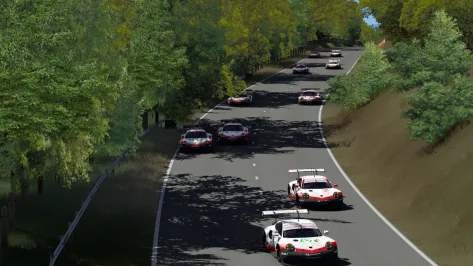
Screenshot_ks_porsche_911_rsr_2017_rouenlesessarts.webp

This is me fighting side by side before "6 Freres" with my own fresh ai fast_lane for my new layout in Rouen les Essarts (modern layout 72-94 but without the chicane, lasted only between 72 and 73) 🙃

By producing the ai lanes, I was able by mistake to reproduce some bugs that have been documented here (cars that stall or move in zig-zag shortly after the start for example). But all in all, after polishing the lanes, I was able to find a quick lane (for me) that allows really fine moments of racing without crazy behaviours (but still enough aggressive to overtake me more or less properly)

I hope to be able to release the MadBrain's Rouen update with the new layout in the following month , hopefully with night lights and some cosmetic and mesh enhancements (now that I have started with Blender...).

And God bless the csp config wiki editors and Blender helpers on the forum ! :lol:
 
Last edited:
Guys, how were the gear ratios on LMP1 cars adjusted in the 2010s? Were the ratios free (as in they could vary event to event) or did they have fixed gear ratio sets instead?
 
Hello friends, can anyone please help? I really like making a skin for this mod. I need to change the front bumper, install plugs like in the second picture, also replace the front and rear lights, and change the texture of the rearview mirror, for some reason it is always light.
mods are here
https://mega.nz/folder/blUxxRwB#WJiaDs-nNZKXeb0JBXMHvQ
Thank you very much in advance, I will be very grateful
__custom_showroom_1758741422.webp

__custom_showroom_1758741428.webp

__custom_showroom_1758741435.webp

__custom_showroom_1758741576.webp

__custom_showroom_1758741582.webp
 
Guys, how were the gear ratios on LMP1 cars adjusted in the 2010s? Were the ratios free (as in they could vary event to event) or did they have fixed gear ratio sets instead?
In 2010, Le Mans Prototype 1 (LMP1) cars had fixed gear ratios within their sealed gearboxes, a rule implemented to control costs and reduce performance disparities between teams. These gearboxes were sealed for the duration of a racing season, meaning teams could not change the ratios to adapt to different tracks.

Reason for fixed gear ratios:

  • Cost control:
    The rule was a cost-cutting measure, preventing teams from continuously developing and changing gear ratios for each specific race.
  • Performance parity:
    By fixing the gear ratios, the regulations aimed to level the playing field, especially considering the wide power curves of the then-new turbo-charged engines, which made gear selection less critical than with older, more peaky naturally-aspirated engines.
 
@Master Focus Where did you find that? I had GPT-5 do some searching on this. It found that gearbox materials and maximum number of forward gears were mandated by the rules and that these rules implicitly allowed teams to choose gear ratios for each event.
 
Last edited:
@Master Focus Where did you find that? I had GPT-5 do some searching on this. It found that gearbox materials and maximum number of forward gears were mandated by the rules and that these rules implicitly allowed teams to choose gear ratios for each event.
I too had a look using Copilot and Perplexity but they just kept bringing up about open ratios but when I asked for where the information came from it said the F1 regulations from some year
 
I've been around PC's quite a long time now, learnt a lot, but one thing that passed me by was HHD and SSD's and performance. So i have boot drive SSD 1tb, largely full with MSFS, the rest of my games including AC is over on a 4tb HHD.

So anyway in order to clear some space i found out i could move the MSFS package folder, so all the planes and mods etc, onto an external SSD... It was easy and cleared up 500 odd gigs on the SSD boot drive. So then i moved ATS and ETS2 onto the boot drive SSD. Again dead easy and now those games load quicker, run better, no micro stutters as it loads the scenery as you drive...
So my question, and there is one related to the game we all love to play.
How do I deal with this complex thing called modded AC?
Do i move the steam install onto the boot drive SSD? Is it likely to break anything? i guess all the content folders with cars tracks etc will go over?
Anyone done it? Or alternatively i'm sure someone used to run all mods off an external drive.
I just feel that i want to move away from HHD's.
So should i just 'don't mess if its not broken', or is it risk free using steam to change the drive? Would CM still pick it all up...so many questions..
 
@RicME85 I asked Perplexity to research the query, limiting it to sources that only had info about LMP1 on them.

The regulations mandated steel gearboxes and sequential shifting; that said, they implicitly allowed teams to change ratios per the needs of the track.

From 2010-13, the maximum number of forward gears allowed was 6. From 2014-20, this was increased to 7.
 
I've been around PC's quite a long time now, learnt a lot, but one thing that passed me by was HHD and SSD's and performance. So i have boot drive SSD 1tb, largely full with MSFS, the rest of my games including AC is over on a 4tb HHD.

So anyway in order to clear some space i found out i could move the MSFS package folder, so all the planes and mods etc, onto an external SSD... It was easy and cleared up 500 odd gigs on the SSD boot drive. So then i moved ATS and ETS2 onto the boot drive SSD. Again dead easy and now those games load quicker, run better, no micro stutters as it loads the scenery as you drive...
So my question, and there is one related to the game we all love to play.
How do I deal with this complex thing called modded AC?
Do i move the steam install onto the boot drive SSD? Is it likely to break anything? i guess all the content folders with cars tracks etc will go over?
Anyone done it? Or alternatively i'm sure someone used to run all mods off an external drive.
I just feel that i want to move away from HHD's.
So should i just 'don't mess if its not broken', or is it risk free using steam to change the drive? Would CM still pick it all up...so many questions..
I have the same query. I moved all my other games on my external drive and would love to do it with AC on its own drive but with AC's weird installation path...
 
Last edited:
I've been around PC's quite a long time now, learnt a lot, but one thing that passed me by was HHD and SSD's and performance. So i have boot drive SSD 1tb, largely full with MSFS, the rest of my games including AC is over on a 4tb HHD.

So anyway in order to clear some space i found out i could move the MSFS package folder, so all the planes and mods etc, onto an external SSD... It was easy and cleared up 500 odd gigs on the SSD boot drive. So then i moved ATS and ETS2 onto the boot drive SSD. Again dead easy and now those games load quicker, run better, no micro stutters as it loads the scenery as you drive...
So my question, and there is one related to the game we all love to play.
How do I deal with this complex thing called modded AC?
Do i move the steam install onto the boot drive SSD? Is it likely to break anything? i guess all the content folders with cars tracks etc will go over?
Anyone done it? Or alternatively i'm sure someone used to run all mods off an external drive.
I just feel that i want to move away from HHD's.
So should i just 'don't mess if its not broken', or is it risk free using steam to change the drive? Would CM still pick it all up...so many questions..

I have the same query. I moved all my other games on my external drive and would love to do it with AC on its own drive but with AC's weird installation path...

You would need to use a symlink if you wanted to have AC installed on to the SSD and the content folder on the HDD. Basically its a clever system that links two locations like shortcuts but unlike shortcuts which is a redirect that software can't use, this method makes it look like the files are where they should be so can be accessed fine.

Symlink is usually done with command line but there are a number of GUIs out there to make it easier. - https://schinagl.priv.at/nt/hardlinkshellext/linkshellextension.html
 
Last edited:
Released : Audi A4 Quattro Supertouringcar
Author:F302
3D Model Car:RRRE,KW Studios
Texture Update : F302 (rework)
Skins: RRRE,KW Studios,StoffleWaffle
Driver Animation :Masscot
3d work: F302
hope u enjoy the Car
ps : send feedback ,bugs ,missing things
tested on 0.2.6-preview1
PP filer _PURELIFEEVO
have fun!
To install, move folders to "...\SteamApps\common\assettocorsa" or simply
drag'n'drop archive to Content Manager


View attachment 1423689
download link doesnt work for this. is there a new one somewhere?
 
A little fix to the VW Scirocco GC10 V8 (it should be fine also with V6 and Hillclimb versions):
  • added CSP wipers
  • fixed windshield with FANATEC banner without reflection

Copy the extension folder to the folder of the car version you have

The same with the skin folder but first select the skins you have then
copy the files inside folder "(copy to other Fanatec whindshiled banner)" to the other skins folder with the FANATEC banner

View attachment 1480989
for what mod version (mod name) is this?
 
Last edited:
You would need to use a symlink if you wanted to have AC installed on to the SSD and the content folder on the HDD. Basically its a clever system that links two locations like shortcuts but unlike shortcuts which is a redirect that software can't use, this method makes it look like the files are where they should be so can be accessed fine.

Symlink is usually done with command line but there are a number of GUIs out there to make it easier. - https://schinagl.priv.at/nt/hardlinkshellext/linkshellextension.html
Homer Simpson Thinking GIF


uh uh
 
You would need to use a symlink if you wanted to have AC installed on to the SSD and the content folder on the HDD. Basically its a clever system that links two locations like shortcuts but unlike shortcuts which is a redirect that software can't use, this method makes it look like the files are where they should be so can be accessed fine.

Symlink is usually done with command line but there are a number of GUIs out there to make it easier. - https://schinagl.priv.at/nt/hardlinkshellext/linkshellextension.html
Its weird though, so steam tells me the files for the base game are on my HDD drive because it was big and back then HDD was considered ok.
Now more games are stating you need an SSD, so with all other games i simply used steam to re install onto a different drive, the SSD. So you are saying that AC now won't do that without some other software?
Currently AC will look in my D drive for folders it needs like track's and cars, CM extension is in there as well. so my theory of just changing where it looks to what will be the C drive seems like it should work....

I've talked myself out of it.... i might just back up cars and tracks folders into external so at least they are saved.....

Pretty sure i remember that Fana rest his soul once said he ran all his mods on an external drive.....
 
Its weird though, so steam tells me the files for the base game are on my HDD drive because it was big and back then HDD was considered ok.
Now more games are stating you need an SSD, so with all other games i simply used steam to re install onto a different drive, the SSD. So you are saying that AC now won't do that without some other software?
Currently AC will look in my D drive for folders it needs like track's and cars, CM extension is in there as well. so my theory of just changing where it looks to what will be the C drive seems like it should work....

I've talked myself out of it.... i might just back up cars and tracks folders into external so at least they are saved.....

Pretty sure i remember that Fana rest his soul once said he ran all his mods on an external drive.....

You can use Symlinks as previously advised but that is actually a pretty complicated solution. Much easier to just tell Steam to move the content to another folder or drive. This is done in Steam by right-clicking on Assetto Corsa and choosing 'Properties', 'Installed Files', then 'Move this games content to another folder or drive'. You have to make sure that the drive or folder you want to move to already exists as Steam does not allow you to create those from within this dialogue.

If you're using an external drive just be mindful that any speed increase you would expect from, say, a SSD would be impacted by the interface used to connect the drive to your PC. This is typically USB.
 
Its weird though, so steam tells me the files for the base game are on my HDD drive because it was big and back then HDD was considered ok.
Now more games are stating you need an SSD, so with all other games i simply used steam to re install onto a different drive, the SSD. So you are saying that AC now won't do that without some other software?
Currently AC will look in my D drive for folders it needs like track's and cars, CM extension is in there as well. so my theory of just changing where it looks to what will be the C drive seems like it should work....

I've talked myself out of it.... i might just back up cars and tracks folders into external so at least they are saved.....

Pretty sure i remember that Fana rest his soul once said he ran all his mods on an external drive.....
Yeah you can do that but are then limited by SSD space. As SSD storage is usually smaller than HDD thats why I said to use Symlink.

Your choice is this.

a) Just use Steam to transfer the whole game directory to the SSD and then realise as its your OS drive you will no doubt run out of space fast and have to juggle which mods you keep etc

or

b) Use Steam to transfer the whole game directory to the SSD and then move the assettocorsa/content/ directory back to the SSD and use Symlink so you have the application files on the faster SSD and the cars, tracks etc on the HDD for the storage volume.

The reason modern games are requiring an SSD is due to the size of the textures etc and its possible with Direct Access Storage for faster load times/invisible load screens. Direct Access Storage is something game devs can use that allows game data on a PCIe SSD to go directly to GPU video buffer memory which speeds things up massively as normally the data would go via the CPU to get the the GPU

AC doesn't need/use any of this so SSD/HDD doesn't really matter. Hell I have been moving my over 7tb AC directory to my Unraid server so that the content folder can be called from there.
 
Last edited:
... tell Steam to move the content to another folder or drive. This is done in Steam by right-clicking on Assetto Corsa and choosing 'Properties', 'Installed Files', then 'Move this games content to another folder or drive'...
Wait, wait, wait... let's see if I understand this correctly...

My computer for Assetto Corsa has two identical 2 TB M2 SSDs. The operating system and the game are installed on the main drive C:, which currently take up just under half of the drive's capacity. The second drive D: is completely empty at the moment.

Are you telling me that from Steam, with a couple of clicks, I could migrate the AC mod folders from the main drive to the second drive, and everything would still work as usual? 😮
 
Last edited:
Wait, wait, wait... let's see if I understand this correctly...

My computer for Assetto Corsa has two identical 2Tb M2 SSDs. The operating system and the game are installed on the main drive (C), which currently take up just under half of the drive's capacity. The second drive (D) is completely empty at the moment.

Are you telling me that from Steam, with a couple of clicks, I could migrate the AC mod folders from the main drive to the second drive, and everything would still work as usual? 😮
Sort of, yes. Specifically, with a couple of clicks in Steam you could move the entire 'assettocorsa' folder to the empty drive. You can't pick and choose the folders within the AC folder, though. In Steam, it's all or nothing.
 
for what mod version (mod name) is this?
Skins fix (it's made only for the FANATEC banners. The ones with the Michelin are OK) can be applied to all version with "scirocco_btcs.kn5":
  • scirocco_gc10_v8 by Assettogarage
  • HillClimb_scirocco_gc10_v8 by Assettogarage, GR.TEAM
  • scirocco_gc10_v6 by unknown

Skins fix doesn't work with:
- scirocco_gc10_v6_hillclimb_jlr by JLR modding

The wipper work on all the above versions.
With others versions you have to check.

Another little add-on: cinematic camera before race starts.
Copy the file in UI folder of all the above versions and remove ".txt"


UPDATE: the files are in first post
 
Last edited:
Sort of, yes...
Okay, clear that Steam transfers the entire "assetocorsa" folder, but I still have questions...

- Will third-party applications (Content Manager, Custom Shaders Patch, etc.) continue to work normally?

- And above all... do you know if having all the mods compressed with the game's compressor could cause any problems when migrating?

I think I've read that to move compressed files from one location to another, Windows first decompresses them, copies to the new destination, and then compresses them again, and that problems can occur if there isn't enough space on one of the hard drives... Currently, my "assettocorsa" folder is 1.87 TB in size (638 GB on disk)...

assettocorsa folder.webp


... and as I mentioned, the source and destination SSD drives are 2 TB each. I'm terrified that the operation might be interrupted mid-migration...

Please, forgive me for being such a pain in the ass about this, but before I mess things up and lose all the work I've accumulated over so long, I want to be absolutely sure.

(SIGNED: The Nuclear Kitten...)
 
Okay, clear that Steam transfers the entire "assetocorsa" folder, but I still have questions...

- Will third-party applications (Content Manager, Custom Shaders Patch, etc.) continue to work normally?

- And above all... do you know if having all the mods compressed with the game's compressor could cause any problems when migrating?

I think I've read that to move compressed files from one location to another, Windows first decompresses them, copies to the new destination, and then compresses them again, and that problems can occur if there isn't enough space on one of the hard drives... Currently, my "assettocorsa" folder is 1.87 TB in size (638 GB on disk)...

View attachment 1481836

... and as I mentioned, the source and destination SSD drives are 2 TB each. I'm terrified that the operation might be interrupted mid-migration...

Please, forgive me for being such a pain in the ass about this, but before I mess things up and lose all the work I've accumulated over so long, I want to be absolutely sure.

(SIGNED: The Nuclear Kitten...)
No problem at all, not being a pain at all. I completely understand not wanting to lose any work.

Yes, third-party apps such as CM and CSP will continue to work, no problem. They're normally installed into and run directly from the 'assettocorsa' folder.

The compression part I confess that I'm not sure, sorry. Steam will check if the destination is large enough to move the folder to but I don't know if it takes compression into account. I suspect not and that Steam will work with the 1.87 TB value. I have just checked a 2TB SSD that I have using the Disk Management app built into Win11 and it reports that my 2TB SSD has only 1.81TB as the usable capacity.

However, at 1.87TB you might not have quite enough room.
 
Sharing a mod? Host it on GTPlanet Downloads. Free, public hosting for files up to 10GB in size.
Back