Assetto Corsa PC Mods General DiscussionPC 

  • Thread starter Thread starter daan
  • 153,106 comments
  • 47,674,012 views
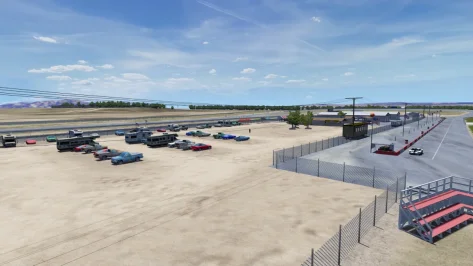
Trying to figure out if this is a 'me' problem with Riverside. The first picture below is what I see by default. There should be cars and other objects in that big empty area, but I don't see any. The second picture is what I think i'm supposed to see with the area populated with objects. But to get this look I had to do some editing to the veh.kn5 file. Basically just some object name changing.

Can someone have a look at this area on Riverside (it's to the right of the pits on the long layout) and tell me if what you see looks like the first or second picture. If it's the second picture, then I definitely have a 'me' problem. If it's the first pic, then something weird is going on with the veh.kn5 file and it's not rendering all of the objects. From my investigating, it seems any object with KSLAYER5 in it's name is not getting rendered. I had to change the name to KSLAYER7 to get them to show.

1.webp

2.webp
 
Last edited:
Trying to figure out if this is a 'me' problem with Riverside. The first picture below is what I see by default. There should be cars and other objects in that big empty area, but I don't see any. The second picture is what I think i'm supposed to see with the area populated with objects. But to get this look I had to do some editing to the veh.kn5 file. Basically just some object name changing.

Can someone have a look at this area on Riverside (it's to the right of the pits on the long layout) and tell me if what you see looks like the first or second picture. If it's the second picture, then I definitely have a 'me' problem. If it's the first pic, then something weird is going on with the veh.kn5 file and it's not rendering all of the objects.

View attachment 1499945
View attachment 1499946
Screenshot_mby_ford_mustang_boss_429_riverside_16-11-125-21-54-30.webp


my right of the pits, csp 0211
 
Trying to figure out if this is a 'me' problem with Riverside. The first picture below is what I see by default. There should be cars and other objects in that big empty area, but I don't see any. The second picture is what I think i'm supposed to see with the area populated with objects. But to get this look I had to do some editing to the veh.kn5 file. Basically just some object name changing.

Can someone have a look at this area on Riverside (it's to the right of the pits on the long layout) and tell me if what you see looks like the first or second picture. If it's the second picture, then I definitely have a 'me' problem. If it's the first pic, then something weird is going on with the veh.kn5 file and it's not rendering all of the objects. From my investigating, it seems any object with KSLAYER5 in it's name is not getting rendered. I had to change the name to KSLAYER7 to get them to show.

View attachment 1499945
View attachment 1499946
CSP 0.3.0-preview140:
 

Attachments

  • 20251216-222653-Riverside Long-WSC60 Ford GT40 Mk1.webp
    20251216-222653-Riverside Long-WSC60 Ford GT40 Mk1.webp
    95.7 KB · Views: 6
Interesting. I guess it's a 'me' problem then. At least now I know so I can continue adding the flags. I had to stop temporarily until I figured out what was up. Some of the flags go in that dead area and didn't make much sense to have them if there were no other objects there. I'll keep going and just use my corrected veh.kn5 for myself.
 
Little tip for any 'islands in the sky' tracks that either don't have horizons or have 2D mountain walls:
Add@shi's excellent 3D hilly perimeter rabbit_field_terrain.kn5 from his Rabbit Field track, drop it in whatever new track folder, add its model insertion config to the end of the new track's models.ini with a sequential entry number, adjust the middle (height) value up or down to suit your preferences.
If there already is a perimeter (or partial) 2D mountain wall, just hide it in the main ext_config.ini with (example here is doublezero's Kameno):
Code:
 ;hide original horizon wall
[MESH_ADJUSTMENT_...]
MESHES=a_bkb
IS_RENDERABLE=0

Original:
1765926828758.webp

With hills:
1765926863075.webp

It obviously won't suit all track types and locations, but (maybe especially in VR?) the extra layer of parallax and depth really helps to give the environment an epic scale, and to me the track often feels more seated in the terrain.
 
Hi. I send a message to Paul...Williams? (Velo) asking for the links to the studebaker and the Frazer Nash, but he never reply to me. Would someone be so kind to share those cars with me?
 
Little tip for any 'islands in the sky' tracks that either don't have horizons or have 2D mountain walls:
Add@shi's excellent 3D hilly perimeter rabbit_field_terrain.kn5 from his Rabbit Field track, drop it in whatever new track folder, add its model insertion config to the end of the new track's models.ini with a sequential entry number, adjust the middle (height) value up or down to suit your preferences.
If there already is a perimeter (or partial) 2D mountain wall, just hide it in the main ext_config.ini with (example here is doublezero's Kameno):
Code:
 ;hide original horizon wall
[MESH_ADJUSTMENT_...]
MESHES=a_bkb
IS_RENDERABLE=0

Original:
View attachment 1499982

With hills:
View attachment 1499983

It obviously won't suit all track types and locations, but (maybe especially in VR?) the extra layer of parallax and depth really helps to give the environment an epic scale, and to me the track often feels more seated in the terrain.
This is awesome. Thank you!
 
Would anyone be able to point me in the direction of a guide or tips on how to implement seasonal adjustments for a track? I tried to look through the csp documentation, but I don't really know where to start when it comes to making it track specific. I'd like to add some winter back to the Colorado mountains in Gabenhoods Pikes Peak mod.

Thanks :cheers:
 
shouldn't it be as simple as updating the date and time of day in CSP for that given location or track, to get the desired season and weather ?
 
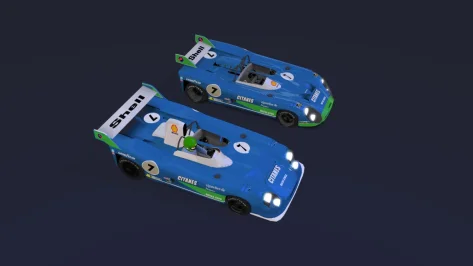
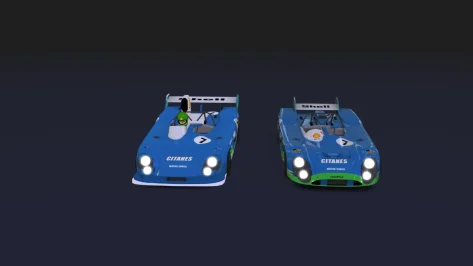
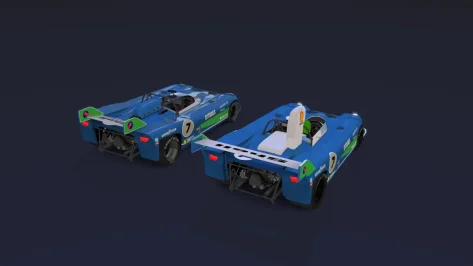
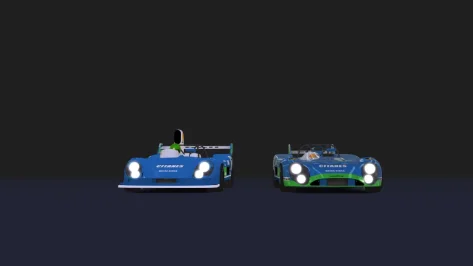
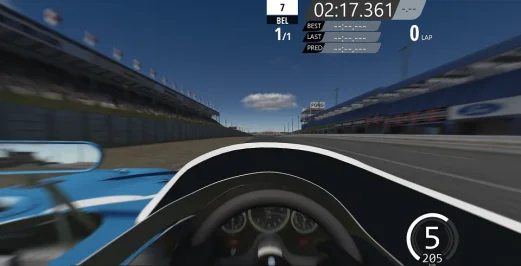
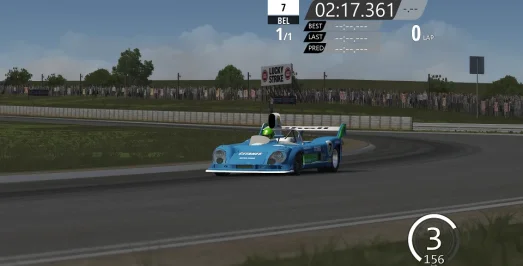
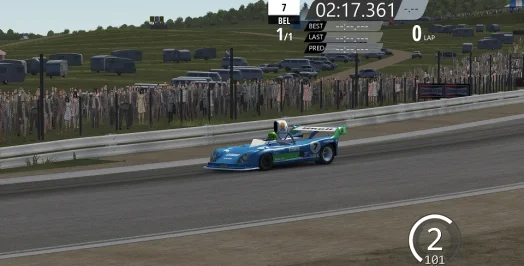
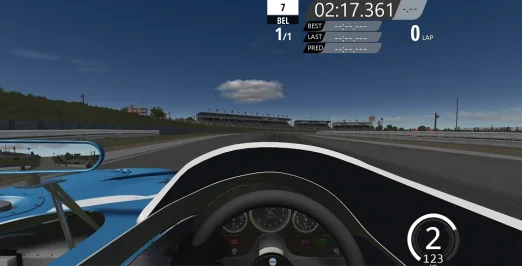
There's still a lot to improve, but (the beginning), at least it's out of the imagination.
Adapting a new model (Matra 670B/1974).Unfortunately, the headlights (don't fit well) because of the new front (that I added).
I imported the air intake (and some other parts) from the model I had already adapted.
I decided to change the front wheels, at least for myself.In the next few days I hope to "redo" the other versions (using as a base) the Matra (by Mr Hunt), Matra (by Godzila) and this one (by HSS).
Unfortunately, this is one of my flaws, I can't stay still (without trying to improve some new version).
 

Attachments

  • __custom_showroom_1765953066.webp
    __custom_showroom_1765953066.webp
    20.6 KB · Views: 8
  • __custom_showroom_1765953052.webp
    __custom_showroom_1765953052.webp
    32.3 KB · Views: 6
  • __custom_showroom_1765953079.webp
    __custom_showroom_1765953079.webp
    28 KB · Views: 7
  • __custom_showroom_1765953097.webp
    __custom_showroom_1765953097.webp
    12.8 KB · Views: 8
  • Assetto Corsa 17_12_2025 03_47_34.webp
    Assetto Corsa 17_12_2025 03_47_34.webp
    35 KB · Views: 7
  • Assetto Corsa 17_12_2025 03_48_51.webp
    Assetto Corsa 17_12_2025 03_48_51.webp
    48.9 KB · Views: 10
  • Assetto Corsa 17_12_2025 03_48_16.webp
    Assetto Corsa 17_12_2025 03_48_16.webp
    92.5 KB · Views: 8
  • Assetto Corsa 17_12_2025 03_47_55.webp
    Assetto Corsa 17_12_2025 03_47_55.webp
    43.5 KB · Views: 8
I have a track conversion that has objects not casting shadows, now i can go through all of them and add shadows casting in ks, but question is, is there a config for extension that can do this? cheers
 
Little tip for any 'islands in the sky' tracks that either don't have horizons or have 2D mountain walls:
Add@shi's excellent 3D hilly perimeter rabbit_field_terrain.kn5 from his Rabbit Field track, drop it in whatever new track folder, add its model insertion config to the end of the new track's models.ini with a sequential entry number, adjust the middle (height) value up or down to suit your preferences.
If there already is a perimeter (or partial) 2D mountain wall, just hide it in the main ext_config.ini with (example here is doublezero's Kameno):
Code:
 ;hide original horizon wall
[MESH_ADJUSTMENT_...]
MESHES=a_bkb
IS_RENDERABLE=0

Original:
View attachment 1499982

With hills:
View attachment 1499983

It obviously won't suit all track types and locations, but (maybe especially in VR?) the extra layer of parallax and depth really helps to give the environment an epic scale, and to me the track often feels more seated in the terrain.
Also if you wanted to get a bit more hands on round the back, you can use the GIS add on for glender and pick the actual terrain of the area and create a 3D base just like the one in Rabbit.

It's like all this stuff, very simple when you know how to do it.
 
I have a track conversion that has objects not casting shadows, now i can go through all of them and add shadows casting in ks, but question is, is there a config for extension that can do this? cheers
[SHADER_REPLACEMENT_...]
ACTIVE = 1
DESCRIPTION = shadows on everything
MESHES = ??
MATERIALS = ??
CAST_SHADOWS = 1
LOD_OUT = 1500
DOUBLE_FACE_SHADOW_BIASED = 1

This will add shadows to everything, you'd then need to do another similar entry after this one if you have some meshes/materials that you don't want to cast shadows.
 
Last edited:
[SHADER_REPLACEMENT_...]
ACTIVE = 1
DESCRIPTION = shadows on everything
MESHES = ??
MATERIALS = ??
CAST_SHADOWS = 1
LOD_OUT = 1500
DOUBLE_FACE_SHADOW_BIASED = 1

This will add shadows to everything, you'd then need to do another similar entry after this one if you have some meshes/materials that you don't want to cast shadows.
@timetoo22 you can add descrete meshes/materials in that style config as well
(mightt be better not to shadow everything by default)
 
Out of interest, what objects would you not want to cast a shadow? I can't think of any
Road, Grass, Sand in many cases.
"tube style" horizons
Misc distant tso and small things
Certain emissive things
some billboards/signage with a backing mesh (adverts over a barrier/wall)
some things inside a garage/building

it depends :)
 
Hello,

I have a question...

VRC Tourers or Cyrill Cherry BTCC?
Tks
whatever VRC made...the others that made the specific car (like the Renault Laguna) - you can basically bin. However do not bin the Honda Accord as it's the MK5. VRC made the MK6 Accord.

keep from Cyrill - 155 TS, A4, MK5 accord, 405, 806 and 850 saloon. PM3DM you keep all 3 and Shaun Clarke's Cavaliers.

edit: my man F302 has the 1994 155 TS but he also has a MK5 accord too so it's 50/50 for the MK5 accord
 
Last edited:
shi
Adelaide Street Circuit 1985 - 1995 and 2000 v1.01


View attachment 1455847
Adelaide Street Circuit with 1985 - 1995 and 2000 layout.
Conversion from F1 Challenge.

-CSP recommended
-12 layouts (Yearly billboards and building variations)

-40 pit/start
-AI, cam

Credits & Thanks;
F1 Challenge Track by dmarques
(Converted from Carrera.4's rF version)

Terms Of Use; (F1C)
Enjoy this mod to the fullest, that's all. If you want to convert or use this
as a base to create other cars, you're welcome in doing so as long as the
appropriate credit is given to the respective authors of the files you are
using. You can find all authors in this file

AC converted by @shi (shin956)
AI line, sidelines and ai_hints.ini by @KevinK2
window light config base from adelaide1988 by @rainmaker
logo.png and sections file by @Fanapryde
.lua base and font by @gunnar333
Crowds texture by @Kniker97
marshall and some textures by kunos
Test and Feedback by @Breathe

Enjoy.
;;;;;;;;;;;;;;;;;;;;;;;;;;;;;;;;;;;;
v1.01 changelog;
Added ALMS 2000 layout.
Some logo textures were edited from skins created by Fredelicious.
- Thank you for gave me permission
Even when CSP settings → General Patch Settings → CPU optimizations → Chunks optimizations are set to Advanced, ground objects are no longer hidden. (Tested with CSP 0.2.12-preview1.)

Adelaide Street Circuit 1985 - 1995 and 2000 v1.01

10 layouts (1986 - 1995) have been made publicly available.
Screenshot_ks_alfa_romeo_155_v6_adelaide_1985_12-3-125-12-25-49.webp

v1.01 changelog;
Added ALMS 2000 layout.

Some logo textures were edited from skins created by Fredelicious.
- Thank you for gave me permission
Even when CSP settings → General Patch Settings → CPU optimizations → Chunks optimizations are set to Advanced, ground objects are no longer hidden. (Tested with CSP 0.2.12-preview1.)
 
whatever VRC made...the others that made the specific car (like the Renault Laguna) - you can basically bin. However do not bin the Honda Accord as it's the MK5. VRC made the MK6 Accord.

keep from Cyrill - 155 TS, A4, MK5 accord, 405, 806 and 850 saloon. PM3DM you keep all 3 and Shaun Clarke's Cavaliers.

edit: my man F302 has the 1994 155 TS but he also has a MK5 accord too so it's 50/50 for the MK5 accord
By Cyrill, why only the 155 TS, A4, Accord MK5, 405, 806, and 850 sedan? Aren't the others any good?
 
Interesting. I guess it's a 'me' problem then. At least now I know so I can continue adding the flags. I had to stop temporarily until I figured out what was up. Some of the flags go in that dead area and didn't make much sense to have them if there were no other objects there. I'll keep going and just use my corrected veh.kn5 for myself.
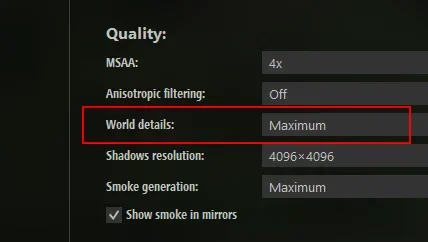
Check the video settings in CM. World details must be set to maximum, otherwise objects with KSLAYER5 won't be rendered.
 

Attachments

  • worlddetails.webp
    worlddetails.webp
    7.2 KB · Views: 5
The kerbs and tyres and signs and stuff all look a bit laboratory clean, so I very quickly smeared dog tods on the red & white skin to filth it up a bit if anyone wants it. Five-minute job so don't expect miracles..!
It's compatible also with Zandzuka
 
Here's a real quick and dirty wip winter seasonal adjst. for Gabenhoods Pikes Peak. I really have no idea what I'm doing, was just using object inspector and clicking on things & copying some text from the csp wiki lol. Would love any tips or suggestions if there's something critical I missed.

Wondering though, is there anyway to remove the color tint or blend the edges better between the grass and the dirt? The tarmac and dirt seem a bit "crisper" than the grass which is a little muddy green blue tint.
1765989836318.webp


Code:
;Seasons starts here
[MATERIAL_ADJUSTMENT_0]
ACTIVE = 1
MATERIALS = new_trees_001, new_trees_006, new_trees_005, new_bushes_001, new_bushes_002, bark, Material #797220, Material #797220, beech_bush_01_a_br, maple_bush_02_a_br, vista
CONDITION = SEASON_WINTER_NORTH
KEY_0 = seasonWinter
VALUE_0 = 10
OFF_VALUE_0 = 0.0
DESCRIPTION = trees bushes

[MATERIAL_ADJUSTMENT_1]
ACTIVE = 1
MATERIALS = Material #797215, Material #797026, Material #797024, Material #57, Material #797066, pke_s_rock_d_1, Material #797217, Material #7970445, Material #796989, Material #797217, Material #7970383, Material #797037, Material #797075, Material #795789, dirt_1, Material #7970422, dirt_3
CONDITION = SEASON_WINTER_NORTH
KEY_0 = seasonWinter
VALUE_0 = 10
OFF_VALUE_0 = 0.0
DESCRIPTION = grass dirt sand

[MATERIAL_ADJUSTMENT_2]
ACTIVE = 1
MATERIALS = Material #795086, Material #7970377, Material #795675, Material #795094
CONDITION = SEASON_WINTER_NORTH
KEY_0 = seasonWinter
VALUE_0 = 10
OFF_VALUE_0 = 0
DESCRIPTION = road 

[MATERIAL_ADJUSTMENT_3]
ACTIVE = 1
MATERIALS = Material #797104, Material #797144, Material #797181, Material #797220
CONDITION = SEASON_WINTER_NORTH
KEY_0 = seasonWinter
VALUE_0 = 1
OFF_VALUE_0 = 0
DESCRIPTION = wood metal 

[MATERIAL_ADJUSTMENT_4]
ACTIVE = 1
MATERIALS = 
CONDITION = SEASON_WINTER_NORTH
KEY_0 = seasonWinter
VALUE_0 = 1
OFF_VALUE_0 = 0
DESCRIPTION = concrete wood buildings
 
Sharing a mod? Host it on GTPlanet Downloads. Free, public hosting for files up to 10GB in size.
Back